Maintenance for the week of June 22:
· [IN PROGRESS] Xbox: NA and EU megaservers for maintenance – June 26, 6:00AM EDT (10:00 UTC) - 12:00PM EDT (16:00 UTC)
· [IN PROGRESS] PlayStation®: NA and EU megaservers for maintenance – June 26, 6:00AM EDT (10:00 UTC) - 12:00PM EDT (16:00 UTC)
· [IN PROGRESS] Xbox: NA and EU megaservers for maintenance – June 26, 6:00AM EDT (10:00 UTC) - 12:00PM EDT (16:00 UTC)
· [IN PROGRESS] PlayStation®: NA and EU megaservers for maintenance – June 26, 6:00AM EDT (10:00 UTC) - 12:00PM EDT (16:00 UTC)
Console addon memory

ellmarie
✭✭✭✭
Is there a fix to this? I keep getting the error 70 mg out of 100 mg memory then all my addons get disabled. I've deleted just about all I can. I don't have very many really. Mini map, harvest map, price fetcher and lazy crafter. Is there something else I need to be doing to clear some space?
Xbox X- NA
1
-
 PeacefulAnarchy✭✭✭✭✭
✭Not all addons use the same amount of memory. If it's anything like PC, Harvest map uses up a ton of memory.
I don't know what fixes are possible for you as I'm not on console.1 -
Twohothardware✭✭✭✭✭
✭✭Try disabling just Price fetcher and see if you stop getting the memory error.3 -
 katanagirl1✭✭✭✭✭
✭✭✭✭✭PeacefulAnarchy wrote: »Not all addons use the same amount of memory. If it's anything like PC, Harvest map uses up a ton of memory.
I don't know what fixes are possible for you as I'm not on console.
I have HarvestMap, Murf’s Treasures, and Combat Alerts, and it’s not much memory at all, I’m going to say something like 40 mb for those but I think it said 250 mb total allotment for me.
It does say that HarvestMap is out of date but there is no way to update it. It works.
PS5 NA0 -
Gabriel_H✭✭✭✭✭
✭✭✭katanagirl1 wrote: »It does say that HarvestMap is out of date but there is no way to update it. It works.
"Out of Date" is simply because the information file (.addon) doesn't have the latest game version number. The API that actually runs the addon is unchanged.
1 -
 DragonRacer✭✭✭✭✭
✭✭✭I ended up uninstalling Harvest Map on PS5. I was running into similar issues. Ever since I uninstalled that one, I have been fine with Mini Map (plus the Circular addition), Price Fetcher, Lazy Writ Crafter, plus several others I am running (Murf's Lorebooks, Murf's Treasures, Code's Combat Alerts, Crutch Alerts, Auto-Bind, Auto-Collect Tome Points, Battle Scrolls, and I think a few others).
I loved the Harvest Map, don't get me wrong, but it seemed to be my culprit. It and Adventurer's Toolkit just were destroying my add-on memory and my issues stopped after yeeting those two.PS5 NA. GM of The PTK's - a free trading guild (CP 500+). Also a werewolf, bites are free when they're available. PSN = DragonRacer130 -
 DenverRalphy✭✭✭✭✭
✭✭✭✭✭DragonRacer wrote: »I ended up uninstalling Harvest Map on PS5. I was running into similar issues. Ever since I uninstalled that one, I have been fine with Mini Map (plus the Circular addition), Price Fetcher, Lazy Writ Crafter, plus several others I am running (Murf's Lorebooks, Murf's Treasures, Code's Combat Alerts, Crutch Alerts, Auto-Bind, Auto-Collect Tome Points, Battle Scrolls, and I think a few others).
I loved the Harvest Map, don't get me wrong, but it seemed to be my culprit. It and Adventurer's Toolkit just were destroying my add-on memory and my issues stopped after yeeting those two.
Harvestmap barely takes up much memory at all. TSC price checker is a memory consuming beast. I don't know what issues Harvest Map is giving you, but memory issues would be the last thing I'd guess.
1 -
msgeek✭✭✭wishlist:
a per-addon quota. e.g. 20mb. if more is used then only that addon gets disabled.
if most addons are tiny (2-4mb) then you'd be able to load way more than the naïve calculation of 100mb divided by 20mb would suggest.
that way everyone knows which addons are the true memory hogs.0 -
 LootAllTheStuff✭✭✭✭✭I run Harvest Map, Can I Craft, Auto-Bind, and the NM activity one on XBSX with no problems. I suspect one of the other add-ons @DragonRacer is using may be the real culprit (memory leak?) but the additional requirement for Harvest Map pushed things too close to the edge.
0 -
DragonRacer✭✭✭✭✭
✭✭✭I'm not the OP having issues. Just added my anecdotal personal experience since a few of the add-ons OP uses align with ones I use, and I was sharing which one(s) I removed that cleared up the issues I had many, many months ago in the past.PS5 NA. GM of The PTK's - a free trading guild (CP 500+). Also a werewolf, bites are free when they're available. PSN = DragonRacer130 -
 code65536✭✭✭✭✭
✭✭✭✭✭PeacefulAnarchy wrote: »Not all addons use the same amount of memory.
Yes!
There are small trivial addons that consumes less than 0.1MB of memory. And there are behemoths that can consume over 40MB. And everything in between.
Unfortunately, because of the architecture underlying how addons work, there is no way to separate the memory usage of individual addons. (Also, such a separation between addons would add a lot of extra complexity and overhead and also act as barriers that restrict the versatility of what addons can do, and would ultimately be a case of a "remedy being worse than the malady".)
That means there's no "easy" way to determine how much each addon consumes and no way to establish quotas as someone else suggested.
But, it is possible to determine "the hard way" how much each addon consumes, by using a memory monitor and seeing what memory consumption looks like as you enable and disable individual addons.
I highly recommend Movable Addon Memory by M0R. This is a very simple addon with almost zero footprint of its own, and it was created specifically to help console users identify addons that use problematic amounts of memory.Edited by code65536 on June 22, 2026 5:18PMNightfighters ― PC/NA and PC/EU
Dungeons and Trials:Personal best scores:- Dragonstar Arena: 46817 (NA)
- Maelstrom Arena: 600526 (NA)
- Blackrose Prison: 99274 (EU) (Unchained)
- Maw of Lorkhaj: 165227 (EU)
- Halls of Fabrication: 220708 (NA) (Tick-Tock Tormentor #1, #2, #3, #4, #5, #6, #7, #8, #9, #10, #11, #12)
- Asylum Sanctorium: 114957 (NA) (Immortal Redeemer #1, #2, #3, #4, #5, #6, #7, #8, #9, #10)
- Cloudrest: 131256 (NA) (Gryphon Heart #1, #2, #3, #4, #5, #6, #7)
- Sunspire: 250866 (EU) (Godslayer #1, #2, #3, #4, #5, #6, #7)
- Kyne's Aegis: 235841 (EU) (Dawnbringer #1, #2, #3, #4, #5, #6, #7, #8)
Dungeon trifectas:- Mountain God and Leave No Bone Unbroken
- Apex Predator and Pure Lunacy
- Depths Defier and Relentless Raider
- Defanged the Devourer and Nature's Wrath
- In Defiance of Death and No Rest for the Wicked
- Bane of Thorns and True Genius
- Ardent Bibliophile and Subterranean Smasher
- Battlespire's Best and Bastion Breaker
- Zero Regrets and Land, Air, and Sea Supremacy
- Fist of Tava and Invader's Bane
- Curator's Champion (Valinna) and Temporal Tempest
- Unshakeable Fervor and Lighting the Embers
Extended Journal Add-Ons: Item Set Browser ― Loot Log ― Character Knowledge ― Collectibles Tracker ― RaidificatorPC/Console Add-Ons: Combat Alerts ― Group Buff PanelsOther Add-Ons: Deconstruction Junk Marker ― Purge Tracker ― Asylum Status Panel ― Smart Looter ― Improved Companion Rapport Information5 -
 spartaxoxo✭✭✭✭✭
✭✭✭✭✭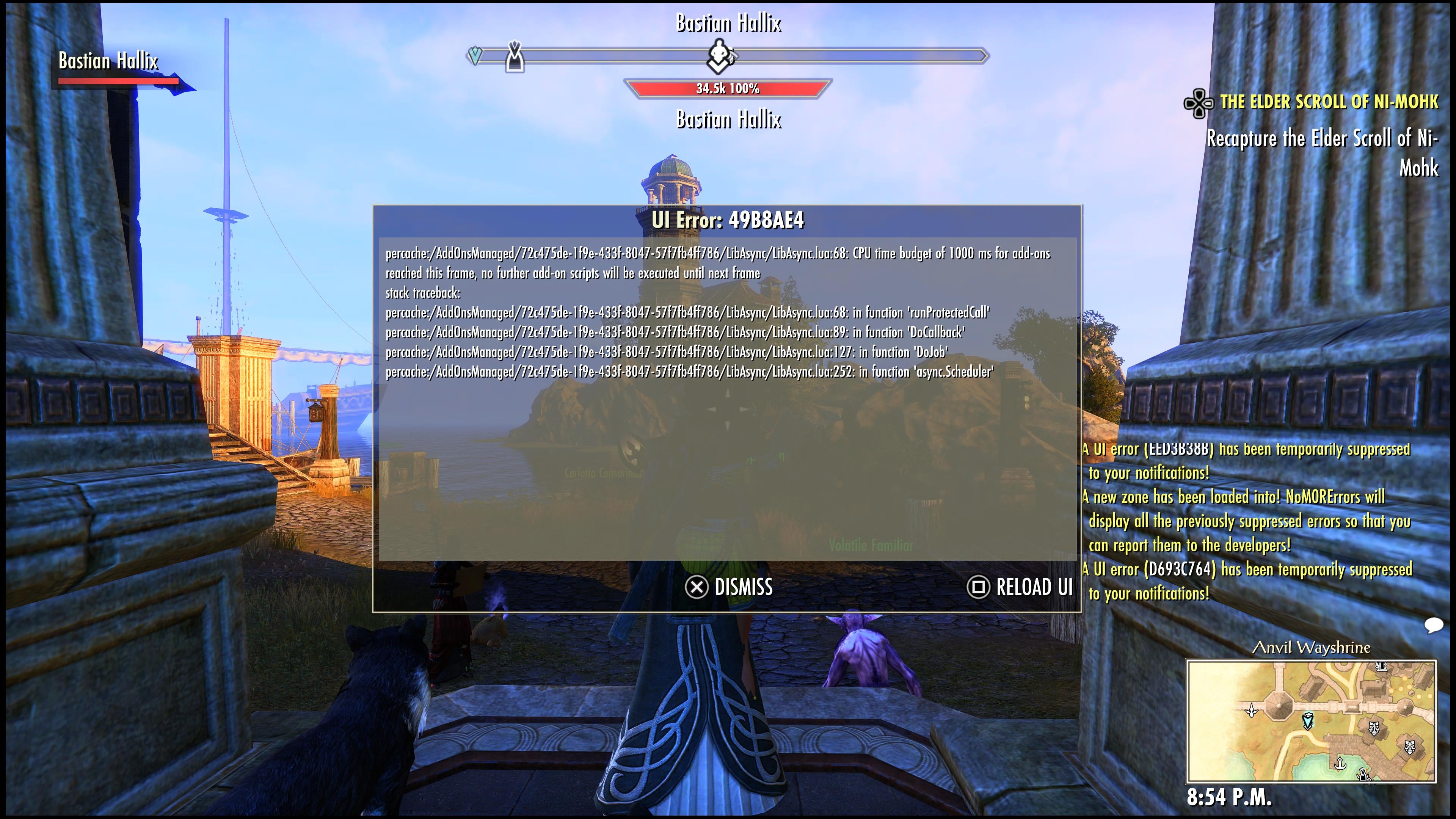
I keep running into the same issue. I'm guessing it's Lib Async, which is used by both TSC and Mini Map? Or maybe I can only run one of these given I also have other add-ons? Should I reinstall them, would that help? Is this just too many?
Edited by spartaxoxo on June 23, 2026 1:48AM0 -
code65536✭✭✭✭✭
✭✭✭✭✭spartaxoxo wrote: »
I keep running into the same issue. I'm guessing it's Lib Async, which is used by both TSC and Mini Map? Or maybe I can only run one of these given I also have other add-ons? Should I reinstall them, would that help? Is this just too many?
This is unrelated to this thread, since this isn't an issue with console console memory usage.
This is a problem with the other console limitation: addon CPU usage.
Specifically, addons must yield control back to the game at least once every second (1000ms). If addons are processing a large amount of data and it takes them more than 1s, then you'll get this error. Like the memory limit, this is applied to every addon combined, so if addon A takes 600ms to process stuff and addon B takes 600ms to process stuff, then even though they each fall under the 1000ms limit, they will, together, trigger this error.
So if an addon needs to process a lot of data, then it needs to break that work down into smaller chunks and yield back control after every chunk, and LibAsync is something to help addons do this break-up-work-into-smaller-pieces thing. So in this case, the problem isn't LibAsync, it's with an addon that's using LibAsync.
Ah, but if LibAsync is supposed to help addons avoid this error, then why are you seeing it? Because LibAsync is not magic. It requires that the addon use it properly. If an addon needs to do 4000ms worth or work, breaking that down into 3 chunks will not be enough. Breaking it down into 5 chunks of 800ms is also a bad idea--it's cutting it too close and if there are other addons that are also doing this, then you'll blow past the 1000ms limit easily. Its work needs to be broken down into 20 or more pieces. So if you're seeing this error, then it means that an addon is at least trying to do the right thing, but they're still trying to do too much at once and need to divide up their work even more.
In any case, my guess is that in your case TSC is the culprit, because this is an issue that I know they've struggled with before.Edited by code65536 on June 23, 2026 2:55AMNightfighters ― PC/NA and PC/EU
Dungeons and Trials:Personal best scores:- Dragonstar Arena: 46817 (NA)
- Maelstrom Arena: 600526 (NA)
- Blackrose Prison: 99274 (EU) (Unchained)
- Maw of Lorkhaj: 165227 (EU)
- Halls of Fabrication: 220708 (NA) (Tick-Tock Tormentor #1, #2, #3, #4, #5, #6, #7, #8, #9, #10, #11, #12)
- Asylum Sanctorium: 114957 (NA) (Immortal Redeemer #1, #2, #3, #4, #5, #6, #7, #8, #9, #10)
- Cloudrest: 131256 (NA) (Gryphon Heart #1, #2, #3, #4, #5, #6, #7)
- Sunspire: 250866 (EU) (Godslayer #1, #2, #3, #4, #5, #6, #7)
- Kyne's Aegis: 235841 (EU) (Dawnbringer #1, #2, #3, #4, #5, #6, #7, #8)
Dungeon trifectas:- Mountain God and Leave No Bone Unbroken
- Apex Predator and Pure Lunacy
- Depths Defier and Relentless Raider
- Defanged the Devourer and Nature's Wrath
- In Defiance of Death and No Rest for the Wicked
- Bane of Thorns and True Genius
- Ardent Bibliophile and Subterranean Smasher
- Battlespire's Best and Bastion Breaker
- Zero Regrets and Land, Air, and Sea Supremacy
- Fist of Tava and Invader's Bane
- Curator's Champion (Valinna) and Temporal Tempest
- Unshakeable Fervor and Lighting the Embers
Extended Journal Add-Ons: Item Set Browser ― Loot Log ― Character Knowledge ― Collectibles Tracker ― RaidificatorPC/Console Add-Ons: Combat Alerts ― Group Buff PanelsOther Add-Ons: Deconstruction Junk Marker ― Purge Tracker ― Asylum Status Panel ― Smart Looter ― Improved Companion Rapport Information6 -
spartaxoxo✭✭✭✭✭
✭✭✭✭✭spartaxoxo wrote: »
I keep running into the same issue. I'm guessing it's Lib Async, which is used by both TSC and Mini Map? Or maybe I can only run one of these given I also have other add-ons? Should I reinstall them, would that help? Is this just too many?
This is unrelated to this thread, since this isn't an issue with console console memory usage.
This is a problem with the other console limitation: addon CPU usage.
Specifically, addons must yield control back to the game at least once every second (1000ms). If addons are processing a large amount of data and it takes them more than 1s, then you'll get this error. Like the memory limit, this is applied to every addon combined, so if addon A takes 600ms to process stuff and addon B takes 600ms to process stuff, then even though they each fall under the 1000ms limit, they will, together, trigger this error.
So if an addon needs to process a lot of data, then it needs to break that work down into smaller chunks and yield back control after every chunk, and LibAsync is something to help addons do this break-up-work-into-smaller-pieces thing. So in this case, the problem isn't LibAsync, it's with an addon that's using LibAsync.
Ah, but if LibAsync is supposed to help addons avoid this error, then why are you seeing it? Because LibAsync is not magic. It requires that the addon use it properly. If an addon needs to do 4000ms worth or work, breaking that down into 3 chunks will not be enough. Breaking it down into 5 chunks of 800ms is also a bad idea--it's cutting it too close and if there are other addons that are also doing this, then you'll blow past the 1000ms limit easily. Its work needs to be broken down into 20 or more pieces. So if you're seeing this error, then it means that an addon is at least trying to do the right thing, but they're still trying to do too much at once and need to divide up their work even more.
In any case, my guess is that in your case TSC is the culprit, because this is an issue that I know they've struggled with before.
Thank you for the detailed reply! I really appreciate it. Would disabling that add-on unless I'm trying to actually list something help in the meantime?0 -
code65536✭✭✭✭✭
✭✭✭✭✭spartaxoxo wrote: »Thank you for the detailed reply! I really appreciate it. Would disabling that add-on unless I'm trying to actually list something help in the meantime?
Yes. Because pricing data for tens of thousands of items is inherently and unavoidably heavy, I know that a number of console users do exactly that: enable it only when they need to use it.Nightfighters ― PC/NA and PC/EU
Dungeons and Trials:Personal best scores:- Dragonstar Arena: 46817 (NA)
- Maelstrom Arena: 600526 (NA)
- Blackrose Prison: 99274 (EU) (Unchained)
- Maw of Lorkhaj: 165227 (EU)
- Halls of Fabrication: 220708 (NA) (Tick-Tock Tormentor #1, #2, #3, #4, #5, #6, #7, #8, #9, #10, #11, #12)
- Asylum Sanctorium: 114957 (NA) (Immortal Redeemer #1, #2, #3, #4, #5, #6, #7, #8, #9, #10)
- Cloudrest: 131256 (NA) (Gryphon Heart #1, #2, #3, #4, #5, #6, #7)
- Sunspire: 250866 (EU) (Godslayer #1, #2, #3, #4, #5, #6, #7)
- Kyne's Aegis: 235841 (EU) (Dawnbringer #1, #2, #3, #4, #5, #6, #7, #8)
Dungeon trifectas:- Mountain God and Leave No Bone Unbroken
- Apex Predator and Pure Lunacy
- Depths Defier and Relentless Raider
- Defanged the Devourer and Nature's Wrath
- In Defiance of Death and No Rest for the Wicked
- Bane of Thorns and True Genius
- Ardent Bibliophile and Subterranean Smasher
- Battlespire's Best and Bastion Breaker
- Zero Regrets and Land, Air, and Sea Supremacy
- Fist of Tava and Invader's Bane
- Curator's Champion (Valinna) and Temporal Tempest
- Unshakeable Fervor and Lighting the Embers
Extended Journal Add-Ons: Item Set Browser ― Loot Log ― Character Knowledge ― Collectibles Tracker ― RaidificatorPC/Console Add-Ons: Combat Alerts ― Group Buff PanelsOther Add-Ons: Deconstruction Junk Marker ― Purge Tracker ― Asylum Status Panel ― Smart Looter ― Improved Companion Rapport Information1 -
spartaxoxo✭✭✭✭✭
✭✭✭✭✭spartaxoxo wrote: »Thank you for the detailed reply! I really appreciate it. Would disabling that add-on unless I'm trying to actually list something help in the meantime?
Yes. Because pricing data for tens of thousands of items is inherently and unavoidably heavy, I know that a number of console users do exactly that: enable it only when they need to use it.
Thank you! I'll make sure to do that then since I don't always have stuff to sell. Appreciate the help0 -
katanagirl1✭✭✭✭✭
✭✭✭✭✭I should note that for HarvestMap I only show nodes in the overland and not on compass or the zone map. It’s all I need and I feel that it probably puts the lightest load on my machine to do the job. I also turned off stolen containers just because it clutters up the display too much for me.
I don’t use pricing addons and just hit the capital traders to search for items to get a feel for the price I should set, just like I always did.
PS5 NA1 -
 Fennorian✭✭✭They need to fix this bc atp it’s pay to play on Xbox with the whole pc app bs with 300 fps uncapped playing on Xbox servers cuz the memory on console itself is awful 🙃Quite literally an NPC1
 -
 M0R_Gaming✭✭✭They need to fix this bc atp it’s pay to play on Xbox with the whole pc app bs with 300 fps uncapped playing on Xbox servers cuz the memory on console itself is awful 🙃
What does FPS have to do with UI memory? If we are talking like ddr4 vs ddr5 ya I guess we could see a difference, but that is unrelated to Addons entirely - that will just improve overall game performance because the game will be able to load assets faster.
I do think the 100mb RAM limit is a bit low, but that limitation is forced by Xbox and PlayStation themselves, requiring precise budgeting of memory.My addons- PC/NA - PvP/PvE AD Sorc main
- Former Emp, GS, DB, TTT, IR, GH, PB, Swash, Misery Master
- PvP Addons - Artaeum Group Tool | Better Scoreboard
- PvE Addons - More Markers | One More Rockgrove Helper | Gear Tracker
- Bug Fix Addons - No M0R Block Bug | No M0R Sticky Wheels
- Other Addons - Simple Vote | Omni Stats
0