Maintenance for the week of April 6:
• PC/Mac: No maintenance – April 6
• PC/Mac: No maintenance – April 6
FREE FLAME ATTRONARCH PET on SAT 27 JULY for PC/MAC & CONSOLE

marius_buys
✭✭✭✭✭
✭
✭
FREE FLAME ATTRONARCH PET
ON SATURDAY, JULY 27, AT 2PM CT (3PM EDT)
PC/MAC & CONSOLE
PC/MAC WATCH THE LIVE TWITCH STREAM WITH A BETHESDA/TWITCH LINKED ACCOUNT
CONSOLE LOG IN AND KILL A MONSTER

Join ZeniMax Online Studio’s Game Director Matt Firor and ESO’s Creative Director Rich Lambert as they share a panel titled “Building Tamriel – The Evolution of ESO,” to talk about the game, its development, and its bright future as the Season of the Dragon continues.
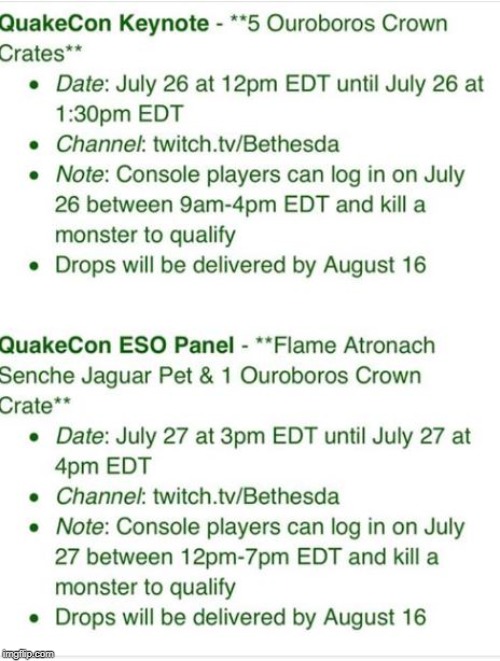
The panel will kick off in the Grapevine Ballroom (Main Stage) on Saturday, July 27, at 2PM CT (3PM EDT). If you can’t make it, don’t worry! You can watch it live on twitch.tv/Bethesda. Even better, if you watch the show with a linked Twitch account, you’ll receive the Flame Atronach Senche-Jaguar pet and an Ouroboros Crown Crate (PC/Mac only)! If you play on console, don’t worry, simply log in to the game and kill a monster on Saturday, July 27 between 12PM-7PM EDT to also receive the rewards. The rewards will be delivered after the convention, during the month of August. Keep an eye out!
Source article:
https://www.elderscrollsonline.com/en-us/news/post/56637
.
.
.
FOR WHICH STREAMS CAN YOU GET CRATES:
For all of the following events save Sunday's Quake Pro League, Twitch drops can be earned by watching streams through the official Bethesda Twitch page. Twitch drops can be earned by watching the Quake Pro League by tuning in to streams offered through the Quake Twitch page.
Times for this schedule are in Central Time (You add 5hrs to get GMT)
Friday, July 26
10 a.m. - The Elder Scrolls: Legends Master Series
11 a.m. - Keynote presentation
12 p.m. - 24 Years of Doom's Influence on Video Games
Saturday, July 27
10 a.m. - Our Future Continues - What's Next for Fallout 76
11 a.m. - Knee-Deep in the Doom
2 p.m. - Building Tamriel - The Evolution of ESO
Sunday, July 28
8 a.m. - CT Quake Pro League
Source article:
https://www.shacknews.com/article/113065/quakecon-2019-twitch-drops-and-live-stream-schedule
.
.
.
HOW DO I LINK MY PC/MAC ESO ACCOUNT TO TWITCH?
If you want to be eligible for Twitch drops for ESO, you will need to link your PC/Mac ESO account to your Twitch account by following these steps:
Log into your ESO account at https://account.elderscrollsonline.com.
Click the Linked Accounts link on the left side of the page
Click the Link Twitch Account button (This button will not be there if you play on a console.)
A Twitch window will appear
If you are logged into your Twitch account already, you'll be asked to authorize Elder Scrolls Online - Live to use your Twitch account
If you are not logged into your Twitch account, you'll be prompted to log in
Click Authorize to link your ESO account to your Twitch account
Please note: if you are sharing a computer with other ESO players, be sure you are logged into the correct Twitch account before click the Link Twitch Account button.
You can read more about Twitch drops for ESO here.
Note: You will not see the option to link your account if you play on the Xbox One or PlayStation 4. It is not possible to link Xbox One or PlayStation 4 ESO acounts to Twitch at this time.
Source article:
https://help.elderscrollsonline.com/app/answers/detail/a_id/41809/kw/how to link my twitch account
.
.
.
Regards
Marius
Golden Clover
https://forums.elderscrollsonline.com/en/discussion/447213/golden-clover-trade-raid-pvp-pve-social-no-sales-quota-beginner-friendly#latest
Edited by marius_buys on July 26, 2019 5:19PM ON SATURDAY, JULY 27, AT 2PM CT (3PM EDT)
PC/MAC & CONSOLE
PC/MAC WATCH THE LIVE TWITCH STREAM WITH A BETHESDA/TWITCH LINKED ACCOUNT
CONSOLE LOG IN AND KILL A MONSTER
Join ZeniMax Online Studio’s Game Director Matt Firor and ESO’s Creative Director Rich Lambert as they share a panel titled “Building Tamriel – The Evolution of ESO,” to talk about the game, its development, and its bright future as the Season of the Dragon continues.
The panel will kick off in the Grapevine Ballroom (Main Stage) on Saturday, July 27, at 2PM CT (3PM EDT). If you can’t make it, don’t worry! You can watch it live on twitch.tv/Bethesda. Even better, if you watch the show with a linked Twitch account, you’ll receive the Flame Atronach Senche-Jaguar pet and an Ouroboros Crown Crate (PC/Mac only)! If you play on console, don’t worry, simply log in to the game and kill a monster on Saturday, July 27 between 12PM-7PM EDT to also receive the rewards. The rewards will be delivered after the convention, during the month of August. Keep an eye out!
Source article:
https://www.elderscrollsonline.com/en-us/news/post/56637
.
.
.
FOR WHICH STREAMS CAN YOU GET CRATES:
For all of the following events save Sunday's Quake Pro League, Twitch drops can be earned by watching streams through the official Bethesda Twitch page. Twitch drops can be earned by watching the Quake Pro League by tuning in to streams offered through the Quake Twitch page.
Times for this schedule are in Central Time (You add 5hrs to get GMT)
Friday, July 26
10 a.m. - The Elder Scrolls: Legends Master Series
11 a.m. - Keynote presentation
12 p.m. - 24 Years of Doom's Influence on Video Games
Saturday, July 27
10 a.m. - Our Future Continues - What's Next for Fallout 76
11 a.m. - Knee-Deep in the Doom
2 p.m. - Building Tamriel - The Evolution of ESO
Sunday, July 28
8 a.m. - CT Quake Pro League
Source article:
https://www.shacknews.com/article/113065/quakecon-2019-twitch-drops-and-live-stream-schedule
.
.
.
HOW DO I LINK MY PC/MAC ESO ACCOUNT TO TWITCH?
If you want to be eligible for Twitch drops for ESO, you will need to link your PC/Mac ESO account to your Twitch account by following these steps:
Log into your ESO account at https://account.elderscrollsonline.com.
Click the Linked Accounts link on the left side of the page
Click the Link Twitch Account button (This button will not be there if you play on a console.)
A Twitch window will appear
If you are logged into your Twitch account already, you'll be asked to authorize Elder Scrolls Online - Live to use your Twitch account
If you are not logged into your Twitch account, you'll be prompted to log in
Click Authorize to link your ESO account to your Twitch account
Please note: if you are sharing a computer with other ESO players, be sure you are logged into the correct Twitch account before click the Link Twitch Account button.
You can read more about Twitch drops for ESO here.
Note: You will not see the option to link your account if you play on the Xbox One or PlayStation 4. It is not possible to link Xbox One or PlayStation 4 ESO acounts to Twitch at this time.
Source article:
https://help.elderscrollsonline.com/app/answers/detail/a_id/41809/kw/how to link my twitch account
.
.
.
Regards
Marius
Golden Clover
https://forums.elderscrollsonline.com/en/discussion/447213/golden-clover-trade-raid-pvp-pve-social-no-sales-quota-beginner-friendly#latest
Golden Clover AD PvP on PC EU (since 2017) Guildex https://eso.guildex.org/view-guild/17669 Facebook https://www.facebook.com/groups/131211320795196
11
-
 Michae✭✭✭✭✭
✭✭I already made a thread about it yesterday. It's still on the main page.
https://forums.elderscrollsonline.com/en/discussion/485652/flame-attronach-pet-on-twitch#latest"I bear the cruel weight of certainty. Total, absolute, relentless certainty. People rarely comprehend the luxury of doubt... the freedom that comes with indecision. I envy you."
―Sotha Sil
@Michae PC/EU5 -
marius_buys✭✭✭✭✭
✭I already made a thread about it yesterday. It's still on the main page.
https://forums.elderscrollsonline.com/en/discussion/485652/flame-attronach-pet-on-twitch#latest
So you literally standing guard over your post? lol.
Dude you literally ONLY pasted the article.
Edited by marius_buys on July 18, 2019 6:45AMGolden Clover AD PvP on PC EU (since 2017) Guildex https://eso.guildex.org/view-guild/17669 Facebook https://www.facebook.com/groups/1312113207951964 -
Michae✭✭✭✭✭
✭✭marius_buys wrote: »I already made a thread about it yesterday. It's still on the main page.
https://forums.elderscrollsonline.com/en/discussion/485652/flame-attronach-pet-on-twitch#latest
So you literally standing guard over your post? lol.
Dude you literally ONLY pasted the article.
No, I'm not standinf guard, just pointing out that the information was already on the forums. Why clutter the thread list? Chill dude. "I bear the cruel weight of certainty. Total, absolute, relentless certainty. People rarely comprehend the luxury of doubt... the freedom that comes with indecision. I envy you."
―Sotha Sil
@Michae PC/EU7 -
 eso_lags✭✭✭✭✭
✭✭I love the drama 👍. Now i wonder if they will talk about some performance fixes... Im guessing not.1 -
 Eldartar✭✭✭✭I already made a thread about it yesterday. It's still on the main page.
https://forums.elderscrollsonline.com/en/discussion/485652/flame-attronach-pet-on-twitch#latest
Sad, Just SAD!!!0 -
 Grianasteri✭✭✭✭✭
✭So, to clarify, console players simply need to log in and kill something? Is this correct?
Or kill something specific, in which case can we define what "monster" is please?1 -
 wolf486✭✭✭✭If you plan on watching 'cos you want a crate, save your time and don't bother giving them the viewership. You are more likely to win the lottery than get a crate.PC/NAMoved onto BDO and GW2 Skyrim, ATS/ETS2, ACNH and the overall goodness of single player games
RIP to the following:
(DC) Tharbûrz gro-Glumgrog - Orsimer -Stamden (lvl 50)
(AD) Vukz - Bosmer - Stamblade (lvl 50)0 -
Michae✭✭✭✭✭
✭✭If you plan on watching 'cos you want a crate, save your time and don't bother giving them the viewership. You are more likely to win the lottery than get a crate.
What if I want a pet? "I bear the cruel weight of certainty. Total, absolute, relentless certainty. People rarely comprehend the luxury of doubt... the freedom that comes with indecision. I envy you."
―Sotha Sil
@Michae PC/EU2 -
wolf486✭✭✭✭
They've been "guaranteed" in all the past live streams too, yet most people never received anything.
Although ironically enough I haven't watched an ESO stream (whether ESO Live or a regular steamer) in 6 months, and somehow got 2 crates a week ago.PC/NAMoved onto BDO and GW2 Skyrim, ATS/ETS2, ACNH and the overall goodness of single player games
RIP to the following:
(DC) Tharbûrz gro-Glumgrog - Orsimer -Stamden (lvl 50)
(AD) Vukz - Bosmer - Stamblade (lvl 50)0 -
marius_buys✭✭✭✭✭
✭Grianasteri wrote: »So, to clarify, console players simply need to log in and kill something? Is this correct?
Or kill something specific, in which case can we define what "monster" is please?
Just do a dolmen you will cover itGolden Clover AD PvP on PC EU (since 2017) Guildex https://eso.guildex.org/view-guild/17669 Facebook https://www.facebook.com/groups/1312113207951962 -
marius_buys✭✭✭✭✭
✭
Well some guys got 30 crates from the last stream, I almos fell over when I saw how many crates I fotGolden Clover AD PvP on PC EU (since 2017) Guildex https://eso.guildex.org/view-guild/17669 Facebook https://www.facebook.com/groups/1312113207951960 -
marius_buys✭✭✭✭✭
✭*gotGolden Clover AD PvP on PC EU (since 2017) Guildex https://eso.guildex.org/view-guild/17669 Facebook https://www.facebook.com/groups/1312113207951960 -
wolf486✭✭✭✭Can it be converted to gemsCan it be converted to gems
Trash items from the crate can be turned into gemsPC/NAMoved onto BDO and GW2 Skyrim, ATS/ETS2, ACNH and the overall goodness of single player games
RIP to the following:
(DC) Tharbûrz gro-Glumgrog - Orsimer -Stamden (lvl 50)
(AD) Vukz - Bosmer - Stamblade (lvl 50)1 -
marius_buys✭✭✭✭✭
✭Probably, and whaddaya know the stream is located in a human hour on the EU timezone
Golden Clover AD PvP on PC EU (since 2017) Guildex https://eso.guildex.org/view-guild/17669 Facebook https://www.facebook.com/groups/1312113207951960 -
Salvas_Aren✭✭✭✭✭
✭✭The game evolves badly. Thank goodness I hate pets, so I don't need to watch those lies.3 -
SweepsAllClowns✭✭✭✭I wonder how am I going to kill even a skeever with my stuck account when I cannot log in, well it's impossible of course and why would I need any pet when my account is probably stuck forever, I could always create a support ticket and waste everyone's time.0
-
 zaria✭✭✭✭✭
✭✭✭✭✭
You get crates however they contain mostly trash consumables but they can be converted to gems.If you plan on watching 'cos you want a crate, save your time and don't bother giving them the viewership. You are more likely to win the lottery than get a crate.
Grinding just make you go in circles.
Asking ZoS for nerfs is as stupid as asking for close air support from the death star.0 -
 Fischblut✭✭✭✭✭
✭✭Do you think this means flame atronauch crates will be coming back ?
I almost 100% sure They were back in August 2018 (together with Dwarven), so next month it will be full year since their return. 0 -
 Edaphon✭✭✭✭✭
✭✭✭SweepsAllClowns wrote: »I wonder how am I going to kill even a skeever with my stuck account when I cannot log in, well it's impossible of course and why would I need any pet when my account is probably stuck forever, I could always create a support ticket and waste everyone's time.
Yes, and posting your sob story everywhere sure will help.4 -
marius_buys✭✭✭✭✭
✭SweepsAllClowns wrote: »I wonder how am I going to kill even a skeever with my stuck account when I cannot log in, well it's impossible of course and why would I need any pet when my account is probably stuck forever, I could always create a support ticket and waste everyone's time.
Youre not wasting anyones time, ZOS has a customer care dept. for that very reason.Golden Clover AD PvP on PC EU (since 2017) Guildex https://eso.guildex.org/view-guild/17669 Facebook https://www.facebook.com/groups/1312113207951960 -
marius_buys✭✭✭✭✭
✭Waffennacht wrote: »Ty OP, I'll try and get er done!
YWGolden Clover AD PvP on PC EU (since 2017) Guildex https://eso.guildex.org/view-guild/17669 Facebook https://www.facebook.com/groups/1312113207951960