Unacceptable frame rates and GPU usage.
-
 Saerydoth✭✭✭✭My 780ti runs on ultra settings with very good performance, only dropping below 60fps in crowded areas. Not saying I wouldn't be happy if Nvidia puts out a driver with ESO optimizations to make it perform even better, but I'm happy with what it's doing now.0
 -
 780 isn't a DUAL GPU card, only the Titan Z and 690 is. and based on a site i saw with benchmarks i should be getting on average 90-120fps with any 700 series card. I doubt it is windows 8 fault. lol and my CPU is pegged at 50% across all cores too... so yeah.1
 -
Also, last patch seems to have made my gpu usage go to 67%.. dont know why <_< so getting a little extra fps.Edited by Jfairclough on April 4, 2014 5:49AM0
-
Semel✭✭i7-3770k, 16Gb, geforce titan, win 7 64, latest drivers vsync off
I play at 1920x1200 preset ultra + 100% view distance.
Generally I get 45-50+fps outdoors.
In some cities like
Elden Root:
Avg: 36.718 - Min: 27 - Max: 39 (fraps benchmark)
Check out GPU usage (the first line) :
http://i.imgur.com/NC1FZ2c.jpg
35% (!!)
All things (simple/old graphics + my rig) considered I should be getting at the very least 60 fps.
Perhaps it is because of windowed borderless mode (the game doesn't have a real fullscreen).. and a poor coding.
All other games run just fine.Edited by Semel on April 4, 2014 6:29AM0 -
Playing at Ultra settings all maxed out and getting stable 50-60FPS with this spec:
i7-3770k
GTX 660 (Driver 334.89)
8GB DDR30 -
Masseffectman1Soul ShrivenSame with myself, have a Nvidia GTX 770, not getting max usage from this or CPU, meaning it's a coding problem. It's annoying to have 50fps sometimes, and not see the game utilizing my system fully. As for poster number 2, be quiet.1
-
definitely an engine problem. bleh. If it got fixed it would be nice if view distance was extended a bit more... can't help but feel like the fog on the render distance is super short when maxed..0
-
additional note: played some pvp... 20FPS... 50% usage on cpu, 50% usage on GPU... Unplayable.2
-
raglau✭✭✭✭✭Please can you check your CPU usage in Taskman? I have noticed that only one core gets properly loaded, thereby bottlenecking the game because not enough geometry data is sent to the GPU for rendering. My GPU (780GTX) sits at about 60% usage and 100FPS with everything on, CPU (3770K @ 4.4GHz) runs 32 threads but really only one core of 8 (HT) gets hit hard. Therefore CPU tops out before GPU, this may be why you see this issue.
Let us know your CPU stats.Jfairclough wrote: »On ultra, cannot get 60FPS, cannot set the game in actual fullscreen, GPU does not clock up fully and game does not use the GPU enough, frame rates hovering in the 30-45 region, why even have vsync as an option. This isn't acceptable for a 2014 game, if anyone knows of any magical fix to make the game use my full GPU power or set into actual fullscreen let me know.
http://imgur.com/wtAJWNj
0 -
 Audigy✭✭✭✭✭
✭✭WylieCoyote1511 wrote: »
Well,
this could have several reasons. As I don't know what CPU you have I of course cant really say what the problem is.
But I would guess you suffer under a similar issue like many people who have FPS drops. Your CPU is the bottle neck because not all cores are addressed and this is the weak point of all those brand new 6 and 8 core CPU´s.
As for example the AMD FX has shared cache and FPU (2 cores use 1 each) which means a single core has a lot less power alone. That's why an I3 outperformed the new AMD´s for a long time in gaming, simply because a single core of Intel was a lot stronger than a single core of AMD and many applications cant use all 6 or 8.
I am not sure if TESO is using more than 4, right now its not even a 64 client, but if it comes to gaming I would always go for an 2500, its the best gaming CPU based on price / value right now. I7 is the future, but not necessary at all and sadly AMD is just very far behind
AMD is currently working on its 14.2 drivers, they at least give games like TR a good boost, so also TESO could maybe benefit from it. Mantle might also give you a boost, once its supported by TESO if It will that is... I also heard that Nvidia has new drivers in store, but those are mostly for SLI if I remember the press release right.
My 2500k system with an 6970 runs the game on ultra with max view distance smooth, the game is very good optimized for 4 core systems and the older GPU´s like mine. The 290 AMD will benefit greatly from the new ATI release and also get higher fps, however the issue with the core´s still remains - if that is the reason which it is in my opinion, but I could be wrong
Edited by Audigy on April 6, 2014 10:44PM0 -
Please can you check your CPU usage in Taskman? I have noticed that only one core gets properly loaded, thereby bottlenecking the game because not enough geometry data is sent to the GPU for rendering. My GPU (780GTX) sits at about 60% usage and 100FPS with everything on, CPU (3770K @ 4.4GHz) runs 32 threads but really only one core of 8 (HT) gets hit hard. Therefore CPU tops out before GPU, this may be why you see this issue.
Let us know your CPU stats.
Uh what are you talking about, i have a 3770k too, at 4.2ghz, the CPU has 8 threads 4 cores with HT on not "32", my HT is off, all unparked.. i know what im doing, either way CPU usage never really goes above 50% either, there is no bottleneck all cores seem evenly distributed. And yeah i get 100fps too in some places, mainly looking at the floor or into non intensive areas like dungeons, but the point remains is that you and i both only have 50-60% GPU usage, otherwise you'd probably be getting 200fps since i don't quite think you have a -100hz- monitor with vsync on.1 -
raglau✭✭✭✭✭``Jfairclough wrote: »Uh what are you talking about, i don't quite think you have a -100hz- monitor with vsync on.
Correct, I have 120Hz monitor with Vsync on. For some reason it tops out at 100 not 120, which I would get in other games. So artificially it's constrained in the app for some reason. Skyrim was actually similar at first, if you had a 120Hz monitor it went nuts before a few patches. The engine assumed we all had 60Hz.
I was merely asking your CPU stats in order I could compare them to mine.
Anyway, it matters not, I performed some quite deep analysis of the game this morning, down to individual thread level and I know why it's bottlenecking in the CPU. See my earlier post.
I don't consider it a big deal, nothing is written badly. An app has to top out somewhere, in this case it's on a CPU core.Edited by raglau on April 8, 2014 1:59PM0 -
 felixgamingx1✭✭✭✭@Jfairclough The human eye can only see 20 Fps I'm getting 30~40 and everything is fine. What's this obsession of getting 200fps?3
 -
raglau✭✭✭✭✭No one is obsessed with it. We were just interested in why the game pushes the GPU so little, but it's now been resolved - to my satisfaction anyway.felixgamingx1 wrote: »@Jfairclough The human eye can only see 20 Fps I'm getting 30~40 and everything is fine. What's this obsession of getting 200fps?
0 -
Epona222✭✭✭✭✭
✭✭✭✭I'm getting a terrible framerate in cities - I have a 2Gb GTX670, which is barely in use in this game. It seems to be a CPU bottleneck with my CPU maxed out on all cores.
Tip about vsync - only turn it on if your framerate is faster than the refresh rate of your display screen and causes screen tearing. Otherwise turn it off, or it might be capping your fps at a lower level.GM - Ghost Sea Trading Co - NA PC
Epona was a Romano-Celtic goddess dating back to around 1800 to 2000 years before computer games were invented.0 -
 Invincible✭✭✭✭✭I've got a 3537(U) and a 8730m in my laptop and I get 30fps in towns and 70+ in instances with everything on ultra and draw distance at 60. This isn't a high end laptop by any means I just got lucky driver wise.
If this game takes off I'm sure more drivers will be minted that support it better.
Woo saa OP woo saaaaa0 -
 Kyosji✭✭✭System is 4-5 years old. Phenom II x6 @2.6GHz, 16 GB DDR3 RAM, AMD RADEON HD7840......50-60 FPS in the Auridon, 100 in dungeons....then there's Grahtwood....where my FPS drops to 12-19. I think there are some areas in the game that are hitting the system a bit harder then it should. I don't think it's completely on the hardware of the player.Edited by Kyosji on April 8, 2014 2:19PM1
 -
Okay i did a bit more monitoring, i went into PVP. FPS dropped to 24fps or so in a large battle. CPU usage is at 70-80% but none of the cores are maxed theyre all evenly distributed, but funny thing is GPU usage dropped to 30% during this... I can't imagine it being a CPU bottleneck, only thing i could fathom is maybe i need better than DDR3 1600MHZ ram? <_<Edited by Jfairclough on April 8, 2014 2:24PM1
-
raglau✭✭✭✭✭Bottleneck in RAM, disk, network or application if not CPU or GPU.
I have 16GB of DDR3 1866MHz, I think that there's hardly any benefit over your 1600. It is entirely possible that the game is waiting for the backend to deliver network data to it.
I shall try to get into PvP again to see how the system changes, as in PvE it's running perfectly and the app shows no ill behaviour at all and I have looked at it in quite some detail today.Jfairclough wrote: »Okay i did a bit more monitoring, i went into PVP. FPS dropped to 24fps or so in a large battle. CPU usage is at 70-80% but none of the cores are maxed theyre all evenly distributed, but funny thing is GPU usage dropped to 30% during this... I can't imagine it being a CPU bottleneck, only thing i could fathom is maybe i need better than DDR3 1600MHZ ram? <_<
0 -
Putok✭✭✭I have an i3570k OCed to 4.4ghz, and a 780ti. I play at 1440p with everything maxed.
The game actually ran slightly faster with my old 7950. It's mostly 60+, but I get drops into the upper 40s in crowded areas an Cyrodiil. Kinda funny that Crysis 3 with everything maxed runs better, lol.0 -
Anyone know if HT will help being on or off? And i have thought about getting 2400mhz ram for some while (although not sure if it will be supported) and now i have more incentive, but otherwise the gpu shouldnt be at 50% when cpu usage is low/uncrowded areas so there definitely isn't a logical benchmark, however when cpu usage hit 80% in a crowded pvp area gpu went down to 30%... Only thing i can think of is RAM. If it really is a CPU issue guaranteed console versions are not going to fair well without some serious player model capping or something.0
-
raglau✭✭✭✭✭Should make no difference. The OS understands HT and schedules threads accordingly. As you sent this post however, I set my processor affinity to 0,2,4,6 as a test.
If the CPU usage goes up, it always impacts the GPU as the CPU is not sending it geometric data fast enough.
We can test for RAM bottlenecks using Perfmon but everything I have read says 2400 RAM is subject to the law of diminishing returns and 1866 is the sweet spot right now.Jfairclough wrote: »Anyone know if HT will help being on or off? And i have thought about getting 2400mhz ram for some while (although not sure if it will be supported) and now i have more incentive, but otherwise the gpu shouldnt be at 50% when cpu usage is low/uncrowded areas so there definitely isn't a logical benchmark, however when cpu usage hit 80% in a crowded pvp area gpu went down to 30%... Only thing i can think of is RAM. If it really is a CPU issue guaranteed console versions are not going to fair well without some serious player model capping or something.
0 -
Kyosji✭✭✭Anyone ever take into consideration it might just be because the drivers have not been optimized for ESO?0
-
raglau✭✭✭✭✭Try this, set your processor affinity for ESO.exe to 0,2,4,6:
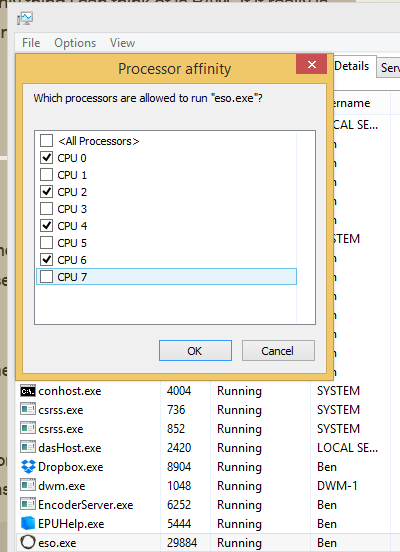 Should make no difference. The OS understands HT and schedules threads accordingly. As you sent this post however, I set my processor affinity to 0,2,4,6 as a test.
If the CPU usage goes up, it always impacts the GPU as the CPU is not sending it geometric data fast enough.
We can test for RAM bottlenecks using Perfmon but everything I have read says 2400 RAM is subject to the law of diminishing returns and 1866 is the sweet spot right now.Jfairclough wrote: »Anyone know if HT will help being on or off? And i have thought about getting 2400mhz ram for some while (although not sure if it will be supported) and now i have more incentive, but otherwise the gpu shouldnt be at 50% when cpu usage is low/uncrowded areas so there definitely isn't a logical benchmark, however when cpu usage hit 80% in a crowded pvp area gpu went down to 30%... Only thing i can think of is RAM. If it really is a CPU issue guaranteed console versions are not going to fair well without some serious player model capping or something.
0 -
raglau✭✭✭✭✭It's entirely possible, there's seemingly nothing wrong with the way the app consumes CPU or RAM resource, in PvE anyway.
That said, as the GPU is not doing any work, what good can driver optimisation do? If people's GPUs were at 100% we might expect driver improvements to eak more out of a card, but that's not the case.Anyone ever take into consideration it might just be because the drivers have not been optimized for ESO?
0 -
ESO is definitely not making much sense to me now.. well how i previously had 80% usage CPU and 30% GPU... i managed to get in a PVP state where CPU was 20% and GPU was 30% still with low frame rates in a big battle. Nothing seems to be consistent or make any sense.0
-
raglau✭✭✭✭✭Which very much implies that the game is waiting for backend data to process. Either due to server-side bottleneck OR you have a network bottleneck.
What's your Internet pipe in terms of latency and size? Also are you EU or US?Jfairclough wrote: »ESO is definitely not making much sense to me now.. well how i previously had 80% usage CPU and 30% GPU... i managed to get in a PVP state where CPU was 20% and GPU was 30% still with low frame rates in a big battle. Nothing seems to be consistent or make any sense.
Edited by raglau on April 8, 2014 4:22PM0
