Adding slash command emotes to quickslot?

HailstoSithis
✭✭✭
I went into collections and didn't see many emotes there to add to the quickslot, but I know there is plenty of slash-command emotes available. Is it possible to add emotes such as /torch or /sitchair to my quickslots, or just type them? Thanks.
0
-
 McMasterx✭✭✭Press F1, go to the Emotes Tab on the right, you can drag and drop emotes into the Wheel.
Pc/Na0 -
HailstoSithis✭✭✭Press F1, go to the Emotes Tab on the right, you can drag and drop emotes into the Wheel.
Hm, you def didn't read my post haha. I said I already saw that. My concern has to do with the slash emotes you don't see in that section. I was just curious of there was a way to macro or bind those. But it's fine I'll just type them.0 -
 TaSheen✭✭✭✭✭
✭✭✭✭✭Considering the way the wheels are set up to work, I think you're not going to be able to add the slash commands to the wheel.
You might want to look into macros so you don't have to keyboard them (especially if you're on console where typting seems to be really problematic).
If I wanted to use slash command emotes, I'd use my Logi G-15 macro setup to do so. I think many keyboards today allow that functionality, and as long as that's all you do with it, I do not believe you'd have any issue with the GMs for using them that way.______________________________________________________
"But even in books, the heroes make mistakes, and there isn't always a happy ending." Mercedes Lackey, Into the West
PC NA, PC EU (non steam)- four accounts, many alts....1 -
 tomofhyrule✭✭✭✭✭
✭✭✭✭✭If you're on PC, there are addons like LovelyEmotes that allow you to hotkey any of the emotes, including the default ones.
Highly recommend for people who do screenshots or RP.5 -
HailstoSithis✭✭✭tomofhyrule wrote: »If you're on PC, there are addons like LovelyEmotes that allow you to hotkey any of the emotes, including the default ones.
Highly recommend for people who do screenshots or RP.
Awesome, this is good news. I appreciate it.0 -
 LunaFlora✭✭✭✭✭
✭✭✭✭✭HailstoSithis wrote: »Press F1, go to the Emotes Tab on the right, you can drag and drop emotes into the Wheel.
Hm, you def didn't read my post haha. I said I already saw that. My concern has to do with the slash emotes you don't see in that section. I was just curious of there was a way to macro or bind those. But it's fine I'll just type them.
which slash emotes don't you see in the Emotes tab?miaow this is my forum signature! my name is Luna ( she/her ).
🌸*throws cherry blossom on you*🌸
"Eagles advance, traveler! And may the Green watch and keep you."
🦬🦌🐰
PlayStation EU is my primary server.
LunaFloraBlossom on PlayStation 5 and PC.
my main character is a Bosmer Warden named Greehnhart in-game, Greenie Florahart in full.
all characters on PS EU:- Luna Blossom, Bosmer Dragonknight.
- Dotty Greehnhart, Bosmer Sorcerer.
- Lía Greehnhart, Khajiit Nightblade.
- Lady Greehnhart, Altmer Templar. Lady is her name and title.
- Holly Blossom, Altmer Sorcerer.
- Sally Jadehart, Argonian Nightblade. Like a green salamander.
- Dorothy Pizzalover, Orc Warden. add pizzas to the game please.
- Greehnhart, Bosmer Warden.
- Lúcia Azurehart, imperial Necromancer. Azureblight, she has a Maarselok outfit.
- Bunny Rubyhart, Dunmer Nightblade.
- Wisteria Antheia, Khajiit Templar. blue hair like the wisteria.
- Cynthia Turquesa, Breton Warden.
- Rubyhart, Bosmer Nightblade.
- Hestia Rubyhart, Dunmer Dragonknight.
- Aurelia Cherryhart, Altmer Warden. Spriggan.
- Aurora Honey, Redguard Templar. Meridian cultist.
- Speaks-With-Blossom, Argonian Warden.
- Lulu Nightshade, Nord Necromancer.
- Lunetta Gleamblossom, Bosmer Arcanist. Ohmes Khajiit.
- Dianna Hyacinth, Altmer Arcanist. Maormer, water hyacinth.0 -
 Billium813✭✭✭✭✭
✭HailstoSithis wrote: »I went into collections and didn't see many emotes there to add to the quickslot, but I know there is plenty of slash-command emotes available. Is it possible to add emotes such as /torch or /sitchair to my quickslots, or just type them?
I think the misunderstanding here is due to ZOS placing the Emotes in a poor place...
There are the Collections Emotes, under Collections (U) > Emotes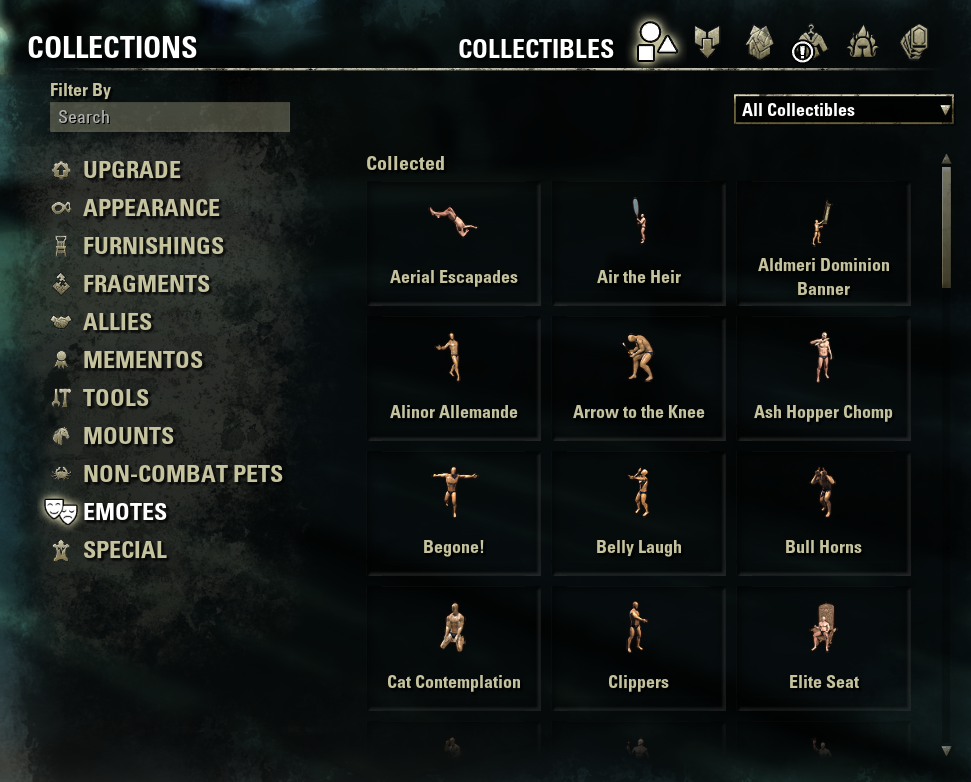
Then, there are the misplaced Emotes, under Help (F1) > Emotes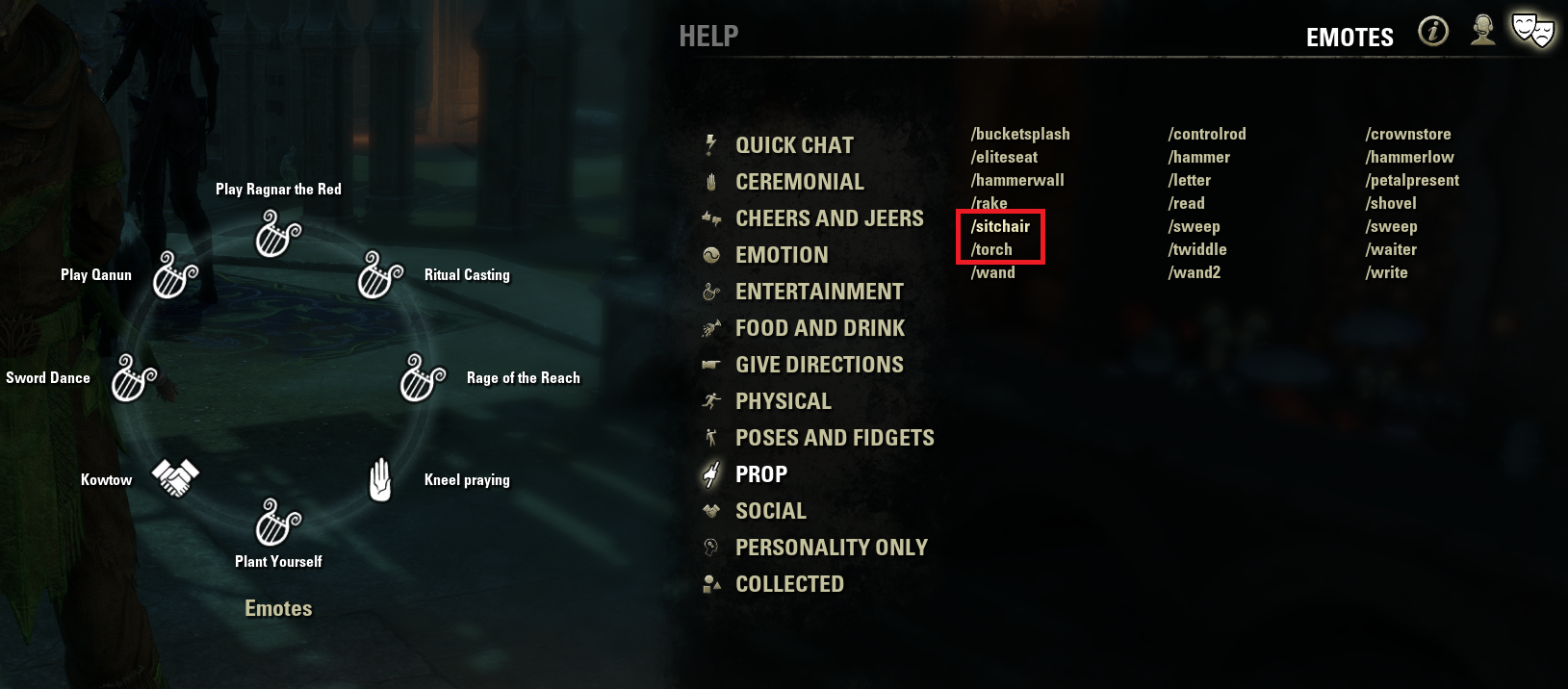
I believe you are looking for the complete list of Emotes, located under the Help menu (for some strange reason...)Edited by Billium813 on November 24, 2023 11:27PM2 -
HailstoSithis✭✭✭Billium813 wrote: »HailstoSithis wrote: »I went into collections and didn't see many emotes there to add to the quickslot, but I know there is plenty of slash-command emotes available. Is it possible to add emotes such as /torch or /sitchair to my quickslots, or just type them?
I think the misunderstanding here is due to ZOS placing the Emotes in a poor place...
There are the Collections Emotes, under Collections (U) > Emotes
Then, there are the misplaced Emotes, under Help (F1) > Emotes
I believe you are looking for the complete list of Emotes, located under the Help menu (for some strange reason...)
Ah I see. It seems very unusualy that Collection Emotes and the Help tab emotes are in completely two different locations. I appreciate that you could share this info.2 -
 tacypoc✭✭In terms of add-ons, "slasher" is another good one for slash commands (I use it for more than just emotes tho...it does holiday items, assistants, the "eye" for antiquarian stuff, etc1