Maintenance for the week of August 31:
• NA megaservers for maintenance – August 31, 4:00AM EDT (8:00 UTC) - 12:00PM EDT (16:00 UTC)
• EU megaservers for maintenance – August 31, 8:00 UTC (4:00AM EDT) - 16:00 UTC (12:00PM EDT)
• ESO Store and Account System for maintenance – August 31, 4:00AM EDT (8:00 UTC) - 12:00PM EDT (16:00 UTC)
• NA megaservers for maintenance – August 31, 4:00AM EDT (8:00 UTC) - 12:00PM EDT (16:00 UTC)
• EU megaservers for maintenance – August 31, 8:00 UTC (4:00AM EDT) - 16:00 UTC (12:00PM EDT)
• ESO Store and Account System for maintenance – August 31, 4:00AM EDT (8:00 UTC) - 12:00PM EDT (16:00 UTC)
UI Error 137611D7 (XB, PC, PS)

LootAllTheStuff
✭✭✭✭✭
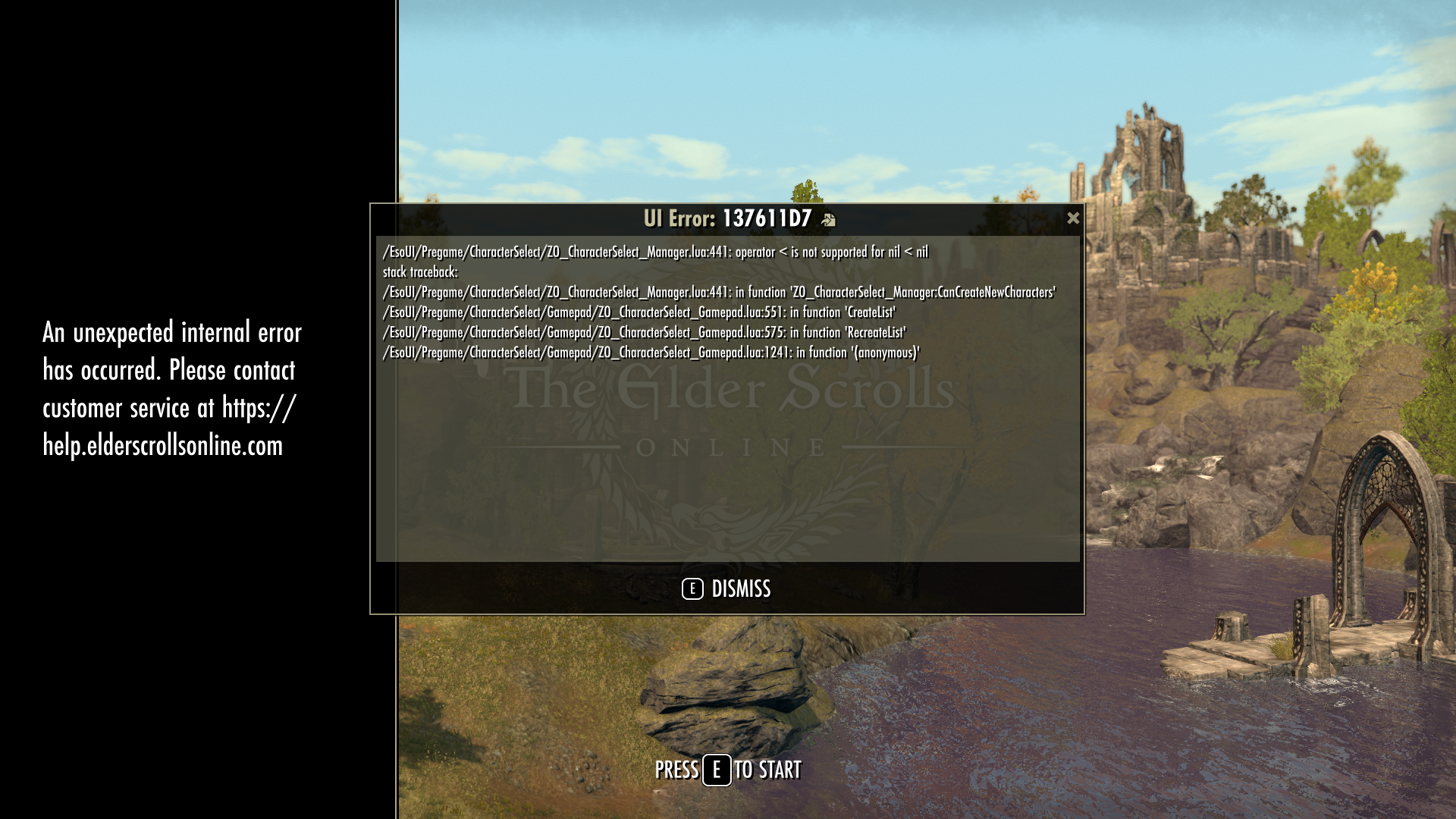
I've been getting this error pop up every time I launch the game, just as it arrives at the initial "Press A to Start" splash screen. The error apears to being triggered by a call to the CharacterSelect_Manager, but this is before the character select screen even shows up.
Any ideas?
I'd take a screen shot, but those aren't allowed on game start up for some reason.
Edited by LootAllTheStuff on August 25, 2026 2:34PM Any ideas?
I'd take a screen shot, but those aren't allowed on game start up for some reason.
0
-
 code65536✭✭✭✭✭
✭✭✭✭✭
Nightfighters ― PC/NA and PC/EU
Dungeons and Trials:Personal best scores:- Dragonstar Arena: 46817 (NA)
- Maelstrom Arena: 600526 (NA)
- Blackrose Prison: 99274 (EU) (Unchained)
- Maw of Lorkhaj: 165227 (EU)
- Halls of Fabrication: 220708 (NA) (Tick-Tock Tormentor #1, #2, #3, #4, #5, #6, #7, #8, #9, #10, #11, #12)
- Asylum Sanctorium: 114957 (NA) (Immortal Redeemer #1, #2, #3, #4, #5, #6, #7, #8, #9, #10)
- Cloudrest: 131256 (NA) (Gryphon Heart #1, #2, #3, #4, #5, #6, #7)
- Sunspire: 250866 (EU) (Godslayer #1, #2, #3, #4, #5, #6, #7)
- Kyne's Aegis: 235841 (EU) (Dawnbringer #1, #2, #3, #4, #5, #6, #7, #8)
Dungeon trifectas:- Mountain God and Leave No Bone Unbroken
- Apex Predator and Pure Lunacy
- Depths Defier and Relentless Raider
- Defanged the Devourer and Nature's Wrath
- In Defiance of Death and No Rest for the Wicked
- Bane of Thorns and True Genius
- Ardent Bibliophile and Subterranean Smasher
- Battlespire's Best and Bastion Breaker
- Zero Regrets and Land, Air, and Sea Supremacy
- Fist of Tava and Invader's Bane
- Curator's Champion (Valinna) and Temporal Tempest
- Unshakeable Fervor and Lighting the Embers
Extended Journal Add-Ons: Item Set Browser ― Loot Log ― Character Knowledge ― Collectibles Tracker ― RaidificatorPC/Console Add-Ons: Combat Alerts ― Group Buff PanelsOther Add-Ons: Deconstruction Junk Marker ― Purge Tracker ― Asylum Status Panel ― Smart Looter ― Improved Companion Rapport Information0 -
LootAllTheStuff✭✭✭✭✭That's the one. It started happening as soon as I enrolled in the current ESO+ free trial. Curious.0
-
 Andreakoss✭✭✭Same issue here, only started recently after ESO+, also with extra details in the error log.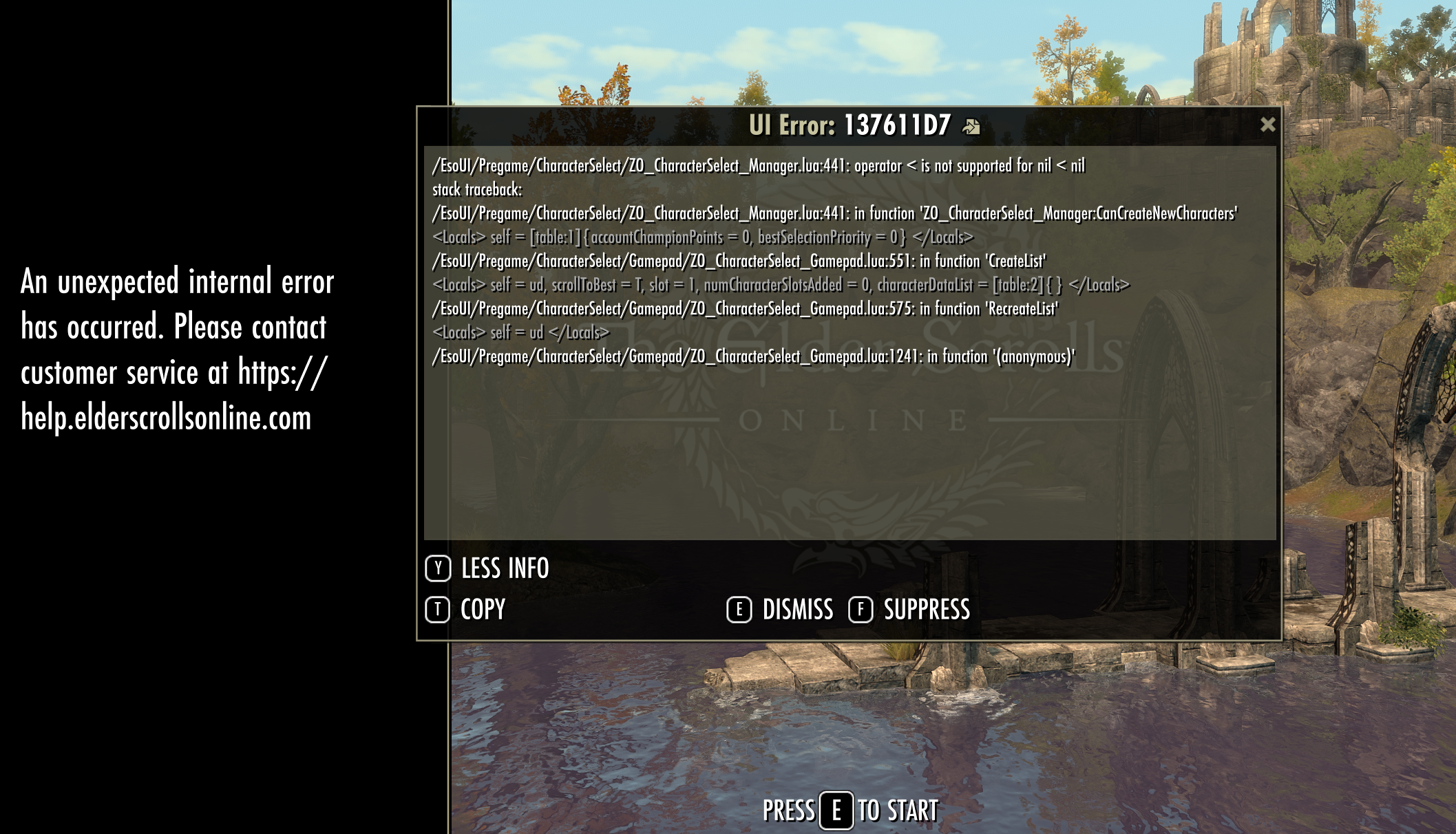
/EsoUI/Pregame/CharacterSelect/ZO_CharacterSelect_Manager.lua:441: operator < is not supported for nil < nil
stack traceback:
/EsoUI/Pregame/CharacterSelect/ZO_CharacterSelect_Manager.lua:441: in function 'ZO_CharacterSelect_Manager:CanCreateNewCharacters'
|caaaaaa<Locals> self = [table:1]{accountChampionPoints = 0, bestSelectionPriority = 0} </Locals>|r
/EsoUI/Pregame/CharacterSelect/Gamepad/ZO_CharacterSelect_Gamepad.lua:551: in function 'CreateList'
|caaaaaa<Locals> self = ud, scrollToBest = T, slot = 1, numCharacterSlotsAdded = 0, characterDataList = [table:2]{} </Locals>|r
/EsoUI/Pregame/CharacterSelect/Gamepad/ZO_CharacterSelect_Gamepad.lua:575: in function 'RecreateList'
|caaaaaa<Locals> self = ud </Locals>|r
/EsoUI/Pregame/CharacterSelect/Gamepad/ZO_CharacterSelect_Gamepad.lua:1241: in function '(anonymous)'
Edited by Andreakoss on August 25, 2026 2:00PM0 -
 Ingenon✭✭✭✭✭
✭Same here on PS5/NA. Started happening as soon as I signed up for the current ESO+ Free Trial.
I have tried removing all my add-ons, deleting local and cloud ESO storage, and I still get this error message every time I start ESO.
@ZOS_Kevin Looking at this thread posts I see this is happening on PC, XB, and PS. I'm seeing posts in my Guild Discord also.
My plan is to ignore this error and tell other players to ignore this error. Obviously there is a problem with players getting conditioned to ignore errors.0 -
 Hypnotica713✭✭✭This error is also happening on PlayStation. Both 4 and 5.
We were just discussing it yesterday in zone chat lol0 -
LootAllTheStuff✭✭✭✭✭As a follow-up, there is a KB article on the support website for general UI errors, but it does not help XBox players since it assumes PC file navigation. I do have a few add-ons, although only one accesses character information (Can I Craft?) so I guess I could try removing that from my library and restarting.
It's just odd that this cropped up only after adding the ESO+ trial, and that it happens before you even select a server to sign in to the game.0 -
 ZOS_JessicaFolsomCommunity ManagerHey all, we have a bug in for this and we have determine it is related to the ESO Plus Trial that is running right now. We're investigating - in the meantime, yes the best course of action is to back out and reenter if you run into this error. Thank you for reporting this and providing info!5
 -
code65536✭✭✭✭✭
✭✭✭✭✭LootAllTheStuff wrote: »I do have a few add-ons
The error happens in a part of the game called "Pregame" which addons are unable to touch or influence in any way, so no point in disabling addons. The error is also exclusive to gamepad (which is why most of the bug reports are from console players).Nightfighters ― PC/NA and PC/EU
Dungeons and Trials:Personal best scores:- Dragonstar Arena: 46817 (NA)
- Maelstrom Arena: 600526 (NA)
- Blackrose Prison: 99274 (EU) (Unchained)
- Maw of Lorkhaj: 165227 (EU)
- Halls of Fabrication: 220708 (NA) (Tick-Tock Tormentor #1, #2, #3, #4, #5, #6, #7, #8, #9, #10, #11, #12)
- Asylum Sanctorium: 114957 (NA) (Immortal Redeemer #1, #2, #3, #4, #5, #6, #7, #8, #9, #10)
- Cloudrest: 131256 (NA) (Gryphon Heart #1, #2, #3, #4, #5, #6, #7)
- Sunspire: 250866 (EU) (Godslayer #1, #2, #3, #4, #5, #6, #7)
- Kyne's Aegis: 235841 (EU) (Dawnbringer #1, #2, #3, #4, #5, #6, #7, #8)
Dungeon trifectas:- Mountain God and Leave No Bone Unbroken
- Apex Predator and Pure Lunacy
- Depths Defier and Relentless Raider
- Defanged the Devourer and Nature's Wrath
- In Defiance of Death and No Rest for the Wicked
- Bane of Thorns and True Genius
- Ardent Bibliophile and Subterranean Smasher
- Battlespire's Best and Bastion Breaker
- Zero Regrets and Land, Air, and Sea Supremacy
- Fist of Tava and Invader's Bane
- Curator's Champion (Valinna) and Temporal Tempest
- Unshakeable Fervor and Lighting the Embers
Extended Journal Add-Ons: Item Set Browser ― Loot Log ― Character Knowledge ― Collectibles Tracker ― RaidificatorPC/Console Add-Ons: Combat Alerts ― Group Buff PanelsOther Add-Ons: Deconstruction Junk Marker ― Purge Tracker ― Asylum Status Panel ― Smart Looter ― Improved Companion Rapport Information0 -
Ingenon✭✭✭✭✭
✭Follow on problem. I removed my add-ons trying to resolve this error. Now I am unable to install any add-ons.
Sigh. ZOS, please post something when you fix this bug. I'm not going back to playing ESO without add-ons, so I will find another game to play on PS5 until this is fixed. I can see forum-dev-tracker in Discord if you tag the post when you announce that you have fixed it. Thanks!1 -
code65536✭✭✭✭✭
✭✭✭✭✭Follow on problem. I removed my add-ons trying to resolve this error. Now I am unable to install any add-ons.
Sigh. ZOS, please post something when you fix this bug. I'm not going back to playing ESO without add-ons, so I will find another game to play on PS5 until this is fixed. I can see forum-dev-tracker in Discord if you tag the post when you announce that you have fixed it. Thanks!
Addons are completely unrelated to this bug. It is impossible for addons to cause this bug, and this bug cannot affect addons. If you are having trouble installing addons, that's a completely separate and unrelated issue.Nightfighters ― PC/NA and PC/EU
Dungeons and Trials:Personal best scores:- Dragonstar Arena: 46817 (NA)
- Maelstrom Arena: 600526 (NA)
- Blackrose Prison: 99274 (EU) (Unchained)
- Maw of Lorkhaj: 165227 (EU)
- Halls of Fabrication: 220708 (NA) (Tick-Tock Tormentor #1, #2, #3, #4, #5, #6, #7, #8, #9, #10, #11, #12)
- Asylum Sanctorium: 114957 (NA) (Immortal Redeemer #1, #2, #3, #4, #5, #6, #7, #8, #9, #10)
- Cloudrest: 131256 (NA) (Gryphon Heart #1, #2, #3, #4, #5, #6, #7)
- Sunspire: 250866 (EU) (Godslayer #1, #2, #3, #4, #5, #6, #7)
- Kyne's Aegis: 235841 (EU) (Dawnbringer #1, #2, #3, #4, #5, #6, #7, #8)
Dungeon trifectas:- Mountain God and Leave No Bone Unbroken
- Apex Predator and Pure Lunacy
- Depths Defier and Relentless Raider
- Defanged the Devourer and Nature's Wrath
- In Defiance of Death and No Rest for the Wicked
- Bane of Thorns and True Genius
- Ardent Bibliophile and Subterranean Smasher
- Battlespire's Best and Bastion Breaker
- Zero Regrets and Land, Air, and Sea Supremacy
- Fist of Tava and Invader's Bane
- Curator's Champion (Valinna) and Temporal Tempest
- Unshakeable Fervor and Lighting the Embers
Extended Journal Add-Ons: Item Set Browser ― Loot Log ― Character Knowledge ― Collectibles Tracker ― RaidificatorPC/Console Add-Ons: Combat Alerts ― Group Buff PanelsOther Add-Ons: Deconstruction Junk Marker ― Purge Tracker ― Asylum Status Panel ― Smart Looter ― Improved Companion Rapport Information0 -
LootAllTheStuff✭✭✭✭✭Follow on problem. I removed my add-ons trying to resolve this error. Now I am unable to install any add-ons.
Sigh. ZOS, please post something when you fix this bug. I'm not going back to playing ESO without add-ons, so I will find another game to play on PS5 until this is fixed. I can see forum-dev-tracker in Discord if you tag the post when you announce that you have fixed it. Thanks!
Can you add/re-enable your add-ons from the bethesda.net ESO mods page?0 -
LootAllTheStuff✭✭✭✭✭LootAllTheStuff wrote: »I do have a few add-ons
The error happens in a part of the game called "Pregame" which addons are unable to touch or influence in any way, so no point in disabling addons. The error is also exclusive to gamepad (which is why most of the bug reports are from console players).
Thanks for the info, although the bug only showing up when a gamepad/controller is being used is even more eyebrow-raising. "Curious", as Spock would say.0 -
code65536✭✭✭✭✭
✭✭✭✭✭LootAllTheStuff wrote: »Thanks for the info, although the bug only showing up when a gamepad/controller is being used is even more eyebrow-raising. "Curious", as Spock would say.
There's nothing nefarious here. The gamepad UI is very different than the keyboard UI. On keyboard, the character list is just that: a character list and nothing else; other UI elements are completely separate. But on gamepad, because having separate UI elements translates into "navigation nightmare", the character list is just a part of a larger list of menu items that include other things.
So this bug happens when there's a change in the "entitlement" (which I assume is where the ESO+ trial connection comes in), and on keyboard, this entitlement change causes a refresh of the separate carousel UI, but on gamepad, because everything is consolidated into a single gamepad-navigable list, it causes a refresh of that entire list, which includes the list of characters.
And this refresh caused by the entitlement change is happening before the game has received the character list, which is the error that you see.Edited by code65536 on August 25, 2026 6:55PMNightfighters ― PC/NA and PC/EU
Dungeons and Trials:Personal best scores:- Dragonstar Arena: 46817 (NA)
- Maelstrom Arena: 600526 (NA)
- Blackrose Prison: 99274 (EU) (Unchained)
- Maw of Lorkhaj: 165227 (EU)
- Halls of Fabrication: 220708 (NA) (Tick-Tock Tormentor #1, #2, #3, #4, #5, #6, #7, #8, #9, #10, #11, #12)
- Asylum Sanctorium: 114957 (NA) (Immortal Redeemer #1, #2, #3, #4, #5, #6, #7, #8, #9, #10)
- Cloudrest: 131256 (NA) (Gryphon Heart #1, #2, #3, #4, #5, #6, #7)
- Sunspire: 250866 (EU) (Godslayer #1, #2, #3, #4, #5, #6, #7)
- Kyne's Aegis: 235841 (EU) (Dawnbringer #1, #2, #3, #4, #5, #6, #7, #8)
Dungeon trifectas:- Mountain God and Leave No Bone Unbroken
- Apex Predator and Pure Lunacy
- Depths Defier and Relentless Raider
- Defanged the Devourer and Nature's Wrath
- In Defiance of Death and No Rest for the Wicked
- Bane of Thorns and True Genius
- Ardent Bibliophile and Subterranean Smasher
- Battlespire's Best and Bastion Breaker
- Zero Regrets and Land, Air, and Sea Supremacy
- Fist of Tava and Invader's Bane
- Curator's Champion (Valinna) and Temporal Tempest
- Unshakeable Fervor and Lighting the Embers
Extended Journal Add-Ons: Item Set Browser ― Loot Log ― Character Knowledge ― Collectibles Tracker ― RaidificatorPC/Console Add-Ons: Combat Alerts ― Group Buff PanelsOther Add-Ons: Deconstruction Junk Marker ― Purge Tracker ― Asylum Status Panel ― Smart Looter ― Improved Companion Rapport Information4 -
Ingenon✭✭✭✭✭
✭LootAllTheStuff wrote: »Follow on problem. I removed my add-ons trying to resolve this error. Now I am unable to install any add-ons.
Sigh. ZOS, please post something when you fix this bug. I'm not going back to playing ESO without add-ons, so I will find another game to play on PS5 until this is fixed. I can see forum-dev-tracker in Discord if you tag the post when you announce that you have fixed it. Thanks!
Can you add/re-enable your add-ons from the bethesda.net ESO mods page?
I use the instructions that ZOS has posted How do I enable add-ons on Xbox Series X|S/PlayStation 5?0 -
Ingenon✭✭✭✭✭
✭Follow on problem. I removed my add-ons trying to resolve this error. Now I am unable to install any add-ons.
Sigh. ZOS, please post something when you fix this bug. I'm not going back to playing ESO without add-ons, so I will find another game to play on PS5 until this is fixed. I can see forum-dev-tracker in Discord if you tag the post when you announce that you have fixed it. Thanks!
Addons are completely unrelated to this bug. It is impossible for addons to cause this bug, and this bug cannot affect addons. If you are having trouble installing addons, that's a completely separate and unrelated issue.
Then the timing is suspicious. Others on PS5 are experiencing the same problem and talking in zone chat, guild discord, and on this forum Add-ons are busted and not working on PS5
I have tried deleting the game save (on console) and the cloud save, and verified in game that there are no add-ons still installed (storage says 0 MB in use out of 200 MB available).
When I click to add a new add-on (any of the ones I have used before) the UI flickers to Install and then immediately changes back to Not Installed. And reload UI at that point does nothing.0 -
LootAllTheStuff✭✭✭✭✭LootAllTheStuff wrote: »Follow on problem. I removed my add-ons trying to resolve this error. Now I am unable to install any add-ons.
Sigh. ZOS, please post something when you fix this bug. I'm not going back to playing ESO without add-ons, so I will find another game to play on PS5 until this is fixed. I can see forum-dev-tracker in Discord if you tag the post when you announce that you have fixed it. Thanks!
Can you add/re-enable your add-ons from the bethesda.net ESO mods page?
I use the instructions that ZOS has posted How do I enable add-ons on Xbox Series X|S/PlayStation 5?
OK there's another way to do it. I go to: https://mods.bethesda.net/en/elderscrollsonline/all
Once there, I can login and browse/favourite/add/remove mods (I believe the button actually says "Subscribe"). When I then launch the game and sign in, any new ones get downloaded and installed and I'm good to go.
I prefer that approach since I can also flag mods as favourites so I can find them later should I not want to install them straight away, or if I want to try different combos out. I don't know about PS5, but the last time I browsed mods on XBSX the UI didn't have that feature, and it was hard to find what I was looking for.
ETA this assumes you have a bethesda.net account (which I did from Skyrim) linked to your console account.
Edited by LootAllTheStuff on August 25, 2026 8:56PM0 -
 Twohothardware✭✭✭✭✭
✭✭ZOS_JessicaFolsom wrote: »Hey all, we have a bug in for this and we have determine it is related to the ESO Plus Trial that is running right now. We're investigating - in the meantime, yes the best course of action is to back out and reenter if you run into this error. Thank you for reporting this and providing info!
@ZOS_JessicaFolsom Add-ons have completely stopping being able to install as well this past week. I don't know if it's also tied to the ESO+ free trial but that's when Addons started having issues.0 -
Twohothardware✭✭✭✭✭
✭✭LootAllTheStuff wrote: »LootAllTheStuff wrote: »Follow on problem. I removed my add-ons trying to resolve this error. Now I am unable to install any add-ons.
Sigh. ZOS, please post something when you fix this bug. I'm not going back to playing ESO without add-ons, so I will find another game to play on PS5 until this is fixed. I can see forum-dev-tracker in Discord if you tag the post when you announce that you have fixed it. Thanks!
Can you add/re-enable your add-ons from the bethesda.net ESO mods page?
I use the instructions that ZOS has posted How do I enable add-ons on Xbox Series X|S/PlayStation 5?
OK there's another way to do it. I go to: https://mods.bethesda.net/en/elderscrollsonline/all
Once there, I can login and browse/favourite/add/remove mods (I believe the button actually says "Subscribe"). When I then launch the game and sign in, any new ones get downloaded and installed and I'm good to go.
I prefer that approach since I can also flag mods as favourites so I can find them later should I not want to install them straight away, or if I want to try different combos out. I don't know about PS5, but the last time I browsed mods on XBSX the UI didn't have that feature, and it was hard to find what I was looking for.
ETA this assumes you have a bethesda.net account (which I did from Skyrim) linked to your console account.
I linked my PlayStation account on Bethesda.net there but when I tried hitting the button to "Subscribe" on a couple of mods it doesn't download it in-game for me on PS5.0 -
Ingenon✭✭✭✭✭
✭Okay, the ESO+ free trial has ended.
I am no longer getting the UI Error 137411D7 when I start ESO on PS5/NA.
And all of my add-ons are back. Thanks to @LootAllTheStuff for the suggestion to go to https://mods.bethesda.net/en/elderscrollsonline/all. I did that yesterday, entered all the add-ons that were missing, restarted my console, and none of them were there when I checked in game.. Today after 10 AM ET when the ESO+ free trial ended, I restarted my console, started ESO, logged in, and all my add-ons were there, without me doing anything else. And the UI Installed Add-ons page now shows my add-ons again, like it used to before the ESO+ free trial.Edited by Ingenon on August 27, 2026 2:29PM1 -
code65536✭✭✭✭✭
✭✭✭✭✭Huh, that's weird. I wonder if that's a PS thing? I was getting that error at login on XBPA and it had no effect on addons.Nightfighters ― PC/NA and PC/EU
Dungeons and Trials:Personal best scores:- Dragonstar Arena: 46817 (NA)
- Maelstrom Arena: 600526 (NA)
- Blackrose Prison: 99274 (EU) (Unchained)
- Maw of Lorkhaj: 165227 (EU)
- Halls of Fabrication: 220708 (NA) (Tick-Tock Tormentor #1, #2, #3, #4, #5, #6, #7, #8, #9, #10, #11, #12)
- Asylum Sanctorium: 114957 (NA) (Immortal Redeemer #1, #2, #3, #4, #5, #6, #7, #8, #9, #10)
- Cloudrest: 131256 (NA) (Gryphon Heart #1, #2, #3, #4, #5, #6, #7)
- Sunspire: 250866 (EU) (Godslayer #1, #2, #3, #4, #5, #6, #7)
- Kyne's Aegis: 235841 (EU) (Dawnbringer #1, #2, #3, #4, #5, #6, #7, #8)
Dungeon trifectas:- Mountain God and Leave No Bone Unbroken
- Apex Predator and Pure Lunacy
- Depths Defier and Relentless Raider
- Defanged the Devourer and Nature's Wrath
- In Defiance of Death and No Rest for the Wicked
- Bane of Thorns and True Genius
- Ardent Bibliophile and Subterranean Smasher
- Battlespire's Best and Bastion Breaker
- Zero Regrets and Land, Air, and Sea Supremacy
- Fist of Tava and Invader's Bane
- Curator's Champion (Valinna) and Temporal Tempest
- Unshakeable Fervor and Lighting the Embers
Extended Journal Add-Ons: Item Set Browser ― Loot Log ― Character Knowledge ― Collectibles Tracker ― RaidificatorPC/Console Add-Ons: Combat Alerts ― Group Buff PanelsOther Add-Ons: Deconstruction Junk Marker ― Purge Tracker ― Asylum Status Panel ― Smart Looter ― Improved Companion Rapport Information0 -
Ingenon✭✭✭✭✭
✭Huh, that's weird. I wonder if that's a PS thing? I was getting that error at login on XBPA and it had no effect on addons.
It is a puzzle. Here on these forums at least three different PS/NA players reported that they could not enable new add-ons during the recent ESO+ free trial, and getting a UI error on login. XB players reported they were getting a UI error on login. PC players that uses a gamepad reported they were getting a UI error on login.
I believe the ESO code for each platform must be different, so I guess it is possible that the same thing (ESO+ free trial) could cause different issues on different platforms.0 -
LootAllTheStuff✭✭✭✭✭Huh, that's weird. I wonder if that's a PS thing? I was getting that error at login on XBPA and it had no effect on addons.
It is a puzzle. Here on these forums at least three different PS/NA players reported that they could not enable new add-ons during the recent ESO+ free trial, and getting a UI error on login. XB players reported they were getting a UI error on login. PC players that uses a gamepad reported they were getting a UI error on login.
I believe the ESO code for each platform must be different, so I guess it is possible that the same thing (ESO+ free trial) could cause different issues on different platforms.
I would suspect differences in the way the tasks have to be structured and executed for each platform/OS as well. I've seen similar situations arise with other games using totally different engines. It can't be easy managing all that on the developer side.0