Maintenance for the week of September 7:
• PC/Mac: No maintenance – September 7
• PC/Mac: No maintenance – September 7
Turn off the Weekly Challenges Pop-up for Tomes System

Vulkunne
✭✭✭✭✭
✭
✭
ZOS,
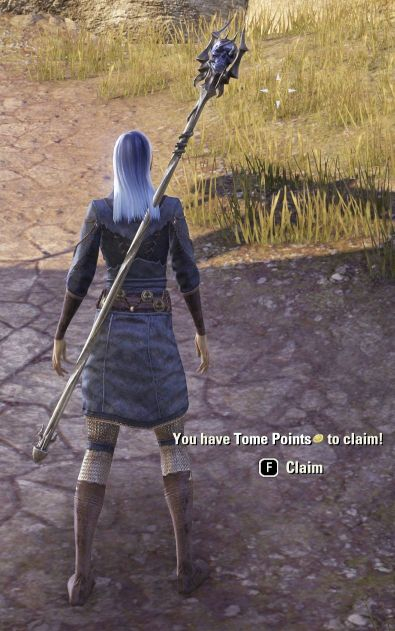
Is there any way to please stop the Weekly Challenges Pop-up from consistently activating every time a requirement is met? It's really annoying when finishing a fight with npcs having this screen continue to pop-up. It's become a real distraction and major source of aggravation, on top of not being able to focus on other tasks at hand, more important.
Please give us a setting to turn this off.
Thanks
Is there any way to please stop the Weekly Challenges Pop-up from consistently activating every time a requirement is met? It's really annoying when finishing a fight with npcs having this screen continue to pop-up. It's become a real distraction and major source of aggravation, on top of not being able to focus on other tasks at hand, more important.
Please give us a setting to turn this off.
Thanks
Today Victory is mines... Long Live the Empire. - From a galaxy far far away.
8
-
 Ardriel✭✭✭✭✭That is indeed extremely annoying.
 I’m surprised no one else has complained about it yet... does no one play dungeons? It’s very irritating when a message suddenly pops up during a boss fight. I had the task of killing 20 shadowy daedras... It kept popping up in the dungeon all the time. Really annoying.
  Please change this! 6
 -
 barney2525✭✭✭✭✭
✭✭✭✭a couple words at the bottom of the screen?
can't take 5 seconds when you are out of combat to clear it?
I, actually am NOT surprised no one has complained about it yet.
I appreciate it because when I finish the task I want to clear it and get started on the next one. 9 -
 DragonRacer✭✭✭✭✭
✭✭✭barney2525 wrote: »a couple words at the bottom of the screen?
can't take 5 seconds when you are out of combat to clear it?
I, actually am NOT surprised no one has complained about it yet.
I appreciate it because when I finish the task I want to clear it and get started on the next one.
Not when you're trying to get a speed run or trifecta done in a dungeon or trial. It's incredibly aggravating and because some of these challenges are super easy and repeatable (like "Kill 8 dangerous foes"), even if you pause to clear out that screen notification, you practically get it again just a few minutes later.PS5 NA. GM of The PTK's - a free trading guild (CP 500+). Also a werewolf, bites are free when they're available. PSN = DragonRacer137 -
 Elvenheart✭✭✭✭✭
✭✭✭✭I hated the pop ups as well. Code’s add-on is a lifesaver. It even claims the daily login challenge when you first sign on each day as well for you. It makes the whole system feel more like endeavors.3 -
 KalevaLaine✭✭✭✭✭
✭Elvenheart wrote: »I hated the pop ups as well. Code’s add-on is a lifesaver. It even claims the daily login challenge when you first sign on each day as well for you. It makes the whole system feel more like endeavors.
Whats the name of this add-on?💜 シカバネ // PC EU (3600CP)
Fianna Rolaine - Templar Heal & DD // Valie Finwe - Templar Heal
Madena Rolaine - Necromancer Heal // Julienne Rolaine - Nightblade Heal
Mireli Telendas - Dragonknight Heal // From-Deepest-Ashes - Warden Heal
Taarie Finwe - Arcanist Heal // Elenwen Finwe - Sorcerer Heal
Jora Strong-Heart - Dragonknight Tank // Gharol gra-Shargakh - Templar DD
Dro'marash - Nightblade Roleplay Thief // Freir Ice-Fist - Warden Roleplay Sorcerer
Rad Red Rubbish - Templar PVP DD (AD)
My YouTube - https://www.youtube.com/@ShikabaneGaming1 -
Vulkunne✭✭✭✭✭
✭barney2525 wrote: »a couple words at the bottom of the screen?
can't take 5 seconds when you are out of combat to clear it?
I, actually am NOT surprised no one has complained about it yet.
I appreciate it because when I finish the task I want to clear it and get started on the next one.
It's a large black window that opens taking over the screen. It's not just a 'couple words' at the bottom of the screen at all - that's misleading. If they're going to have it working this way, then in my opinion this becomes a UI element and needs to be brought in line with other UI elements so the user can tailor these to their personal preference. As it stands, it's really annoying, its unnecessary and its messing with the combat experience in undesirable ways by forcing me into another screen at seemingly 'random' times.
It's completely unnecessary for me to acknowledge an achievement right away. I can do that later cause more important things are happening. This website won't accept an image file from my computer, and I can't find an example but it's the Weekly Challenges window from Tomes that keeps popping up. And again, it's not a couple words at the bottom of the screen. It should be a low priority system that can be managed later and made adjustable for my needs, not its.Edited by Vulkunne on April 8, 2026 1:14PMToday Victory is mines... Long Live the Empire. - From a galaxy far far away.2 -
 AzuraFan✭✭✭✭✭
✭✭✭✭That is indeed extremely annoying. I’m surprised no one else has complained about it yet... does no one play dungeons? It’s very irritating when a message suddenly pops up during a boss fight. I had the task of killing 20 shadowy daedras... It kept popping up in the dungeon all the time. Really annoying. Please change this!
There have been tons of people complaining about it in one of the pinned feedback threads.
Agreed that it's really annoying. Make it like endeavors - claim it automatically in the background.5 -
 JeroenB✭✭✭✭Agreed as well. It was already irritating when they started doing this with Golden Pursuits, but to have it for every completion of a Challenge bar is far more frequent and thus far more frustrating.
It fits in this whole new direction that is gradually driving me away, of forcing the 'playing a game'-nature front and centre overwhelming the 'exploring a world and its stories'-nature.
Many thanks for sharing that add-on, installed immediately.
Unless I am misunderstanding your post, for most people the Weekly Challenge window does not pop up automatically. Instead there is a short message with no background at the bottom of the screen, the same as for Golden Pursuits or character level-ups. Still very irritatingly intrusive, distracting, immersion-breaking, and other such negative terms, but technically it does not block 'the action' the way the whole Challenge window would. Do you perhaps have an add-on that auto-opens the Challenge window?It's a large black window that opens taking over the screen. It's not just a 'couple words' at the bottom of the screen at all - that's misleading.Edited by JeroenB on April 8, 2026 2:06PM2 -
 whitecrow✭✭✭✭✭
✭✭✭I just get a small "Press F to claim" at the bottom and I'm glad I do because I don't have to keep checking manually to see if I've completed anything.2 -
 LootAllTheStuff✭✭✭✭✭I just get a small "Press F to claim" at the bottom and I'm glad I do because I don't have to keep checking manually to see if I've completed anything.
On XBox, the notifications is two lines of text above the skill icons and player stat bars (so about 1/3rd the way up the screen), which is very distracting. To clear it, you have to press the UI button, which pulls up the full menu/window on the current activities page, press again to claim, and then close it.
I took a quick look via the Add-ons menu for Code's Auto-Claim add-on but didn't see it. Anyone know if it was released for console?
ETA: Yes it is on console, just not showing up in the in-game list for some reason.
https://mods.bethesda.net/en/elderscrollsonline/details/910446ca-4e83-47c8-8c9b-a5d99bcec73e
Edited by LootAllTheStuff on April 8, 2026 2:39PM1 -
 allochthons✭✭✭✭✭
✭Yeah, Code's (wonderful) add-on for console is called "Auto-Claim Tome Points."
The console* add-on menu only displays the most installed add-ons. So we often have to search for the ones we want in the UI, especially when they are brand new.
* (at least PS5)She/They
PS5/NA (CP3100+)1 -
 Danikat✭✭✭✭✭
✭✭✭✭✭Thanks to everyone who mentioned the addon, that's really helpful. No more annoying pop-up and instead I get an unobtrusive little note in the chat box like I used to for endeavours. (I can't remember if that was from an addon or base game functionality.)
BTW if you want to see the notification but want it smaller (or bigger) or in a different position on the screen an addon like Azurah could help - it lets you move and resize the UI. (I have no idea if there's a console version.)
Confusingly the tome notifications seem to be using the 'player interaction prompt' space (which is normally for options related to other players like trade or add friend) not the on screen notifications or alert text notifications, which I'd already shrunk down and moved off to the side where they're out the way.Edited by Danikat on April 8, 2026 4:21PMPC EU player | She/her/hers | PAWS (Positively Against Wrip-off Stuff) - Say No to Crown Crates!
"Remember in this game we call life that no one said it's fair"2 -
DragonRacer✭✭✭✭✭
✭✭✭LootAllTheStuff wrote: »I just get a small "Press F to claim" at the bottom and I'm glad I do because I don't have to keep checking manually to see if I've completed anything.
On XBox, the notifications is two lines of text above the skill icons and player stat bars (so about 1/3rd the way up the screen), which is very distracting. To clear it, you have to press the UI button, which pulls up the full menu/window on the current activities page, press again to claim, and then close it.
I took a quick look via the Add-ons menu for Code's Auto-Claim add-on but didn't see it. Anyone know if it was released for console?
ETA: Yes it is on console, just not showing up in the in-game list for some reason.
https://mods.bethesda.net/en/elderscrollsonline/details/910446ca-4e83-47c8-8c9b-a5d99bcec73e
And to add to this, to clear the line of text, I believe the console (PS, at least) prompt is to hold the Options button... which is also the same button you press to open inventory or hold to REVIVE A FALLEN TEAMMATE.
I mean, thankfully, I'm a tank main so I'm not generally expected to revive the fallen (DPS should primarily be picking their own up in sweaty content), but I cannot possibly imagine how awesome it must be to try and rez a teammate only to have your stupid tome open up and take up half the screen instead. LOL It's already frustrating when lag or whatever causes your inventory screen to open up instead of rezzing someone. Now we get this tome reward claiming line to add to the "fun".
I'm gonna have to look into Code's add-on and spread the word because this was fairly irritating during prog last night.PS5 NA. GM of The PTK's - a free trading guild (CP 500+). Also a werewolf, bites are free when they're available. PSN = DragonRacer132 -
 redlink1979✭✭✭✭✭
✭✭✭As said before, the workaround can be the add-on "Auto-Claim Tome Points" by our fellow @code65536
PC
https://www.esoui.com/downloads/info4484-Auto-ClaimTomePoints.html
Consoles
https://mods.bethesda.net/en/elderscrollsonline/details/910446ca-4e83-47c8-8c9b-a5d99bcec73e/Auto_Claim_Tome_Points"Sweet Mother, sweet Mother, send your child unto me, for the sins of the unworthy must be baptized in blood and fear"- Sons of the Night Mother | VforVendetta | Grownups Gaming EU | English Elders [PS][EU] 2500 CP
- Daggerfall's Mightiest | Eternal Champions | Legacy | Tamriel Melting Pot [PS][NA] 2300 CP
- SweetTrolls | Spring Rose | Daggerfall Royal Legion | Tinnitus Delux [PC][EU] 2525 CP
- Bacon Rats | Silverlight Brotherhood | Canis Root Tea Party | Vincula Doloris [PC][NA] 2300 CP
2 -
LootAllTheStuff✭✭✭✭✭allochthons wrote: »Yeah, Code's (wonderful) add-on for console is called "Auto-Claim Tome Points."
The console* add-on menu only displays the most installed add-ons. So we often have to search for the ones we want in the UI, especially when they are brand new.
* (at least PS5)
On XBox, you can sort by most downloaded or name. But the alphabetical name list didn't include Code's add-on at all, so I'm wondering if the A-Z list is also only the most downloaded. At least there's the website. Would love to have it working more like the Skyrim version, though.0 -
 Masteroshi430✭✭✭✭Users of the Vestige's Epic Quest addon have auto claim tome points integrated since U49 release.@Masteroshi430 PC/EU (old French guy playing in English & addon author/maintainer) My addons1
 -
Vulkunne✭✭✭✭✭
✭Ok so there are addons to help manage this 'feature creep'.
That's good to know. Ok thanks again for the info. Edited by Vulkunne on April 8, 2026 7:51PMToday Victory is mines... Long Live the Empire. - From a galaxy far far away.0 -
 AcadianPaladin✭✭✭✭✭
✭✭✭✭✭Thanks to everyone who mentioned the addon, that's really helpful. No more annoying pop-up and instead I get an unobtrusive little note in the chat box like I used to for endeavours. (I can't remember if that was from an addon or base game functionality.)
BTW if you want to see the notification but want it smaller (or bigger) or in a different position on the screen an addon like Azurah could help - it lets you move and resize the UI. (I have no idea if there's a console version.)
Confusingly the tome notifications seem to be using the 'player interaction prompt' space (which is normally for options related to other players like trade or add friend) not the on screen notifications or alert text notifications, which I'd already shrunk down and moved off to the side where they're out the way.
@Danikat, thanks so much for posting this since I have Azurah installed. Your tip that the correct box to move for this is the 'player interaction prompt' was essential to me being able to move the notification to an unobtrusive place. PC NA(no Steam), PvE, mostly solo0 -
AzuraFan✭✭✭✭✭
✭✭✭✭redlink1979 wrote: »As said before, the workaround can be the add-on "Auto-Claim Tome Points" by our fellow @code65536
PC
https://www.esoui.com/downloads/info4484-Auto-ClaimTomePoints.html
Consoles
https://mods.bethesda.net/en/elderscrollsonline/details/910446ca-4e83-47c8-8c9b-a5d99bcec73e/Auto_Claim_Tome_Points
All hail @code65536! I'm using the addon, and it's making my ESO life much more pleasant. Thanks for creating it. 3 -
 SilverBride✭✭✭✭✭
✭✭✭✭✭Don't Golden Pursuits pop-up when we have earned a reward, too? I never heard any complaints about those.PCNA0 -
LootAllTheStuff✭✭✭✭✭SilverBride wrote: »Don't Golden Pursuits pop-up when we have earned a reward, too? I never heard any complaints about those.
I definitely complained the one time it happened during the final boss fight in a trial. Fortunately, those didn't happen nearly as often as the tomes ones do, because the GP ones didn't repeat 6 or more times in a row.2 -
 Umbracat449✭✭✭SilverBride wrote: »Don't Golden Pursuits pop-up when we have earned a reward, too? I never heard any complaints about those.
Are you thinking these complaints are unfounded?
One has to open a screen, hover over the right challenge, which takes a second to spot, then click to claim. That's three actions, when for endeavors, there were none.
Goldens don't happen repeatedly, 6 times over per challenge, but are still annoying.0 -
allochthons✭✭✭✭✭
✭
There were definitely complaints about how Golden Pursuit pop-ups functioned on console. They were awful. They're still really annoying. We haven't had a Pursuit since code65536 added auto-claim, I wonder if it'll work for Golden Pursuits too.SilverBride wrote: »Don't Golden Pursuits pop-up when we have earned a reward, too? I never heard any complaints about those.
AFAICT, The closest add-on for moving all the UI elements on PS is Khajiit Feng Shui.
BTW if you want to see the notification but want it smaller (or bigger) or in a different position on the screen an addon like Azurah could help - it lets you move and resize the UI. (I have no idea if there's a console version.)
Feng Shui will let you move and resize most of the UI elements. There are other add-ons that only move 1 thing (the chat box, or the quest box, or the health/mag/stam bars) and some, like Fancy Action Bar+ let you move some base game UI stuff it modifies, and it's own text boxes.
Feng Shui has limitations. It seems to only like to keep so many things in memory. For instance, my chat window jumps between it's default location, and the place I put it with the add-on. But it jumps back and forth as I reloadui or change characters.
And my skill tool-bar moves around a lot more. When I first log in, it's right at the bottom center of my screen (lower than the default location, it goes to the last pixel at the bottom of my screen), but if I go into the menu, it'll pop up to where I moved it with Feng Shui (just a bit above the bottom, but moved a fair bit left). And then if I travel, or go into a a crafting station, it'll pop back down to the very bottom center again, until the next time I open my menu.
But I moved a bunch of my UI elements, because I use the various combat add-ons, and those add a ton of visual clutter, and some of those default locations overlap default UI locations. So Feng Shui is much appreciated, and I'll live with the quirks.She/They
PS5/NA (CP3100+)0 -
SilverBride✭✭✭✭✭
✭✭✭✭✭Umbracat449 wrote: »SilverBride wrote: »Don't Golden Pursuits pop-up when we have earned a reward, too? I never heard any complaints about those.
Are you thinking these complaints are unfounded?
Not at all. But they are both so similar that I wondered why I wasn't hearing complaints about both of them.PCNA0 -
 code65536✭✭✭✭✭
✭✭✭✭✭SilverBride wrote: »Don't Golden Pursuits pop-up when we have earned a reward, too? I never heard any complaints about those.
There are two crucial differences between Golden Pursuits and Tome Challenges:- The rewards for Golden Pursuits were more varied, so a case could be made for giving the user a choice on who and when to claim a Golden Pursuit reward. During one of the Vengeance pursuits, we had rewards in the form of AP, and a player might want to claim that on a specific character that needed Alliance War leveling. There was a Whitestrake's pursuit that rewarded Tel-Var, and a player probably would probably want to choose to claim that when they're in a safe place. And for rewards that are physical items, a player might want to choose to claim it when they're under less inventory pressure or on a character that would actually use the item. In contrast, Tome Points are an account-wide currency with no meaningful "who and when" choice for claiming.
So, in short, while the Golden Pursuit popup was annoying as well, at least it had a reasonable justification for that annoyance, whereas Tome Points are more like Endeavor Seals. And Endeavor Seals were rewarded automatically and seamlessly. - Golden Pursuits are a "sometimes food", while Tome Challenges, like the Endeavors that they replaced, are ever-present. So there is a big difference in frequency between Pursuits and Challenges.
Nightfighters ― PC/NA and PC/EU
Dungeons and Trials:Personal best scores:- Dragonstar Arena: 46817 (NA)
- Maelstrom Arena: 600526 (NA)
- Blackrose Prison: 99274 (EU) (Unchained)
- Maw of Lorkhaj: 165227 (EU)
- Halls of Fabrication: 220708 (NA) (Tick-Tock Tormentor #1, #2, #3, #4, #5, #6, #7, #8, #9, #10, #11, #12)
- Asylum Sanctorium: 114957 (NA) (Immortal Redeemer #1, #2, #3, #4, #5, #6, #7, #8, #9, #10)
- Cloudrest: 131256 (NA) (Gryphon Heart #1, #2, #3, #4, #5, #6, #7)
- Sunspire: 250866 (EU) (Godslayer #1, #2, #3, #4, #5, #6, #7)
- Kyne's Aegis: 235841 (EU) (Dawnbringer #1, #2, #3, #4, #5, #6, #7, #8)
Dungeon trifectas:- Mountain God and Leave No Bone Unbroken
- Apex Predator and Pure Lunacy
- Depths Defier and Relentless Raider
- Defanged the Devourer and Nature's Wrath
- In Defiance of Death and No Rest for the Wicked
- Bane of Thorns and True Genius
- Ardent Bibliophile and Subterranean Smasher
- Battlespire's Best and Bastion Breaker
- Zero Regrets and Land, Air, and Sea Supremacy
- Fist of Tava and Invader's Bane
- Curator's Champion (Valinna) and Temporal Tempest
- Unshakeable Fervor and Lighting the Embers
Extended Journal Add-Ons: Item Set Browser ― Loot Log ― Character Knowledge ― Collectibles Tracker ― RaidificatorPC/Console Add-Ons: Combat Alerts ― Group Buff PanelsOther Add-Ons: Deconstruction Junk Marker ― Purge Tracker ― Asylum Status Panel ― Smart Looter ― Improved Companion Rapport Information2 - The rewards for Golden Pursuits were more varied, so a case could be made for giving the user a choice on who and when to claim a Golden Pursuit reward. During one of the Vengeance pursuits, we had rewards in the form of AP, and a player might want to claim that on a specific character that needed Alliance War leveling. There was a Whitestrake's pursuit that rewarded Tel-Var, and a player probably would probably want to choose to claim that when they're in a safe place. And for rewards that are physical items, a player might want to choose to claim it when they're under less inventory pressure or on a character that would actually use the item. In contrast, Tome Points are an account-wide currency with no meaningful "who and when" choice for claiming.
-
AzuraFan✭✭✭✭✭
✭✭✭✭SilverBride wrote: »Don't Golden Pursuits pop-up when we have earned a reward, too? I never heard any complaints about those.
They do, and I wish the popup would go away and the pursuit would just be claimed in the background.
The tome challenge pop up is more annoying because it pops up frequently. For example, I had the "open 1 treasure chest" challenge. That popped up twice within 30s for me. It's the same with some others that are easy to do. The golden pursuit tasks usually took a little more time to complete.0 -
code65536✭✭✭✭✭
✭✭✭✭✭The tome challenge pop up is more annoying because it pops up frequently. For example, I had the "open 1 treasure chest" challenge. That popped up twice within 30s for me. It's the same with some others that are easy to do. The golden pursuit tasks usually took a little more time to complete.
That's a good point as well.
I really didn't think that much about the popup (it was a mild nuisance, but it didn't really bother me that much) until the second day of Season Zero, when I was running my first trial since the start of Tomes. I had the "kill dangerous enemies" challenge. Since almost everything in a trial is classified as a dangerous enemy, I was completing this challenge literally every trash pull.
I could claim it, but doing so took multiple actions, and it would be back the next trash pull because everything was "dangerous". I could temporarily dismiss it (by pressing X on keyboard--this option is not telegraphed to the user), which is a faster option than claiming, but it'll be back again if I go through a door that causes a load screen or if I complete the challenge again.
And while it is true that the on-screen prompt goes away temporarily if you enter combat, it's still distracting. I was supposed to cast barrier as we approached one particular trash pull, but I was distracted by the notification and forgot, and as a result someone died on that pull.
And that is the story of how the auto-claim addon came to be, since the whole situation had ticked me off so much that literally the first thing I did after I left the trial was to ensure that I would never see that popup ever again.Nightfighters ― PC/NA and PC/EU
Dungeons and Trials:Personal best scores:- Dragonstar Arena: 46817 (NA)
- Maelstrom Arena: 600526 (NA)
- Blackrose Prison: 99274 (EU) (Unchained)
- Maw of Lorkhaj: 165227 (EU)
- Halls of Fabrication: 220708 (NA) (Tick-Tock Tormentor #1, #2, #3, #4, #5, #6, #7, #8, #9, #10, #11, #12)
- Asylum Sanctorium: 114957 (NA) (Immortal Redeemer #1, #2, #3, #4, #5, #6, #7, #8, #9, #10)
- Cloudrest: 131256 (NA) (Gryphon Heart #1, #2, #3, #4, #5, #6, #7)
- Sunspire: 250866 (EU) (Godslayer #1, #2, #3, #4, #5, #6, #7)
- Kyne's Aegis: 235841 (EU) (Dawnbringer #1, #2, #3, #4, #5, #6, #7, #8)
Dungeon trifectas:- Mountain God and Leave No Bone Unbroken
- Apex Predator and Pure Lunacy
- Depths Defier and Relentless Raider
- Defanged the Devourer and Nature's Wrath
- In Defiance of Death and No Rest for the Wicked
- Bane of Thorns and True Genius
- Ardent Bibliophile and Subterranean Smasher
- Battlespire's Best and Bastion Breaker
- Zero Regrets and Land, Air, and Sea Supremacy
- Fist of Tava and Invader's Bane
- Curator's Champion (Valinna) and Temporal Tempest
- Unshakeable Fervor and Lighting the Embers
Extended Journal Add-Ons: Item Set Browser ― Loot Log ― Character Knowledge ― Collectibles Tracker ― RaidificatorPC/Console Add-Ons: Combat Alerts ― Group Buff PanelsOther Add-Ons: Deconstruction Junk Marker ― Purge Tracker ― Asylum Status Panel ― Smart Looter ― Improved Companion Rapport Information5 -
DragonRacer✭✭✭✭✭
✭✭✭The tome challenge pop up is more annoying because it pops up frequently. For example, I had the "open 1 treasure chest" challenge. That popped up twice within 30s for me. It's the same with some others that are easy to do. The golden pursuit tasks usually took a little more time to complete.
That's a good point as well.
I really didn't think that much about the popup (it was a mild nuisance, but it didn't really bother me that much) until the second day of Season Zero, when I was running my first trial since the start of Tomes. I had the "kill dangerous enemies" challenge. Since almost everything in a trial is classified as a dangerous enemy, I was completing this challenge literally every trash pull.
I could claim it, but doing so took multiple actions, and it would be back the next trash pull because everything was "dangerous". I could temporarily dismiss it (by pressing X on keyboard--this option is not telegraphed to the user), which is a faster option than claiming, but it'll be back again if I go through a door that causes a load screen or if I complete the challenge again.
And while it is true that the on-screen prompt goes away temporarily if you enter combat, it's still distracting. I was supposed to cast barrier as we approached one particular trash pull, but I was distracted by the notification and forgot, and as a result someone died on that pull.
And that is the story of how the auto-claim addon came to be, since the whole situation had ticked me off so much that literally the first thing I did after I left the trial was to ensure that I would never see that popup ever again.
Bless you, from the hearts of prog teams everywhere.PS5 NA. GM of The PTK's - a free trading guild (CP 500+). Also a werewolf, bites are free when they're available. PSN = DragonRacer130