Maintenance for the week of April 6:
• PC/Mac: No maintenance – April 6
• PC/Mac: No maintenance – April 6
U49 [PC-NA] [UI bug]

AvalonRanger
✭✭✭✭✭
✭
✭
U49 [PC-NA] [UI bug]
UI layout broken.
UI layout broken.
My playing time Mon-Friday UTC13:00-16:00 [PC-NA] CP over2000 now.
I'm Tank and Healer main player.
I'm Tank and Healer main player.
0
-
 Soarora✭✭✭✭✭
✭✭✭✭✭You need to be a lot more specific. Nothing’s broken for me, though my current crowns are covered by my cp bar.[PC/NA] Dungeoneer (Tank/DPS), Retired Trialist, and amateur Battlegrounder (DPS) with a passion for The Elder Scrolls lore.- Current GM of Hard Dungeoneers
- Tanks: Sorcerer - Necromancer - Templar
- DPS: Frost Warden - Stamarc
- Ex-healer
- Dungeons: 32/32 HMs - 26/26 Tris
View my builds!
1 -
AvalonRanger✭✭✭✭✭
✭The text layout location of chat and conversation log isn't correct.My playing time Mon-Friday UTC13:00-16:00 [PC-NA] CP over2000 now.
I'm Tank and Healer main player.0 -
AvalonRanger✭✭✭✭✭
✭ My playing time Mon-Friday UTC13:00-16:00 [PC-NA] CP over2000 now.
I'm Tank and Healer main player.0 -
AvalonRanger✭✭✭✭✭
✭Can't use chat function at all....
My playing time Mon-Friday UTC13:00-16:00 [PC-NA] CP over2000 now.
I'm Tank and Healer main player.1 -
AvalonRanger✭✭✭✭✭
✭NPC conversation UI is also broken in sometimes.
The position of UI become too much right bottom side of display,
So I can't choose talking option. Almost unplayable. My playing time Mon-Friday UTC13:00-16:00 [PC-NA] CP over2000 now.
I'm Tank and Healer main player.0 -
 Masteroshi430✭✭✭✭AvalonRanger wrote: »NPC conversation UI is also broken in sometimes.
The position of UI become too much right bottom side of display,
So I can't choose talking option. Almost unplayable.
Hi AvalonRanger,
I have the same UI bug happening every other time,
It is possibly an addon doing that (can you please share your addon list so I can compare with mine ?), but I doubt an addon can randomly butcher every parts of the UI...
Or it can be a bug on ZOS side which occurs randomly and where controls have wrong parents or dimensions...
It can also happen on the map but it's only visible if you have an addon drawing things on the map, so it looks like it can happen everywhere on the UI including chatter (NPC dialogues).
It happens for the Inventory: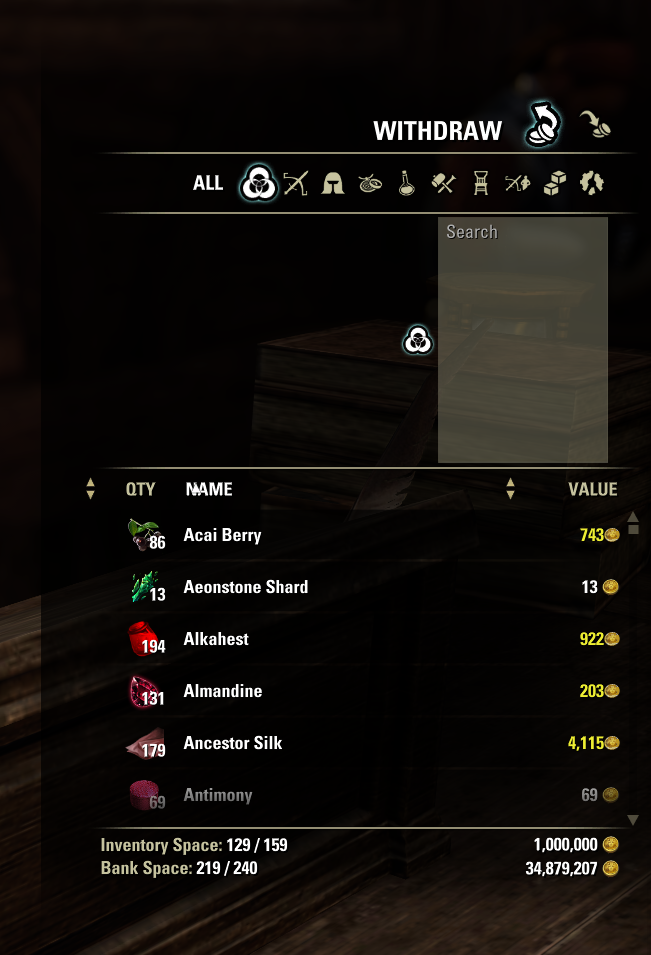
Here is my QuickMapNav addon drawing zone names on the map, positions are hardcoded but the names are displayed at wrong locations every other time: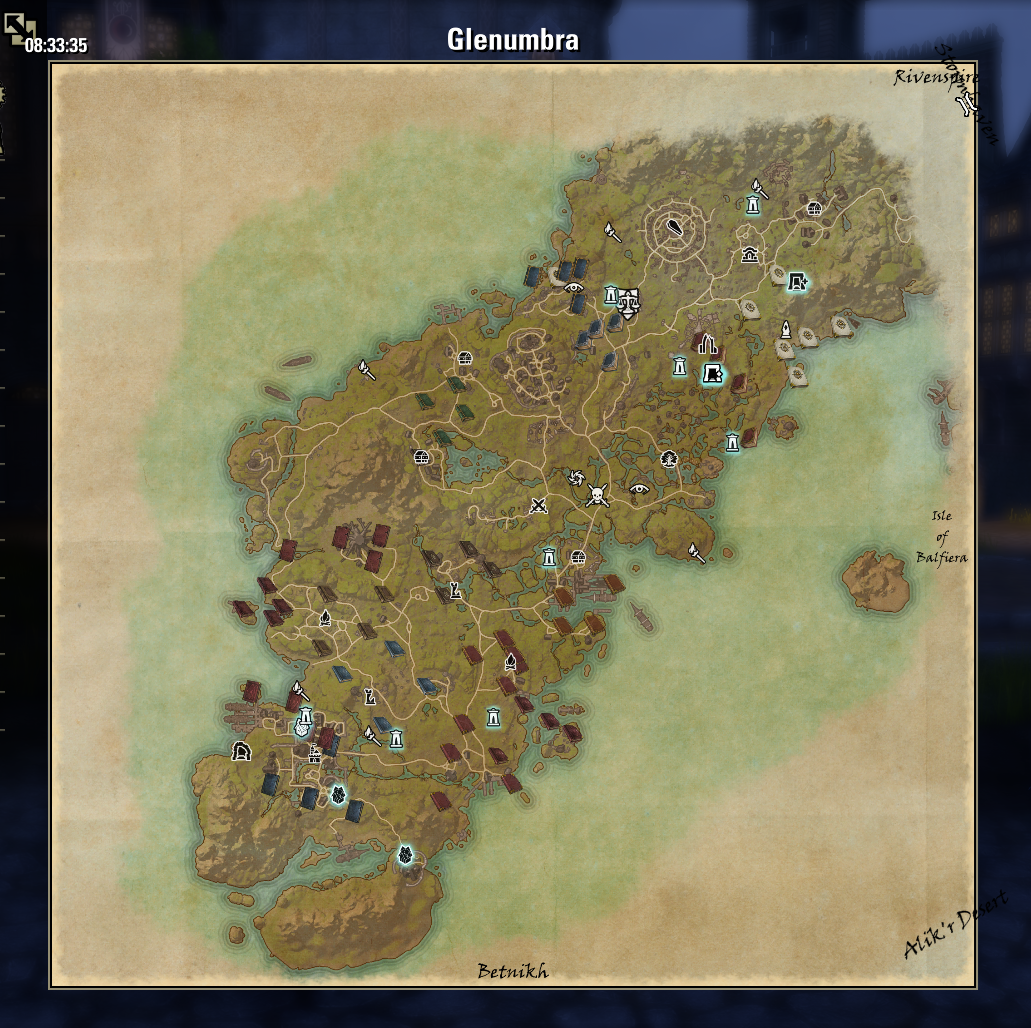
Here is the chat, where the bug happens the most and is the more visible, when it does that you cannot see the messages: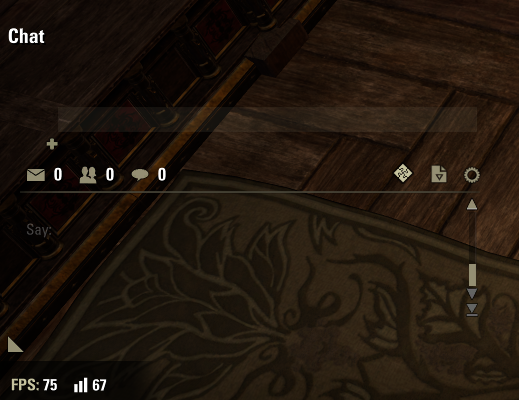
If you are lucky a reload UI can fix the bug until next time.
If you have the bug, you can have it on multiple parts of the UI at the same time, so it looks like either an addon or a combination of addons (if it is caused by addons) or something not initializing correctly or failing to give the right data in the ZOS part of the code.
Edited by Masteroshi430 on March 13, 2026 9:04AM@Masteroshi430 PC/EU (old French guy playing in English & addon author/maintainer) My addons2 -
AvalonRanger✭✭✭✭✭
✭Masteroshi430 wrote: »AvalonRanger wrote: »NPC conversation UI is also broken in sometimes.
The position of UI become too much right bottom side of display,
So I can't choose talking option. Almost unplayable.
Hi AvalonRanger,
I have the same UI bug happening every other time,
It is possibly an addon doing that (can you please share your addon list so I can compare with mine ?), but I doubt an addon can randomly butcher every parts of the UI...
Or it can be a bug on ZOS side which occurs randomly and where controls have wrong parents or dimensions...
It can also happen on the map but it's only visible if you have an addon drawing things on the map, so it looks like it can happen everywhere on the UI including chatter (NPC dialogues).
It happens for the Inventory:
Here is my QuickMapNav addon drawing zone names on the map, positions are hardcoded but the names are displayed at wrong locations every other time:
Here is the chat, where the bug happens the most and is the more visible, when it does that you cannot see the messages:
If you are lucky a reload UI can fix the bug until next time.
If you have the bug, you can have it on multiple parts of the UI at the same time, if you reload UI and have by chance the chat fixed then it will be fixed everywhere, so it looks like either an addon loading order thing (if it is caused by addons) or something not initializing correctly or failing to give the right data in the ZOS part of the code.
Thanks for replying.
I did repairing of the ROM, then temporary it was fixed.
However, after the game crashed, it happened again.... My playing time Mon-Friday UTC13:00-16:00 [PC-NA] CP over2000 now.
I'm Tank and Healer main player.0 -
 virtus753✭✭✭✭✭
✭✭✭✭✭AvalonRanger wrote: »Masteroshi430 wrote: »AvalonRanger wrote: »NPC conversation UI is also broken in sometimes.
The position of UI become too much right bottom side of display,
So I can't choose talking option. Almost unplayable.
Hi AvalonRanger,
I have the same UI bug happening every other time,
It is possibly an addon doing that (can you please share your addon list so I can compare with mine ?), but I doubt an addon can randomly butcher every parts of the UI...
Or it can be a bug on ZOS side which occurs randomly and where controls have wrong parents or dimensions...
It can also happen on the map but it's only visible if you have an addon drawing things on the map, so it looks like it can happen everywhere on the UI including chatter (NPC dialogues).
It happens for the Inventory:
Here is my QuickMapNav addon drawing zone names on the map, positions are hardcoded but the names are displayed at wrong locations every other time:
Here is the chat, where the bug happens the most and is the more visible, when it does that you cannot see the messages:
If you are lucky a reload UI can fix the bug until next time.
If you have the bug, you can have it on multiple parts of the UI at the same time, if you reload UI and have by chance the chat fixed then it will be fixed everywhere, so it looks like either an addon loading order thing (if it is caused by addons) or something not initializing correctly or failing to give the right data in the ZOS part of the code.
Thanks for replying.
I did repairing of the ROM, then temporary it was fixed.
However, after the game crashed, it happened again....
Do you have any add-ons enabled when this happens? If so, can you please list them?0 -
Masteroshi430✭✭✭✭Do you have any add-ons enabled when this happens? If so, can you please list them?
Yes, anyone having the problem we need your addon list to find out if it's an addon doing that or vanilla UI or a combination of both.
@Masteroshi430 PC/EU (old French guy playing in English & addon author/maintainer) My addons0 -
AvalonRanger✭✭✭✭✭
✭AvalonRanger wrote: »Masteroshi430 wrote: »AvalonRanger wrote: »NPC conversation UI is also broken in sometimes.
The position of UI become too much right bottom side of display,
So I can't choose talking option. Almost unplayable.
Hi AvalonRanger,
I have the same UI bug happening every other time,
It is possibly an addon doing that (can you please share your addon list so I can compare with mine ?), but I doubt an addon can randomly butcher every parts of the UI...
Or it can be a bug on ZOS side which occurs randomly and where controls have wrong parents or dimensions...
It can also happen on the map but it's only visible if you have an addon drawing things on the map, so it looks like it can happen everywhere on the UI including chatter (NPC dialogues).
It happens for the Inventory:
Here is my QuickMapNav addon drawing zone names on the map, positions are hardcoded but the names are displayed at wrong locations every other time:
Here is the chat, where the bug happens the most and is the more visible, when it does that you cannot see the messages:
If you are lucky a reload UI can fix the bug until next time.
If you have the bug, you can have it on multiple parts of the UI at the same time, if you reload UI and have by chance the chat fixed then it will be fixed everywhere, so it looks like either an addon loading order thing (if it is caused by addons) or something not initializing correctly or failing to give the right data in the ZOS part of the code.
Thanks for replying.
I did repairing of the ROM, then temporary it was fixed.
However, after the game crashed, it happened again....
Do you have any add-ons enabled when this happens? If so, can you please list them?
1, Action Duration Reminder
2, LibAddonMenu-2.0
3, RaidBuffs
4, RaidNotifer UpfdateMy playing time Mon-Friday UTC13:00-16:00 [PC-NA] CP over2000 now.
I'm Tank and Healer main player.0 -
Masteroshi430✭✭✭✭AvalonRanger wrote: »1, Action Duration Reminder
2, LibAddonMenu-2.0
3, RaidBuffs
4, RaidNotifer Upfdate
Ok the two we have in common if we exclude LibAddonMenu are Action Duration Reminder and RaidNotifer, let's try to play without one of them to find which one (if any) is doing that.
EDIT: The bug happens with both addons off...
I will need to play without addons tomorrow to see if the bug happens...Edited by Masteroshi430 on March 13, 2026 8:07PM@Masteroshi430 PC/EU (old French guy playing in English & addon author/maintainer) My addons2 -
Masteroshi430✭✭✭✭It's happening with addons off, it's a vanilla UI bug.
The question is why is it happening only to a few...@Masteroshi430 PC/EU (old French guy playing in English & addon author/maintainer) My addons1 -
 TheGMac316✭✭✭
I originally thought it might of been an addon doing this as well but after disabiling all my addons and running the game Vanilla the problem was still thereMasteroshi430 wrote: »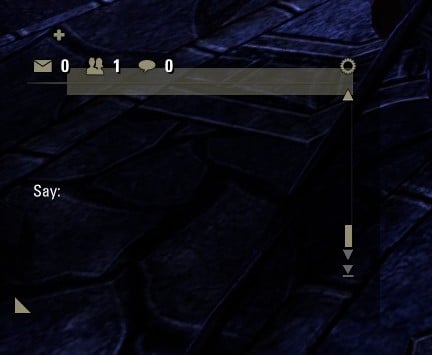
1 -
 code65536✭✭✭✭✭
✭✭✭✭✭TheGMac316 wrote: »
I originally thought it might of been an addon doing this as well but after disabiling all my addons and running the game Vanilla the problem was still thereMasteroshi430 wrote: »
It can still be an addon problem. If an addon corrupts the chat settings, then it might cause problems like this, even after the addon is gone. Have you tried to reset the chat?/script KEYBOARD_CHAT_SYSTEM:ResetChat()
You can also click the cogwheel and select reset.Nightfighters ― PC/NA and PC/EU
Dungeons and Trials:Personal best scores:- Dragonstar Arena: 46817 (NA)
- Maelstrom Arena: 600526 (NA)
- Blackrose Prison: 99274 (EU) (Unchained)
- Maw of Lorkhaj: 165227 (EU)
- Halls of Fabrication: 220708 (NA) (Tick-Tock Tormentor #1, #2, #3, #4, #5, #6, #7, #8, #9, #10, #11, #12)
- Asylum Sanctorium: 114957 (NA) (Immortal Redeemer #1, #2, #3, #4, #5, #6, #7, #8, #9, #10)
- Cloudrest: 131256 (NA) (Gryphon Heart #1, #2, #3, #4, #5, #6, #7)
- Sunspire: 250866 (EU) (Godslayer #1, #2, #3, #4, #5, #6, #7)
- Kyne's Aegis: 235841 (EU) (Dawnbringer #1, #2, #3, #4, #5, #6, #7, #8)
Dungeon trifectas:- Mountain God and Leave No Bone Unbroken
- Apex Predator and Pure Lunacy
- Depths Defier and Relentless Raider
- Defanged the Devourer and Nature's Wrath
- In Defiance of Death and No Rest for the Wicked
- Bane of Thorns and True Genius
- Ardent Bibliophile and Subterranean Smasher
- Battlespire's Best and Bastion Breaker
- Zero Regrets and Land, Air, and Sea Supremacy
- Fist of Tava and Invader's Bane
- Curator's Champion (Valinna) and Temporal Tempest
- Unshakeable Fervor and Lighting the Embers
Extended Journal Add-Ons: Item Set Browser ― Loot Log ― Character Knowledge ― Collectibles Tracker ― RaidificatorPC/Console Add-Ons: Combat Alerts ― Group Buff PanelsOther Add-Ons: Deconstruction Junk Marker ― Purge Tracker ― Asylum Status Panel ― Smart Looter ― Improved Companion Rapport Information0 -
Masteroshi430✭✭✭✭It's not only the chat, the chat is the most visible part of the bug but it can happen everywhere in the UI.@Masteroshi430 PC/EU (old French guy playing in English & addon author/maintainer) My addons0
-
Masteroshi430✭✭✭✭Probably related:
https://forums.elderscrollsonline.com/en/discussion/689781
To test: escape and do not escape the game window during loading screens to see how the game reacts.@Masteroshi430 PC/EU (old French guy playing in English & addon author/maintainer) My addons0 -
karthrag_inak✭✭✭✭✭
✭✭✭Khajiit has found that going into settings->social and moving the text size slider back and forth it corrects the chat box issue. At least a work-around.PC-NA : 19 Khajiit and 1 Fishy-cat with fluffy delusions. cp3600
GM of Imperial Gold Reserve trading guild (started in 2017) since 2/2022
Come visit Karth's Glitter Box, Khajiit's home. Fully stocked guild hall done in sleek Khajiit stylings, with Grand Master Stations, Transmute, Scribing, Trial Dummies, etc. Also has 2 full bowling alleys, nightclub, and floating maze over Wrothgar.(Pariah's Pinacle)0 -
Masteroshi430✭✭✭✭CONFIRMED :
If you leave the game window (going to desktop or another window) during character loading screen or reload UI, the bug occurs. (some UI data is not populated and UI glitches can happen)
If you stay in the game window during character loading screen or reload UI, the bug doesn't occur.
My display mode is FULLSCREEN.
So you can temporarily fix this bug by doing a reload ui & stay in the game window and avoid it during character loading screens the same way.
@ZOS_Kevin Can this be escalated? Edited by Masteroshi430 on March 14, 2026 8:47PM@Masteroshi430 PC/EU (old French guy playing in English & addon author/maintainer) My addons3
 -
code65536✭✭✭✭✭
✭✭✭✭✭Ugh, not sure whether to reply in this thread, in karthrag's thread, or in gitter.
I often tab out during load screens and I haven't noticed any problems. Just to be sure, I tested again, following the steps laid out in @karthrag_inak's thread, and I still don't see any problems. So what's different about your setup and my setup?
The detail about text size slider is interesting and makes me wonder if this might be related to scaling settings?
My Windows scaling is set to 100%, and my in-game scaling is set to 1.00. What kind of settings do you have?
SET CustomUIScale "1.00000000"
SET UseCustomUIScale.2 "1"
Edited by code65536 on March 14, 2026 11:23PMNightfighters ― PC/NA and PC/EU
Dungeons and Trials:Personal best scores:- Dragonstar Arena: 46817 (NA)
- Maelstrom Arena: 600526 (NA)
- Blackrose Prison: 99274 (EU) (Unchained)
- Maw of Lorkhaj: 165227 (EU)
- Halls of Fabrication: 220708 (NA) (Tick-Tock Tormentor #1, #2, #3, #4, #5, #6, #7, #8, #9, #10, #11, #12)
- Asylum Sanctorium: 114957 (NA) (Immortal Redeemer #1, #2, #3, #4, #5, #6, #7, #8, #9, #10)
- Cloudrest: 131256 (NA) (Gryphon Heart #1, #2, #3, #4, #5, #6, #7)
- Sunspire: 250866 (EU) (Godslayer #1, #2, #3, #4, #5, #6, #7)
- Kyne's Aegis: 235841 (EU) (Dawnbringer #1, #2, #3, #4, #5, #6, #7, #8)
Dungeon trifectas:- Mountain God and Leave No Bone Unbroken
- Apex Predator and Pure Lunacy
- Depths Defier and Relentless Raider
- Defanged the Devourer and Nature's Wrath
- In Defiance of Death and No Rest for the Wicked
- Bane of Thorns and True Genius
- Ardent Bibliophile and Subterranean Smasher
- Battlespire's Best and Bastion Breaker
- Zero Regrets and Land, Air, and Sea Supremacy
- Fist of Tava and Invader's Bane
- Curator's Champion (Valinna) and Temporal Tempest
- Unshakeable Fervor and Lighting the Embers
Extended Journal Add-Ons: Item Set Browser ― Loot Log ― Character Knowledge ― Collectibles Tracker ― RaidificatorPC/Console Add-Ons: Combat Alerts ― Group Buff PanelsOther Add-Ons: Deconstruction Junk Marker ― Purge Tracker ― Asylum Status Panel ― Smart Looter ― Improved Companion Rapport Information1 -
karthrag_inak✭✭✭✭✭
✭✭✭Khajiit's resolution is 7680 x 2160 rtx 5090. OS (win11) Scaling is set to 125%
will attempt it again with os scale set to 100%.Edited by karthrag_inak on March 15, 2026 12:10AMPC-NA : 19 Khajiit and 1 Fishy-cat with fluffy delusions. cp3600
GM of Imperial Gold Reserve trading guild (started in 2017) since 2/2022
Come visit Karth's Glitter Box, Khajiit's home. Fully stocked guild hall done in sleek Khajiit stylings, with Grand Master Stations, Transmute, Scribing, Trial Dummies, etc. Also has 2 full bowling alleys, nightclub, and floating maze over Wrothgar.(Pariah's Pinacle)0 -
karthrag_inak✭✭✭✭✭
✭✭✭karthrag_inak wrote: »will attempt it again with os scale set to 100%.
With Windows scale set to 100% it still bugged out.PC-NA : 19 Khajiit and 1 Fishy-cat with fluffy delusions. cp3600
GM of Imperial Gold Reserve trading guild (started in 2017) since 2/2022
Come visit Karth's Glitter Box, Khajiit's home. Fully stocked guild hall done in sleek Khajiit stylings, with Grand Master Stations, Transmute, Scribing, Trial Dummies, etc. Also has 2 full bowling alleys, nightclub, and floating maze over Wrothgar.(Pariah's Pinacle)4 -
Masteroshi430✭✭✭✭The detail about text size slider is interesting and makes me wonder if this might be related to scaling settings?
I think that maybe changing the text size forces a reload of the controls' data which fixes the data not populated during the out of focus loading screen.
But the reason why you can't reproduce the bug on your machine is yet a mystery, probably some UI or txt setting?
@Masteroshi430 PC/EU (old French guy playing in English & addon author/maintainer) My addons0 -
Masteroshi430✭✭✭✭I did some tests comparing a control with and without the bug and the parent stays the same but the (normaly hardcoded in my addon) x y position on screen changes.@Masteroshi430 PC/EU (old French guy playing in English & addon author/maintainer) My addons1
-
karthrag_inak✭✭✭✭✭
✭✭✭My Windows scaling is set to 100%, and my in-game scaling is set to 1.00. What kind of settings do you have?SET CustomUIScale "1.00000000" SET UseCustomUIScale.2 "1"
Ah, khajiit just noticed the second half of your question. Apologies.
In game settings are :SET CustomUIScale "0.65405202" SET UseCustomUIScale.2 "0"
Will try to duplicate your settings and see how that behaves.PC-NA : 19 Khajiit and 1 Fishy-cat with fluffy delusions. cp3600
GM of Imperial Gold Reserve trading guild (started in 2017) since 2/2022
Come visit Karth's Glitter Box, Khajiit's home. Fully stocked guild hall done in sleek Khajiit stylings, with Grand Master Stations, Transmute, Scribing, Trial Dummies, etc. Also has 2 full bowling alleys, nightclub, and floating maze over Wrothgar.(Pariah's Pinacle)1 -
karthrag_inak✭✭✭✭✭
✭✭✭With CustomUIScale set to 1.00 and UseCustomUIScale.2 enabled (set to 1) the same problems persist.PC-NA : 19 Khajiit and 1 Fishy-cat with fluffy delusions. cp3600
GM of Imperial Gold Reserve trading guild (started in 2017) since 2/2022
Come visit Karth's Glitter Box, Khajiit's home. Fully stocked guild hall done in sleek Khajiit stylings, with Grand Master Stations, Transmute, Scribing, Trial Dummies, etc. Also has 2 full bowling alleys, nightclub, and floating maze over Wrothgar.(Pariah's Pinacle)0 -
karthrag_inak✭✭✭✭✭
✭✭✭There are work a-rounds for some of the symptoms, but it is still happening. Something changed with u49, perhaps with how the frame buffer is swapping, that is causing some component of the font initialization to get scrambled.
Khajiit has reset his Bar Steward to re-display by going into settings and selecting a different font name and then going back to original name, and Chat by going into settings->social and moving the text size slider up or down and then back to original setting.PC-NA : 19 Khajiit and 1 Fishy-cat with fluffy delusions. cp3600
GM of Imperial Gold Reserve trading guild (started in 2017) since 2/2022
Come visit Karth's Glitter Box, Khajiit's home. Fully stocked guild hall done in sleek Khajiit stylings, with Grand Master Stations, Transmute, Scribing, Trial Dummies, etc. Also has 2 full bowling alleys, nightclub, and floating maze over Wrothgar.(Pariah's Pinacle)1 -
AvalonRanger✭✭✭✭✭
✭This UI bug is still not fixed. This bug also might happen in the test server.
But Nobody reported this? So strange.... My playing time Mon-Friday UTC13:00-16:00 [PC-NA] CP over2000 now.
I'm Tank and Healer main player.0 -
Masteroshi430✭✭✭✭AvalonRanger wrote: »This UI bug is still not fixed. This bug also might happen in the test server.
But Nobody reported this? So strange....
I kind of reported it as strange UI things on PTS but thought it was one of my installed addons causing it, now that we know it happens on vanilla and it is caused by the game not being the focused window during a 1st loading screen or reload UI they should fix it, but we need an incremental patch for that.@Masteroshi430 PC/EU (old French guy playing in English & addon author/maintainer) My addons1
