How on Earth do people play this game with mouse and keyboard? (Help requested)
-
 Kadoin✭✭✭✭✭
✭✭Step 1: Buy a cheap one
Step 2: play the game
Step 3: Abuse keyboard
Step 4: Sometimes take it out of the usb port with a little force and dance on it
Step 5: ... rinse, repeat
Yeah, that usually works out well. Still got the same $0.99 cent keyboard after 3 years...It's served me well, except I sometimes accidentally roll because my keys are clunky now, and NBs think I am cheating 0
0 -
Runkorko✭✭✭✭✭
✭""How on Earth do people play this game with mouse and keyboard?""
Short answer- like a boss!!!
Bid skills on your mouse.
Even standart one +2 xtra buttons do miracles 0
0 -
Runkorko✭✭✭✭✭
✭my keybids
w s a d = standart move keybids
remove double tapp roll dodge/disable it
w+midle mouse to roll dodge / hold the direction button and press middle mouse. Is faster and more reliable
skill 1= key one. /unchanged
skill 2 =key two/unchanged
skill 3 =mouse wheel up
skill 4=mouse wheel down
skill 5=mouse button 4
q =use quick slot/unchanfed
crouch mouse button 5
interupt f / for some builds is better to keep interupt on button 5/ in case you weave light attack skill interupt combo/ you can bid long cd skill/like 20-30 sec duration one/ on F
roll dodge =middle mouse button.
togle mount z
shatle unshatle 3
control break/use sinergy x
interact with player g
camer zoom in/out f1 f2
rest dont matter.
there is even addon which alows you to bid combinations with shift/key alt/key or ctr/key if you need i use ***+q/shift+w to turn character moving on/off
as you see i use standart 5 button mouse and is more than enough.
good luck adaptingEdited by Runkorko on May 21, 2019 2:19AM0 -
firedrgn✭✭✭✭✭Get the orbweaver and razer triad mouse.
I move and hit my abilitys with orbweaver.
I jump roll amd bar swap with razer mouse. Takes a bit to retrain yourself but its well worth it.0 -
 yRaven✭✭✭✭I really don't know, i always played with K&M on PC, i started to hate Joysticks, i think it's just automatic by nowJack of all trades. Master of at least one.
-
Àrës - Magicka Dragonknight (EP)
Persephónē - Magicka Warden (EP)
Athēna - Magicka Templar (EP)
Hādēs - Magicka Necromancer (EP)
Hërmës - Runner Troll (EP)0 -
 Jayman1000✭✭✭✭✭
✭I suppose this is because you have the default setup where skills are 1-5 keys and movement keys are aswd, ultimate is R, synergy is X, potion is Q, barswapping on.. whatever it defaults too, cant remember. I have my weapon swap setup on a mouse button. All this have to controlled by your 5 fingers, at the same time while your other hand is busy with the mouse. I understand why this can feel problematic. Im used to this from many many years of gaming, not just eso but also keybind setups in other games. If you get a gaming mouse with additional buttons on the side you can offload some of the keybinds to them so that some of the fingers on the mousehand can be utilized too. This can help a lot.Edited by Jayman1000 on May 21, 2019 2:27AM0 -
 peacenote✭✭✭✭✭
✭✭✭CMDR_Un1k0rn wrote: »
I think it's settled. Once I'm able to, probably early June, I will get a gaming mouse with a large number of buttons. I very much believe that being able to dedicate my left fingers to WASD only will transform the game for me.
I do think this is all very individualized and I like to see threads like this where specific settings are discussed.
I ran into an issue a while back with Cubital Tunnel Syndrome. I almost had to quit playing. Instead, I discovered the Orbweaver (highly recommend) which allowed me to re-map everything so my left hand and arm were barely moving and my pinkie and ring finger were not required to hit anything repeatedly.
I use the Logitech G500 mouse which has THREE thumb buttons. I have weapon swap, sprint, and walk backwards mapped to these buttons. Between those three settings and the fact that I use my mouse to change direction based on camera controls, which are also done by the mouse, besides moving forward initially and sometimes strafing all of my movement is done by my right hand, with the mouse, and my left hand only does abilities. I then re-mapped all of my character's bars so that passives and double-barred abilities (Inner light, sorc pets, etc) were on 1 & 2, with spammable abilities on 4 and 5, again so that my pinky and ring finger weren't very active.
I did try one of those mice that had ~15 buttons but I could not differentiate between the buttons enough to be effective. The G500 has three buttons only and the middle one has an indentation which works well for me. I am worried about what mouse I will switch to when it finally dies since it has been discontinued and its replacement doesn't have thumb buttons in the same configuration. (Side comment -- anyone who can recommend current gaming mice with three thumb buttons... I want to know about these mice!)
Besides needing a mouse with three (but not a gazillion) thumb buttons, I can say that re-training myself wasn't too bad... but that I think early gaming habits learned play a big part in what is most comfortable for you. As a kid I grew up using the arrow keys with my right hand, instead of WASD, and to this day I think this is what causes me to gravitate towards solutions where most navigation is in the right hand.
Anyway.... I sympathize with the "how do I cast skills while moving" plight. My particular solution was to move with the right hand and cast with the left, so sharing in case this is helpful to you or others. BTW, the Orbweaver also has a thumbstick which could help if you can easily separate thumb activity from other key presses.Edited by peacenote on May 21, 2019 3:08AM0 -
 stevenyaub16_ESO✭✭✭✭Yup the default controls suck. I could never play a game where my movement is restricted.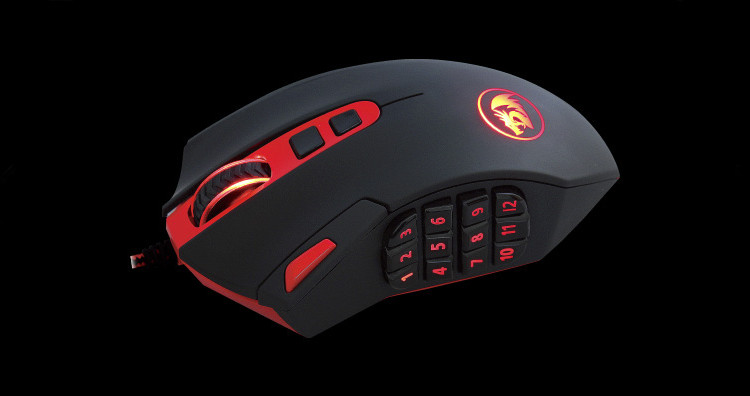
I use something like this. Without it I don't think I could enjoy the game either.
I need to ALWAYS be able to LOOK and MOVE no matter what I'm doing. It just feels more fluid.
It's same reason why I think using controller sucks for anything with look aiming, because you need to take your thumb off the stick to press x y b a.Edited by stevenyaub16_ESO on May 21, 2019 3:16AM0 -
 Isojukka✭✭✭Buy Corsair SCIMITAR, it has movable thumb buttons(12) and you can set 3 different settings in it etc.Edited by Isojukka on May 21, 2019 3:20AMEso since Xbox launch and switched over to pc 1/2019.0
 -
russelmmendoza✭✭✭✭✭
✭Playing with kbm gives you an advantage over controller users.
And they have tab targetting.
So yeah, they play great.0 -
Isojukka✭✭✭Snip
It's same reason why I think using controller sucks for anything with look aiming, because you need to take your thumb off the stick to press x y b a.[/quote]
You can use Xbox elite controller and not take your thumb off the stick.Eso since Xbox launch and switched over to pc 1/2019.0 -
Xerikten✭✭✭✭after 17 years of playing with a keyboard for online games and 27 with regular computer games you learn to remap the key board. ditch the wasd crap as even the best typist monkey will miss hit.
if you pvp well that is a different game where a multi button mouse will help as you cant marco in this game. before you wowtards complain about macro, there are different types of marcos other than the complete rotation ones.0 -
Runkorko✭✭✭✭✭
✭after 17 years of playing with a keyboard for online games and 27 with regular computer games you learn to remap the key board. ditch the wasd crap as even the best typist monkey will miss hit.
if you pvp well that is a different game where a multi button mouse will help as you cant marco in this game. before you wowtards complain about macro, there are different types of marcos other than the complete rotation ones.
Dont call ppl tards only because they play diferent game.
And btw you can macro here, its just not legal.
In wow macro is legal because back in time there was around 40-70 skills you needed to have on your bars.
So please, cut the BS.0 -
Dunning_Kruger✭✭✭✭CMDR_Un1k0rn wrote: »Before we begin, allow me to state that the only person who is lacking in skills is myself.
I've been playing on PC near everyday since halfway through January, and I always make some time to try and practice with mouse and keyboard input.
I cannot do it.
Every time I attempt to enter a fight with an NPC, I find my character paralysed as I cannot cast skills whilst moving, or I cannot move whilst casting.
How on Earth do I make it possible for me to do both at the same time? At this point I'm begging. A gamepad is a decent stop-gap solution but they fail rather quickly under intense use. Especially the sticks.
I am desperate to find a way to play this game with mouse and keyboard, but thus far, I can't do anything with it.
Does anyone have suggestions for custom bindings? I currently have my controls more or less set to default. As a result, it seems, I can't move and cast at the same time, because my five left digits just can't reach casting keys and movement keys at the same time.
Has anyone got any advice? I'm at a complete loss.
I use a naga hex for my abilities.____________________________________
A G G R O - the legendary stamplar GM of <HALL MONITORS>
For the Queen bby0 -
 Ryath_Waylander✭✭✭✭✭
✭Kiralyn2000 wrote: »Question for all the people using gaming mice with thumb buttons - how do you actually hold the mouse, if your thumb is running around pushing buttons? I grip the sides of the mouse with my thumb & ring/pinky fingers, using index & middle to push the two buttons. I honestly have no idea how you'd hold a mouse when it has buttons on the sides. /confused
My mouse, logitech G502 or something, is weighted so I use my palm to swivel it and the sensitivity is very high so small movements are sufficient for spinning 180 degrees when required. My thumb and pinkie are not needed to actually grip it then. Also, my previous mouse had a dodgy right button so I remapped block to the shift key and run to the rmb. This works surprisingly well for me as block casting, firing a skill and attacking has less inputs on the mouse. I don't jump a lot so I use x to jump and space to use a synergy (easier for me to miss the x key by mistake) lastly I use the middle mouse for ultimates. This avoids me dropping Ulti's on my loot chests With three mouse buttons on the thumb side and a left/right tilt scroll button with press function too (three clicks on the wheel button) I have plenty space to assign weapon swaps, interrupt and 4 skills. I still use keyboard 2 for slow 20 sec skills. Edited by Ryath_Waylander on May 21, 2019 6:53AM0 -
Ryath_Waylander✭✭✭✭✭
✭Oh I forgot, the two fps increase/decrease buttons behind the wheel can be mapped but my hand is too small to use them comfortably.Edited by Ryath_Waylander on May 21, 2019 6:35AM0 -
 huntgod_ESO✭✭✭✭✭
✭As many have mentioned an MMO mouse really makes things easier, I've used a Logitech g600 for years and swear by it. Though I only use 6 thumb buttons, using all 12 with the way I rest my hand is awkward, but with the 6 I am able to slot all myh skills and my ultimate, then I wpn swap by pressing my mouse wheel (middle button).
I like logitech so that is what I stick with, though the corsair scimitar mentioned is really nice as you can move the buttons back and forth, Razer also makes a nice one that you can change out, from 2 buttons, 7 button (hex pattern) or 12 button grid, realy nice if you like razer.--- HuntGod ---
Officer of the Unrepentant
www.unrepentantgaming.com0 -
huntgod_ESO✭✭✭✭✭
✭Oh someone mentioned a g13 which is awesome, unfortunately they are no longer being made and used ones runs around $300+ so it's not an option for most folks.--- HuntGod ---
Officer of the Unrepentant
www.unrepentantgaming.com0 -
sherahd✭✭✭Just use a PS4, or even a PS3 controller works. I had to do game pad. I was about to quit the game back in 2017 while during my first month. I somewhat managed with just solo questing, but when I tried to do anything harder than that where I needed to try and do a rotation and stay mobile. I couldn't do it. Someone told me in zone about game pad mode. I never went back. The game pad default feels great. I didn't even have to mess with anything. Everything was intuitive, and is smooth, and I don't feel like I'm at a disadvantage at all. Go with the game pad it'll improve your experience totally. I don't like how much a lot of those gaming mice cost, and have so many buttons in one small area all close and small near each other. I already know I'd be trading one hot mess situation for another. That's the only advice I can offer you based on my own experience.0
-
 CMDR_Un1k0rn✭✭✭✭✭
✭✭huntgod_ESO wrote: »As many have mentioned an MMO mouse really makes things easier, I've used a Logitech g600 for years and swear by it. Though I only use 6 thumb buttons, using all 12 with the way I rest my hand is awkward, but with the 6 I am able to slot all myh skills and my ultimate, then I wpn swap by pressing my mouse wheel (middle button).
I like logitech so that is what I stick with, though the corsair scimitar mentioned is really nice as you can move the buttons back and forth, Razer also makes a nice one that you can change out, from 2 buttons, 7 button (hex pattern) or 12 button grid, realy nice if you like razer.
I do indeed like Razer. I have a Lancehead that luckily cost me only a tenner. Had some vouchers for GAME at Christmas last year. It does me just fine on my FPS & voxel games, and the sensor is crazy good. Like, really good. I've also had one of their keyboards for a while and I've never used a better plank. I write a lot online on various forums so a good keyboard is essential for me even though most of my games play with HOTAS units.
But yeah it's a little lacking for MMOs.
Had I known I'd end up discovering a love for MMOs at the start of the year, I'd have probably got a very different mouse. Alas, foresight is not a quality I have.
With this in mind, I also stumbled across this:
https://www.amazon.co.uk/Razer-Tartarus-Mecha-Membran-programmierbare-Beleuchtung/dp/B077T9391Z/ref=sr_1_1?crid=1RSFUAE6GLRFQ&keywords=razer+tartarus+v2&qid=1556740355&s=gateway&sprefix=razer+tar,aps,182&sr=8-1
Now I was looking at this and can't help but think that this might be an alternative solution that would not need me to outright replace my current mouse. The way I'm seeing it, with this I could assign movement (WASD) to the keys with printed arrows on them, and use the 8-way D-pad to cast with my left thumb. I'm very familiar with Synapse so setting up these devices is no obstacle for me.
Another nice thing about it, is that it shares the same type of key as my keyboard. Not quite mechanical, but frankly I actually prefer the keys on the Ornata, for some reason. Yes I have had a go with many mech' boards. A friend of mine is hardcore FPS and I visit him every now and then.
The main thing is that I separate my casting digits and movement digits. I've already made a spreadsheet to go through how all the options could alter my bindings and how ergonomic they would be.
What are your thoughts guys? I kinda' lean towards the keypad now because it would be better value overall IMO, and it also offers applications for my flight sims that the mouse simply doesn't offer.In-game username: Un1korn | Happy member of the PCNA UESP guild (Resident Daggerfall Covenant enjoyer) | Main & basically only character: Crucian Vulpin, Imperial Dragonknight of the Daggerfall Covenant, and Undaunted Bulwark (I tank) | Mountain bike enjoyer and vulpine appreciator | If you know me from PCEU: No | To ZOS: THANK YOU FOR LETTING ME BRING MY HORSE INTO BATTLE!0 -
Vigawatt✭✭✭I use keyboard and mouse, regular mouse, and I use the numbers above the keyboard for abilities and not a number pad.
For me, I almost always move left while casting. Holding A with my left ring finger I can use middle or index finger to fire off abilities. It's much more difficult for me if I'm moving right because my index finger is used to hold D.
I also used to have trouble with pressing the correct buttons, so my rotation is 3-1-4-2 instead of 1-2-3-4-5 as some people are suggesting because spacing out the keys like that made it easier to press the one I intended.
It certainly takes practice though. I didn't catch it if it was posted here, but what you use for bar swap is also important. I had been using the default ~ key until a guild mate had suggested using middle mouse button, and ~ had been such an awkward button to use that switching to middle mouse button made a world of difference.0 -
 Seri✭✭✭✭I think there's very much a component of 'what you get used to'. I've tried an MMO-type mouse but just can't get used to it, so I just use the keyboard for both movement and skill casts (and I know a few other end-game raiders that do the same). I did swap ultimate and '5' such that my skills are actually 1234R (with ult on a mouse button) though. For positioning, I just know I can't strafe right at the same time as I want to use skill 4 or 5, can't go forward at same time as 3, etc (and in most cases the game is fairly forgiving anyway).
Currently running a SteelSeries Rival 500 mouse instead - currently have synergy (scroll down), sprint, mount, autorun, weapon swap and ultimate all bound there, meaning I can use keyboard exclusively for regular skills + movement.EP CP160+ Templar, Sorc, NB
DC CP160+ Templar, Sorc, DK0 -
 AhPook_Is_Here✭✭✭✭✭
✭SteveCampsOut wrote: »CMDR_Un1k0rn wrote: »Before we begin, allow me to state that the only person who is lacking in skills is myself.
I've been playing on PC near everyday since halfway through January, and I always make some time to try and practice with mouse and keyboard input.
I cannot do it.
Every time I attempt to enter a fight with an NPC, I find my character paralysed as I cannot cast skills whilst moving, or I cannot move whilst casting.
How on Earth do I make it possible for me to do both at the same time? At this point I'm begging. A gamepad is a decent stop-gap solution but they fail rather quickly under intense use. Especially the sticks.
I am desperate to find a way to play this game with mouse and keyboard, but thus far, I can't do anything with it.
Does anyone have suggestions for custom bindings? I currently have my controls more or less set to default. As a result, it seems, I can't move and cast at the same time, because my five left digits just can't reach casting keys and movement keys at the same time.
Has anyone got any advice? I'm at a complete loss.
I have my Ultimate and "Action/Use" keys bound to buttons on my Trackball as well as the Autorun which is bound to my scrollwheel button.
OMG someone else who plays with a trackball! I used to use a Kensington because I liked the ball's mass, but have been using a microsoft trackball now for ages for all the extra buttons, I hope it never dies because learning to play with a mouse will be totally bizarro world.“Whatever.”
-Unknown American0 -
 Kagukan✭✭✭✭✭
✭huntgod_ESO wrote: »Oh someone mentioned a g13 which is awesome, unfortunately they are no longer being made and used ones runs around $300+ so it's not an option for most folks.
Unfortunately this is true. There are similar alternatives though like the Razer Orbweaver.0 -
 Nemesis7884✭✭✭✭✭
✭✭✭✭✭I also vastly prefer gpad for comfort but animation cancelling is much harder and clunky0 -
MusekininKanchou✭✭✭Kiralyn2000 wrote: »Personally, I've never understood how anyone uses those gaming mice without mashing their thumb across half a dozen buttons every time they try to touch it. (I had a 4-button regular mouse with side buttons, I physically disabled them because I kept accidentally triggering them just moving the mouse around. I suppose I hold my mouse differently? /shrug)
I don't have any issues with using WASD to move and all the keys around it for other commands, but I've been playing games that use that control arrangement for several decades. It's just so ingrained that it's hard to give useful advice - it's just "um, that's the way it works?" to me. Sorry.
The naga hex is a nice compromise. 6 buttons instead of 12. I use the naga and my wife has a naga hex. She didn’t like the tiny buttons on the regular naga. I like the full keypad myself but it takes getting used to. Technically the hex is all you need though. 1-5 for skills and asign 6 to ult or weapon swap whichever you prefer.0
