Maintenance for the week of March 2:
• PC/Mac: No maintenance – March 2
• PC/Mac: No maintenance – March 2
Anyone tried out the new Nvidia Freestyle game filter on ESO?
-
 Night_Watch✭✭✭Hello again,
I got the video uploaded. I have not dubbed in any sound - what is heard is from game. I have recorded samples of the 'Game Filter' (nVidia) overlay in use and written text that I hope is useful.
There seem to be a few 'tricks' to getting the game filter to work but once it's sorted and working it seems to do a great job.
EDIT;
Hmmm ... Although the video is correct, it seems that there is another way to get the game running with the overlay filter on (Enable Experimental Features). I just tried again and simply restarted the game several times - each giving the blank screen or simply closing itself. On the fourth attempt the game started. There seems to me to be some sort of problem in memory or via game / overlay structure files that is, maybe, marking the game as already running or some how 'flagged' as to not be able to complete the game start up. It's gone 02:30 here and I need to sleep. If I find anything useful when using ESO + nVidia Geforce Experience another time I will post here.
Anywho, The video is here;
https://youtu.be/emdzIWtBvH0 https://youtu.be/emdzIWtBvH0
Edited by Night_Watch on January 13, 2018 2:46AM"If there is an underlying oneness of all things, it does not matter where we begin, whether with stars, or laws of supply and demand, or frogs, or Napoleon Bonaparte. One measures a circle, beginning anywhere."
Charles Fort - Lo! (1931)0 -
 Messy1✭✭✭✭✭
✭Hey the overlay feature that NVidia rolled out is really cool, defintiely enhances the level of detail you can see in the game!0 -
 RouDeR✭✭✭✭✭
✭Here is a 4k video with the result of my overlay choice.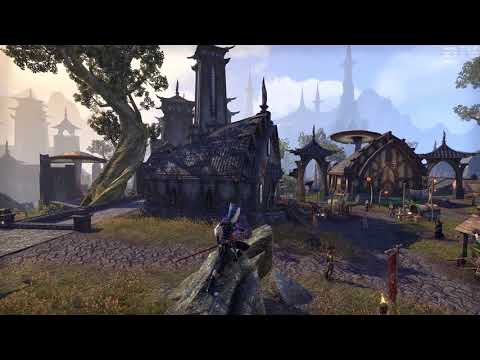 https://youtu.be/JRY_TFj1Uik 2
 -
 SirCritical✭✭✭✭✭Interesting, I had lots of issues with this black screen, where not just the game crashed, but also my PC got freezed, and the only solution was the shutdown with the power switch and restart. Surprisingly if this happened, all my addon settings were resetted (after I removed AUI, the addon reset didn't happen anymore, but the crashes still continued). I could find out that this happened when I was using another internet-based programs, like Discord or browser.
Yesterday I updated the NVIDIA driver first, but suddenly the above issue happened again, then updated the Experience, and after that everything was smooth. I wonder if I could solve the crashing problems? Hopefully.Edited by SirCritical on January 13, 2018 11:45AM0 -
 JasonSilverSpring✭✭✭✭✭Here is a 4k video with the result of my overlay choice.https://youtu.be/JRY_TFj1Uik
@RouDeR, please share what filters and settings you used to get that result. I like it. Thanks for sharing.0 -
 MjolnirVilkas✭✭✭✭Invincible wrote: »Snapchat filters for your video games. Color me unimpressed.
That's a silly remark. Since when does snapchat hold a monopoly on filters though? I don't use snapchat, but I somehow doubt that it allows the same level of customization as this.Sick liaisons raised this monumental mark
The sun sets forever over Blackwater Park5 -
 danno8✭✭✭✭✭
✭✭✭✭✭Invincible wrote: »Snapchat filters for your video games. Color me unimpressed.
Snapchat? You mean that thing that lets self-absorbed people overlay cutesy-pootsey filters and drawings over there selfies so they can share their "oh so important and original" moments with everyone they know?
Yah, this isn't that.
This is more like a real-time photo-editor that you can use to correct or enhance the visual acuity in a game for a more immersive gameplay experience.
Although it can't show your "friends" how you can turn your face into a raccoon face! lol.4 -
MjolnirVilkas✭✭✭✭I couldn't agree more. I hate how nowadays any post-processing on videos, photos or whatever is regarded as "Instagram/Snapchat" filters.Sick liaisons raised this monumental mark
The sun sets forever over Blackwater Park1 -
 Bryong9ub17_ESO✭✭✭✭I can't seem to get it to work. I have everything updated, i clicked the enable experiment and i restarted it but still nothing. Am i missing something?
Edit: I had to reinstall the drivers and it seemed to do the trick.Edited by Bryong9ub17_ESO on January 13, 2018 3:02PM0 -
danno8✭✭✭✭✭
✭✭✭✭✭Bryong9ub17_ESO wrote: »I can't seem to get it to work. I have everything updated, i clicked the enable experiment and i restarted it but still nothing. Am i missing something?
I updated to the newest drivers, restarted, then had to click the "enable experimental..." thing, then had to restart again. After restarting, when I opened Geforce Experience, the program itself did an update and that's when it started working.
Also noticed if I started ESO too quickly after rebooting, Gerforce Experience wouldn't be up and running just yet and would miss the program launch. Have to wait a few seconds after reboot before starting ESO.
Overall I'd say it's a pretty decent program, but if you are already using Reshade (esp. the one with the in-game overlay using shift-F2) then it is fairly pointless and less customizable.
Also, Reshade will work with nearly every game out there, while Nvidia only has a select number of games on their list.Edited by danno8 on January 13, 2018 3:02PM2 -
Night_Watch✭✭✭Here is a 4k video with the result of my overlay choice.
That's a very nice looking video and a good example of the filter in use. Took me near an hour and 3/4 to upload my 1080 vid! Goodness knows how long it would take me to upload 4k. Not got the fastest connection.
Edit: I just sent a brief feedback report to nVidia about the issues I have had with the experimental feature.Edited by Night_Watch on January 13, 2018 6:16PM"If there is an underlying oneness of all things, it does not matter where we begin, whether with stars, or laws of supply and demand, or frogs, or Napoleon Bonaparte. One measures a circle, beginning anywhere."
Charles Fort - Lo! (1931)0 -
JasonSilverSpring✭✭✭✭✭oh, damn nice!! it was not working for me somehow yesterday. I could not open the filters menu.
I even changed the shortcut keybiddings, but it did not work for me, any ideas why?
Not sure if this is your issue but I found that Tamriel Trade Center's client causes problems. If it is launched first it will trigger the overlay and not ESO. I work around it by launching ESO, alt-tab'ing to desktop, launch TTC, then alt-tab back to ESO.
Otherwise maybe try reinstalling the latest drivers.1 -
 FakeFox✭✭✭✭✭
✭✭If it says ESO isn't compatible restarting the PC seems to help, even if you haven't installed any new drivers.EU/PC (GER) - Healermain since 2014 - 50305 Achievement Points - Youtube (PvE Healing Guides, Builds & Gameplay)0 -
 nathan_bri✭✭✭✭Most of what ails the look of the game is from setting your Gamma too high. There is no need to use third-party graphics modifications to fix that. You can fix most issues related to the washed-out look of the game by simply lowering the Gamma, incorrectly written as Brightness on the Calibration screen. The default Calibration suggestion, which is to “Adjust Brightness • The Middle Logo Should Be Barely Visible” is terribly wrong. Instead, set it so the right-most logo is barely visible.Edited by nathan_bri on January 14, 2018 7:03PM0
 -
MjolnirVilkas✭✭✭✭sorry wrong thread

Edited by MjolnirVilkas on January 14, 2018 9:38PMSick liaisons raised this monumental mark
The sun sets forever over Blackwater Park0 -
Night_Watch✭✭✭Just an update! I just got back to my laptop and [auto] update the nVidia drivers and now Eso starts every time without apparent issue.
I recommend updating the driver if it has not yet auto updated. Maybe this update will not be good for all but it seems to work for me in ESO - not tried any other games as yet. Go ahead and check updates for other drivers too. You know you wanna!"If there is an underlying oneness of all things, it does not matter where we begin, whether with stars, or laws of supply and demand, or frogs, or Napoleon Bonaparte. One measures a circle, beginning anywhere."
Charles Fort - Lo! (1931)1 -
 Highlor3✭✭✭✭My settings so far:
Details- Sharpen 5%
- Clarity 55%
- HDR Toning 40%
- Bloom 10%
- Gamma 50%
- Contrast 55%
- Vibrance 40%
- Color Enhancer 0%
- Exposure 55%
- Highlights 50%
- Shadows 40%
- Sketch 0%
- Color enhancer 20%
- Vignette 0%
ScreenshotsEdit: Added more screenshots and changed some "Details" settings.


 Edited by Highlor3 on January 30, 2018 10:27AM[PC-NA] CP 1810+ The Conquest of Tamriel & Taverna do MestreThe Scientia Consortium:[PC-EU] CP 300+ Autumn Rose & Portucale
- Rodbertus Quercus, Imperial, Dragonknight [EP]
- Robert Bethencourt, Breton, Templar [DC]
- Karlindah Telvanni, Dunmer, Sorcerer [AD]
- Hejthuxis (former Raises-Her-Rear), Argonian, Nightblade [EP]
- Limeril Bravewind, Altmer, Warden [AD]
- Isilarelen, Dunmer, Dragonknight [EP]
- Elindael, Bosmer, Warden [AD]
- Hrodberaht Bright-Fame, "Nordguard", Warden [EP]
- Ra'Kham, Khajiit, Nightblade [DC]
- Brazilia gra-Bagol, Orsimer, Dragonknight [EP]
- Nirrah al-Hegathe, Redguard, Necromancer [DC]
- Theodora Quercus, Imperial, Templar [DC]
- Cainneach the Pale, Reachman, Necromancer [AD]
- Dughlas af-Fearley, Redguard, Sorcerer [DC]
- Roze Cloturier, Breton, Arcanist [AD]
- Vinnus Limia, Imperial, Templar [AD]
- Ravhungorn Orangewood, Bosmer, Arcanist [EP]
- Adaltos Indoril, Dunmer, Templar [EP]
- Geralt of Evermore, Breton, Dragonknight [DC]
- Robert Cloturier-Baudiae, Breton, Arcanist [DC]
- M'ahnurr the Elusive, Khajiit, Necromancer [AD]
- Bruis al-Shornhelm, Breton, Nightblade [DC]
7 -
MjolnirVilkas✭✭✭✭I was so excited to see those screenshots and the I clicked on "show" button and now my day is RUINED!
 Sick liaisons raised this monumental mark
The sun sets forever over Blackwater Park0 -
Highlor3✭✭✭✭MjolnirVilkas wrote: »I was so excited to see those screenshots and the I clicked on "show" button and now my day is RUINED!
Sorry for the ruined day, @MjolnirVilkas
My OP was updated with the screenshots (took a bunch with Steam overlay, didn't captured the filters, had to take some new using the Nvidia's overlay).[PC-NA] CP 1810+ The Conquest of Tamriel & Taverna do MestreThe Scientia Consortium:[PC-EU] CP 300+ Autumn Rose & Portucale- Rodbertus Quercus, Imperial, Dragonknight [EP]
- Robert Bethencourt, Breton, Templar [DC]
- Karlindah Telvanni, Dunmer, Sorcerer [AD]
- Hejthuxis (former Raises-Her-Rear), Argonian, Nightblade [EP]
- Limeril Bravewind, Altmer, Warden [AD]
- Isilarelen, Dunmer, Dragonknight [EP]
- Elindael, Bosmer, Warden [AD]
- Hrodberaht Bright-Fame, "Nordguard", Warden [EP]
- Ra'Kham, Khajiit, Nightblade [DC]
- Brazilia gra-Bagol, Orsimer, Dragonknight [EP]
- Nirrah al-Hegathe, Redguard, Necromancer [DC]
- Theodora Quercus, Imperial, Templar [DC]
- Cainneach the Pale, Reachman, Necromancer [AD]
- Dughlas af-Fearley, Redguard, Sorcerer [DC]
- Roze Cloturier, Breton, Arcanist [AD]
- Vinnus Limia, Imperial, Templar [AD]
- Ravhungorn Orangewood, Bosmer, Arcanist [EP]
- Adaltos Indoril, Dunmer, Templar [EP]
- Geralt of Evermore, Breton, Dragonknight [DC]
- Robert Cloturier-Baudiae, Breton, Arcanist [DC]
- M'ahnurr the Elusive, Khajiit, Necromancer [AD]
- Bruis al-Shornhelm, Breton, Nightblade [DC]
0 -
MjolnirVilkas✭✭✭✭hehe, can't wait to see those whenever you come around to post 'em! Sick liaisons raised this monumental mark
The sun sets forever over Blackwater Park0 -
JasonSilverSpring✭✭✭✭✭My settings so far:
Details- Sharpen 5%
- Clarity 55%
- HDR Toning 40%
- Bloom 10%
- Gamma 50%
- Contrast 55%
- Vibrance 40%
- Color Enhancer 0%
- Exposure 55%
- Highlights 50%
- Shadows 40%
- Sketch 0%
- Color enhancer 20%
- Vignette 0%
ScreenshotsEdit: Added more screenshots and changed some "Details" settings.
I like these settings. The only change I made for me was to raise Sharpen to about 50%. I am not sure if it is just me or if it is because I use Nvidia's DSR to run it at a higher resolution than my monitor, but by default everything seems too soft for my taste. The sharpen setting improves that a lot and makes it look better to me. It is interesting that you updated your post to lower sharpen to 5% from 10%. Do you have ESO's anti-aliasing turned on? Maybe that is why it is too soft for my taste. I think ESO uses FXAA.
It was night time in the game when I tried your settings. I am anxious to try later for some daylight views.0 -
Highlor3✭✭✭✭JasonSilverSpring wrote: »My settings so far:
Details- Sharpen 5%
- Clarity 55%
- HDR Toning 40%
- Bloom 10%
- Gamma 50%
- Contrast 55%
- Vibrance 40%
- Color Enhancer 0%
- Exposure 55%
- Highlights 50%
- Shadows 40%
- Sketch 0%
- Color enhancer 20%
- Vignette 0%
ScreenshotsEdit: Added more screenshots and changed some "Details" settings.
I like these settings. The only change I made for me was to raise Sharpen to about 50%. I am not sure if it is just me or if it is because I use Nvidia's DSR to run it at a higher resolution than my monitor, but by default everything seems too soft for my taste. The sharpen setting improves that a lot and makes it look better to me. It is interesting that you updated your post to lower sharpen to 5% from 10%. Do you have ESO's anti-aliasing turned on? Maybe that is why it is too soft for my taste. I think ESO uses FXAA.
It was night time in the game when I tried your settings. I am anxious to try later for some daylight views.
Lowered Sharpen to 5% from 10% and raised Clarity to 55% from 50% (to diminish some sharpen artifact at distance).
I'm using ESO's Antialiasing, monitor's native resolution (no DSR). When I use DSR to reach 4K, I set DSR Smoothness to 0%, maybe your smoothness settings is high (default is 33%)Edited by Highlor3 on January 30, 2018 10:39AM[PC-NA] CP 1810+ The Conquest of Tamriel & Taverna do MestreThe Scientia Consortium:[PC-EU] CP 300+ Autumn Rose & Portucale- Rodbertus Quercus, Imperial, Dragonknight [EP]
- Robert Bethencourt, Breton, Templar [DC]
- Karlindah Telvanni, Dunmer, Sorcerer [AD]
- Hejthuxis (former Raises-Her-Rear), Argonian, Nightblade [EP]
- Limeril Bravewind, Altmer, Warden [AD]
- Isilarelen, Dunmer, Dragonknight [EP]
- Elindael, Bosmer, Warden [AD]
- Hrodberaht Bright-Fame, "Nordguard", Warden [EP]
- Ra'Kham, Khajiit, Nightblade [DC]
- Brazilia gra-Bagol, Orsimer, Dragonknight [EP]
- Nirrah al-Hegathe, Redguard, Necromancer [DC]
- Theodora Quercus, Imperial, Templar [DC]
- Cainneach the Pale, Reachman, Necromancer [AD]
- Dughlas af-Fearley, Redguard, Sorcerer [DC]
- Roze Cloturier, Breton, Arcanist [AD]
- Vinnus Limia, Imperial, Templar [AD]
- Ravhungorn Orangewood, Bosmer, Arcanist [EP]
- Adaltos Indoril, Dunmer, Templar [EP]
- Geralt of Evermore, Breton, Dragonknight [DC]
- Robert Cloturier-Baudiae, Breton, Arcanist [DC]
- M'ahnurr the Elusive, Khajiit, Necromancer [AD]
- Bruis al-Shornhelm, Breton, Nightblade [DC]
0 -
JasonSilverSpring✭✭✭✭✭JasonSilverSpring wrote: »My settings so far:
Details- Sharpen 5%
- Clarity 55%
- HDR Toning 40%
- Bloom 10%
- Gamma 50%
- Contrast 55%
- Vibrance 40%
- Color Enhancer 0%
- Exposure 55%
- Highlights 50%
- Shadows 40%
- Sketch 0%
- Color enhancer 20%
- Vignette 0%
ScreenshotsEdit: Added more screenshots and changed some "Details" settings.
I like these settings. The only change I made for me was to raise Sharpen to about 50%. I am not sure if it is just me or if it is because I use Nvidia's DSR to run it at a higher resolution than my monitor, but by default everything seems too soft for my taste. The sharpen setting improves that a lot and makes it look better to me. It is interesting that you updated your post to lower sharpen to 5% from 10%. Do you have ESO's anti-aliasing turned on? Maybe that is why it is too soft for my taste. I think ESO uses FXAA.
It was night time in the game when I tried your settings. I am anxious to try later for some daylight views.
Lowered Sharpen to 5% from 10% and raised Clarity to 55% from 50% (to diminish some sharpen artifact at distance).
I'm using ESO's Antialiasing, monitor's native resolution (no DSR). When I use DSR to reach 4K, I set DSR Smoothness to 0%, maybe your smoothness settings is high (default is 33%)
Ah yes. Forgot about that setting. I will check it later today.0 -
 Jayman1000✭✭✭✭✭
✭
Nice vid (although dude should turn microphone off that breath lol XD). I just wish we could tweak esos internal colors to get rid of that horrid blue shadows. Everytime you try to increase saturation slightly this song begins to play: https://www.youtube.com/watch?v=BinWA0EenDY Edited by Jayman1000 on January 30, 2018 11:52AM0
 -
Jade1986✭✭✭✭✭
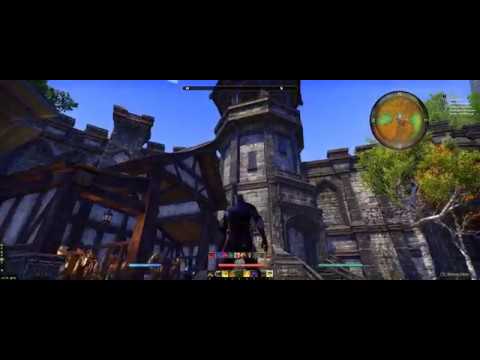
✭✭✭I enhanced the color a bit and now the game looks fantastic, cant play without it. No more drab depressing looking auridon!
0


 https://www.youtube.com/watch?v=nSsJQfGWDac