Maintenance for the week of September 7:
• PC/Mac: No maintenance – September 7
• PC/Mac: No maintenance – September 7
ESO on Xbox Game Pass and Xbox Play Anywhere
-
 Felkara✭✭✭Been loving having play anywhere for ESO! Thank you guys for all the work you’ve done on it so far.
Something I wanted to comment on is that my game settings don’t stay saved, Vsync for example, I will have turned on and somehow it will turn itself off? I saw people mentioning Addon settings not saving, but I’ve noticed a lot of my video setting in general don’t seem to stay saved.
Another issue I responded to Skinny on is that I noticing the Lighting is definitely off on Play Anywhere, seems fairly washed out for some reason. The shadows definitely don’t have the depth they had on my PC account or on my Series X.0 -
 BlankIniSoul Shrivenskinnycheeks wrote: »1st off...this is so awesome! Aside from a few bugs that people have mentioned, it's working really well. I love that I don't have to play Xbox through the cloud anymore.
I did notice something about the image that I could be imagining, but it feels like the actual game looks different on Xbox Play Anywhere vs Xbox Cloud or natively on Xbox. It's like the shaders or colors are different. The image quality is much better than I'm used to on the Cloud since that couldn't utilize the high frame rates and resolution from my monitor. But something about the shading or colors just looks a bit worse. Idk, has anyone else noticed this?
I notice this as well with Play Anywhere. Even having my brightness almost turned all the way down, the game is still fairly bright and almost washed out? Not sure if that makes sense. But the lighting is definitely off in this version.
Yeah I own the PC version through steam and it looks different to the play anywhere version with the same settings
1 -
 Nosferatu607Soul ShrivenHeadphoneActor3 wrote: »When playing ESO in play anywhere the game would take up to 10 minutes to initiate, and when accessing the server the loading screen freezes.
I have a 12th Gen Intel(R) Core(TM) i5-12450H (2.00 GHz), a 16gb ram and a NVIDIA GeForce RTX 4050 Laptop GPU (6 GB)
Intel(R) UHD Graphics (128 MB), are my specifications not enough for the game to run?
I am having this exact same issue, and I have been trying for hours over and over to make the game work to no avail.
NVIDIA system information report created on: 05/25/2026 17:46:54
NVIDIA App version: 11.0.7.247
Operating system: Microsoft Windows 11 Home, Version 10.0.26200
DirectX runtime version: DirectX 12
Driver: Game Ready Driver - 596.49 - Tue May 12, 2026
CPU: 13th Gen Intel(R) Core(TM) i7-13620H
RAM: 32.0 GB
Storage (3): SSD - 953.9 GB,SSD - 1.8 TB,+1 more
Graphics card
GPU: NVIDIA GeForce RTX 4070 Laptop GPU
Direct3D feature level: 12_1
CUDA cores: 4608
Graphics clock: 1980 MHz
Max-Q technologies: Gen-5
Dynamic Boost: Yes
WhisperMode: No
Advanced Optimus: No
Maximum graphics power: 105 W
Memory data rate: 16.00 Gbps
Memory interface: 128-bit
Memory bandwidth: 256.032 GB/s
Total available graphics memory: 24423 MB
System video memory: N/A
Shared system memory: 16235 MB
Dedicated video memory: 8188 MB GDDR6
Video BIOS version: 95.06.15.40.2e
I managed to get the opening video to play one time somehow, but then it did the same thing and kicked me back to the title screen. I cannot currently put in a support ticket either because it says "Email not satisfactory" for some reason, even when trying to use a text response. Any help would be greatly appreciated. I really want to play again.0 -
onyxorb✭✭✭✭Nosferatu607 wrote: »HeadphoneActor3 wrote: »When playing ESO in play anywhere the game would take up to 10 minutes to initiate, and when accessing the server the loading screen freezes.
I have a 12th Gen Intel(R) Core(TM) i5-12450H (2.00 GHz), a 16gb ram and a NVIDIA GeForce RTX 4050 Laptop GPU (6 GB)
Intel(R) UHD Graphics (128 MB), are my specifications not enough for the game to run?
I am having this exact same issue, and I have been trying for hours over and over to make the game work to no avail.
NVIDIA system information report created on: 05/25/2026 17:46:54
NVIDIA App version: 11.0.7.247
Operating system: Microsoft Windows 11 Home, Version 10.0.26200
DirectX runtime version: DirectX 12
Driver: Game Ready Driver - 596.49 - Tue May 12, 2026
CPU: 13th Gen Intel(R) Core(TM) i7-13620H
RAM: 32.0 GB
Storage (3): SSD - 953.9 GB,SSD - 1.8 TB,+1 more
Graphics card
GPU: NVIDIA GeForce RTX 4070 Laptop GPU
Direct3D feature level: 12_1
CUDA cores: 4608
Graphics clock: 1980 MHz
Max-Q technologies: Gen-5
Dynamic Boost: Yes
WhisperMode: No
Advanced Optimus: No
Maximum graphics power: 105 W
Memory data rate: 16.00 Gbps
Memory interface: 128-bit
Memory bandwidth: 256.032 GB/s
Total available graphics memory: 24423 MB
System video memory: N/A
Shared system memory: 16235 MB
Dedicated video memory: 8188 MB GDDR6
Video BIOS version: 95.06.15.40.2e
I managed to get the opening video to play one time somehow, but then it did the same thing and kicked me back to the title screen. I cannot currently put in a support ticket either because it says "Email not satisfactory" for some reason, even when trying to use a text response. Any help would be greatly appreciated. I really want to play again.
I had a similar issue with my system, but for me, it turned out to be a networking issue where it wasn't connecting to the XBox servers.
For me, it turned out that I needed to enable the 'Teredo interface ' on my windows box to connect to the XBox servers.
Just want to mention that in the off chance that is the issue.
0 -
 DreadKnight✭✭✭✭So another question to the devs....is the pc ui ever going to to be implemented on this version of the game?0
 -
 SkaiFaith✭✭✭✭✭
✭✭Question, ping me if you can answer, please: I play on XBOX console and my friends want to play together via PC with Play Anywhere. I don't use Discord nor third party communication. How will we be able to communicate with voice? Will Guild Chat Voice Channel be available to them? Otherwise, will we "be forced" to use XBOX Party Chat?
Another question: if they already have an ESO PC account and it uses the same email as their MS Store account, will they be able to create a new ESO account to play on XBOX servers using that same email address? How does this work?Edited by SkaiFaith on May 28, 2026 4:29PM"..........Anyway, here's how
to tell if your RPG
sign is cheap" - Tony(?)0 -
onyxorb✭✭✭✭
@SkaiFaithQuestion, ping me if you can answer, please: I play on XBOX console and my friends want to play together via PC with Play Anywhere. I don't use Discord nor third party communication. How will we be able to communicate with voice? Will Guild Chat Voice Channel be available to them? Otherwise, will we "be forced" to use XBOX Party Chat?
Another question: if they already have an ESO PC account and it uses the same email as their MS Store account, will they be able to create a new ESO account to play on XBOX servers using that same email address? How does this work?
I use the same email for my ESO pc account and for the MS account. I had to link the XBox account via the eso website:
As for the voice chat, I'm not sure about guild chat, but the zone and group chat work just fine. They make me jump every time someone talks because I'm not used to that (PC uses discord usually).
(not sure why my picture is uploading, but it just shows the 'LINKED ACCOUNTS' section of the ESO website)
Hope that helps.
Edited by onyxorb on May 31, 2026 12:04AM1 -
 Balibe✭✭✭✭Question, ping me if you can answer, please: I play on XBOX console and my friends want to play together via PC with Play Anywhere. I don't use Discord nor third party communication. How will we be able to communicate with voice? Will Guild Chat Voice Channel be available to them? Otherwise, will we "be forced" to use XBOX Party Chat?
Another question: if they already have an ESO PC account and it uses the same email as their MS Store account, will they be able to create a new ESO account to play on XBOX servers using that same email address? How does this work?
ESO on Xbox Game Pass and Xbox Play Anywhere only accesses the Xbox servers from a PC. There is no cross-play implemented yet to allow the Xbox servers to play with the people on the PC servers. They have stated this is being worked on this with no release date stated yet, only it will not be in 2026.
0 -
SkaiFaith✭✭✭✭✭
✭✭Question, ping me if you can answer, please: I play on XBOX console and my friends want to play together via PC with Play Anywhere. I don't use Discord nor third party communication. How will we be able to communicate with voice? Will Guild Chat Voice Channel be available to them? Otherwise, will we "be forced" to use XBOX Party Chat?
Another question: if they already have an ESO PC account and it uses the same email as their MS Store account, will they be able to create a new ESO account to play on XBOX servers using that same email address? How does this work?
ESO on Xbox Game Pass and Xbox Play Anywhere only accesses the Xbox servers from a PC. There is no cross-play implemented yet to allow the Xbox servers to play with the people on the PC servers. They have stated this is being worked on this with no release date stated yet, only it will not be in 2026.
Yes, but if they have PC GamePass or buy the game on MS store, they from PC can play with Xbox players on Xbox servers.
It's not like who plays on PC via Xbox Play Anywhere has its own different server - they join Xbox consoles servers, from PC.
It wouldn't make sense otherwise: Play Anywhere is meant for people like me that already plays via Xbox console to continue playing on same server with same account and progress via PC..."..........Anyway, here's how
to tell if your RPG
sign is cheap" - Tony(?)0 -
SkaiFaith✭✭✭✭✭
✭✭
@SkaiFaithQuestion, ping me if you can answer, please: I play on XBOX console and my friends want to play together via PC with Play Anywhere. I don't use Discord nor third party communication. How will we be able to communicate with voice? Will Guild Chat Voice Channel be available to them? Otherwise, will we "be forced" to use XBOX Party Chat?
Another question: if they already have an ESO PC account and it uses the same email as their MS Store account, will they be able to create a new ESO account to play on XBOX servers using that same email address? How does this work?
I use the same email for my ESO pc account and for the MS account. I had to link the XBox account via the eso website:
As for the voice chat, I'm not sure about guild chat, but the zone and group chat work just fine. They make me jump every time someone jumps because I'm not used to that (PC uses discord usually).
(not sure why my picture is uploading, but it just shows the 'LINKED ACCOUNTS' section of the ESO website)
Hope that helps.
Thank you!
When you say voice group chat works, do you mean the Xbox one or there's a voice group chat in-game? (Never used it, Idk, only knew about Guild voice channel and Zone voice chat) Btw, if zone voice chat works via PC (Play Anywhere) I guess any voice chat should be fine."..........Anyway, here's how
to tell if your RPG
sign is cheap" - Tony(?)0 -
SkaiFaith✭✭✭✭✭
✭✭@ZOS_Kevin Can we have a dedicated article on the matter to officially answer all questions in details on how this exactly works?
It would definitely be helpful to all those interested to use it (and much appreciated if appears before the game sale ends XP)
Thank you!
I'm considering gifting the game to some friends..."..........Anyway, here's how
to tell if your RPG
sign is cheap" - Tony(?)0 -
Nosferatu607Soul ShrivenNosferatu607 wrote: »HeadphoneActor3 wrote: »When playing ESO in play anywhere the game would take up to 10 minutes to initiate, and when accessing the server the loading screen freezes.
I have a 12th Gen Intel(R) Core(TM) i5-12450H (2.00 GHz), a 16gb ram and a NVIDIA GeForce RTX 4050 Laptop GPU (6 GB)
Intel(R) UHD Graphics (128 MB), are my specifications not enough for the game to run?
I am having this exact same issue, and I have been trying for hours over and over to make the game work to no avail.
NVIDIA system information report created on: 05/25/2026 17:46:54
NVIDIA App version: 11.0.7.247
Operating system: Microsoft Windows 11 Home, Version 10.0.26200
DirectX runtime version: DirectX 12
Driver: Game Ready Driver - 596.49 - Tue May 12, 2026
CPU: 13th Gen Intel(R) Core(TM) i7-13620H
RAM: 32.0 GB
Storage (3): SSD - 953.9 GB,SSD - 1.8 TB,+1 more
Graphics card
GPU: NVIDIA GeForce RTX 4070 Laptop GPU
Direct3D feature level: 12_1
CUDA cores: 4608
Graphics clock: 1980 MHz
Max-Q technologies: Gen-5
Dynamic Boost: Yes
WhisperMode: No
Advanced Optimus: No
Maximum graphics power: 105 W
Memory data rate: 16.00 Gbps
Memory interface: 128-bit
Memory bandwidth: 256.032 GB/s
Total available graphics memory: 24423 MB
System video memory: N/A
Shared system memory: 16235 MB
Dedicated video memory: 8188 MB GDDR6
Video BIOS version: 95.06.15.40.2e
I managed to get the opening video to play one time somehow, but then it did the same thing and kicked me back to the title screen. I cannot currently put in a support ticket either because it says "Email not satisfactory" for some reason, even when trying to use a text response. Any help would be greatly appreciated. I really want to play again.
I had a similar issue with my system, but for me, it turned out to be a networking issue where it wasn't connecting to the XBox servers.
For me, it turned out that I needed to enable the 'Teredo interface ' on my windows box to connect to the XBox servers.
Just want to mention that in the off chance that is the issue.
I did that and also restarted my computer (which I didn't do after I installed the game because I never have to usually) and one of these things fixed it. Thanks for the tip.1 -
onyxorb✭✭✭✭
@SkaiFaithQuestion, ping me if you can answer, please: I play on XBOX console and my friends want to play together via PC with Play Anywhere. I don't use Discord nor third party communication. How will we be able to communicate with voice? Will Guild Chat Voice Channel be available to them? Otherwise, will we "be forced" to use XBOX Party Chat?
Another question: if they already have an ESO PC account and it uses the same email as their MS Store account, will they be able to create a new ESO account to play on XBOX servers using that same email address? How does this work?
I use the same email for my ESO pc account and for the MS account. I had to link the XBox account via the eso website:
As for the voice chat, I'm not sure about guild chat, but the zone and group chat work just fine. They make me jump every time someone jumps because I'm not used to that (PC uses discord usually).
(not sure why my picture is uploading, but it just shows the 'LINKED ACCOUNTS' section of the ESO website)
Hope that helps.
Thank you!
When you say voice group chat works, do you mean the Xbox one or there's a voice group chat in-game? (Never used it, Idk, only knew about Guild voice channel and Zone voice chat) Btw, if zone voice chat works via PC (Play Anywhere) I guess any voice chat should be fine.
I'm new to the XBox so not sure how to answer that.
I accessed the voice chat settings through the game though, so assuming they are game based.
I had options for:
zone
group
and I think 'guild'
1 -
 YoshinJaa✭✭✭Official launch of Xbox Play Anywhere version today
https://www.elderscrollsonline.com/en-us/news/post/69935
Keep in mind that we still have the add-on sync/saving issue until u50 on June 8th. I got excited for a sec and then had a realization that this is still a bug lol0 -
borkley✭ZOS_JessicaFolsom wrote: »Hello! We wanted to provide an update on one of the issues some of you have called out in this thread. We do have a fix for the addons setting not saving on this version of the game, and it will be going out with the Update 50 launch on June 8. Thank you and please continue to raise any issues you run into!
@ZOS_JessicaFolsom Why have you just put out an announcement that the play anywhere version is now officially released without releasing this fix first?
https://www.elderscrollsonline.com/en-us/news/post/699350 -
ImperatorXMSoul ShrivenI have the same question about ESO+ that others have expressed.
Let's say I buy ESO Plus from the Microsoft Store, will it work on the PC servers? (ZOS Launcher)
And if I buy ESO Plus through, say, Steam, will it be valid on my Xbox PC App account?
I fully understand that progress and characters are isolated on each server, PC and Xbox.
Today I tried the Xbox Game Pass PC version and linked my account; my crowns were linked (they're available on Xbox PC, even though they were purchased on Steam), so I understand the main account is the same; it's not completely separate as some have implied. (I saw some comments claiming that what you buy on one platform is totally independent of the other, which is clearly not the case.)
It makes sense that ESO Plus would also work at the Zenimax account level and not just at the platform level. It would be stupid to expect someone to pay twice for ESO Plus, for example.
I hope you can answer my question, thank you.0 -
BlankIniSoul ShrivenImperatorXM wrote: »I have the same question about ESO+ that others have expressed.
Let's say I buy ESO Plus from the Microsoft Store, will it work on the PC servers? (ZOS Launcher)
And if I buy ESO Plus through, say, Steam, will it be valid on my Xbox PC App account?
I fully understand that progress and characters are isolated on each server, PC and Xbox.
Today I tried the Xbox Game Pass PC version and linked my account; my crowns were linked (they're available on Xbox PC, even though they were purchased on Steam), so I understand the main account is the same; it's not completely separate as some have implied. (I saw some comments claiming that what you buy on one platform is totally independent of the other, which is clearly not the case.)
It makes sense that ESO Plus would also work at the Zenimax account level and not just at the platform level. It would be stupid to expect someone to pay twice for ESO Plus, for example.
I hope you can answer my question, thank you.
Why do people keep asking the same question its been answered already.
0 -
ImperatorXMSoul ShrivenImperatorXM wrote: »I have the same question about ESO+ that others have expressed.
Let's say I buy ESO Plus from the Microsoft Store, will it work on the PC servers? (ZOS Launcher)
And if I buy ESO Plus through, say, Steam, will it be valid on my Xbox PC App account?
I fully understand that progress and characters are isolated on each server, PC and Xbox.
Today I tried the Xbox Game Pass PC version and linked my account; my crowns were linked (they're available on Xbox PC, even though they were purchased on Steam), so I understand the main account is the same; it's not completely separate as some have implied. (I saw some comments claiming that what you buy on one platform is totally independent of the other, which is clearly not the case.)
It makes sense that ESO Plus would also work at the Zenimax account level and not just at the platform level. It would be stupid to expect someone to pay twice for ESO Plus, for example.
I hope you can answer my question, thank you.
Why do people keep asking the same question its been answered already.
Hi, I clearly missed the answer after reading this thread. Since you already found it, could you please quote it? I would really appreciate it.
Thanks in advance.1 -
BlankIniSoul ShrivenImperatorXM wrote: »ImperatorXM wrote: »I have the same question about ESO+ that others have expressed.
Let's say I buy ESO Plus from the Microsoft Store, will it work on the PC servers? (ZOS Launcher)
And if I buy ESO Plus through, say, Steam, will it be valid on my Xbox PC App account?
I fully understand that progress and characters are isolated on each server, PC and Xbox.
Today I tried the Xbox Game Pass PC version and linked my account; my crowns were linked (they're available on Xbox PC, even though they were purchased on Steam), so I understand the main account is the same; it's not completely separate as some have implied. (I saw some comments claiming that what you buy on one platform is totally independent of the other, which is clearly not the case.)
It makes sense that ESO Plus would also work at the Zenimax account level and not just at the platform level. It would be stupid to expect someone to pay twice for ESO Plus, for example.
I hope you can answer my question, thank you.
Why do people keep asking the same question its been answered already.
Hi, I clearly missed the answer after reading this thread. Since you already found it, could you please quote it? I would really appreciate it.
Thanks in advance.
They have already said the platforms are separate why would eso+ transfer between the two separate platforms? When it never has before.
We don't have crossplay/save yet
Also its just the xbox version of eso ported to PC it isn't a native PC port reason being why there is no PC UI at all and it has the add-on limitations it does0 -
borkley✭It's not just the xbox version ported to pc because it has all of the same graphical options as the PC which aren't available on Xbox.1
-
 Ardaghion✭✭✭✭Hopefully when Xbox Play Anywhere officially launches on June 8th, it will launch on my PC correctly. Sometimes, with no rhyme or reason, the game fails to launch. It will usually launch without issue the first time after starting my PC but will fail to launch later on. Sometimes it is after the PC has slept but also if I have quit and started again at a later time.
When I say fails to launch I don't mean the launcher, that starts correctly, the launch will check for updates, syncs with the cloud and then shows "launching game..." but it never launches.
I've tried restarting services and background apps related to Xbox and gaming but nothing helps. Only a complete restart of the PC corrects this. No other Play Anywhere game does this.0 -
Nosferatu607Soul ShrivenHopefully when Xbox Play Anywhere officially launches on June 8th, it will launch on my PC correctly. Sometimes, with no rhyme or reason, the game fails to launch. It will usually launch without issue the first time after starting my PC but will fail to launch later on. Sometimes it is after the PC has slept but also if I have quit and started again at a later time.
When I say fails to launch I don't mean the launcher, that starts correctly, the launch will check for updates, syncs with the cloud and then shows "launching game..." but it never launches.
I've tried restarting services and background apps related to Xbox and gaming but nothing helps. Only a complete restart of the PC corrects this. No other Play Anywhere game does this.
when it does this to me I restart my computer and so far it has fixed it every time. But I've had this same issue. Not sure restarting fixes it, but it does.0 -
YoshinJaa✭✭✭Okay so add-ons are indeed working/migrating data over as intended from any version of Xbox with u50.
Only thing I have is this constant error that pops up on character login. Doesn't occur after switching zones or instances and it's very minor but wanted to report it regardless. Attached as pic. I remember this being an error when Play Anywhere first launched early.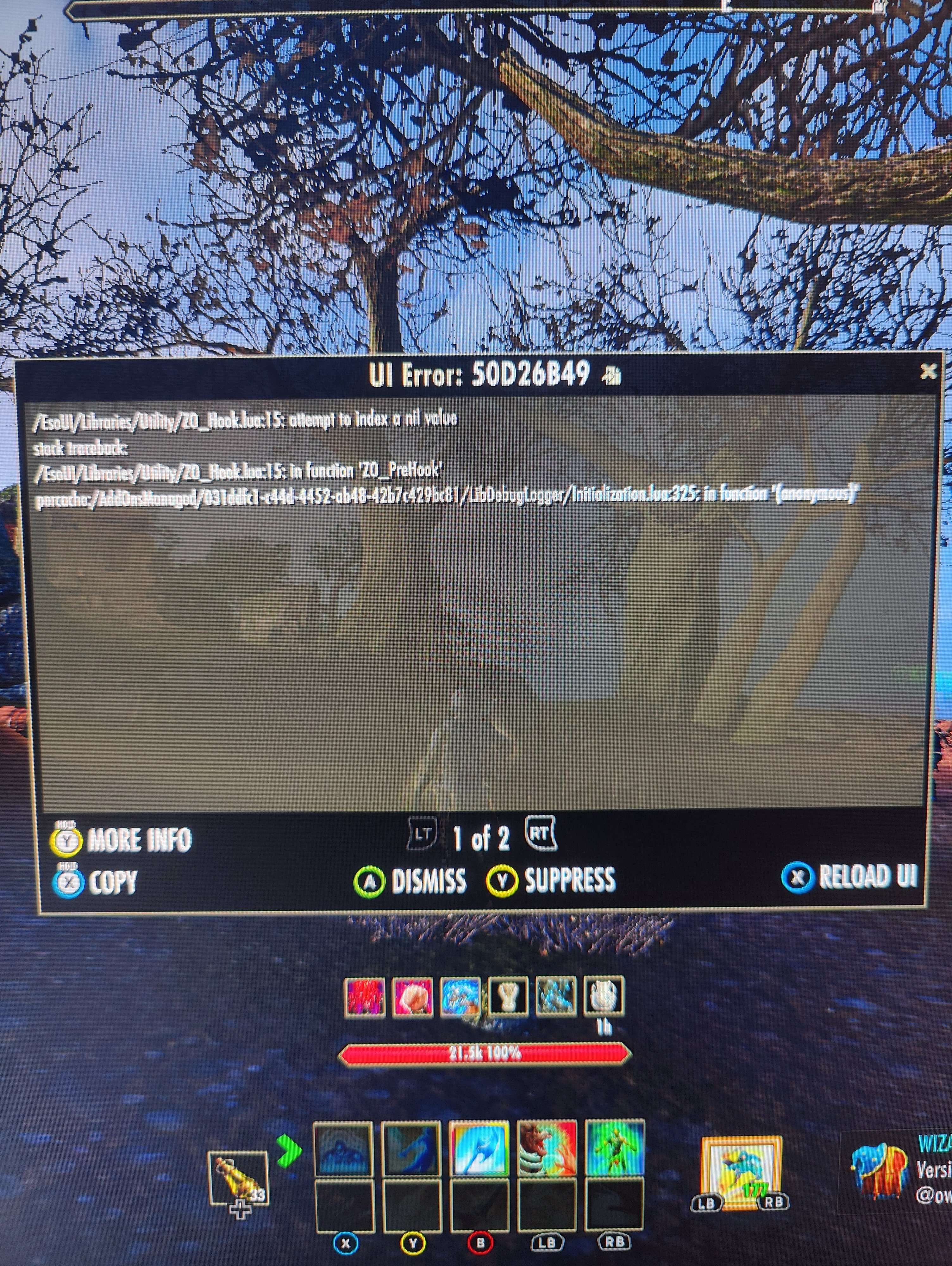
0 -
YoshinJaa✭✭✭Okay so add-ons are indeed working/migrating data over as intended from any version of Xbox with u50.
Only thing I have is this constant error that pops up on character login. Doesn't occur after switching zones or instances and it's very minor but wanted to report it regardless. Attached as pic. I remember this being an error when Play Anywhere first launched early.
This was fixed after manually updating libmessage and libdebuglogger in Browse Add-Ons.0 -
 Do we know if this version will get the same UI as PC if connected with a mouse and keyboard?0
 -
Ardaghion✭✭✭✭I'm still having some issues with the Xbox Play Anywhere ESO client on my PC. While I don't have any issues launching lately, or the client launching on the wrong monitor, I do have issues with quitting the game and occasionally connecting to the servers.
I have an Xbox Series X, right next to my PC and the Xbox version of ESO works perfectly. The Play Anywhere version has issues connecting, quitting, syncing and hanging.
1. Connecting - I can get to the main screen (Press [E] To Start) without issue but about 50% of the time I'll press "E" or controller (A) and it can take anywhere from 30 secs to a minute to get the main menu (Game Startup). Sometimes, I get a notice from the game that I'm not connected to the internet, trying again usually works fine after that. The Xbox version never sees this issue as I often login to my wife's account on my Xbox around the same time.
2. Quitting - Since there is no quit menu like on the PC version, I either have to log out and get back to the main menu to select quit or use alt-F4. The long time to the main menu of item #1 will often take forever. I just had this issue and had to force quit ESO. The alternative is to alt-F4 and that doesn't always work.
3. Syncing - Syncing to the cloud can take quite a long time. It took 10 minutes to sync as I was typing this. The Xbox status page only shows issues with cloud saving for Forza, no other issues. I've never had issues with cloud syncing on the Xbox unless the service is down or there's an internet connection issue, although if the latter happens I'd already be diconnected from the game.
4. Hanging - On a few occasions, using the quit menu or alt-F4 will cause the game window to hang. On most occasions ESO can be forced closed during a hang using the usual methods. There have been two other occasions that force quitting didn't work. One required a restart of my PC, the other hung so badly that a restart didn't happen, I waited nearly 20 minutes, and I had to do a power shutdown.
While I like using the Play Anywhere version of ESO on my PC, there are definitely issues with this version.0