Maintenance for the week of August 31:
• NA megaservers for maintenance – August 31, 4:00AM EDT (8:00 UTC) - 12:00PM EDT (16:00 UTC)
• EU megaservers for maintenance – August 31, 8:00 UTC (4:00AM EDT) - 16:00 UTC (12:00PM EDT)
• ESO Store and Account System for maintenance – August 31, 4:00AM EDT (8:00 UTC) - 12:00PM EDT (16:00 UTC)
• NA megaservers for maintenance – August 31, 4:00AM EDT (8:00 UTC) - 12:00PM EDT (16:00 UTC)
• EU megaservers for maintenance – August 31, 8:00 UTC (4:00AM EDT) - 16:00 UTC (12:00PM EDT)
• ESO Store and Account System for maintenance – August 31, 4:00AM EDT (8:00 UTC) - 12:00PM EDT (16:00 UTC)
U49 on PC won't use laptop's high performance GPU

Moohemoth
Soul Shriven
Haven't seen this issue anywhere yet, but just as the title says ever since the update I can't get the game to use my NVIDIA GPU and it *only* chooses to use my CPU's integrated AMD GPU. Even going into the graphics settings in Windows to tell it to use the high performance GPU for eso64.exe won't stop it from using my integrated one.
1
-
 PrinceShroob✭✭✭✭✭Do you use MSI Center? From what I understand, this behavior usually happens because, basically, the computer has been told to use the integrated card unless the program is intensive enough to need the more powerful card, and it isn't reading the game as a game.
I have the same problem with with running Morrowind on my laptop--it's not recognized as a game so it just uses the integrated card. Unfortunately, the only fix I know of is to force the computer to use the NVIDIA card at all times.0 -
MoohemothSoul Shrivennope, no software like that, but good call! only things I got to manage what GPU a game runs on is windows graphics settings, and NVIDIA control panel. neither of 'em can make the game run with the right GPU for some reason. I wonder if it's related to not being able to pick which monitor the game runs on either
this is all after rebooting and letting Windows update and everything too, for the record.
quick EDIT: finally found someone else mention this exact problem on reddit, so it's hopefully not just me lol. exact same experience!Edited by Moohemoth on March 10, 2026 8:08PM2 -
TazDSoul ShrivenGame not using the high performance GPU after update 49, FPS drop after update 49
I have the same Problem.
With AMD GPUs.
First I only saw that the FPS after the update dropped fromm 100 to below 40 even 30. Was thinking about network etc ...
Later I found this post I checked the stats for GPUs. Found that the internal GPU goes to full load while the high performance one stays more or less idle.
Makes the game unplayable on a normal graphics quality.
:-(
Edited by TazD on March 13, 2026 5:05AM3 -
 Please ZOS, notice this issue since it has been noticed only in reddit but we have not received any updates here.
May we receive any comments about it?
@ZOS_Kevin @ZOS_JessicaFolsom
Hello! I’m experiencing the exact same issue, and it only started after Update 49 — I had never encountered anything like this before.
I’m playing on a Lenovo Ideapad Gaming laptop with both an integrated AMD Radeon graphics card and an NVIDIA GeForce 3050 Ti.
After the update, all my graphics settings disappeared. I can no longer select a monitor (even though I’m using my laptop display), resolution, or DLSS. The NVIDIA GPU is no longer being recognized. In Task Manager, it’s clear that the game is not detecting my GPU at all.
The issue appears to be related to hybrid GPU setups (integrated AMD Radeon + NVIDIA GPU), as the game is no longer detecting the dedicated graphics card after the update.
I have tried every solution I could find online, including contacting NVIDIA support and following all the troubleshooting steps from the TESO FAQ and TESO Support. Unfortunately, nothing has worked and also Support agents did not address the issue to the dev team in order to fix that. All my other games run perfectly fine, and I even had my laptop checked at a service center — there are no hardware issues.
On the morning of March 9, 2026, the game was running perfectly with no issues. However, immediately after the update on March 10, 2026, this problem appeared.
I strongly believe this issue is related to the update and should be investigated by the developers. The more visibility this problem gets, the higher the chance it will be noticed and addressed.
Please take into consideration:
• our post in reddit
• another post related to the issue despite this one
• also topic where GPU is detected but settings for monitor disappeared and it looks similar to the problem which is described here. The only difference, TESO doesn't recognize GPU anymore.
This is how it looks like: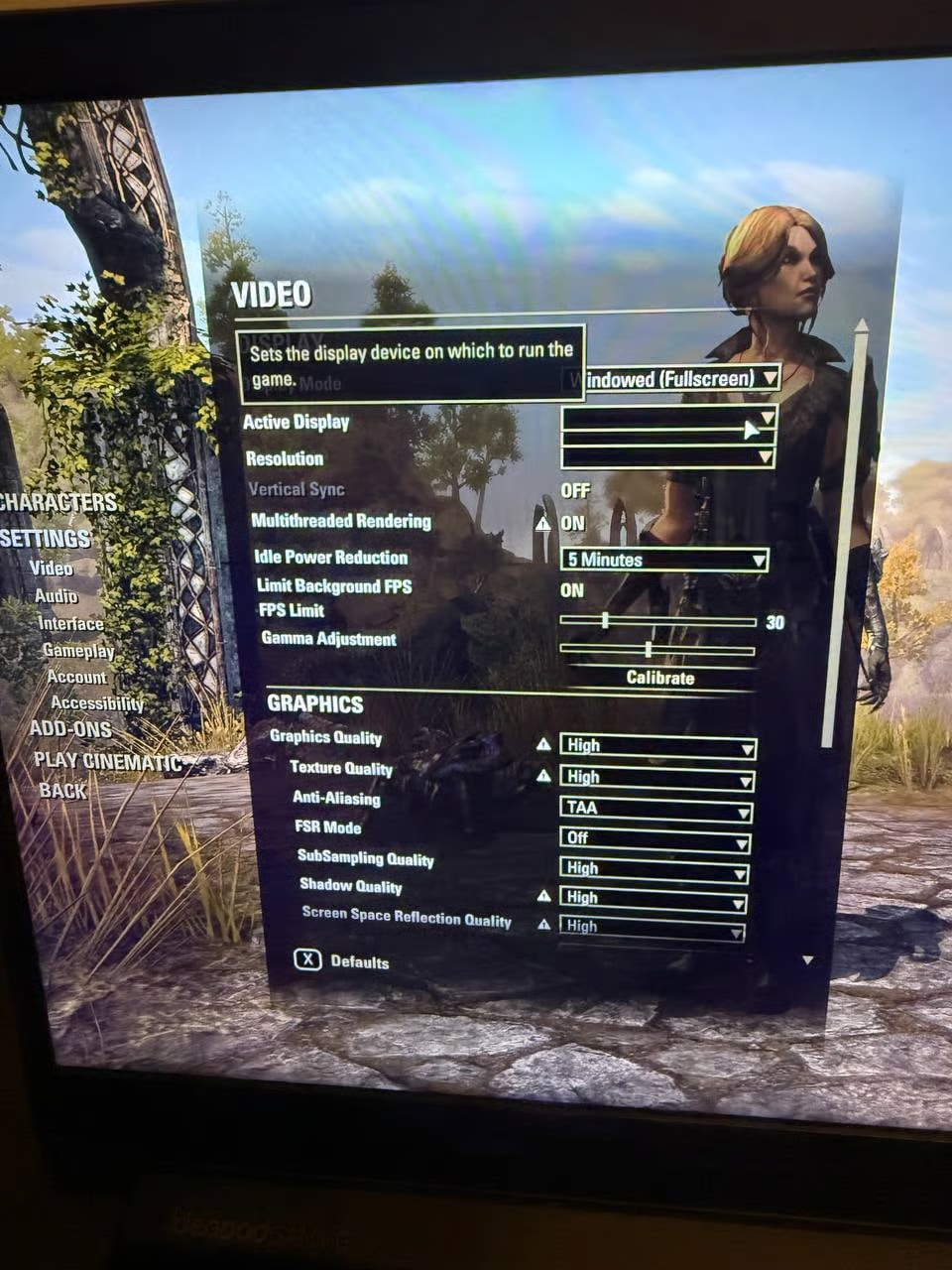
Please, we need your help to come back to the game!Edited by CassandraMurphy on March 23, 2026 9:41PM2 -
@ZOS_Kevin @ZOS_JessicaFolsom
I made my own experiment and maybe it can help you to reproduce the issue.
I tested the game on laptops of the same model and settings: my laptop (system 1) where the game was installed and got broken after U49 and on the second laptop (system 2) where TESO has never been installed.
I would like to provide a structured and reproducible description of the issue to assist the development team.
Environment
Device: Laptop (Lenovo IdeaPad Gaming 3)
CPU: AMD Ryzen (with integrated Radeon iGPU)
iGPU: AMD Radeon
dGPU: NVIDIA RTX 3050 Ti Laptop GPU
Graphics mode: Hybrid (AMD + NVIDIA, no MUX switch)
Issue Description
After Update 49 in The Elder Scrolls Online:
The game no longer detects the NVIDIA GPU
The system defaults to AMD integrated graphics
DLSS option is missing
Settings are missing (monitor, resolution)
Performance is significantly degraded
Critical Observations
The game was functioning correctly before Update 49 on the same system and same drivers - morning 03/09/2026 before a maintainance - everything worked with the same drivers and system. evening 03/09/2026 after a maintainance and u49 release - TESO has issues described above.
The issue appeared immediately after the update, without any system changes
The issue is not isolated — multiple players report similar problems (GPU detection issues, missing DLSS, broken graphics settings)
Reproduction Pattern (Key Finding)
Testing on identical hardware shows:
System A (existing installation before Update 49)
Game updated
❌ NVIDIA GPU not detected
System B (identical laptop, fresh install after Update 49)
Game installed after update
✅ NVIDIA GPU detected correctly
Additional Important Detail
There is a consistent pattern observed among players:
Systems where the game works correctly often use older GPU drivers (e.g., from 2024) - the game on the system 2 was tested with driver 566.36 from Thu 05/12/2024
Systems with newer drivers are more likely to experience the issue
This suggests a potential compatibility problem between Update 49 and newer NVIDIA drivers in hybrid GPU environments (AMD + NVIDIA).
Conclusion
This indicates a game-side issue introduced in Update 49, likely related to:
• GPU detection logic
• handling of hybrid graphics systems
• interaction with existing configurations or driver versions
This is not a hardware failure and cannot be resolved through further user-side troubleshooting.
Request
We kindly ask that you test this hypothesis and provide feedback on your findings. We believe that a fix already exists, as similar issues have occurred following updates in 2014, 2018, and 2024 among players.
A fix (hotfix) is required, as the issue prevents normal use of the game and persists despite all troubleshooting steps performed.Edited by CassandraMurphy on March 25, 2026 10:16PM4 -
Follow-up to previous report – additional findings (GPU detection fully reproducible)
Hello, @ZOS_Kevin @ZOS_JessicaFolsom @ZOS_GinaBruno
I would like to provide an update to my previous report, as I was able to isolate the issue further and identify a fully reproducible trigger.
1. Summary of previous findings
As described earlier:
• The issue started immediately after Update 49
• NVIDIA GPU is not detected on affected systems
• DLSS is missing
• The game defaults to AMD integrated graphics
• The issue occurs on hybrid AMD + NVIDIA laptops (no MUX switch)
I also confirmed inconsistent behavior on identical hardware:
• One system works correctly
• Another does not
2. Additional troubleshooting performed
To exclude any driver-related issues, the following steps were performed on the affected system:
• Full driver removal using DDU (both AMD and NVIDIA)
• Clean installation of the latest AMD and NVIDIA drivers
• Installation without NVIDIA App / GeForce Experience
• System reboot and clean environment setup
Result:
❌ No change in behavior
❌ NVIDIA GPU still not detected when AMD iGPU is enabled
This confirms that the issue is NOT caused by:
* corrupted drivers
* leftover configurations
* incorrect driver installation.
3. New test performed (critical result)
I conducted an additional controlled test on the affected system.
Step 1: Disable AMD iGPU (Device Manager)
Result:
✔ NVIDIA GPU is immediately detected
✔ DLSS becomes available
✔ Performance significantly improves
However, overall visual smoothness and frame pacing are noticeably degraded in this configuration.
Animations appear less fluid and micro-stuttering is present, indicating that this workaround disrupts normal hybrid GPU behavior.
Step 2: Re-enable AMD iGPU
Result:
❌ NVIDIA GPU disappears again
❌ DLSS is no longer available
❌ Game reverts to integrated graphics
4. Key conclusion (fully reproducible behavior)
This behavior is 100% reproducible:
With AMD iGPU enabled → NVIDIA is NOT detected
With AMD iGPU disabled → NVIDIA works correctly
5. What this proves
This test confirms that:
The NVIDIA GPU and drivers are functioning correctly
The system configuration is valid
The issue is NOT related to driver installation or corruption
The issue is NOT related to hardware or MUX
The problem lies in how the game detects or selects GPUs in hybrid environments.
6. Technical implication
The issue appears to be related to:
• incorrect DXGI adapter selection
• improper GPU prioritization in hybrid systems
• failure to correctly bind to the discrete GPU when iGPU is present
7. Important clarification
Disabling the AMD iGPU is only a temporary workaround:
• It breaks normal hybrid GPU behavior
• It may result in unstable frame pacing and reduced user experience
• It is not a valid long-term solution
8. Final conclusion
This is a game-side regression introduced in Update 49 affecting hybrid AMD + NVIDIA systems.
The issue is:
• reproducible
• hardware-independent (confirmed on identical devices)
• not fixable through user-side troubleshooting
9. Request
Please investigate GPU detection and selection logic for hybrid systems.
A fix (hotfix) is required to ensure:
• proper detection of NVIDIA GPUs
• correct GPU prioritization
• DLSS availability
10. Additional note
Given that similar issues have been reported after previous updates (2014, 2018, 2024), this may indicate a recurring problem in GPU detection logic after major patches.Edited by CassandraMurphy on March 27, 2026 11:46PM2 -
Following today's maintenance on 30.03.26. the issue still persists.
The behavior remains fully reproducible:
- With AMD iGPU enabled - NVIDIA GPU is not detected, DLSS missing
- With AMD iGPU disabled - NVIDIA works correctly, DLSS appears
This confirms the issue is still present and not related to drivers or system configuration.
This issue appears to be related to GPU detection and selection logic in hybrid (AMD iGPU + NVIDIA dGPU) systems, where the game fails to correctly prioritize the discrete GPU.
It is important to note that disabling the AMD iGPU is not a valid solution. While it forces correct GPU detection, it breaks normal hybrid GPU behavior, resulting in degraded frame pacing, reduced animation smoothness, and overall lower visual quality.
Could you please confirm whether this issue is being actively investigated?
Thank you.
Edited by CassandraMurphy on March 30, 2026 7:54PM2 -
 ArchangelIsraphel✭✭✭✭✭
✭✭✭✭✭After today's update I am also experiencing this issue, which is extremely frustrating as I had fixed FPS problems with ESO related to Windows Updates only a week before.
I do not have an AMD card, but my Lenovo Legion does have an integrated intel card along with a NVIDIA GPU. Normally my performance in ESO is outstanding on this laptop. I wasn't having issues at all last night, but after todays update, I have every single problem listed in this thread.
-Frames tank from 100 down to 20.
-Game feels like I'm moving through molasses.
-Stuttering becomes progressively worse over time until the game is completely unplayable.
Although my control panel/task manager CLAIMS that my NVIDIA card is under load, it either isn't being utilized properly by the game, or something else is going on that's related to the issue other players are experiencing here.
I have done all the usual checks and re-installations of drivers, checked settings, made sure I'm running on high performance, messed with settings in windows control panel...
Really this is beyond frustrating, it seems like every 3 weeks or so I have to fix this game, when it used to run perfectly.PC l NA
Legends never die
They're written down in eternity
But you'll never see the price it costs
The scars collected all their lives
When everything's lost, they pick up their hearts and avenge defeat
Before it all starts, they suffer through harm just to touch a dream
Oh, pick yourself up, 'cause
Legends never die3 -
 ZOS_JessicaFolsomCommunity ManagerHello! Sorry for the delayed response in providing an update on this issue. Thank you all so much for the detailed info. It's been helpful. We have a potential fix going into the next incremental patch on April 20. Unfortunately, this issue is not one we can hotfix - it requires a new client build and incremental patch. We appreciate everyone's patience as we investigated this issue and worked on a fix.6
 -
ZOS_JessicaFolsomCommunity ManagerFor a little more technical context from the devs investigating this issue, here's what they had to say:This issue is caused by some players' integrated GPU (Intel or AMD, integrated on the CPU) reporting more VRAM available than their discreet GPU (Nvidia or AMD in the PCIe slot), so the game was picking the integrated GPU as the best candidate. We changed the way we select GPU with the fix to ask the OS for the high performance GPU, instead of iterating all the GPU on the system and selecting the one with the most VRAM. (This works on Windows 10 and 11 only though, so the fix may not work for players still on Windows 7.)9
-
TazDSoul ShrivenZOS_JessicaFolsom wrote: »For a little more technical context from the devs investigating this issue, here's what they had to say:This issue is caused by some players' integrated GPU (Intel or AMD, integrated on the CPU) reporting more VRAM available than their discreet GPU (Nvidia or AMD in the PCIe slot), so the game was picking the integrated GPU as the best candidate. We changed the way we select GPU with the fix to ask the OS for the high performance GPU, instead of iterating all the GPU on the system and selecting the one with the most VRAM. (This works on Windows 10 and 11 only though, so the fix may not work for players still on Windows 7.)
1 question regarding the above:
How is it possible for the game to decide to use another GPU as set in Windows graphics settings telling for ESO to use the high performance GPU and in (my case) AMD Adrenalin doing the same ?
Just not for DEVs to miss a part of the problem:
Same Problem for me, with
Radeon 780M internal
and
Radeon RX 7600M XT external as High perf GPU
was working fine until U49
Now the game is using the integrated GPU so ... no useful FPS anymore
Deinstallation and reinstallion did not solve the problem.
...
screenshot of game, just standing around. low FPS (drops to 19 when moving) with overlay of GPUs usage (GPU1 is the external high perf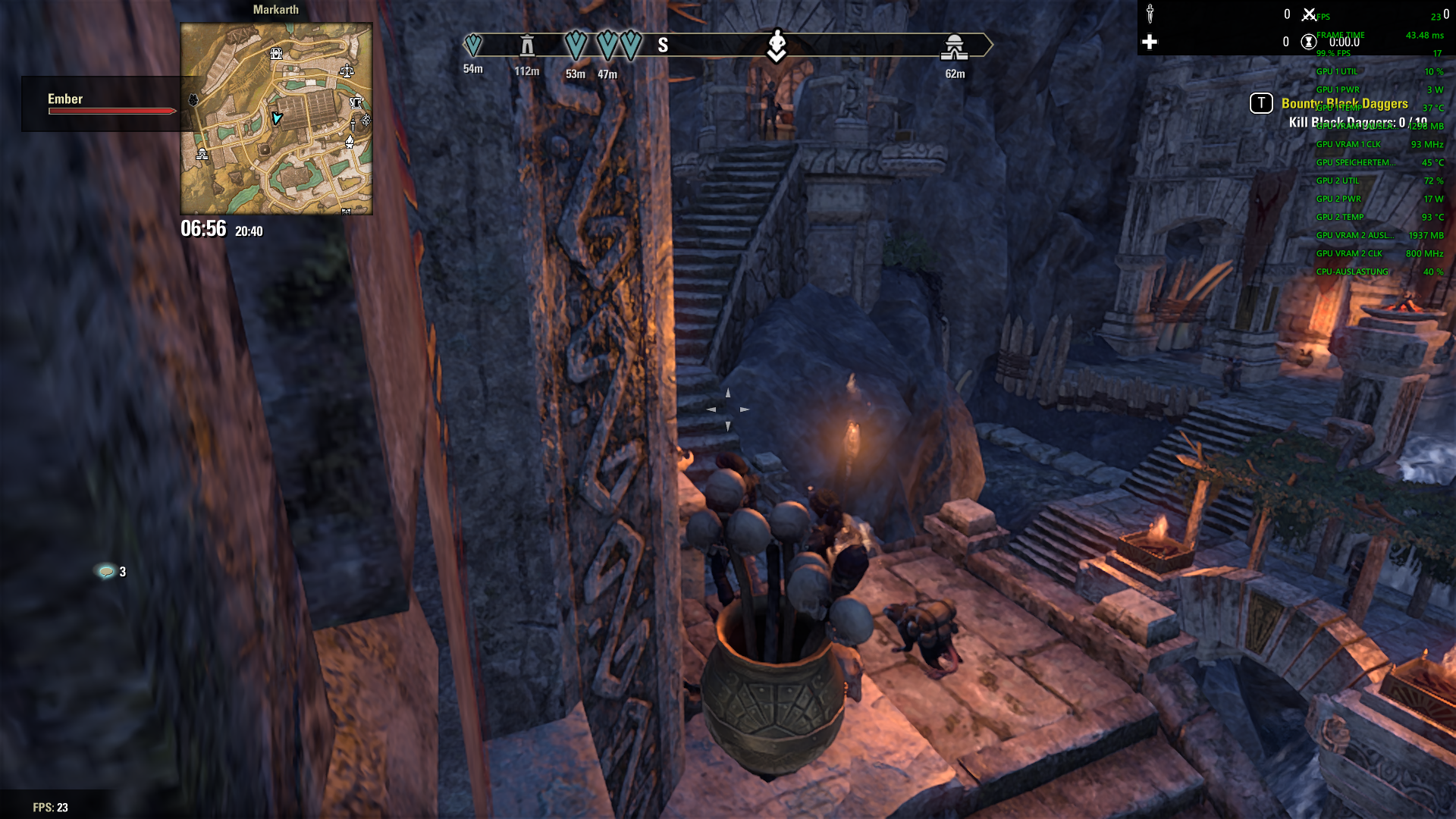
GPU usage trend: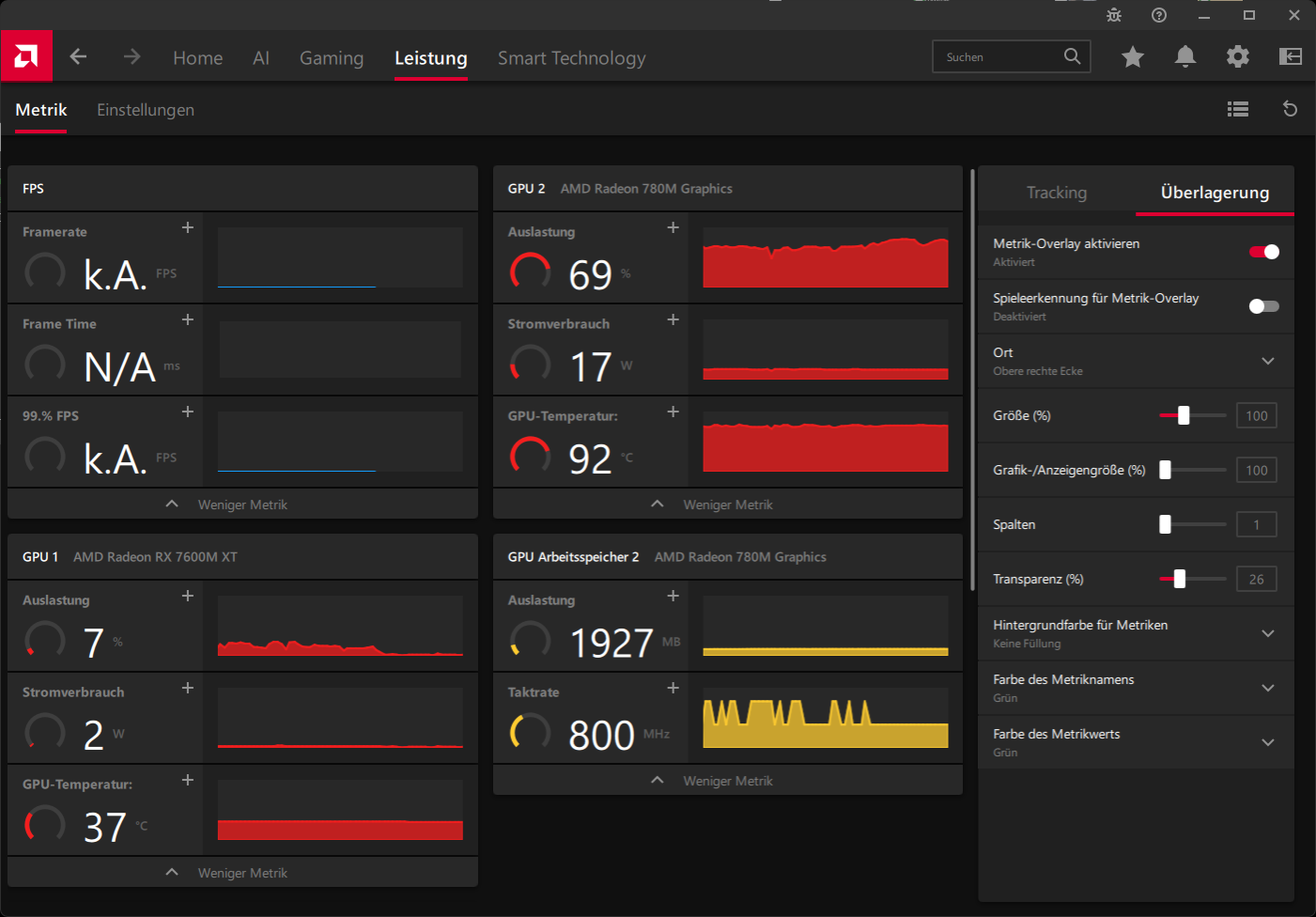
If I can do some experiments to help getting a fix for that issue, I am ready to help
Edited by TazD on April 6, 2026 5:20AM0 -
1 question regarding the above:
How is it possible for the game to decide to use another GPU as set in Windows graphics settings telling for ESO to use the high performance GPU and in (my case) AMD Adrenalin doing the same ?
Because they explained that the code of the game is incorrect now that's why it is happening and they will rewrite everything.
In the reddit post we mentioned that this windows thing did not help, the game does not understand it.
That's what devs will rewrite in the code.0 -
Darrel570Soul ShrivenZOS_JessicaFolsom wrote: »For a little more technical context from the devs investigating this issue, here's what they had to say:This issue is caused by some players' integrated GPU (Intel or AMD, integrated on the CPU) reporting more VRAM available than their discreet GPU (Nvidia or AMD in the PCIe slot), so the game was picking the integrated GPU as the best candidate. We changed the way we select GPU with the fix to ask the OS for the high performance GPU, instead of iterating all the GPU on the system and selecting the one with the most VRAM. (This works on Windows 10 and 11 only though, so the fix may not work for players still on Windows 7.)
Please send your thanks to the dev team for these comments (and for posting them!) it's very useful for folk who enjoy technical context.
As a minor datapoint, I'm experiencing the same "Wrong display pipeline/Monitor" issue on a radeon dGPU and a 9800x3d - so it's not something limited to just nvidia stuff, althought I've not experienced the same perfomance issues noted.0 -
As a minor datapoint, I'm experiencing the same "Wrong display pipeline/Monitor" issue on a radeon dGPU and a 9800x3d - so it's not something limited to just nvidia stuff, althought I've not experienced the same perfomance issues noted.
These may look similar, but they are not necessarily the same issue. There is another post in the forum about this issue. https://forums.elderscrollsonline.com/en/discussion/689487/game-starting-on-the-wrong-screen/p2
In my case, the NVIDIA GPU (and other GPU of other players, not necessarily NVIDIA) is not detected at all (no DLSS, wrong performance), and the devs already confirmed this is caused by incorrect GPU selection based on VRAM. Thus it’s hybrid/optimus GPU related issue.
Display/monitor issues may be related, but they can also be separate problems with different causes.
So it is better to update another post regarding it.
1 -
ZOS_JessicaFolsomCommunity ManagerHey all, we have an update on the potential fix we mentioned in this post. This work has been shifted out to Update 50 due to some conflicts with other ongoing back-end technical work. We know this is disappointing news for those of you experiencing this issue - we're sorry for any frustration and thank you for the patience.Edited by ZOS_JessicaFolsom on April 10, 2026 6:21PM2
-
ZOS_JessicaFolsom wrote: »Hey all, we have an update on the potential fix we mentioned in this post. This work has been shifted out to Update 50 due to some conflicts with other ongoing back-end technical work. We know this is disappointing news for those of you experiencing this issue - we're sorry for any frustration and thank you for the patience.
Excuse me but I paid my ESO+ for 6 months and I played with my subsription just 1.5 months. In this case make a refund, because I am not going to waste my money on a game that does not work for half a year.Edited by CassandraMurphy on April 12, 2026 10:02PM2 -
 virtus753✭✭✭✭✭
✭✭✭✭✭CassandraMurphy wrote: »ZOS_JessicaFolsom wrote: »Hey all, we have an update on the potential fix we mentioned in this post. This work has been shifted out to Update 50 due to some conflicts with other ongoing back-end technical work. We know this is disappointing news for those of you experiencing this issue - we're sorry for any frustration and thank you for the patience.
Excuse me but I paid my ESO+ for 6 months and I played with my subsription just 1.5 months. In this case make a refund, because I am not going to waste my money on a game that does not work for half a year.
It’s a quarter of a year from Update 49 until the scheduled fix (Update 50 releases June 8).
To request a refund, you need to do so from within your game account. Since forum accounts and game accounts are two different systems (with potentially different usernames and hopefully different passwords), there is no way to authenticate your game account from the forums. If I remember right, the option to get a refund on the website is even automated:
https://help.elderscrollsonline.com/
Billing > [platform] > Cancel Membership Contract Here0 -
CassandraMurphy wrote: »ZOS_JessicaFolsom wrote: »Hey all, we have an update on the potential fix we mentioned in this post. This work has been shifted out to Update 50 due to some conflicts with other ongoing back-end technical work. We know this is disappointing news for those of you experiencing this issue - we're sorry for any frustration and thank you for the patience.
Excuse me but I paid my ESO+ for 6 months and I played with my subsription just 1.5 months. In this case make a refund, because I am not going to waste my money on a game that does not work for half a year.
It’s a quarter of a year from Update 49 until the scheduled fix (Update 50 releases June 8).
To request a refund, you need to do so from within your game account. Since forum accounts and game accounts are two different systems (with potentially different usernames and hopefully different passwords), there is no way to authenticate your game account from the forums. If I remember right, the option to get a refund on the website is even automated:
https://help.elderscrollsonline.com/
Billing > [platform] > Cancel Membership Contract Here
Still I paid for 6 months and not able to play for 3 months from 9th of March to 8th of June. So my request is reasonable. My request is ignored by support starting from the end of March. I created a new ticket regarding this. 260413-000527Edited by CassandraMurphy on April 13, 2026 8:44AM1 -
 RedJohn_COF✭✭✭ZOS_JessicaFolsom wrote: »Hey all, we have an update on the potential fix we mentioned in this post. This work has been shifted out to Update 50 due to some conflicts with other ongoing back-end technical work. We know this is disappointing news for those of you experiencing this issue - we're sorry for any frustration and thank you for the patience.
Heya, can you confirm that the fix is already part of the PTS?
At least my issue, where I couldn't even start the game on live right now, seems fixed. PTS I can at least play the game again.
What kind of compensation can the people that currently can't play the game expect? I saw on the PTS today that I got already kicked out of one of my guilds, due to inactivity.Cyrodiil Orange Farmers
Xbox - EU / Xbox - NA2 -
ZOS_JessicaFolsom wrote: »Hey all, we have an update on the potential fix we mentioned in this post. This work has been shifted out to Update 50 due to some conflicts with other ongoing back-end technical work. We know this is disappointing news for those of you experiencing this issue - we're sorry for any frustration and thank you for the patience.
UPD: I received a compensation equal to lost months of my subscription. I appreciate this. Thank you!
Just wish the communication would be better regarding this.I am unable to play the game starting from 9th of March like all people here, also the problem won't be fixed until 8th of June which is not guaranteed. I paid ESO+ for 6 months, sent a ticket. 260413-000527
My request to expand the subscribtion for the missing time or make a refund was cancelled.
Under EU law, specifically Directive (EU) 2019/770 on digital content and digital services, a provider is legally required to deliver a service that conforms to what was purchased. When a digital service is defective or not functioning as intended for an extended period of time, the provider is obligated to offer an appropriate remedy, such as a refund, price reduction, or compensation.
In this case, players are paying for ESO Plus but are unable to access the full functionality of the service due to a known issue that has remained unresolved for months. At the same time, both of you - the developer and the distributor are refusing to provide any form of remedy.
This effectively results in players losing money for a service that is not being properly delivered during the paid subscription period.
Denying both refunds and compensation in such circumstances may constitute a breach of EU consumer protection law regarding the conformity of digital services.
This situation requires proper resolution, as customers are entitled to receive what they paid for or receive a proper compensation.Edited by CassandraMurphy on April 15, 2026 7:47AM2
