Maintenance for the week of March 30:
• NA megaservers for patch maintenance – March 30, 4:00AM EDT (8:00 UTC) - 12:00PM EDT (16:00 UTC)
• EU megaservers for patch maintenance – March 30, 8:00 UTC (4:00AM EDT) - 16:00 UTC (12:00PM EDT)
• NA megaservers for patch maintenance – March 30, 4:00AM EDT (8:00 UTC) - 12:00PM EDT (16:00 UTC)
• EU megaservers for patch maintenance – March 30, 8:00 UTC (4:00AM EDT) - 16:00 UTC (12:00PM EDT)
Known Issues and additional Bug Reports for PTS Tamriel Tome

ZOS_Kevin
Community Manager
Below are current known issues for the PTS Tamriel Tome. Our goal is to have these issues resolved for launch when Season Zero begins. Additionally, if you identify any other issues, please feel free to post them in this thread. For general feedback on the PTS Tamriel Tome, we have a feedback thread for you to use, linked here.
- Currently when looking at the Weekly Challenges, they will be missing. This is a high priority investigation for the team. Some ZOS employees are seeing Weekly challenges during their playtest. You should still be seeing Seasonal Challenges.
- Additionally, if you are seeing weekly challenges when using the Tome, please let us now. It will help the team as we work to identify and fix this issue.
- When viewing the Tome, it is possible some missing text and images will be present.
- Workaround: Reload your UI or relog into the game.
- Currently on PTS, you are able to go over the Challenge Re-Roll currency of 12. This is due to the PTS Template granting every character 10 additional Challenge Re-Rolls. However, when this goes live in U49, you should not be able to gain rerolls over the cap of 12.
- Pressing Alt should not exit the Tome. When working as intended, it should bring you back to the main Tome screen.
- Workaround: Don't press Alt
Community Manager for ZeniMax Online Studio and Elder Scrolls OnlineDev Tracker | Service Alerts | ESO Twitter
0
-
 Emeratis✭✭✭✭✭From the other thread for visibility's sake:
- I tried to do "Open 1 Chest from Treasure Maps" twice, it counted for "Loot 1 Treasure Chest" but did not progress the treasure maps one at all.
- Click to preview a cosmetic in the Tomes does not hide the book ui and is buggy. Using the R key hides the book and previews things properly but given how preview click or R key functions in every other preview ui in game this needs to be fixed before going live. Some people thought or think it's bugged and you can't preview at all.
3 -
 BloodstainedFay✭✭✭✭✭From my original thread, bugs:
- Items are not preview-able inside the tome itself. The moment you move your mouse away from the item in the tome, the preview ends- making it impossible to cycle through the idles
- Tome appeared halfway down the screen for me. Looks very weird.
PC-EU: BloodstainedFay
Find me on the UESP!2 -
 Soarora✭✭✭✭✭
✭✭✭✭✭Completing the "read lorebooks" weekly challenge also completed the "dig up treasure maps" weekly challenge. Claiming the "dig up treasure maps" weekly challenge keeps it glowing as if its claimable again but I get a "[DEBUG] Error." popup in the top right.[PC/NA] Dungeoneer (Tank/DPS), Retired Trialist, and amateur Battlegrounder (DPS) with a passion for The Elder Scrolls lore.- Current GM of Hard Dungeoneers
- Tanks: Sorcerer - Necromancer - Templar
- DPS: Frost Warden - Stamarc
- Ex-healer
- Dungeons: 32/32 HMs - 26/26 Tris
View my builds!
2 -
 JHartEllis✭✭✭✭✭
It's very unclear what this +page icon is supposed to represent.Guild leader of Spicy Economics and Spicy Life on PC/NA
ESO Stream Team Partner on Twitch: https://www.twitch.tv/jhartellis
Twitter: https://twitter.com/JHartEllis
YouTube: https://www.youtube.com/JHartEllis
Website: https://spicyeconomics.com/7 -
 MoonPile✭✭✭✭✭
✭These were in my feedback, but maybe better here:
1. Need option to change the keybind for Tamriel Tomes.
I've always used F4 for something else; this explains why I got the little "you can't access that right now" popup for the last 2 weeks on PTS – I was using my normal F4, and Tomes was quietly in the background pre-launch.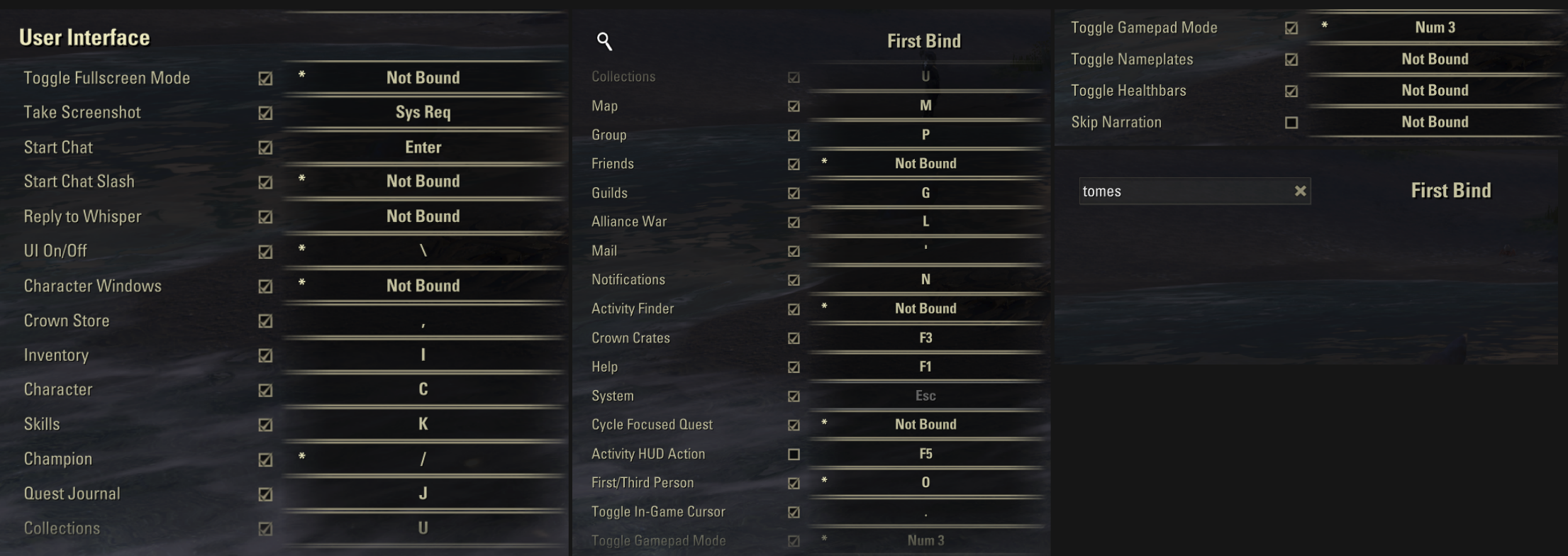
2. Personality:
No walk animation and I couldn't properly preview the sitting ones because the angle makes it obscured. It would help to have some camera motion / rotation in preview.
3. Challenges screen:
Nothing happened when clicking anything, couldn't re-roll etc..Edited by MoonPile on January 27, 2026 9:18PM0 -
 WhiteCoatSyndrome✭✭✭✭✭
✭✭✭✭✭Personality clipping issue with staves: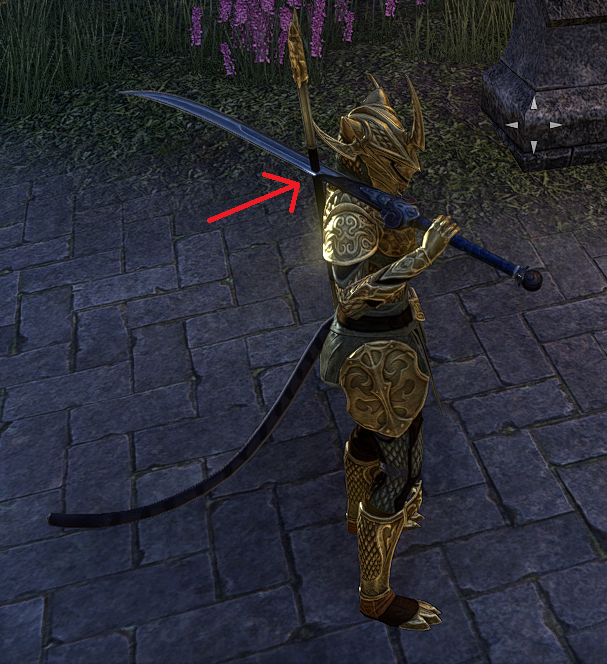
#proud2BAStarObsessedLoony
PAWS (Positively Against Wrip-off Stuff) - Say No to Crown Crates!
A useful explanation for how RNG works
How to turn off the sustainability features (screen dimming, fps cap) on PC2 -
ZOS_KevinCommunity ManagerBloodstainedFay wrote: »From my original thread, bugs:
- Items are not preview-able inside the tome itself. The moment you move your mouse away from the item in the tome, the preview ends- making it impossible to cycle through the idles
- Tome appeared halfway down the screen for me. Looks very weird.
Hi @BloodstainedFay. Just wanted to follow-up on your post.- If your resolution is not 1920x1080, OR you are using a large monitor like 4K, the Tome is going to stretch a bit. This actually happens with all ESO UI, but the Tome is just the first one to really highlight this.
- There is a hotkey to fully Preview the item within the Tome UI, F4. The mouseover Preview is what we call "light Preview". To give a quick view of the item. You can also hit 'R' for the full preview while doing the light preview. However, we are thinking about some future improvements to better the experience.
Edited by ZOS_Kevin on January 27, 2026 9:51PMCommunity Manager for ZeniMax Online Studio and Elder Scrolls OnlineDev Tracker | Service Alerts | ESO Twitter1 -
BloodstainedFay✭✭✭✭✭BloodstainedFay wrote: »From my original thread, bugs:
- Items are not preview-able inside the tome itself. The moment you move your mouse away from the item in the tome, the preview ends- making it impossible to cycle through the idles
- Tome appeared halfway down the screen for me. Looks very weird.
Hi @BloodstainedFay. Just wanted to follow-up on your post.- If your resolution is not 1920x1080, OR you are using a large monitor like 4K, the Tome is going to stretch a bit. This actually happens with all ESO UI, but the Tome is just the first one to really highlight this.
- There is a hotkey to fully Preview the item within the Tome UI, F4. The mouseover Preview is what we call "light Preview". To give a quick view of the item. You can also hit 'R' for the full preview while doing the light preview. However, we are thinking about some future improvements to better the experience.
Hey Kevin, thanks for the reply!
I am indeed using a 2K monitor, that explains it. As for the preview I completely missed that and it makes sense. Thanks again for the quick response !PC-EU: BloodstainedFay
Find me on the UESP!0 -
 Radiate77✭✭✭✭✭
✭It is certainly a bug that my 2H is Khajiit style, right?
As someone who primarily uses two-handers, and has for the majority of my time playing, I would appreciate if the new personality used my own weapon.Edited by Radiate77 on January 27, 2026 11:56PMDragon Priest [Restoring Light, Draconic Power, Grave Lord]
Death Knight [Grave Lord, Winter’s Embrace, Siphoning]
Pyromancer [Ardent Flame, Dawn’s Wrath, Earthen Heart]
Summoner [Living Death, Grave Lord, Daedric Summoning]
Ranger [Animal Companions, Green Balance, Shadow]
Druid [Earthen Heart, Animal Companions, Stormcalling]
Elementalist [Stormcalling, Winter’s Embrace, Ardent Flame]
Dawnguard [Dawn’s Wrath, Restoring Light, Ardent Flame]2 -
 Faulgor✭✭✭✭✭
✭✭✭✭✭Hovering over a reward in the Gamepad UI gives you the preview, while actually pressing (X) zooms in but ends the preview.
This makes features such as mount walk/run/rear up selection inaccessible, as the preview only works while the controls still respond to the Tome UI.Alandrol Sul: He's making another Numidium?!?
Vivec: Worse, buddy. They're buying it.0 -
 virtus753✭✭✭✭✭
✭✭✭✭✭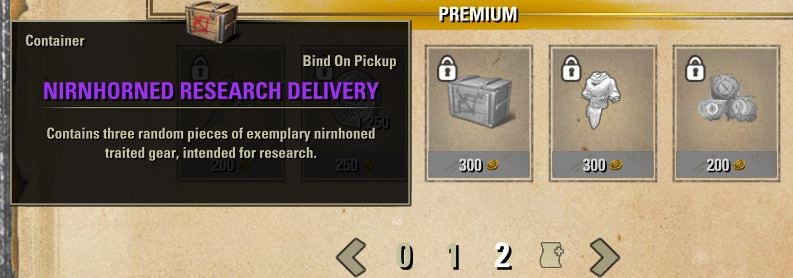
NirnhoRned is a common typo (see ESO Logs). The description text follows the spelling used elsewhere in game and suggests "nirnhoned" (no R) remains the proper form.1 -
virtus753✭✭✭✭✭
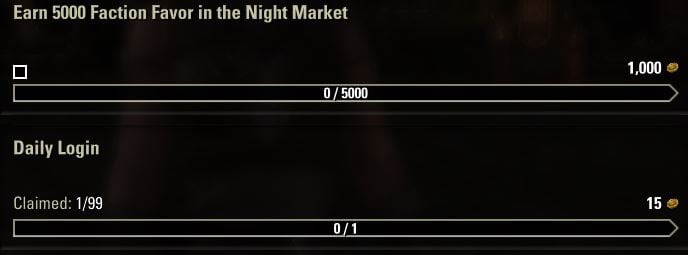
✭✭✭✭✭Things unclear to the point of interfering with usability (hence bug):- Small Check Boxes: Why is there a small check box in the Seasonal Challenges descriptions? I can't seem to do anything with it. It doesn't get checked or filled in. It was initially present in all three challenges, and the one in the "Daily Login" box disappeared when I claimed the Tome points (see image -the small box changed to "Claimed: 1/99"). The box isn't related to pinning, which adds a pin to the title of the challenge. Why is this box here? What is it meant to do? Please explain it clearly in game or remove it to avoid UI clutter and confusion.
- Re-Rolls: Are Challenge Re-Rolls meant to be usable on Seasonal Challenges? They're not for me, and it's unclear whether this is a known issue or working as intended. I can't see the Weeklies (a possibility you noted above as a known issue), so I can't see if the re-rolls are meant to apply to those. If the re-rolls are for Weeklies only, they need to be named accordingly to avoid misleading players into thinking they can be used on any Challenges full stop (including Seasonals). At this point I'm unclear on what exactly is bugged here, but something definitely is.
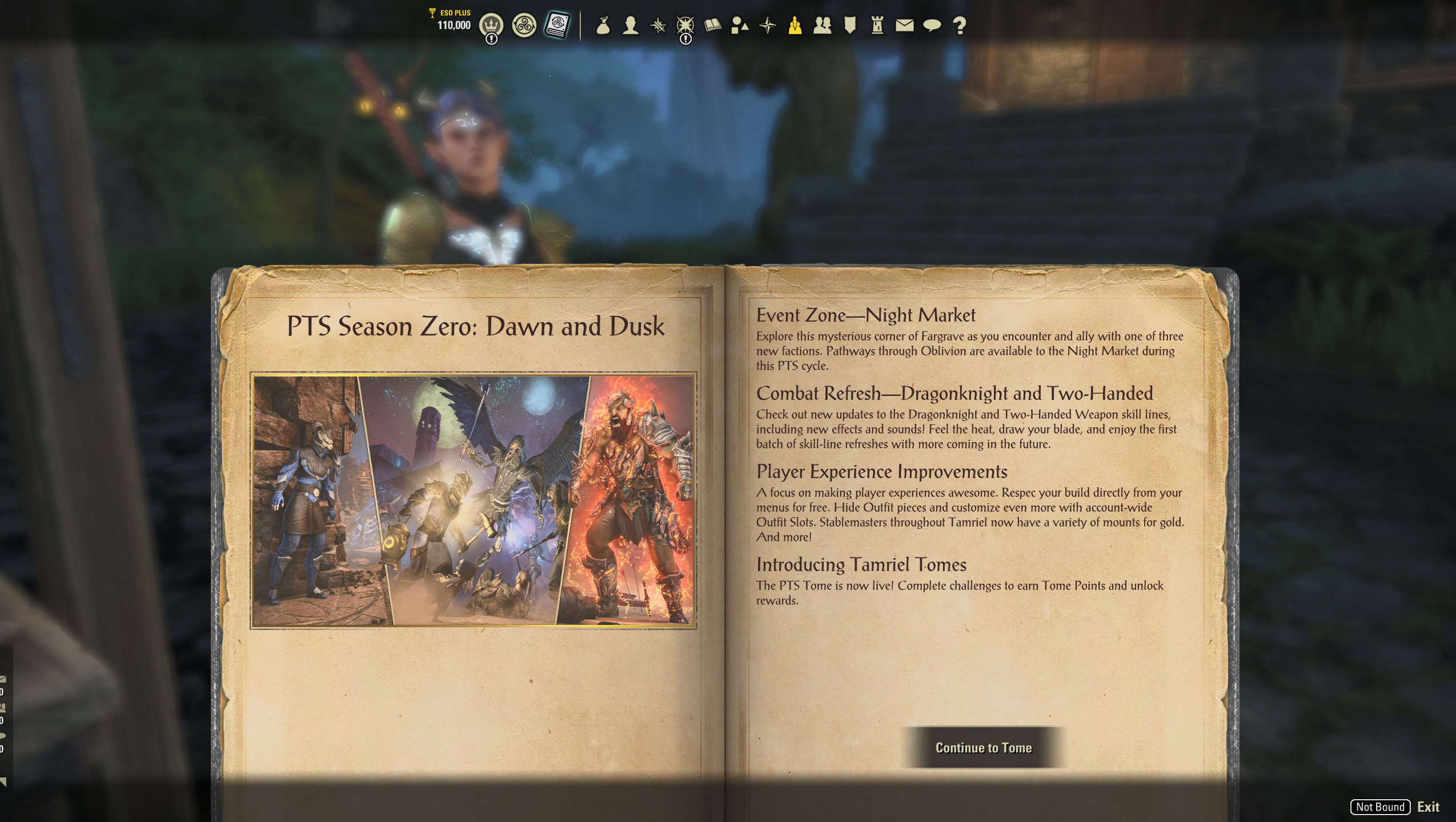
- Page Notation: (perhaps you'll consider this more feedback than bug, but it's interfering with understanding what does what in the UI) Please get rid of the "0" icon and replace it with something that indicates "information" (like one of those small i in a circle type deals, perhaps? or just i, as in the prefatory numbering for a book, which this is maybe(?) meant to be). Using "0" to convey "find prefatory info here" is very unintuitive, especially because you set an expectation with your nomenclature for "Season 0" - that means "the first season", so I accordingly expect you to use "page 0" to mean "the first page of Tome rewards". That is not what I get when I click on it. It is jarring to click "0" to be forced into a span of pages with more information but no rewards. After reading, I click "continue to Tome" (which means that the prefatory info is NOT actually considered part of the Tome - so how is it page 0 of said Tome it's not part of?) and have to go through the whole transition back to reward pages. If "0" is not actually a Tome reward page, please don't put it on the same numbering scheme as the reward pages. Give it a unique, non-numerical icon to indicate it is an information/introduction. It also doesn't make sense to label this "page 0" (singular) when it clearly spans two pages of the "Tome" graphically. Taking it off of a numerical scheme would eliminate that inconsistency as an additional benefit of making it clearer what this screen is actually for.
0 - Small Check Boxes: Why is there a small check box in the Seasonal Challenges descriptions? I can't seem to do anything with it. It doesn't get checked or filled in. It was initially present in all three challenges, and the one in the "Daily Login" box disappeared when I claimed the Tome points (see image -the small box changed to "Claimed: 1/99"). The box isn't related to pinning, which adds a pin to the title of the challenge. Why is this box here? What is it meant to do? Please explain it clearly in game or remove it to avoid UI clutter and confusion.
-
 tomofhyrule✭✭✭✭✭
✭✭✭✭✭Another bug for the Monster Hunter personality:
Using some mementos will make the game 'forget' you have the personality active and put you into the default idle stance until you reset it by readying/sheathing weapons or the like.
Shown below with Malacath's Wrathful Flame, which has it's own bug since the animations were changed in U48 (please also notice that this pose is not correct!)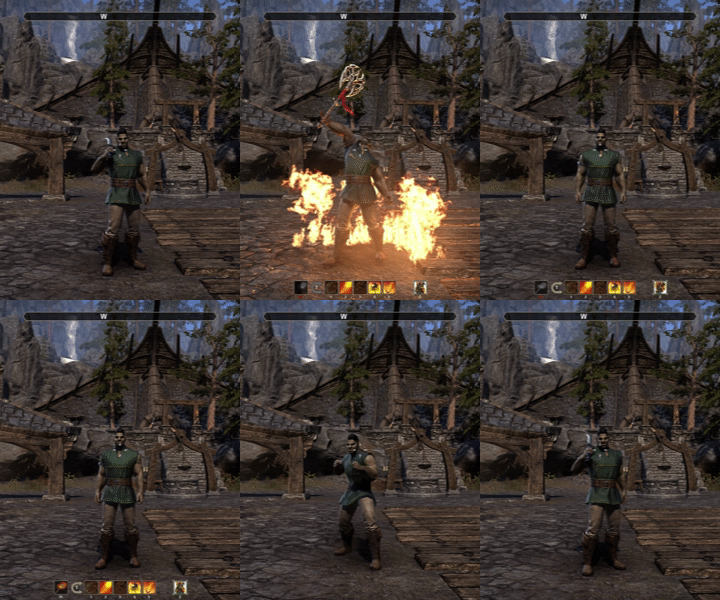 1
1 -
PeacefulAnarchy✭✭✭✭✭
✭I'm doubting my memory here now, maybe not a bug.
Edited by PeacefulAnarchy on February 10, 2026 9:50PM0 -
 SkaiFaith✭✭✭✭✭
✭WhiteCoatSyndrome wrote: »Personality clipping issue with staves:
Does anyone know if on PTS this has been fixed (and how) so that won't be an issue when the Tome launches on live?A: "We, as humans, should respect and take care of each other like in a Co-op, not a PvP 🌸"
B: "Many words. Words bad. Won't read. ⚔️"0 -
 Renato90085✭✭✭✭✭
nopeWhiteCoatSyndrome wrote: »Personality clipping issue with staves:
Does anyone know if on PTS this has been fixed (and how) so that won't be an issue when the Tome launches on live?Edited by Renato90085 on March 6, 2026 2:59PM1