Update 50 is now available for testing on the PTS! You can read the latest patch notes here: https://forums.elderscrollsonline.com/en/categories/pts
Maintenance for the week of April 20:
• [COMPLETE] NA megaservers for patch maintenance – April 20, 3:00AM EDT (7:00 UTC) - 12:00PM EDT (16:00 UTC)
• [COMPLETE] EU megaservers for patch maintenance – April 20, 7:00 UTC (3:00AM EDT) - 17:00 UTC (12:00PM EDT)
• [COMPLETE] NA megaservers for patch maintenance – April 20, 3:00AM EDT (7:00 UTC) - 12:00PM EDT (16:00 UTC)
• [COMPLETE] EU megaservers for patch maintenance – April 20, 7:00 UTC (3:00AM EDT) - 17:00 UTC (12:00PM EDT)
A Journey to Reduce Input Lag

guarstompemoji
✭✭✭✭
My system is as follows:
Ping averages around 65
For years, I've had input lag. I'd press a skill, and it would take a second to fire. I thought well, the game is just a bit gummy. It's old, so it's gummy. That isn't the case and it shouldn't be gummy. These are the things I've done. Perhaps they'll help someone else.
Recognizing that ESO Is an Old, CPU-Intensive Engine
That fancy GPU up there? Nope. ESO cares about CPU and RAM. Once I realized this, I started targeting the system with this in mind. We basically have to time-travel.
AMD Adrenaline is Poopy-Pants, and Probably So is Any GPU Bloatware
During one update, it uninstalled itself. Ended up using AMD's software scrubber to rip any of their extra products from their system, and then reinstall using drivers-only.
Studio Drivers vs Gaming Drivers
There are Game Drivers and Studio Drivers. Studio Drivers are the most stable. Gaming Drivers are the most cutting-edge in development, but may come with bugs. ESO is an old engine. I went with the more stately option.
Limit FPS to Monitor Refresh Rate to Make CPU Load More Efficient
Because ESO gobbles the CPU, whereas modern engines shift load to the GPU, limiting the FPS to the monitor's refresh rate, or slightly above it, helps reduce load. The most efficient means of doing this is via the game files. It can be done in GPU software, but that can add an extra half-second of input lag. Don't set this below monitor refresh rate.
Consider Disabling SMT/Intel Hyperthreading
This is simultaneous multi-threading. Doing this can reduce CPU load. It needs done in BIOS. There is software that advertises being able to do it within the OS, but I've seen mixed results reported. If it doesn't work, you can reboot and re-enable it.
DUAL CHANNEL RAM
Don't do single-channel. Being as CPU-heavy as it is, ESO does better on 16x2 rather than 32x1. Prebuilt systems are bad about this. Companies short customers by installing only ONE stick of RAM. It creates a hella chokepoint that will be noticed less in more modern game engines, as they offload to GPU. With older engines such as ESO, it's much more pronounced. Luckily, this is often an easy fix.
Dawid's channel shows multiple videos talking about single vs dual. The one I linked to shows input/lag differences in games running single vs dual. Or should. He covers this topic often, and my ears could only take so much.
Maximize RAM Further
CPU-intensive programs rely on RAM even more than ones that utilize the GPU. I launch ESO through a program that allows my system to bite off even larger chunks of RAM at a time, thereby minimizing the bottleneck further. This program is called 7-MAX. Depending, it could be worth trying.
Close the Launcher
Leaving the launcher open while the game runs seems to have adverse effects for some people. By now, I just do this all the time.
Make a Trading and Farming Character
Any farming or trading addons should limit to this character. This includes the libraries. Addons are bad about leaving libraries enabled even when they, themselves, are disabled, so hunt those down and nuke them, except on the one character.
Things Others Have Done to Assist their CPU Load
More things can be found in the forum regarding what people have done.
TL;DR
What I've done comes down to, effectively, a bit of timetravel. ESO is just CPU hungry, and therefore RAM hungry as well. It doesn't respond like modern engines do, that offload to the GPU.
Edited by guarstompemoji on December 16, 2025 8:37PM - AMD Radeon RX 9070 XT
- AMD Ryzen 9 7900X 12-Core Processor
- Kingston DDR5 64 (32x2) ("dual channel")
- Samsung SSD 990 Pro 1TB
- ProArt X870E-Creator WiFi
- Corsair RM850x (being upgraded)
- Keychron kb, plugged in as USB
Ping averages around 65
For years, I've had input lag. I'd press a skill, and it would take a second to fire. I thought well, the game is just a bit gummy. It's old, so it's gummy. That isn't the case and it shouldn't be gummy. These are the things I've done. Perhaps they'll help someone else.
Recognizing that ESO Is an Old, CPU-Intensive Engine
That fancy GPU up there? Nope. ESO cares about CPU and RAM. Once I realized this, I started targeting the system with this in mind. We basically have to time-travel.
AMD Adrenaline is Poopy-Pants, and Probably So is Any GPU Bloatware
During one update, it uninstalled itself. Ended up using AMD's software scrubber to rip any of their extra products from their system, and then reinstall using drivers-only.
Studio Drivers vs Gaming Drivers
There are Game Drivers and Studio Drivers. Studio Drivers are the most stable. Gaming Drivers are the most cutting-edge in development, but may come with bugs. ESO is an old engine. I went with the more stately option.
Limit FPS to Monitor Refresh Rate to Make CPU Load More Efficient
Because ESO gobbles the CPU, whereas modern engines shift load to the GPU, limiting the FPS to the monitor's refresh rate, or slightly above it, helps reduce load. The most efficient means of doing this is via the game files. It can be done in GPU software, but that can add an extra half-second of input lag. Don't set this below monitor refresh rate.
Consider Disabling SMT/Intel Hyperthreading
This is simultaneous multi-threading. Doing this can reduce CPU load. It needs done in BIOS. There is software that advertises being able to do it within the OS, but I've seen mixed results reported. If it doesn't work, you can reboot and re-enable it.
DUAL CHANNEL RAM
Don't do single-channel. Being as CPU-heavy as it is, ESO does better on 16x2 rather than 32x1. Prebuilt systems are bad about this. Companies short customers by installing only ONE stick of RAM. It creates a hella chokepoint that will be noticed less in more modern game engines, as they offload to GPU. With older engines such as ESO, it's much more pronounced. Luckily, this is often an easy fix.
Dawid's channel shows multiple videos talking about single vs dual. The one I linked to shows input/lag differences in games running single vs dual. Or should. He covers this topic often, and my ears could only take so much.
Maximize RAM Further
CPU-intensive programs rely on RAM even more than ones that utilize the GPU. I launch ESO through a program that allows my system to bite off even larger chunks of RAM at a time, thereby minimizing the bottleneck further. This program is called 7-MAX. Depending, it could be worth trying.
Close the Launcher
Leaving the launcher open while the game runs seems to have adverse effects for some people. By now, I just do this all the time.
Make a Trading and Farming Character
Any farming or trading addons should limit to this character. This includes the libraries. Addons are bad about leaving libraries enabled even when they, themselves, are disabled, so hunt those down and nuke them, except on the one character.
Things Others Have Done to Assist their CPU Load
- Limiting Max Cores Used by Masteroshi430
- Disabling MMAgend Memory Compression
- Tinkered with CPU overclocking
More things can be found in the forum regarding what people have done.
TL;DR
What I've done comes down to, effectively, a bit of timetravel. ESO is just CPU hungry, and therefore RAM hungry as well. It doesn't respond like modern engines do, that offload to the GPU.
0
-
 madman65✭✭✭✭Find out what your TV/Monitor Mhz is and use the settings from the link: https://forums.elderscrollsonline.com/en/discussion/584759/frame-rate-cap-adjustment-how-to-limit-your-fps-from-being-too-high-updated
Also, this is ONLY a suggestion but I have found that if I clean out my registry when the game gets really bad it will help. I use Revo registry cleaner, I run the Advanced scan. The registry gets alot of crap that Windows has to figure out what to do with while running the system, DEAD END STUFF.0 -
 Jammet✭✭✭Use a gaming profile on your screen. TVs and some screens will use AI or interpolation to enhance the image. Disable all of that.
Use wired devices where possible.
Use wired internet where possible.
Talk to your ISP for fast gaming routing (some offer this).
Check for interference if you use anything wireless, such as packet loss, cross channel talk. Never use more than one bluetooth device. Don't use 2.4Ghz WiFi and Bluetooth at the same time.
Also check for interference with wires, to reduce signal crosstalk between them when they have bad isolation. This gets more prominent when you have cables close together over longer distances. They may bleed some of what they transmit into neighbouring leads, causing interference, CRC errors, packet drops/loss and cause "bad hearing" at the receiving end, your computer.
Try other power outlets in the house. Some might have that interference "built-in" by the design of the architecture of the power circuits at your home. Volt fluctuation, dirty wiring, nearby appliances of all sorts. Use surge protection and stablilize it all. If you experience a lot of ground loop hum with your audio equipment, it's likely that this may be a part of this, however small.
Edited by Jammet on December 22, 2025 12:11PM0 -
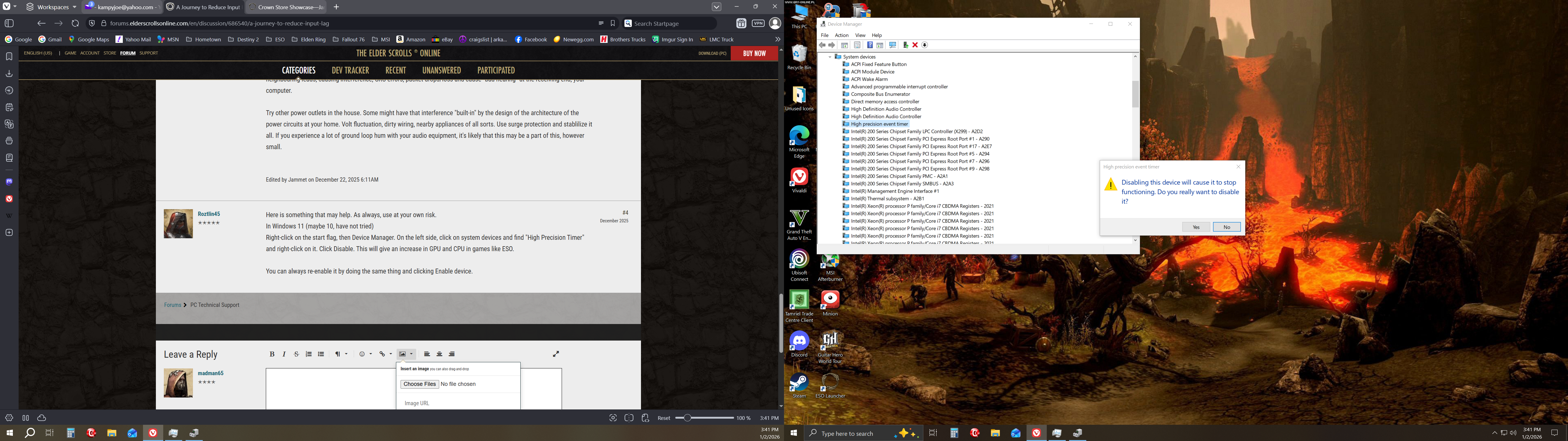
 Roztlin45✭✭✭✭✭Here is something that may help. As always, use at your own risk.
In Windows 11 (maybe 10, have not tried)
Right-click on the start flag, then Device Manager. On the left side, click on system devices and find "High Precision Timer" and right-click on it. Click Disable. This will give an increase in GPU and CPU in games like ESO.
You can always re-enable it by doing the same thing and clicking Enable device.0 -
 ZomZom✭✭✭FWIW when I switch from my PS5 Pro to my Razer Blade 15 2080 it feels laggy in comparison.0