Update 50 is now available for testing on the PTS! You can read the latest patch notes here: https://forums.elderscrollsonline.com/en/categories/pts
Account Sign In - Not Working

Fentras
✭✭
A few days ago, I noticed that the SIGN IN link on the login page is no longer working for me:
https://account.elderscrollsonline.com/en-us/login
Nothing happens when clicking on the SIGN IN link.
I have verified the issue on multiple browsers and PCs.
I was hoping to see a thread here regarding this issue.

https://account.elderscrollsonline.com/en-us/login
Nothing happens when clicking on the SIGN IN link.
I have verified the issue on multiple browsers and PCs.
I was hoping to see a thread here regarding this issue.
0
-
 TaSheen✭✭✭✭✭
✭✭✭✭✭Odd. Yes, not working for me either! Google Chrome - and yes, working in Edge. Good thing I don't need to get into my accounts....
@ZOS_Kevin!Edited by TaSheen on April 18, 2025 3:58PM______________________________________________________
"But even in books, the heroes make mistakes, and there isn't always a happy ending." Mercedes Lackey, Into the West
PC NA, PC EU (non steam)- four accounts, many alts....0 -
Fentras✭✭A few days ago, I noticed that the SIGN IN link on the login page is no longer working for me:
https://account.elderscrollsonline.com/en-us/login
Nothing happens when clicking on the SIGN IN link.
I have verified the issue on multiple browsers and PCs.
I was hoping to see a thread here regarding this issue.
FYI, I was able to resolve my login issue via Edge by clearing the browser cache.
I guess I need to do that with my other browsers as well.
Thanks for the feedback, as it helped me to resolve my issue.0 -
 Tobyja✭✭✭✭✭Seems that some dependencies changes from "essetial cookies" to "functional cookies"? Don't know, but happens to me too (Edge).
On the ESO-site bottom line, by clicking "do not sell or share my personal info"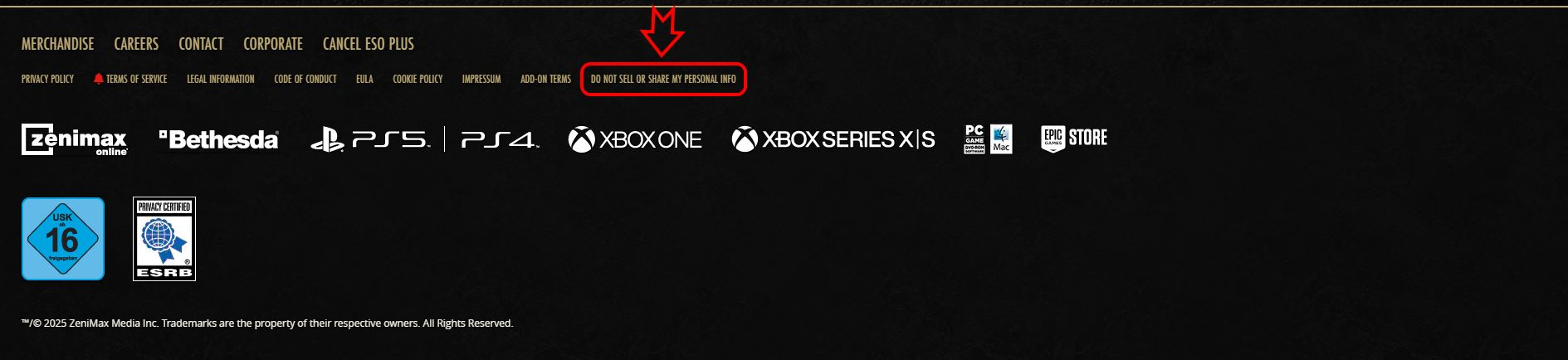
u can "activate" (upper right) the setting for "funktional cookies", save settings and maybe reload site.
I play the german version, but it should look similar in english.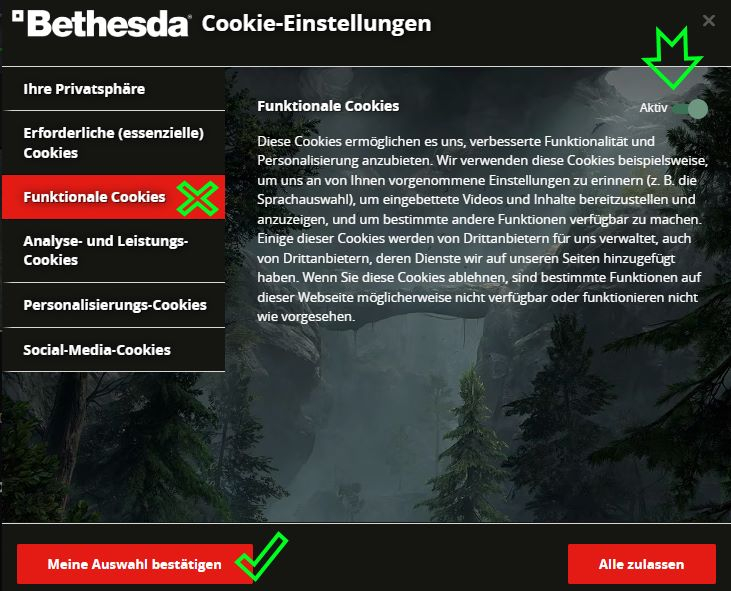
It also do not work, as long as the cookie banner hasn't been confirmed. [not sure, if this sounds right in english ] "Am Beginn einer jeden Katastrophe steht eine Vermutung."1
 -
 Pixiepumpkin✭✭✭✭✭
✭✭✭IT HAS NOT worked for me for two days on EDGE or CHROME
I had to use Firefox to log in. Same with wife."Class identity isn’t just about power or efficiency. It’s about symbolic clarity, mechanical cohesion, and a shared visual and tactical language between players." - sans-culottes0


