The issues related to Epic players logging in to the North American and European PC/Mac megaservers have been resolved at this time. If you continue to experience difficulties at login, please restart your client. Thank you for your patience!
HEY ESO, WHAT DID YOU BREAK THIS TIME?

yizumannub19_ESO
Soul Shriven
You broke something during maintenance, I can't login now. Getting all kinds of errors each time I try to login. permission denied messages, login time out, all sorts of messages.
FB postings are going nuts over there.
Can't anyone do anything right???
FB postings are going nuts over there.
Can't anyone do anything right???
0
-
 Brittany_Joy✭✭✭✭I got the same error and was able to repair it but I exited the game and started it up again and now it is back to repairing..0
 -
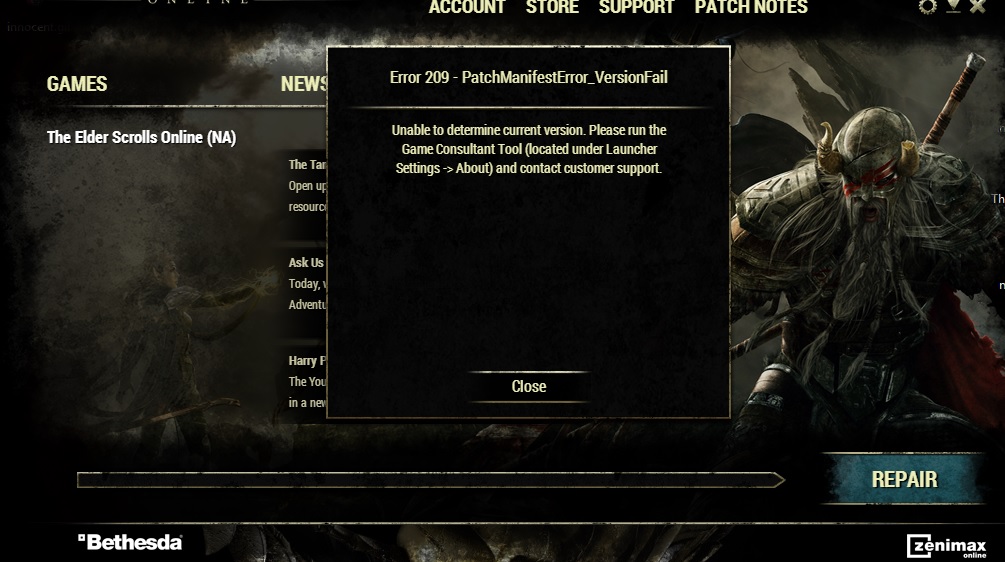
yizumannub19_ESOSoul ShrivenThe patch didn't start when I had hit "play", then I quit the game, then the patch begain. After the patch, my client is messed up now. I hit the "repair" button and it won't fix it. It said to contact support.0
-
ThericSoul ShrivenI had the same issue. Spoke to a friend of mine, and he mentioned a patch today. Exited the game and got back to the launcher in time to see it START downloading. This was after 10 minutes of being AFK after clicking the launcher icon on my desktop.0
-
 nickroc✭✭well all these "fixes" ended up breaking something else and no longer can do anything but reinstall... if this isnt fixed by the time the clients downloaded ill be about done with this *** game.Error 301: You purchased The Elder Scrolls Online0
 -
yizumannub19_ESOSoul ShrivenI tried "repair" again and I'm getting this message, I don't understand what it is this message wants me to look for....
0 -
ThericSoul ShrivenAnd...after the update, I get an error stating that my version cannot be confirmed. So now I'm repairing ("repair" replaced my "play" button after this error message appeared), and hoping I can play sometime this evening...0
-
dan_x21rwb17_ESOSoul ShrivenI was having the above issue as well... clicking repair wasn't doing anything either... so i closed the launcher and re-opened it... came up with play... tried to log in... failed... tried a second time... now i'm able to play again. So no idea wtf was up with that.0
-
yizumannub19_ESOSoul ShrivenI submitted a ticket for my problem. Will await a response, if I ever get one.0
-
metrunecb16_ESOSoul ShrivenIt looks like it's incompatibility with mods. Uninstalling them fixed it for me0
-
ThericSoul ShrivenI have no mods at all. I think my problem was the fact that the update didn't start right away, and I clicked "play" before I was supposed to.0
-
yizumannub19_ESOSoul ShrivenI finally figured it out, somehow the client itself on the desktop link is messed up which is giving me the error, so I went to the ESO folder itself and found the launcher there and tried it. It worked just fine.
So I saved it as my desktop lcon and deleted the other one.
1 -
degausser781b14a_ESOSoul Shrivenyizumannub19_ESO wrote: »I finally figured it out, somehow the client itself on the desktop link is messed up which is giving me the error, so I went to the ESO folder itself and found the launcher there and tried it. It worked just fine.
So I saved it as my desktop lcon and deleted the other one.
This saved my screen from a very angry fist going through it. You should bill me for your spot on advice!0 -
 Auralia✭✭✭No matter how many times I repair, launch as admin, I keep getting login time out problem. And I do not use any mods at all.0
 -
 MercyKilling✭✭✭✭✭yizumannub19_ESO wrote: »I tried "repair" again and I'm getting this message, I don't understand what it is this message wants me to look for....
I get this exact same thing now.
Odd thing is..I can launch ESO directly from the .exe in the game file just fine. It's the launcher that's borked.I am not spending a single penny on the game until changes are made to the game that I want to see.
1) Remove having to be in a guild to sell items to other players at a kiosk.
2) Cosmetic modding for armor and clothing.
3) Difficulty slider.
4) Fully customizable player housing that isn't tied to anything in the game other than having the correct resources and enough gold to build. Don't tie it to PvP, guild membership, or anything at all. Oh, make it instanced so as not to take up world map space, too. Zeni screwed this one up already.
Any /one/ of these things implemented would get me spending again, maybe even subbing.0 -
 Shaie✭✭✭Tried to login, got a login timeout error, tried again & got a server is offline error. Tried again, login timeout so I closed the game & suddenly the launcher started patching. After that, same as what's pictured above. I also went to the game files & pulled out "eso" application as a desktop shortcut & the game launched just fine. Hopefully the patch is also included in that, but with that weird error up there & no way to fix it there's no real way of knowing.0
 -
youngblood97b14_ESO wrote: »I must be blind me no see "repair" button

you have to run the Launcher NOT the game exe..
I also ran into a problem after patch update I was unable to log into the game it is now 1:00 AM Wednesday morning and I resorted to trying reinstalling the game and the DL Is horribly slow.. I may not get to play till later..
Sigh!!!!!!
0
