Maintenance for the week of April 13:
• PC/Mac: No maintenance – April 13
• PC/Mac: No maintenance – April 13
210 - Patch Manifest Error

Login Error Codes: Their Meaning and Solutions
by ZOS_JasonL
209/210 - Patch Manifest Error
This error occurs when selecting the EU server. Users instructed to uninstall/reinstall client.
First of all I'm playing on the NA megaserver and getting this error.
Second, if I have to reinstall this game after every god damn patch you roll out, I'll be downloading the bloody game for half of the 30 days included playtime and I'm gonna run up my download bandwidth for this month. The game is what, 20GB to download? I don't know the correct size, but it's 30GB on my drive right now.
I'm not willing to go through that because you CAN'T bloody patch the game correctly.
Oh sure some will come flame in here: Ohhhh it's just been released, have some patience. You know what. Bite me!
I have better things to do then sit here and be angry about a bloody game not working, there more fish in the sea so to speak. Heck I'll just go back to playing Skyrim again. At least that works!
Subscription canceled! Which is another *** you guys let loose LOL. Thank god I used PayPal and didn't get charged right away like so many others.
0
-
 GossiTheDog✭✭✭✭✭If you get that error, close the launcher, restart it - press Game Options, click Repair. It should fix it.0
 -
GossiTheDog✭✭✭✭✭Okay, I'm not psychic so didn't realise that. Browse to ESO folder in c:\program files (x86)\zenimax and look for the patchdepot folder (under Elder Scrolls Online -> Game, I think). Delete contents. Repair.0
-
I know and I'm sorry for snapping at you. It is definitely not your fault. And thank you for trying to help.
Though I can't find that folder. Also I installed the game on my D drive under "Zenimax Online". There is a depot folder in D :\Zenimax Online\The Elder Scrolls Online\depot ... do you mean that?Edited by TenshiRyu on April 8, 2014 1:49PM0 -
GossiTheDog✭✭✭✭✭No probs. You're on the right track, but there's a patch folder somewhere but I don't know exactly where (not at my ESO PC now). If you can find the patch folder, rename it (it has a bunch of ZIPs in it). That causes the patches to redownload.0
-
Unfortunately no such thing as a patch folder here
 . There aren't many folders at all in there.
Also no luck in the %appdata% folder on the C-drive or the ESO folder in My Documents.0 -
Looks like I'm gonna have to reinstall after all
 . But this will be a one-time thing, I can promise you that Bethesda. If it happens again your game gets uninstalled again alright, but I won't be reinstalling it.
Gonna do it later tonight before I go on night shift.Edited by TenshiRyu on April 8, 2014 2:03PM0 -
Well, whatdaya know ... more problems:
1. simply unistalling from the launcher and then reinstalling doesn't work, I got the same error
2. so I uninstalled everything and downloaded the launcher again and installed that
3. which worked fine and now after launching I get this (see screenshot) and THAT'S IT.
Are you kidding me!?
Oh and what the hell is this, when I started the installation of the launcher, not the game itself no, just the installation of the launcher, it switched to fullscreen suddenly ( I was like WTF ) and showed some dev logos like an intro for the game itself.
How full of yourself you have to be to add a GOD DAMN intro to your launcher installation. Considering the state of this game you should be happy that you don't have people pillaging your offices for christ sake. Better put some work in the actual game instead of crap like that!!!!0 -
 ZOS_AmeliaR✭✭✭✭✭Hey folks. If you're continuing to get Error 210, please do the following:
- Run ESO's Game Consultant (instructions on how to do this can be found here).
- Once the Game Consultant has finished running, click Open Report
- Search the file (Ctrl-F for most PC users) for pinging launcher.bethesda.net
- Copy that line and paste it as a comment in this thread
NOTE: Under the "pinging" line, you'll likely see "Request timed out" - don't be alarmed, as this is expected behavior.0 -
 Pinging launcher.bethesda.net [54.197.250.95] with 32 bytes of data:
Request timed out.
Request timed out.
Request timed out.
Request timed out.
Ping statistics for 54.197.250.95:
Packets: Sent = 4, Received = 0, Lost = 4 (100% loss),
Ping test failed!1 -
 Darlgon✭✭✭✭✭
✭Interesting results.. no launcher.bethesda.net tho.PING RESULTS
Pinging a1092.d.akamai.net [23.62.6.122] with 32 bytes of data:
Reply from 23.62.6.122: bytes=32 time=66ms TTL=54
Reply from 23.62.6.122: bytes=32 time=34ms TTL=54
Reply from 23.62.6.122: bytes=32 time=39ms TTL=54
Reply from 23.62.6.122: bytes=32 time=37ms TTL=54
Ping statistics for 23.62.6.122:
Packets: Sent = 4, Received = 4, Lost = 0 (0% loss),
Approximate round trip times in milli-seconds:
Minimum = 34ms, Maximum = 66ms, Average = 44ms
Pathping RESULTS
Tracing route to a1092.d.akamai.net [23.62.6.122]
over a maximum of 30 hops:
0 10.189.10.102
1 10.189.10.1
2 10.164.240.1
3 96.34.54.20
4 96.34.2.20
5 96.34.0.14
6 96.34.0.12
7 96.34.0.59
8 96.34.3.162
9 96.34.148.22
10 23.62.6.122
Computing statistics for 2 seconds...
Source to Here This Node/Link
Hop RTT Lost/Sent = Pct Lost/Sent = Pct Address
0 10.189.10.102
0/ 1 = 0% |
1 1ms 0/ 1 = 0% 0/ 1 = 0% 10.189.10.1
0/ 1 = 0% |
2 --- 1/ 1 =100% 1/ 1 =100% 10.164.240.1
0/ 1 = 0% |
3 9ms 0/ 1 = 0% 0/ 1 = 0% 96.34.54.20
0/ 1 = 0% |
4 18ms 0/ 1 = 0% 0/ 1 = 0% 96.34.2.20
0/ 1 = 0% |
5 18ms 0/ 1 = 0% 0/ 1 = 0% 96.34.0.14
0/ 1 = 0% |
6 --- 1/ 1 =100% 1/ 1 =100% 96.34.0.12
0/ 1 = 0% |
7 --- 1/ 1 =100% 1/ 1 =100% 96.34.0.59
0/ 1 = 0% |
8 --- 1/ 1 =100% 1/ 1 =100% 96.34.3.162
0/ 1 = 0% |
9 --- 1/ 1 =100% 1/ 1 =100% 96.34.148.22
0/ 1 = 0% |
10 37ms 0/ 1 = 0% 0/ 1 = 0% 23.62.6.122
Trace complete.Edited by Darlgon on April 9, 2014 12:48PMPower level to CP160 in a week:
Where is the end game? You just played it.
Why don't I have 300+ skill points? Because you skipped content along the way.
Where is new content? Sigh.0 -
Here are the results of the test on my computer:pinging: patcher.elderscrollsonline.com
Pinging a1092.d.akamai.net [2.16.218.18] with 32 bytes of data:
Reply from 2.16.218.18: bytes=32 time=17ms TTL=56
Reply from 2.16.218.18: bytes=32 time=17ms TTL=56
Reply from 2.16.218.18: bytes=32 time=17ms TTL=56
Reply from 2.16.218.18: bytes=32 time=16ms TTL=56
Ping statistics for 2.16.218.18:
Packets: Sent = 4, Received = 4, Lost = 0 (0% loss),
Approximate round trip times in milli-seconds:
Minimum = 16ms, Maximum = 17ms, Average = 16ms
pinging: launcher.bethesda.net
Pinging launcher.bethesda.net [54.197.250.95] with 32 bytes of data:
Request timed out.
Request timed out.
Request timed out.
Request timed out.
Ping statistics for 54.197.250.95:
Packets: Sent = 4, Received = 0, Lost = 4 (100% loss),
Ping test failed!
Pathping RESULTS
pathing: patcher.elderscrollsonline.com
Tracing route to a1092.d.akamai.net [2.16.218.41]
over a maximum of 30 hops:
0 192.168.178.20
1 192.168.178.1
2 * 62.52.52.207
3 195.71.134.34
4 * 62.53.0.105
5 * 176.52.173.177
6 * 172.52.252.174
7 * 2.16.218.41
Computing statistics for 1 seconds...
Source to Here This Node/Link
Hop RTT Lost/Sent = Pct Lost/Sent = Pct Address
0 192.168.178.20
0/ 1 = 0% |
1 --- 1/ 1 =100% 1/ 1 =100% 192.168.178.1
0/ 1 = 0% |
2 16ms 0/ 1 = 0% 0/ 1 = 0% 62.52.52.207
0/ 1 = 0% |
3 17ms 0/ 1 = 0% 0/ 1 = 0% 195.71.134.34
0/ 1 = 0% |
4 17ms 0/ 1 = 0% 0/ 1 = 0% 62.53.0.105
0/ 1 = 0% |
5 20ms 0/ 1 = 0% 0/ 1 = 0% 176.52.173.177
0/ 1 = 0% |
6 --- 1/ 1 =100% 1/ 1 =100% 172.52.252.174
0/ 1 = 0% |
7 17ms 0/ 1 = 0% 0/ 1 = 0% 2.16.218.41
Trace complete.
pathing: launcher.bethesda.net
Tracing route to launcher.bethesda.net [54.197.250.95]
over a maximum of 30 hops:
0 192.168.178.20
1 192.168.178.1
2 * 62.52.52.207
3 * 195.71.134.46
4 * 62.53.0.109
5 * 84.16.10.189
6 * 94.142.127.38
7 * 212.73.207.45
8 4.69.168.126
9 4.69.161.97
10 4.69.137.58
11 4.69.134.154
12 4.69.149.141
13 4.28.125.110
14 72.21.220.141
15 205.251.245.63
16 * * *
Computing statistics for 3 seconds...
Source to Here This Node/Link
Hop RTT Lost/Sent = Pct Lost/Sent = Pct Address
0 192.168.178.20
0/ 1 = 0% |
1 0ms 0/ 1 = 0% 0/ 1 = 0% 192.168.178.1
0/ 1 = 0% |
2 17ms 0/ 1 = 0% 0/ 1 = 0% 62.52.52.207
0/ 1 = 0% |
3 17ms 0/ 1 = 0% 0/ 1 = 0% 195.71.134.46
0/ 1 = 0% |
4 17ms 0/ 1 = 0% 0/ 1 = 0% 62.53.0.109
0/ 1 = 0% |
5 17ms 0/ 1 = 0% 0/ 1 = 0% 84.16.10.189
0/ 1 = 0% |
6 31ms 0/ 1 = 0% 0/ 1 = 0% 94.142.127.38
0/ 1 = 0% |
7 26ms 0/ 1 = 0% 0/ 1 = 0% 212.73.207.45
0/ 1 = 0% |
8 26ms 0/ 1 = 0% 0/ 1 = 0% 4.69.168.126
0/ 1 = 0% |
9 26ms 0/ 1 = 0% 0/ 1 = 0% 4.69.161.97
0/ 1 = 0% |
10 109ms 0/ 1 = 0% 0/ 1 = 0% 4.69.137.58
0/ 1 = 0% |
11 107ms 0/ 1 = 0% 0/ 1 = 0% 4.69.134.154
0/ 1 = 0% |
12 104ms 0/ 1 = 0% 0/ 1 = 0% 4.69.149.141
1/ 1 =100% |
13 --- 1/ 1 =100% 0/ 1 = 0% 4.28.125.110
0/ 1 = 0% |
14 --- 1/ 1 =100% 0/ 1 = 0% 72.21.220.141
0/ 1 = 0% |
15 --- 1/ 1 =100% 0/ 1 = 0% 205.251.245.63
Trace complete.0 -
 I got same as the guy earlier in the comments
Pinging launcher.bethesda.net [54.217.220.128] with 32 bytes of data:
Request timed out.
Request timed out.
Request timed out.
Request timed out.
Ping statistics for 54.217.220.128:
Packets: Sent = 4, Received = 0, Lost = 4 (100% loss),
Ping test failed!
How are all these different?.... fyi... my version says Version 1.0.0.9... ect ..dont think mines recognized the patch Edited by danny_zuko2309b16_ESO on April 9, 2014 8:19AM0
 -
Alright this is god damn pissing me off now. I can't install this bloody game, because all I get is the stupid loading screen from my earlier screenshot! My included game time is ticking away while I'm sitting here waiting for you to fix the god damn game.
AM I GETTING THESE LOST DAYS BACK!? probably not huh?0 -
ZOS_LenaicR✭✭✭✭Hi there,
We would like to be sure about a point:
- Did you manage to uninstall ESO via the Launcher?
For a clean uninstallation, you need to do so. Do not use the Control Panel / Programs and Features.
If you didn't, please do the following.0 -
Yes I tried the uninstall via the launcher, but when trying to reinstall I just received the same error "210 - Patch Manifest Error". That's when I uninstalled the whole thing and downloaded the installer from your website. And now the damn thing doesn't go any further then the bloody loading screen.0
-
Yes I tried the uninstall via the launcher, but when trying to reinstall I just received the same error "210 - Patch Manifest Error". That's when I uninstalled the whole thing and downloaded the installer from your website. And now the damn thing doesn't go any further then the bloody loading screen.
Ok so i did what the mod said and it didn't work still got the 210 error. After I did what the mod said I had to erase all folder in the install folder. Download a new install client from the website. After that the client was stuck in the update then went to loading and froze. I had to check my anti virus to see if that was the issue. For some reason my anti virus would not allow me to download the patch. I had to shut down the Web scans before it would continue. All of this because someone screwed up a patch. Everyone who received this error should get some kind of compensation back. By the time my game is done I would of lost over 2 days of play. So far I am not at all impressed with their patch work. They really need to get their *** together and fast. If there mods what to give us instructions they need to make sure it's right...
0 -
Same issue for me as Smasher03. My launcher is currently downloading the game files and should be done once I get off work. 22GB takes a while.
Apparently my Avira Internet Security's web protection component was blocking the launcher from updating. Which means the launcher is most likely writing with HTML/PHP and/or Javascript, which is why the web component was even affecting it.
The web protection component of Avira is meant to keep you safe from phishing websites or harmful scripts running on websites, not from applications running on your computer, that's what the virus scan and firewall are for.
If you would have written the launcher in the native language (C#/C++ or even JAVA) this wouldn't have been a problem. This is not looking good for the future of the game, if the devs can't even program the bloody launcher correctly.Edited by TenshiRyu on April 9, 2014 8:33PM0 -
Same issue for me as Smasher03. My launcher is currently downloading the game files and should be done once I get off work. 22GB takes a while.
Apparently my Avira Internet Security's web protection component was blocking the launcher from updating. Which means the launcher is most likely writing with HTML/PHP and/or Javascript, which is why the web component was even affecting it.
The web protection component of Avira is meant to keep you safe from phishing websites or harmful scripts running on websites, not from applications running on your computer, that's what the virus scan and firewall are for.
If you would have written the launcher in the native language (C#/C++ or even JAVA) this wouldn't have been a problem. This is not looking good for the future of the game, if the devs can't even program the bloody launcher correctly.
I have the SAME program as you. Avira Security Suite. how are you getting around it. It download most of it now im getting the error again. I cant seem to add it to the exception list.
0 -
i dont have to have to keep shutting down my web protection just for patching. Something needs to be changed.1
-
I have the SAME program as you. Avira Security Suite. how are you getting around it. It download most of it now im getting the error again. I cant seem to add it to the exception list.
To disable the web protection just right click the icon in the system tray and you should see several check marks. One of them is for the web protection. Just disable it until you have updated and then re-enable.
Unfortunately I can't tell you yet if I have that issue after the update. I'm currently at work. I started the download before I went. Will check when I get home though and let ya know.Edited by TenshiRyu on April 10, 2014 12:22AM0 -
Ok so the installation worked fine. BUT, afterwards I re-enabled my web protection and restarted the launcher and guess what ... I get a god damn "210 - Patch Manifest Error" AGAIN. And the Play button is replaced with a Repair button. Disabling the web protection fixes the issue.
So every time I wanna play your game I have to lower the security of my computer!?
THIS IS SIMPLY NOT AN OPTION! FIX YOUR GOD DAMN GAME!0 -
Ok so the installation worked fine. BUT, afterwards I re-enabled my web protection and restarted the launcher and guess what ... I get a god damn "210 - Patch Manifest Error" AGAIN. And the Play button is replaced with a Repair button. Disabling the web protection fixes the issue.
So every time I wanna play your game I have to lower the security of my computer!?
THIS IS SIMPLY NOT AN OPTION! FIX YOUR GOD DAMN GAME!
Add this to your except list. http://launcher.bethesda.net
0 -
 Areo✭i am a returning player and i keep running into the same problem, i downloaded a new installer from the eso account page installed as normal and run into the below pop up
Error 201 -PatchManifestError_DownloadFail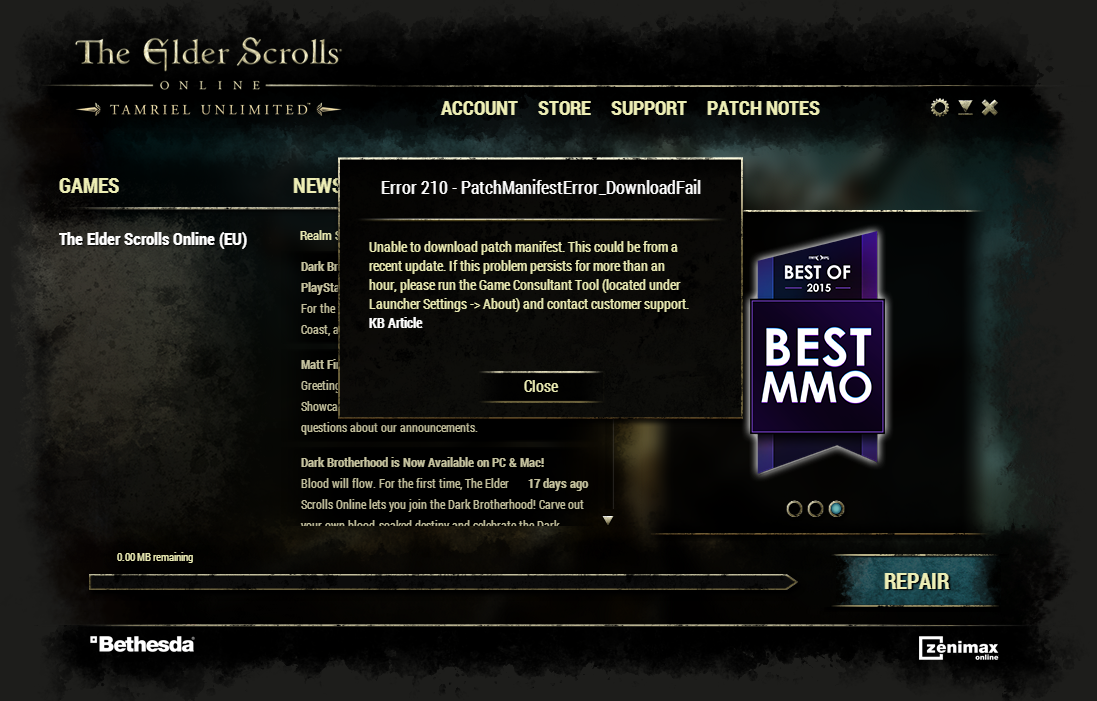
Steps ive tryed:
https://help.elderscrollsonline.com/app/answers/detail/a_id/22414/~/what-do-i-do-if-i-get-error-210-patchmanifesterror_downloadfail-on-windows?
&
https://help.elderscrollsonline.com/app/answers/detail/a_id/6486/#dss
nothing seems to be working, does anyone have any more advice for me to tryEdited by Areo on June 18, 2016 8:38AM0