Maintenance for the week of August 24:
• PC/Mac: No maintenance – August 24
• PC/Mac: No maintenance – August 24
Two layers of textures in certain buildings? (incl. screenshots)
-
 Etaniel✭✭✭✭✭
✭✭I Highlander l wrote: »
Seen this as well. It's also the case in Cyrodil with some rocks that you can no longer see after respawning in certain keeps..0 -
 Gidorick✭✭✭✭✭
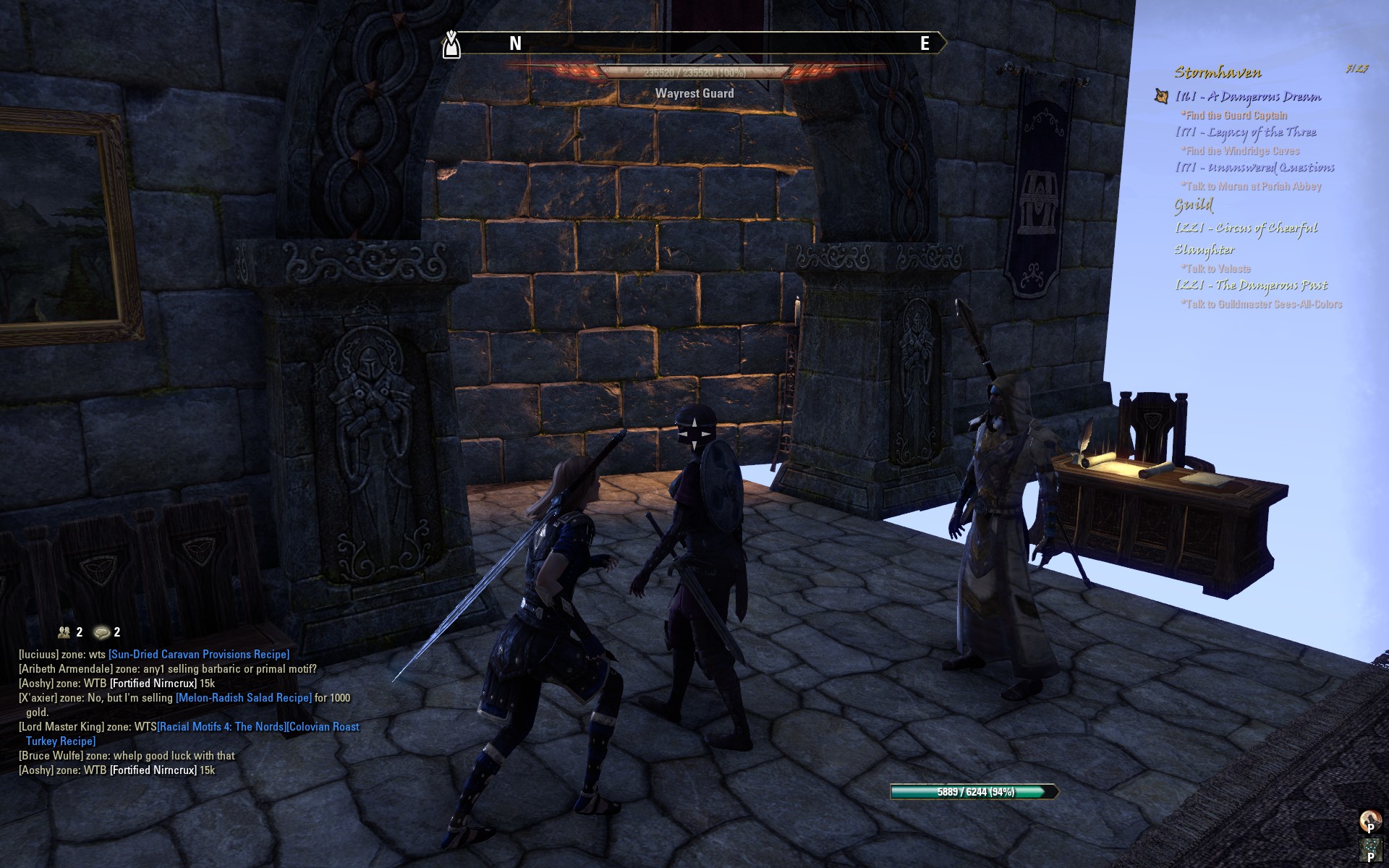
✭✭✭✭✭So has there been any development on this issue? It seems to be getting worse for me. I used to NEVER see this, now it's not at all irregular for me to open a door and see:
What ESO really needs is an Auction Horse.
That's right... Horse.
Click HERE to discuss.
Want more crazy ideas? Check out my Concept Repository!2 -
 Moonshadow66✭✭✭✭✭
✭So has there been any development on this issue? It seems to be getting worse for me. I used to NEVER see this, now it's not at all irregular for me to open a door and see:
Wow, I thought this thread was forgotten for good now, thanks for reactivating it, @Gidorick Yeah, I'm still getting this whenever I enter a building, too, ever since update 6. Also the "double layers" are still there and no one of the officials has said any word about it yet.. Venus Ocean - Breton Sorceress VR16, EP, Tamriel Hero | Gixia - Breton Sorceress VR16, EP, Tamriel Hero
Frances Demnevanni - Breton Dragonknight VR16, EP, Tamriel Hero | Raygee - Breton Nightblade VR16, EP, Tamriel Hero
Lady Olivieri - Breton Nightblade VR16, EP, Tamriel Hero | Donna Demnevanni - Breton Templar VR16, DC, Tamriel Hero
Elaine Benes - Breton Templar VR16, EP | Ray McCluck - Breton Sorcerer VR16, EP
Moonshadow Demnevanni - Dunmer Dragonknight Lvl 50, EP | Jamie Stacey - Redguard Templar Lvl 50, EP
Caia Cosades - Imperial Nightblade, EP0 -
Moonshadow66✭✭✭✭✭
✭It's also really "great" when this happens and doesn't load at all, like f.e. with my 2 last characters that have done the Coldharbour zone. When I was supposed to kill that "Thane" (Everfull Flagon quest), that small dungeon did not load, I couldn't see walls or the floor, not even urns or something. So I had to use the map (!) to make my way through the hallways to the boss room in hope it would load by that time. Well, it did, but I hate playing like this.Venus Ocean - Breton Sorceress VR16, EP, Tamriel Hero | Gixia - Breton Sorceress VR16, EP, Tamriel Hero
Frances Demnevanni - Breton Dragonknight VR16, EP, Tamriel Hero | Raygee - Breton Nightblade VR16, EP, Tamriel Hero
Lady Olivieri - Breton Nightblade VR16, EP, Tamriel Hero | Donna Demnevanni - Breton Templar VR16, DC, Tamriel Hero
Elaine Benes - Breton Templar VR16, EP | Ray McCluck - Breton Sorcerer VR16, EP
Moonshadow Demnevanni - Dunmer Dragonknight Lvl 50, EP | Jamie Stacey - Redguard Templar Lvl 50, EP
Caia Cosades - Imperial Nightblade, EP0 -
Moonshadow66✭✭✭✭✭
✭I need to post/ask again. @Gidorick What DirectX version are you using? Since someone in this thread posted it's a DX9 issue and would work with DX11. If you're using DX11 though, then it must be something else. I'm using 9.Venus Ocean - Breton Sorceress VR16, EP, Tamriel Hero | Gixia - Breton Sorceress VR16, EP, Tamriel Hero
Frances Demnevanni - Breton Dragonknight VR16, EP, Tamriel Hero | Raygee - Breton Nightblade VR16, EP, Tamriel Hero
Lady Olivieri - Breton Nightblade VR16, EP, Tamriel Hero | Donna Demnevanni - Breton Templar VR16, DC, Tamriel Hero
Elaine Benes - Breton Templar VR16, EP | Ray McCluck - Breton Sorcerer VR16, EP
Moonshadow Demnevanni - Dunmer Dragonknight Lvl 50, EP | Jamie Stacey - Redguard Templar Lvl 50, EP
Caia Cosades - Imperial Nightblade, EP0 -
Gidorick✭✭✭✭✭
✭✭✭✭✭DirectX 11 @Moonshadow66. I'm updating drivers and whatnow now. I'll let the thread know if that seems to fix the issue.What ESO really needs is an Auction Horse.
That's right... Horse.
Click HERE to discuss.
Want more crazy ideas? Check out my Concept Repository!0 -
Moonshadow66✭✭✭✭✭
✭DirectX 11 @Moonshadow66. I'm updating drivers and whatnow now. I'll let the thread know if that seems to fix the issue.
Thank you Venus Ocean - Breton Sorceress VR16, EP, Tamriel Hero | Gixia - Breton Sorceress VR16, EP, Tamriel Hero
Frances Demnevanni - Breton Dragonknight VR16, EP, Tamriel Hero | Raygee - Breton Nightblade VR16, EP, Tamriel Hero
Lady Olivieri - Breton Nightblade VR16, EP, Tamriel Hero | Donna Demnevanni - Breton Templar VR16, DC, Tamriel Hero
Elaine Benes - Breton Templar VR16, EP | Ray McCluck - Breton Sorcerer VR16, EP
Moonshadow Demnevanni - Dunmer Dragonknight Lvl 50, EP | Jamie Stacey - Redguard Templar Lvl 50, EP
Caia Cosades - Imperial Nightblade, EP0 -
 starkerealm✭✭✭✭✭
✭✭✭✭✭It might not be an issue for you, but you might check to see what your system's temperatures are looking like... or just clean out the system.
When this was happening to me, it turned out my cats had taken to sleeping next to one of my tower's heat exhausts, and shed into the system.0 -
 MornaBaine✭✭✭✭✭
✭✭✭✭✭And still no further official word on the original texture weirdness that occasioned the OP?PAWS (Positively Against Wrip-off Stuff) - Say No to Crown Crates!0 -
Moonshadow66✭✭✭✭✭
✭starkerealm wrote: »It might not be an issue for you, but you might check to see what your system's temperatures are looking like... or just clean out the system.
When this was happening to me, it turned out my cats had taken to sleeping next to one of my tower's heat exhausts, and shed into the system.
Thanks for the tips Unfortunately, I've checked it already (the temperature is average/normal range), and I also cleaned both the system (data trash etc) and the whole tower from inside (especially the fans). The latter helped to gain a bit more fps, but with the non-loading textures it's still the same.
This started exactly with update 6, also on PTS I could see this already, there's something very different than before where this never happened. After testing it on PTS and went back to the live server, everything was like normal again. And vice versa when I went to PTS again. It's the game..Venus Ocean - Breton Sorceress VR16, EP, Tamriel Hero | Gixia - Breton Sorceress VR16, EP, Tamriel Hero
Frances Demnevanni - Breton Dragonknight VR16, EP, Tamriel Hero | Raygee - Breton Nightblade VR16, EP, Tamriel Hero
Lady Olivieri - Breton Nightblade VR16, EP, Tamriel Hero | Donna Demnevanni - Breton Templar VR16, DC, Tamriel Hero
Elaine Benes - Breton Templar VR16, EP | Ray McCluck - Breton Sorcerer VR16, EP
Moonshadow Demnevanni - Dunmer Dragonknight Lvl 50, EP | Jamie Stacey - Redguard Templar Lvl 50, EP
Caia Cosades - Imperial Nightblade, EP1 -
Moonshadow66✭✭✭✭✭
✭MornaBaine wrote: »And still no further official word on the original texture weirdness that occasioned the OP?
I don't expect it anymore tbh, although they said they'll "look into it", as usual.Venus Ocean - Breton Sorceress VR16, EP, Tamriel Hero | Gixia - Breton Sorceress VR16, EP, Tamriel Hero
Frances Demnevanni - Breton Dragonknight VR16, EP, Tamriel Hero | Raygee - Breton Nightblade VR16, EP, Tamriel Hero
Lady Olivieri - Breton Nightblade VR16, EP, Tamriel Hero | Donna Demnevanni - Breton Templar VR16, DC, Tamriel Hero
Elaine Benes - Breton Templar VR16, EP | Ray McCluck - Breton Sorcerer VR16, EP
Moonshadow Demnevanni - Dunmer Dragonknight Lvl 50, EP | Jamie Stacey - Redguard Templar Lvl 50, EP
Caia Cosades - Imperial Nightblade, EP0 -
Gidorick✭✭✭✭✭
✭✭✭✭✭So pretty much, it's still happening for me... I pulled down my graphic levels and it happens less and less frequently. So I think it has to do with the capabilities of my system. Weird that it didn't happen before but it happens now.What ESO really needs is an Auction Horse.
That's right... Horse.
Click HERE to discuss.
Want more crazy ideas? Check out my Concept Repository!0 -
Moonshadow66✭✭✭✭✭
✭So pretty much, it's still happening for me... I pulled down my graphic levels and it happens less and less frequently. So I think it has to do with the capabilities of my system. Weird that it didn't happen before but it happens now.
Thank you for testing and reporting back, @Gidorick Yeah, it IS weird that it didn't happen before but now it does, it's the same here.
What I think that causes that either this:
1) There must be something different with the wall- and floor textures now (also some other stuff shows up only after a while, though) which takes longer to load for some reason,
or this:
2) It could have something to do with something I found in the usersettings file back then when update 6 was out and I got 30-minutes loading screens. I compared that file to an older one and saw that some lines were different, including this: "SET CacheDataPath "machine:/Cache2/"". I changed it back to the original/previous version and removed the "2", and the endless loading screens were gone. But these no-textures or double textures when entering a building are still there, so I guess there must be something else besides of this causing it, even if it's related to it.
Although it seems we're the minority here having this issue, I still hope this can be fixed somehow.Venus Ocean - Breton Sorceress VR16, EP, Tamriel Hero | Gixia - Breton Sorceress VR16, EP, Tamriel Hero
Frances Demnevanni - Breton Dragonknight VR16, EP, Tamriel Hero | Raygee - Breton Nightblade VR16, EP, Tamriel Hero
Lady Olivieri - Breton Nightblade VR16, EP, Tamriel Hero | Donna Demnevanni - Breton Templar VR16, DC, Tamriel Hero
Elaine Benes - Breton Templar VR16, EP | Ray McCluck - Breton Sorcerer VR16, EP
Moonshadow Demnevanni - Dunmer Dragonknight Lvl 50, EP | Jamie Stacey - Redguard Templar Lvl 50, EP
Caia Cosades - Imperial Nightblade, EP0 -
starkerealm✭✭✭✭✭
✭✭✭✭✭Okay, way back when, I said the second layer of textures had to be getting flushed from the client after the correct ones loaded in. And, here's the proof of that:
If it wasn't purging those textures, you'd see this in Wayrest's Bank.0 -
 nastuug✭✭✭✭✭
✭So has this been pegged as being caused local processing power or network speed/quality?0 -
Moonshadow66✭✭✭✭✭
✭starkerealm wrote: »Okay, way back when, I said the second layer of textures had to be getting flushed from the client after the correct ones loaded in. And, here's the proof of that:
If it wasn't purging those textures, you'd see this in Wayrest's Bank.
Yeah, I've been there pretty often lately, too, same picture
I've noticed that these "double layers" cannot actually be double layers, otherwise I still would see the pillar in the Daggerfall Fighter's Guild which is not the case. But I still would be interested in what these other textures are, I haven't seen them before update 6.Venus Ocean - Breton Sorceress VR16, EP, Tamriel Hero | Gixia - Breton Sorceress VR16, EP, Tamriel Hero
Frances Demnevanni - Breton Dragonknight VR16, EP, Tamriel Hero | Raygee - Breton Nightblade VR16, EP, Tamriel Hero
Lady Olivieri - Breton Nightblade VR16, EP, Tamriel Hero | Donna Demnevanni - Breton Templar VR16, DC, Tamriel Hero
Elaine Benes - Breton Templar VR16, EP | Ray McCluck - Breton Sorcerer VR16, EP
Moonshadow Demnevanni - Dunmer Dragonknight Lvl 50, EP | Jamie Stacey - Redguard Templar Lvl 50, EP
Caia Cosades - Imperial Nightblade, EP0 -
 LameoveR✭✭✭✭Do you use D3D9 driver or D3D11?
http://forums.elderscrollsonline.com/en/discussion/161749/texture-glitch-with-d3d9-graphics-driver
0 -
 Cuyler✭✭✭✭✭
✭So pretty much, it's still happening for me... I pulled down my graphic levels and it happens less and less frequently. So I think it has to do with the capabilities of my system. Weird that it didn't happen before but it happens now.
@Gidorick IIRC both the required and recommended RAM doubled in 1.6 due to all the new facial/particle animations or something like that. @ZOS_GinaBruno have you guys hadd a chance to look into this one yet?
Thanks Edited by Cuyler on May 22, 2015 8:15PMGuild: STACK n BURN (gm) PC - NA
CP 810 18 Maxed Characters:
"How hard can u guar?" - Rafishul[/spoiler]0 -
Moonshadow66✭✭✭✭✭
✭Do you use D3D9 driver or D3D11?
http://forums.elderscrollsonline.com/en/discussion/161749/texture-glitch-with-d3d9-graphics-driver
I'm using 9, I posted in your thread back then and linked it here, too
But as f.e. Gidorick has posted here a few days ago, he's using 11 and also sees these half-empty rooms.
Of what I've seen so far, there are certain buildings/architecture which have this other layer (or version) of textures, and others only have one version but also take longer to load like the others.
I cannot test it myself until I can use DX11, but if you happen to switch around again, could you eventually test it f.e. in the Bank of Daggerfall? Because this is one of the many places I do not see "double" layers but only emptiness, except for some furniture and NPCs, like Gidorick has posted.
This is really confusing... 2 versions of textures, 1 version of textures, DX9, DX11, but only a handful of people seem to see this, though. After update 6..Venus Ocean - Breton Sorceress VR16, EP, Tamriel Hero | Gixia - Breton Sorceress VR16, EP, Tamriel Hero
Frances Demnevanni - Breton Dragonknight VR16, EP, Tamriel Hero | Raygee - Breton Nightblade VR16, EP, Tamriel Hero
Lady Olivieri - Breton Nightblade VR16, EP, Tamriel Hero | Donna Demnevanni - Breton Templar VR16, DC, Tamriel Hero
Elaine Benes - Breton Templar VR16, EP | Ray McCluck - Breton Sorcerer VR16, EP
Moonshadow Demnevanni - Dunmer Dragonknight Lvl 50, EP | Jamie Stacey - Redguard Templar Lvl 50, EP
Caia Cosades - Imperial Nightblade, EP0 -
Moonshadow66✭✭✭✭✭
✭So pretty much, it's still happening for me... I pulled down my graphic levels and it happens less and less frequently. So I think it has to do with the capabilities of my system. Weird that it didn't happen before but it happens now.
@Gidorick IIRC both the required and recommended RAM doubled in 1.6 due to all the new facial/particle animations or something like that. @ZOS_GinaBruno have you guys hadd a chance to look into this one yet?
Thanks
Wow, ok.. I wasn't aware it was changed to double. But the strange thing is, though, that everything runs pretty much like before except when entering buildings (mostly when I just started the game, or after zoning etc).
I'm still curious, too, if this issue was looked into already.Venus Ocean - Breton Sorceress VR16, EP, Tamriel Hero | Gixia - Breton Sorceress VR16, EP, Tamriel Hero
Frances Demnevanni - Breton Dragonknight VR16, EP, Tamriel Hero | Raygee - Breton Nightblade VR16, EP, Tamriel Hero
Lady Olivieri - Breton Nightblade VR16, EP, Tamriel Hero | Donna Demnevanni - Breton Templar VR16, DC, Tamriel Hero
Elaine Benes - Breton Templar VR16, EP | Ray McCluck - Breton Sorcerer VR16, EP
Moonshadow Demnevanni - Dunmer Dragonknight Lvl 50, EP | Jamie Stacey - Redguard Templar Lvl 50, EP
Caia Cosades - Imperial Nightblade, EP0 -
Gidorick✭✭✭✭✭
✭✭✭✭✭Thanks @Cuyler. I currently have 8gb ram, 2gb video (shared... laptop). It probably has to do with that. What ESO really needs is an Auction Horse.
That's right... Horse.
Click HERE to discuss.
Want more crazy ideas? Check out my Concept Repository!0 -
LameoveR✭✭✭✭After the game load i enter the bank.
D3D9 Daggerfall bank:
D3D11 Daggerfall bank:
Driver change means full game restart. So all textures are just freshly loaded.
I've 8gb ram and GTX 660 2gb.
@Gidorick are you sure you use Directx11?
Don't you mind to check it in usersettings.txt ?
It's in Documents\Elder Scrolls Online\live (or liveeu for EU server) folder.
Check for this line
SET GraphicsDriver.7 "D3D11"
2 -
Moonshadow66✭✭✭✭✭
✭After the game load i enter the bank.
D3D9 Daggerfall bank:
D3D11 Daggerfall bank:
Driver change means full game restart. So all textures are just freshly loaded.
I've 8gb ram and GTX 660 2gb.
@Gidorick are you sure you use Directx11?
Don't you mind to check it in usersettings.txt ?
It's in Documents\Elder Scrolls Online\live (or liveeu for EU server) folder.
Check for this line
SET GraphicsDriver.7 "D3D11"
Wow, you're awesome, thank you for testing it, and even so fast
I guess I do need to upgrade, unfortunately; before 1.6 there was no need to do so since everyhing including ESO worked fine (not fast, but average, which was ok for me).
Anyways, thanks again^^
Venus Ocean - Breton Sorceress VR16, EP, Tamriel Hero | Gixia - Breton Sorceress VR16, EP, Tamriel Hero
Frances Demnevanni - Breton Dragonknight VR16, EP, Tamriel Hero | Raygee - Breton Nightblade VR16, EP, Tamriel Hero
Lady Olivieri - Breton Nightblade VR16, EP, Tamriel Hero | Donna Demnevanni - Breton Templar VR16, DC, Tamriel Hero
Elaine Benes - Breton Templar VR16, EP | Ray McCluck - Breton Sorcerer VR16, EP
Moonshadow Demnevanni - Dunmer Dragonknight Lvl 50, EP | Jamie Stacey - Redguard Templar Lvl 50, EP
Caia Cosades - Imperial Nightblade, EP0 -
LameoveR✭✭✭✭@Moonshadow66 you can try OPENGL driver.
Change D3D9 to OPENGL and check how it will work.
You can see some graphic glitches on login screen with OPENGL.
Like that:
Or that:
But it's all OK in game.Edited by LameoveR on May 22, 2015 9:22PM0 -
Gidorick✭✭✭✭✭
✭✭✭✭✭.
@Gidorick are you sure you use Directx11?
Don't you mind to check it in usersettings.txt ?
It's in Documents\Elder Scrolls Online\live (or liveeu for EU server) folder.
Check for this line
SET GraphicsDriver.7 "D3D11"
@LameoveR. You. Are. Awesome!... How silly of me to assume ESO would use the most current driver I have installed on my system. lol. But seriously. Thank you, thank you, THANK YOU!!!! First two buildings I just went in had ZERO pop-in!!!
I'll report back in a few days to let everyone know how it's going. What ESO really needs is an Auction Horse.
That's right... Horse.
Click HERE to discuss.
Want more crazy ideas? Check out my Concept Repository!1 -
Moonshadow66✭✭✭✭✭
✭@Moonshadow66 you can try OPENGL driver.
Change D3D9 to OPENGL and check how it will work.
You can see some graphic glitches on login screen with OPENGL.
Like that:
Or that:
But it's all OK in game.
Wow, I wish this would work on my end. I tried it twice when update 6 was out, first I got a bluescreen immediately, the second time a blackscreen. I don't know why, do I have to change any other settings as well?Venus Ocean - Breton Sorceress VR16, EP, Tamriel Hero | Gixia - Breton Sorceress VR16, EP, Tamriel Hero
Frances Demnevanni - Breton Dragonknight VR16, EP, Tamriel Hero | Raygee - Breton Nightblade VR16, EP, Tamriel Hero
Lady Olivieri - Breton Nightblade VR16, EP, Tamriel Hero | Donna Demnevanni - Breton Templar VR16, DC, Tamriel Hero
Elaine Benes - Breton Templar VR16, EP | Ray McCluck - Breton Sorcerer VR16, EP
Moonshadow Demnevanni - Dunmer Dragonknight Lvl 50, EP | Jamie Stacey - Redguard Templar Lvl 50, EP
Caia Cosades - Imperial Nightblade, EP0 -
Moonshadow66✭✭✭✭✭
✭@Moonshadow66 what video card do you have?
It's a Nvidia GTX 460 (I know it's not the latest model).
I just checked in OpenGL Extensions Viewer about the version etc, apparently it's shader language version 4.50 but only can use 4.40 since 4.50 is not supported, it says. Now I try to find a downgrade, but it seems they're all the same installation. I don't know much about these things, so I can only assume that ESO is trying to run the 4.50, which I can't change.Venus Ocean - Breton Sorceress VR16, EP, Tamriel Hero | Gixia - Breton Sorceress VR16, EP, Tamriel Hero
Frances Demnevanni - Breton Dragonknight VR16, EP, Tamriel Hero | Raygee - Breton Nightblade VR16, EP, Tamriel Hero
Lady Olivieri - Breton Nightblade VR16, EP, Tamriel Hero | Donna Demnevanni - Breton Templar VR16, DC, Tamriel Hero
Elaine Benes - Breton Templar VR16, EP | Ray McCluck - Breton Sorcerer VR16, EP
Moonshadow Demnevanni - Dunmer Dragonknight Lvl 50, EP | Jamie Stacey - Redguard Templar Lvl 50, EP
Caia Cosades - Imperial Nightblade, EP0
 Relogging fixed this.