Maintenance for the week of April 6:
• [COMPLETE] ESO Store and Account System for maintenance – April 8, 9:00AM EDT (13:00 UTC) - 6:00PM EDT (22:00 UTC)
• [COMPLETE] ESO Store and Account System for maintenance – April 8, 9:00AM EDT (13:00 UTC) - 6:00PM EDT (22:00 UTC)
Crazy display bug out when playing TESO

Shuggana
Soul Shriven
https://youtube.com/watch?v=6guRlcNOGeI
Yo, maybe somebody can help here.
I played TESO fine for weeks without issue until one of the more recent patches came through (I forget which one as there were multiple) and suddenly on loading screens the game makes my monitor go crazy.
When I close TESO entirely it continues anyway (see video at top).
Now before anybody blames my GPU, my monitor or my computer at all:
This happens literally only with TESO
Didn't happen before an update, kicked in immediately after the update
While I am aware the issue continuing AFTER TESO is closed makes it look like computer issue, I have a feeling it's because TESO is doing something specific to the display settings when it is launched.
So far the only way to stop it is to shut down the machine. I can't really read the open processes to see if anything related to TESO is still running at the time because.. well, try reading anything with the monitor going haywire like that.
I do IT for a living so please don't ask me to check the freakin cables.
TL;DR
Has this happened to anybody else?
Yo, maybe somebody can help here.
I played TESO fine for weeks without issue until one of the more recent patches came through (I forget which one as there were multiple) and suddenly on loading screens the game makes my monitor go crazy.
When I close TESO entirely it continues anyway (see video at top).
Now before anybody blames my GPU, my monitor or my computer at all:
This happens literally only with TESO
Didn't happen before an update, kicked in immediately after the update
While I am aware the issue continuing AFTER TESO is closed makes it look like computer issue, I have a feeling it's because TESO is doing something specific to the display settings when it is launched.
So far the only way to stop it is to shut down the machine. I can't really read the open processes to see if anything related to TESO is still running at the time because.. well, try reading anything with the monitor going haywire like that.
I do IT for a living so please don't ask me to check the freakin cables.
TL;DR
Has this happened to anybody else?
0
-
 DMuehlhausen✭✭✭✭✭
✭✭I got loaded into VGA graphics once, and every time I start the game I get the top title bar of the Window saying Elder Scrolls Onll... in like 640x480 resolution.
This could still be something though when your computer. There are probably other people getting the exact same thing as you sure, but it is still an interaction between the software of TESO and your hardware.0 -
chumba418Soul ShrivenMy screen started doing the same thing when i patched it yesterday. So unless we have the same computer with the same problem it is a TESO issue. None of my other games or programs do this just TESO0
-
DMuehlhausen✭✭✭✭✭
✭✭I guess the thing is know the different between Server and Local issues. What is happening is a local issue. Is TESO causing it? Yes. Is it a TESO issue? Not really. If it was a server (TESO) issue then everybody would be having the issue. When it is a display issue that only affects random people it's something with the way TESO (or any software) interacts with your hardware/software.
I'm not saying any of this to be a jerk or anything. I just had to restart the client and was fine. It just gets annoying when people blame TESO and the server for everything when sometimes it could be a Windows setting you've changed, or a driver you have downloaded that is causing the problem.1 -
chumba418Soul ShrivenUnderstand your not trying to be a jerk. You are probably correct about interaction with another program that is running or with windows. I know windows is sneaky like that but the ONLY change on my computer was with TESO. I have a second computer I can run it on without any issues. I'm beginning the process of narrowing down conflicts incase someone else comes across this and has a similar issue.
A couple things that strike me as odd... The game is playable in Windowed Mode (Full Screen) though windows displays the same tearing issue if you tab out, secondly when the Cap's lock key is on at the logon screen the issue stop's (not for windows though)though just an anomaly. I have tried Different AMD drivers (including the BETA) so far no dice. I will post an update if I find anything useful.0 -
chumba418Soul ShrivenUPDATE: The first thing I tried after my last post was Disabling windows Aero.... (Win 7 pro here) I've had this bite me before. I recall some games having issues with it in the past, changing color schemes.
Edit: It Worked
I don't know if this will help anyone else. (quickest way to disable in win 7 is to select a Basic Windows 7 Theme from the personalization menu)Edited by chumba418 on June 11, 2014 8:47PM0 -
chumba418Soul Shriven
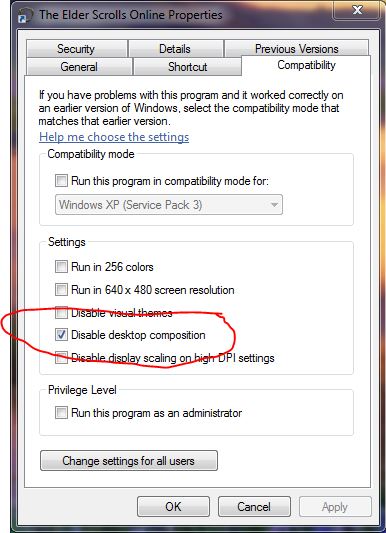
For those who can't live without their custom theme, tell the launcher shortcut to disable Aero and enable1 -
ShugganaSoul Shriven
For those who can't live without their custom theme, tell the launcher shortcut to disable Aero and enable
Hi Chumba,
Cheers man that did the trick. Really appreciate it. I had tried driver updates and everything else but Aero had never occurred to me, though it should have.
Don't wanna push my luck but it seems to be 100% now.
On the subject of this being a machine fault, I disagree. Thought it was a Windows 7 Aero issue, it was an issue caused solely by TESO immediately after a patch.
Hopefully somebody from Zenimax sees this and has a look at how TESO interacts with Windows 7 Aero.
Cheers0 -
CamaroFullHDSoul Shriven+1 BUMP
I'm also having this issue, thank you for the provided fixes, I hope Zenimax works this one out.0