Maintenance for the week of April 6:
• PC/Mac: No maintenance – April 6
• PC/Mac: No maintenance – April 6
eroor 102 -download error invalid meta file unable to load meta file - help
-
 Detector✭✭✭✭Error 102 on my 2 computers. Prior to this, 4 months everything was fine. The problem on the server.0
 -
Ojustaboo✭✭✭✭✭
✭Just gone to my guilds website and so far only one person has no problem but 4 do.
Last patch a few of us myself included had the installer redownloading all 26GB, some taking 2 days or more due to their ISP.
This really needs to be given your top priority, we shouldn't have to keep messing with settings every update, every other bit of sw we own updates fine without having to alter permissions, removing files etc.
I have win 8.1, I have all sorts of games and other software, I've never had to set anything to win 7 compatability mode, why do I now have to with ESO? It always used to update fine?Edited by Ojustaboo on August 12, 2014 4:19PM0 -
 phineasfSoul ShrivenI tried the suggestion from ZOS_HugoP - run in compatibility Windows 7 mode with admin rights but I continued to get the error. After putting back the way it was (normal Windows 8.1 without admin rights), I cleared my DNS cache and tried starting the launcher a few times (admin cmd prompt, "ipconfig /flushdns").. after 5 or 6 attempts the error stopped, the launcher downloaded the patch, and the game is ready to play.
-
Conclusion - there's nothing wrong at the PC end, its in the European megaserver end.. my guess, as some people are not seeing this problem, there is more than 1 patch server, and its just down to which server is least busy when you start the launcher; if you get the bad patch server you get the error.1 -
jaspericus wrote: »Sorted- Delete bethseda launcher version file in launcher folder restart launcher
Thanks Jasper, worked perfectly, quick update and in the game.
0 -
beeriod✭✭I give up seriously wasting 3 hours every patch or maintenanceEdited by beeriod on August 12, 2014 5:36PMEU server / Ebonheart pactPenguin MafiaPm for invite0
-
 Amaranthe92Soul Shrivenjaspericus wrote: »Sorted- Delete bethseda launcher version file in launcher folder restart launcher
This solved it for me, thank you!0 -
Had same problem tonight but having read this thread tried re-starting game before I started deleting files or repairing etc. I was lucky - it worked. Had a small update (about 1 minute download) and game opened. However loadin screen took about 2 minutes before I got to character screen. But now in game.0
-
 Tandor✭✭✭✭✭
✭✭✭✭✭Setting the launcher to run as administrator fixed the problem for me.
Definitely a EU megaserver issue, not a problem at our end.0 -
 Templeton2014Soul ShrivenSprotch_16_ESO wrote: »I tried running the launcher as admin, but it still gave me the same error after repairing...
Then I deleted the 'bethesda launcher version' file as suggested by Jaspericus.
It worked ! Problem solved (for me...)
Delete above file name. Worked.0 -
When I logged in the launcher repaired itself. I immediately got a virus warning from my AVAST software. Since then I cannot get past the launcher. I uninstalled the game and reinstalled it. Can't get past the launcher. Deleted the "Bethesda launcher version" file as suggested above.... still cannot get the game to load after pressing PLAY. Below is what was quarantined. Any suggestions?0
-
 AJTC5000✭✭✭✭Where is the ESO launcher folder on a Mac? Still looking...Edited by AJTC5000 on August 13, 2014 1:41PM
- PC/NA - @AJTC5000
DC - Alena-Draco - Dunmer Magicka Templar
PvE AchievementsTrials- vHRC HM
- vAA HM
- vSO HM
- vMoL HM (Dro-m'Athra Destroyer)
- vHoF HM (Tick-Tock Tormentor/The Dynamo)
- vAS HM (Saintly Saviour/Immortal Redeemer)
- vCR HM (Gryphon Heart/Welkynar Liberator)
- vSS HM
- vKA HM
- vRG HM
- vDSR (Reef Guardian HM)
- vSE (Twelvane + Chimera HM)
- vLC HM
- vOC (Shapers of Flesh HM)
Arenas- vMA Flawless
- vBRP Flawless (The Unchained)
- vVA Flawless (Spirit Slayer)
- IA 12-4-3
Dungeons- vFL HM (Leave No Bone Unbroken)
- vSCP HM (Mountain God)
- vMHK HM (Pure Lunacy)
- vMoS HM (Apex Predator)
- vDoM HM (Depths Defier)
- vFV HM (Relentless Raider)
- vMGF HM (Defanged the Devourer)
- vLoM HM (Nature's Wrath)
- vIcereach HM (No Rest for the Wicked/Storm Foe)
- vUG HM (In Defiance of Death/Bonecaller's Bane)
- vSG HM (True Genius)
- vCT HM (Bane of Thorns)
- vBDV HM (Ardent Bibliophile)
- vCauldron HM (Subterranean Smasher)
- vRPB HM (Bastion Breaker/of the Silver Rose)
- vDC HM (Battlespire's Best/The Dreaded)
- vCA HM
- vSR HM (Zero Regrets/Privateer)
- vERE HM (Invaders' Bane)
- vGD HM (Fist of Tava)
- vSH HM (Magnastylus in the Making/Curator's Champion)
- vBS HM (Temporal Tempest)
- vOP HM (Lighting the Embers/Oathsworn)
- vBV HM (Unshakeable Fervour/Bedlam's Disciple)
- vER HM (Revenger Breaker/the Just)
- vLS HM (Sic Semper/Moth Trusted)
- vNC HM (Key to the Stone/Deathbringer)
- vBGF HM (Cut Above the Rest/The Brilliant)
0 - PC/NA - @AJTC5000
-
alkoriak✭✭✭Wow! One whole day trying to install the game on new computer, and after abandonning the idea to redowload the whole client I installed from disks and then run the patches, until at +- 20% this error again
 . It sems I have to begin again the whole patch download? At 400 kb/s it will take looong! 0
 -
elphaba_throppSoul ShrivenCould this be related to not having enough space on your harddrive to unzip the files?
I remember when I installed the first time I had trouble because I needed about 60GB free (which was hard to achieve on my 128GB drive). I had to clear everything off to external HDD in order to get 60GB free and then installation proceeded fine. After the install, I had a ton of space free (it doesnt actually use all 60GB but demands it is available) on the HDD so could move the files back from external HDD.0 -
Tandor✭✭✭✭✭
✭✭✭✭✭elphaba_thropp wrote: »Could this be related to not having enough space on your harddrive to unzip the files?
Not in my case. 91gb should be more than enough free space!0 -
LouJunoSoul ShrivenI'm having the same problem. I've tried all the of suggestions in this thread and have had no luck!0
-
ErendizSoul ShrivenI have the same issue, and I tried everything mentioned above. I even uninstall everything but even then the same error 102! And it's very curious that I've got this error after I just paid for 180 day subscription! Besides, customer support not giving any answer anymore
 0
0 -
 Mitrenga✭✭✭✭✭I have tried everything mentioned on this topic but had no luck, could not pass through the error.
Then I reset my internet connection, tried repairing and voila! It works now.0 -
AShadowSoul Shriven
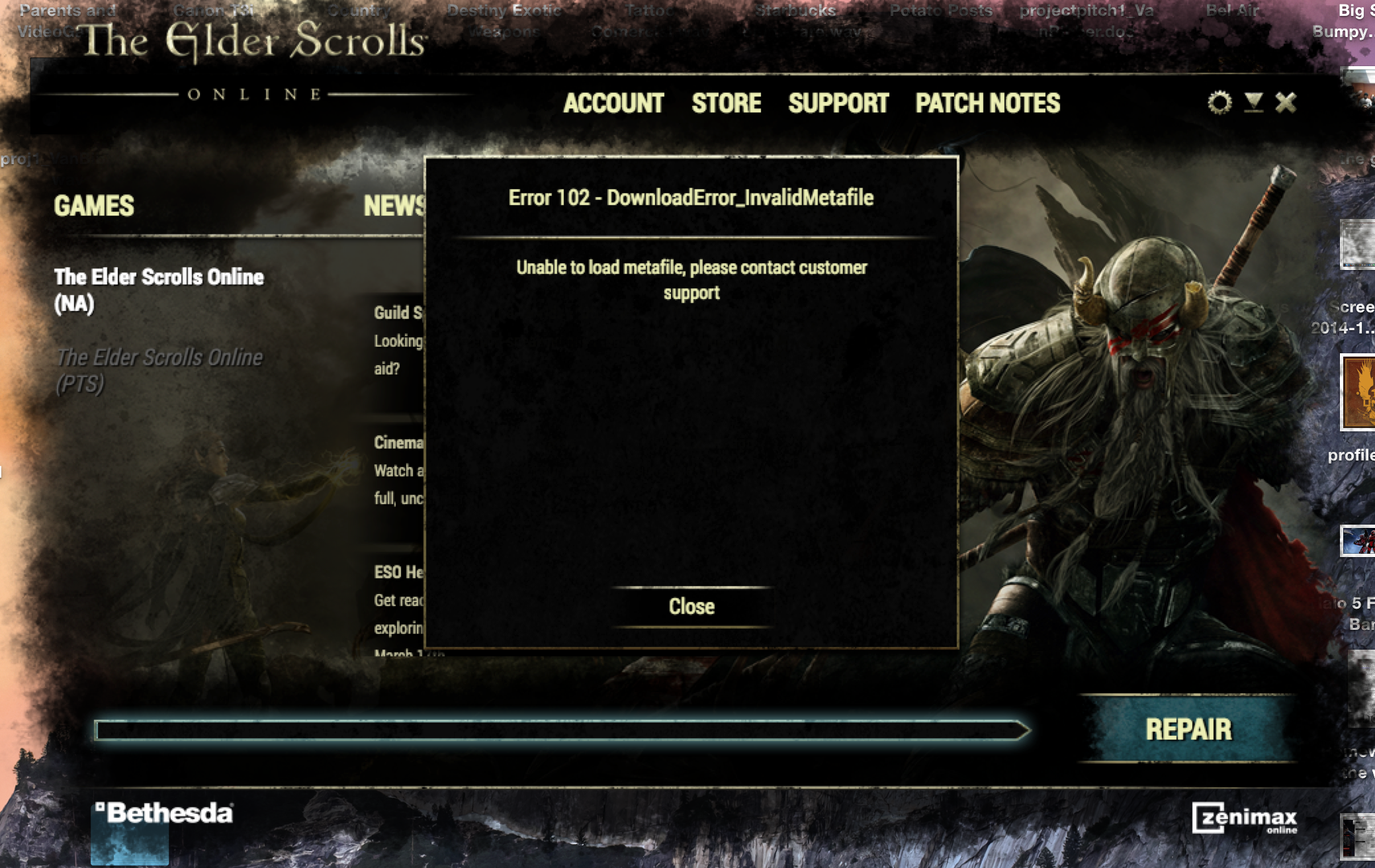
Does anyone know how to fix the 102 Error on mac I am having no luck with this at all? Any help would be greatly appreciated.Edited by AShadow on January 24, 2015 1:44AM0
