Maintenance for the week of April 13:
• PC/Mac: No maintenance – April 13
• PC/Mac: No maintenance – April 13
"Missing" boxes?

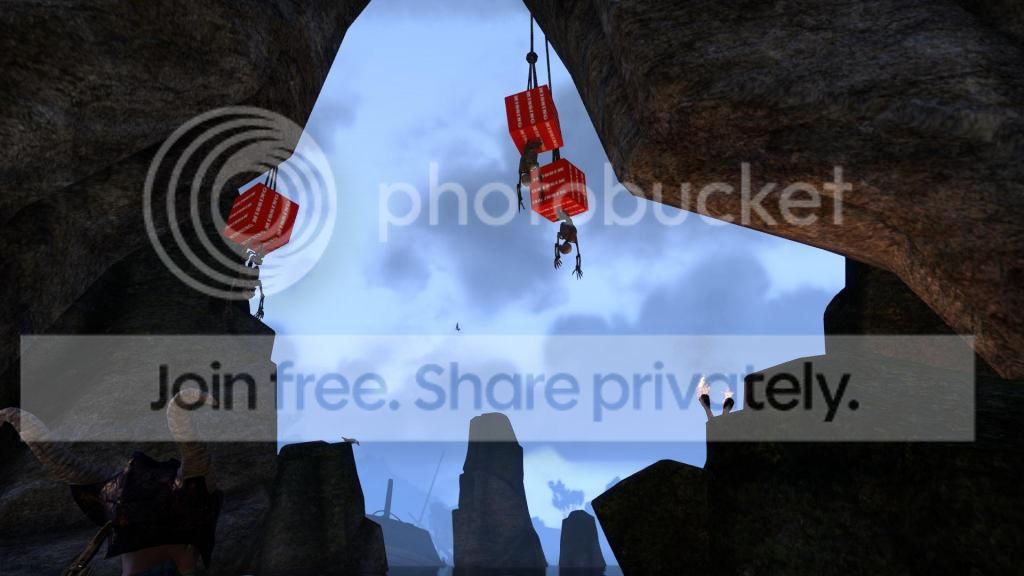
If anyone else has seen these near the frost atronach's cave in Vulkwasten then maybe we should tell Zenimax about it... it looked kind of obvious that something was wrong when these giant orange boxes showed up! lol[img][/img]
0
-
 kip_silverwolf✭✭✭✭✭Lol These ones I found hanging at the front of the pirates cave in Khenarthi's Roost like some macabre Christmas Tree ornaments.
"I'm going to live forever..or at least die trying"
drunken Nord & Tamriel streaker since Arena11 -
 david271749✭✭✭✭✭Wow. Haven't seen those since beta. The guy above could be right. Installing an update with addons might have messed up some files.0
 -
 Liquid_Time✭✭✭✭✭I.. I.. Love seeing these. Never thought to take a screen shot of any though. First month of release I would see one every other day.¸.•¨)
¸.•´¸.•*´¨) ¸.•*¨)
(¸.•´ (¸.•` Liquid_Time'*-.¸.-•-.¸_¸.-•-.¸_¸.-•-.¸_¸.-•-.¸_¸.-•-.¸_¸.-••¤
╔═══════════════════════════════════════════════════╗
IGN: Liquid Past || Rank: V14 || Class: Nightblade || World Skill: Vampire
╚═══════════════════════════════════════════════════╝1 -
 WilliamTee✭✭✭If you open them you find all kinds of wonderful things.
Keys, TV remotes...
[Moderator Note: Edited per our rules on Inappropriate Content and Language]Edited by ZOS_JuhoJ on June 24, 2014 10:24AM4 -
It doesn't really bother me I just thought id share, that is a good point though I didn't see these until I downloaded addons around this level. But I posted the pic to see if anyone else had seen them in this particular spot, if no one has then theres no worry for ZO and its just my client
 0
0 -
 AlexDougherty✭✭✭✭✭
✭✭david271749 wrote: »Wow. Haven't seen those since beta. The guy above could be right. Installing an update with addons might have messed up some files.
It's not the client, I don't use addons and still sometimes see them, it's just a glitch with the server that happens occassionally.
Choices are report them, try /reloadui, or ignore them.People believe what they either want to be true or what they are afraid is true!
Wizard's first rule
Passion rules reason
Wizard's third rule
Mind what people Do, not what they say, for actions betray a lie.
Wizard's fifth rule
Willfully turning aside from the truth is treason to one's self
Wizard's tenth rule1 -
ZOS_TristanK✭✭✭✭✭
✭Thanks for finding our missing boxes! We knew we'd left them somewhere.
Typically players will see "missing" boxes when the graphics haven't loaded properly. If the boxes aren't bothering you or you're not seeing them too often, feel free to chuckle at them and move on. If you'd like to see what should be there or you're seeing an excessive amount of boxes, using /reloadui (as @AlexDougherty mentioned) may allow the graphics to properly load.
If /reloadui doesn't help, turning off the grass may (Settings > Video > Grass off). Keep in mind that if your graphics are running at a higher setting than recommended, you will see issues like the missing boxes, falling through stairs, and getting trapped in rocks.5 -
ZOS_TristanK wrote: »Thanks for finding our missing boxes! We knew we'd left them somewhere.
Typically players will see "missing" boxes when the graphics haven't loaded properly. If the boxes aren't bothering you or you're not seeing them too often, feel free to chuckle at them and move on. If you'd like to see what should be there or you're seeing an excessive amount of boxes, using /reloadui (as @AlexDougherty mentioned) may allow the graphics to properly load.
If /reloadui doesn't help, turning off the grass may (Settings > Video > Grass off). Keep in mind that if your graphics are running at a higher setting than recommended, you will see issues like the missing boxes, falling through stairs, and getting trapped in rocks.
can I ask why having a better system than recommended would cause these issues? just out of curiosity of course because I suffer from black screen crashing and do not have exactly recommended settings anyways. I run on minimum settings as you may notice from my screenshot anyways, my computer is great for everything but eso seems to need better hardware than most games that haven't even been released yet lol.0 -
 demonlkojipub19_ESO✭✭✭✭✭I chuckle at them whenever I see them. First time I saw one was at the earth forge. I bug reported it of course.1
 -
 UrQuan✭✭✭✭✭
✭✭✭✭✭
It wouldn't be having a better system than recommended that would cause this - it would be running the game on higher settings than recommended for your system. If the game thinks that your system should be running on low settings, but you choose to switch to high, then if this is an issue with graphics not loading properly, this could easily pop up.goochpuckett wrote: »can I ask why having a better system than recommended would cause these issues? just out of curiosity of course because I suffer from black screen crashing and do not have exactly recommended settings anyways. I run on minimum settings as you may notice from my screenshot anyways, my computer is great for everything but eso seems to need better hardware than most games that haven't even been released yet lol.
Someone stole my sweetrollCaius Drusus Imperial DK (DC)
Bragg Ironhand Orc Temp (DC)
Neesha Stalks-Shadows Argonian NB (EP)
Falidir Altmer Sorcr (AD)
J'zharka Khajiit NB (AD)Isabeau Runeseer Breton Sorc (DC)
Fevassa Dunmer DK (EP)
Manut Redguard Temp (AD)
Tylera the Summoner Altmer Sorc (EP)
Svari Snake-Blood Nord DK (AD)Ashlyn D'Elyse Breton NB (EP)
Filindria Bosmer Temp (DC)
Vigbjorn the Wanderer Nord Warden (EP)
Hrokki Winterborn Breton Warden (DC)
Basks-in-the-Sunshine Argonian Temp0 -
 Animus0724✭✭✭goochpuckett wrote: »ZOS_TristanK wrote: »Thanks for finding our missing boxes! We knew we'd left them somewhere.
Typically players will see "missing" boxes when the graphics haven't loaded properly. If the boxes aren't bothering you or you're not seeing them too often, feel free to chuckle at them and move on. If you'd like to see what should be there or you're seeing an excessive amount of boxes, using /reloadui (as @AlexDougherty mentioned) may allow the graphics to properly load.
If /reloadui doesn't help, turning off the grass may (Settings > Video > Grass off). Keep in mind that if your graphics are running at a higher setting than recommended, you will see issues like the missing boxes, falling through stairs, and getting trapped in rocks.
can I ask why having a better system than recommended would cause these issues? just out of curiosity of course because I suffer from black screen crashing and do not have exactly recommended settings anyways. I run on minimum settings as you may notice from my screenshot anyways, my computer is great for everything but eso seems to need better hardware than most games that haven't even been released yet lol.
I play this game on an HP slimline because lets face, not everyone can afford a $2000 gaming machine. I run a mid range GFX card from Zotac which isn't anything special and I'm still able to run ESO on full mid settings smoothly. The only difference is I properly maintain this machine as getting a new one would definitely hurt my wallet.goochpuckett wrote: »my computer is great for everything but eso seems to need better hardware than most games that haven't even been released yet lol.
This is quite a statement, newer games tend to require more for performance, that's how it has always been, and how would you know about what is required to run them, typically a game that hasn't been released yet will perform on lower end PCs just because that was what was available during development, but as games develop, so does its software, and the tech world moves fast so by the time the game is released, the specs required to run it might have changed all together.I take pride in being an incredibly smart dumb ass, or an incredibly dumb smart ass, either way I'm awesome.
-The Art Of Warfare (T.A.W.)0 -
 Bhakura✭✭✭✭Not sure if this is same or if this was an effect caused by eating to much mushrooms ...
3 -
Animus0724 wrote: »goochpuckett wrote: »ZOS_TristanK wrote: »Thanks for finding our missing boxes! We knew we'd left them somewhere.
Typically players will see "missing" boxes when the graphics haven't loaded properly. If the boxes aren't bothering you or you're not seeing them too often, feel free to chuckle at them and move on. If you'd like to see what should be there or you're seeing an excessive amount of boxes, using /reloadui (as @AlexDougherty mentioned) may allow the graphics to properly load.
If /reloadui doesn't help, turning off the grass may (Settings > Video > Grass off). Keep in mind that if your graphics are running at a higher setting than recommended, you will see issues like the missing boxes, falling through stairs, and getting trapped in rocks.
can I ask why having a better system than recommended would cause these issues? just out of curiosity of course because I suffer from black screen crashing and do not have exactly recommended settings anyways. I run on minimum settings as you may notice from my screenshot anyways, my computer is great for everything but eso seems to need better hardware than most games that haven't even been released yet lol.
I play this game on an HP slimline because lets face, not everyone can afford a $2000 gaming machine. I run a mid range GFX card from Zotac which isn't anything special and I'm still able to run ESO on full mid settings smoothly. The only difference is I properly maintain this machine as getting a new one would definitely hurt my wallet.goochpuckett wrote: »my computer is great for everything but eso seems to need better hardware than most games that haven't even been released yet lol.
This is quite a statement, newer games tend to require more for performance, that's how it has always been, and how would you know about what is required to run them, typically a game that hasn't been released yet will perform on lower end PCs just because that was what was available during development, but as games develop, so does its software, and the tech world moves fast so by the time the game is released, the specs required to run it might have changed all together.
just thought that I should mention playing something like guildwars 2, eve online, or even fps like crysis 3 on high settings is easy yet my gpu crashes as does hundreds of other even using recommended settings playing this game. I cant say its the games fault, I can say that a lot of communication through this forum and others that since the craglorn update many many people have had this problem.0 -
stefan.gustavsonb16_ESO✭✭✭✭✭
✭I get those occasionally, too. What puzzles me is how an obvious debug graphics asset like that can still be in the game 3 months after release. If the client is missing something, it should try to reload it or just give up and go on without it. To flaunt a glitch like that sounds like a very strange thing to do when you are trying to render an immersive 3D game world.
If you really must paint something, please don't make it bright red, and don't make it that big. A 50% gray box would be better. Anything but a red box with text would be better. Debug graphics should not remain in the game after release.
0 -
 trucqulent✭✭✭goochpuckett wrote: »ZOS_TristanK wrote: »Thanks for finding our missing boxes! We knew we'd left them somewhere.
Typically players will see "missing" boxes when the graphics haven't loaded properly. If the boxes aren't bothering you or you're not seeing them too often, feel free to chuckle at them and move on. If you'd like to see what should be there or you're seeing an excessive amount of boxes, using /reloadui (as @AlexDougherty mentioned) may allow the graphics to properly load.
If /reloadui doesn't help, turning off the grass may (Settings > Video > Grass off). Keep in mind that if your graphics are running at a higher setting than recommended, you will see issues like the missing boxes, falling through stairs, and getting trapped in rocks.
can I ask why having a better system than recommended would cause these issues? just out of curiosity of course because I suffer from black screen crashing and do not have exactly recommended settings anyways. I run on minimum settings as you may notice from my screenshot anyways, my computer is great for everything but eso seems to need better hardware than most games that haven't even been released yet lol.
you should have someone who's qualified, troubleshoot your graphics card and motherboard.
Different games stress different areas of various components. black or blue screens = hardware errors. Could be any 1 of a thousand different reasons.
0 -
Murmeltier✭✭✭✭trucqulent wrote: »goochpuckett wrote: »ZOS_TristanK wrote: »Thanks for finding our missing boxes! We knew we'd left them somewhere.
Typically players will see "missing" boxes when the graphics haven't loaded properly. If the boxes aren't bothering you or you're not seeing them too often, feel free to chuckle at them and move on. If you'd like to see what should be there or you're seeing an excessive amount of boxes, using /reloadui (as @AlexDougherty mentioned) may allow the graphics to properly load.
If /reloadui doesn't help, turning off the grass may (Settings > Video > Grass off). Keep in mind that if your graphics are running at a higher setting than recommended, you will see issues like the missing boxes, falling through stairs, and getting trapped in rocks.
can I ask why having a better system than recommended would cause these issues? just out of curiosity of course because I suffer from black screen crashing and do not have exactly recommended settings anyways. I run on minimum settings as you may notice from my screenshot anyways, my computer is great for everything but eso seems to need better hardware than most games that haven't even been released yet lol.
you should have someone who's qualified, troubleshoot your graphics card and motherboard.
Different games stress different areas of various components. black or blue screens = hardware errors. Could be any 1 of a thousand different reasons.
Hm, i see them sometimes too and i have a damn good PC. Not often but often enough to wonder about the technical Answer from Zenimax. Strange Things are going outthere .
0 -
ferzalrwb17_ESO✭✭✭✭✭I was in a group and everyone saw the "missing" boxes. Everyone not in the group at this area saw them. It was a topic of general conversation there. So every single person that turned up had the same bug? Relogging didn't work by the way.0
-
 LordEcks✭✭✭ferzalrwb17_ESO wrote: »I was in a group and everyone saw the "missing" boxes. Everyone not in the group at this area saw them. It was a topic of general conversation there. So every single person that turned up had the same bug? Relogging didn't work by the way.
That case would be a good time to screenshot and bug report it then.
This can be slightly immersion breaking, but overall a minor issue, as I've never seen this occur with actually interactable objects like chests. Just scenery objects like crates (that cant be opened).
Your mileage may vary, but like you said if multiple people are seeing the same thing then you either all have messed up client files (unlikely) or maybe something is amiss.
Screenshot and report. Only you can prevent forest fires.
0 -
 zgrssd✭✭✭✭
There is a small chance that the file on the download server is damaged, so everyone got a damaged file when patching/repairing. But those are the big exceptions.ferzalrwb17_ESO wrote: »I was in a group and everyone saw the "missing" boxes. Everyone not in the group at this area saw them. It was a topic of general conversation there. So every single person that turned up had the same bug? Relogging didn't work by the way.
Most of the time it is a clientmistake (corrupted files) or running the game on higher settings then CPU, GPU, RAM and Disk* can currently provide.
If the disk cannot answer the the request in time or there is not enough Ram/GPU Ram to store the texture at those settings the game just displays a error texture.
It could also be that some backgroudn process taxed out the Disk or Ram in addition to the normal loading load of the game.
*HDD's are currently the biggest bottlenecks for performance/loading times. While the possible transmission rate from the connections is pretty damn high, they physically still run around at ATA-100 speeds + some built in cache.
SDD do not have those limits or seektimes, but are still expensive and not designed for much writing work,Edited by zgrssd on June 24, 2014 10:03AMElana Peterson (EU), Dominion, Imperial Sorc, Rune & Alchemy Crafting Char
Leonida Peterson (EU), Daggerfall, Kajiit Nightblade, Tank & main Crafter
Kurga Peterson (EU), Ebonhart, Ork Dragonknight, Provision Mule
Coldblood Peterson (EU) Argonian Templer, Daggerfall, Healer
Incendia Peterson (EU), Dominion, Dunmer Dragonknight, fire DPS & healer
Haldor Belendor (EU), Ebonhart, Breton Sorcerer, Tank
Fuliminictus Peterson (EU), Ebonhart, Altmer Sorcerer, Electric DPS
Me babbling about PvE roles and Armor, Short Guide to Addon Programming (for Programmers)
If you think anything I or somebody else said violates the Rules of this Forum, you are free to flag my posts. Till I get any notifcaion from this, I just asume you know you have no case against me or Zenimax disagrees with you.0

