Maintenance for the week of July 27:
• [IN PROGRESS] NA megaservers for maintenance – July 27, 6:00AM EDT (10:00 UTC) - 11:00AM EDT (15:00 UTC)
• [IN PROGRESS] EU megaservers for maintenance – July 27, 10:00 UTC (6:00AM EDT) - 15:00 UTC (11:00AM EDT)
• [IN PROGRESS] NA megaservers for maintenance – July 27, 6:00AM EDT (10:00 UTC) - 11:00AM EDT (15:00 UTC)
• [IN PROGRESS] EU megaservers for maintenance – July 27, 10:00 UTC (6:00AM EDT) - 15:00 UTC (11:00AM EDT)
Landscape Texture Errors

AdrianLeong98
Soul Shriven
I have recently started playing ESO again after a hiatus, and have re-installed it. When I came back into the game, I started having these weird texture glitches, and no matter what settings I alter, I can't seem to fix them. I have also tired factory resetting my AMD Radeon R7 M265 graphics card with the latest Radeon 20.4.2 Software and Display Drivers. I am not using any new mods compared to the last time I played where I did not encounter this texture issue. Does anyone know how to fix these errors?
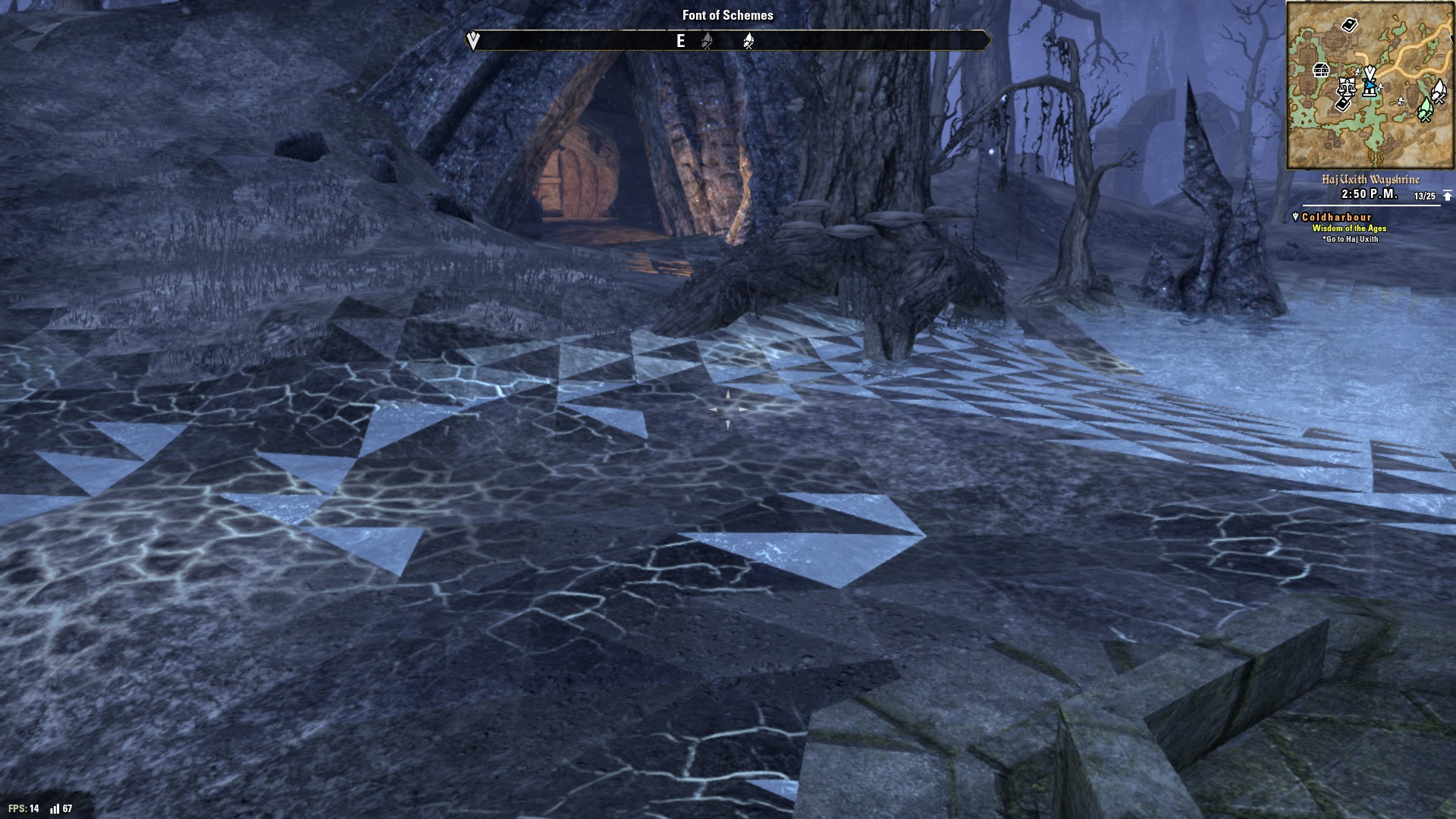
Edited by AdrianLeong98 on May 2, 2020 2:16PM 0
-
 MilkJugg24✭✭@AdrianLeong98
I recently tried to help someone with this exact issue, but was unsuccessful in resolving the issue. You can find the thread here: https://forums.elderscrollsonline.com/en/discussion/524523/weird-graphics-glitches-on-intel-hd-graphics-tried-many-things#latest
The other person was using Intel integrated graphics to run the game. Since you're having issues on AMD drivers, I think it's safe to say that this is a game specific issue.
If you can, please follow the steps for submitting a /bug report in-game.I play on PC NA! Currently looking for a casual dungeon and trial group/guild. If you want to talk, feel free to message me here or in-game to Pizza (Yes, I'm the original Pizza)
Follow me on Twitter for video games and cats. I also casually stream on Twitch!1 -
AdrianLeong98Soul ShrivenMilkJugg24 wrote: »@AdrianLeong98
I recently tried to help someone with this exact issue, but was unsuccessful in resolving the issue. You can find the thread here: https://forums.elderscrollsonline.com/en/discussion/524523/weird-graphics-glitches-on-intel-hd-graphics-tried-many-things#latest
The other person was using Intel integrated graphics to run the game. Since you're having issues on AMD drivers, I think it's safe to say that this is a game specific issue.
If you can, please follow the steps for submitting a /bug report in-game.
Thanks for the reply. I think it may actually be an issue with the Intel integrated graphics (just my personal opinion). I have tried to get the game to run using my GPU but with no success. I tried forcing it to utilise my "High performance GPU" through the Windows 10 graphics settings but it didn't work. And I am not sure whether or not there is a way to force the game to utilise the GPU as the modern version of the AMD Radeon software has removed the ability to do so. Do you know any way of doing so?0 -
MilkJugg24✭✭AdrianLeong98 wrote: »I am not sure whether or not there is a way to force the game to utilise the GPU as the modern version of the AMD Radeon software has removed the ability to do so. Do you know any way of doing so?
I'm afraid I do not. I'm unfamiliar with how AMD designs their laptop GPUs nowadays. I've been a desktop user for several years now.I play on PC NA! Currently looking for a casual dungeon and trial group/guild. If you want to talk, feel free to message me here or in-game to Pizza (Yes, I'm the original Pizza)
Follow me on Twitter for video games and cats. I also casually stream on Twitch!0