Brazil connection problem possible solution

pedrenrik
Soul Shriven
I'm been having the same problem as you. I'm from Minas Gerais and have VIVO Fibra.
Today I contacted the provider and got a possible solution with Josué. I'll leave it here so you can try and see for yourself if it will work.
1- Press the Windows Button + "R"
2- Type "ncpa.cpl" (without the quotes, of course)
3- It will open your Network Connection thing
4- Right click the one you're using and select Properties
5- In the area that you can scroll down, find "Protocolo IP Versão 4" and double click it
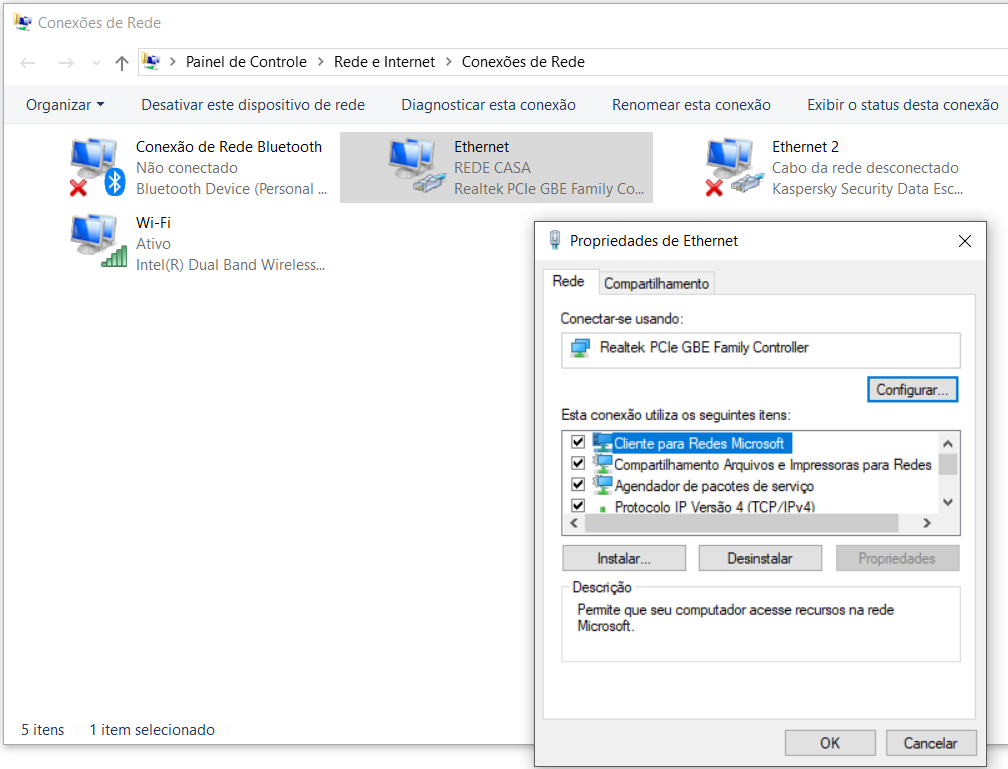
6- You should leave the screen that will open just like the picture below
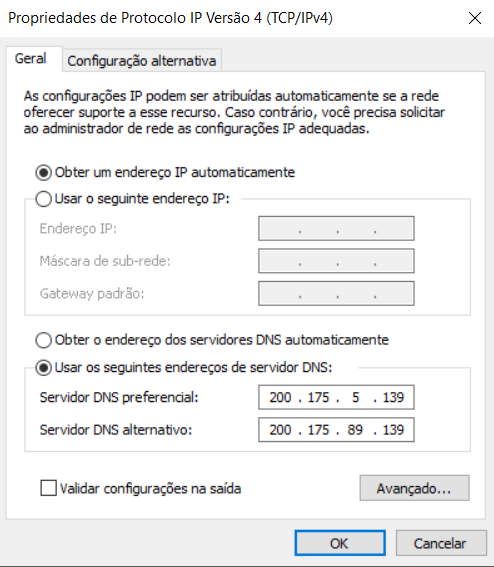
Again, I HAVE VIVO'S INTERNET, dont know about NET's.
In any case, I sugest contacting your provider like I did, since ZOS said the problem is now theirs to solve (if things go harsh, I personally sugest using Anatel as a threat - sometimes it works)
TRADUÇÃO
Estou tendo o msm problema de conexão que muita gente do Brasil. Sou mineiro e tenho fibra da Vivo.
Liguei pra lá hoje e consegui uma solução e ESTÁ FUNCIONANDO. Vou deixar as etapas para q vc tambem possa tentar.
1- Aperte o Botão do Windows + R
2- Digite "ncpa.cpl" (sem as aspas né)
3- Vai abrir suas Conexões de Rede
4- Clique com o botão direito do mause e selecione Propriedades
5- Na área que da pra rolar, encontre "Protocolo IP Versão 4" e clique duas vezes sobre ele (consulte imagem acima)
6- A tela ue vai abrir vc deve deixa-la como na segunda imagem acima
Essa solução funcionou para VIVO, não sei quanto à NET, apenas sugiro entrar em contato com a provedora, uma vez que a ZOS disse q o problema está partindo delas (se ficar dificil de resolver com ela, sugiro usar o nome da Anatel para ameaçar - costuma funcionar)
Edited by pedrenrik on February 18, 2019 4:32PM Today I contacted the provider and got a possible solution with Josué. I'll leave it here so you can try and see for yourself if it will work.
1- Press the Windows Button + "R"
2- Type "ncpa.cpl" (without the quotes, of course)
3- It will open your Network Connection thing
4- Right click the one you're using and select Properties
5- In the area that you can scroll down, find "Protocolo IP Versão 4" and double click it
6- You should leave the screen that will open just like the picture below
Again, I HAVE VIVO'S INTERNET, dont know about NET's.
In any case, I sugest contacting your provider like I did, since ZOS said the problem is now theirs to solve (if things go harsh, I personally sugest using Anatel as a threat - sometimes it works)
TRADUÇÃO
Estou tendo o msm problema de conexão que muita gente do Brasil. Sou mineiro e tenho fibra da Vivo.
Liguei pra lá hoje e consegui uma solução e ESTÁ FUNCIONANDO. Vou deixar as etapas para q vc tambem possa tentar.
1- Aperte o Botão do Windows + R
2- Digite "ncpa.cpl" (sem as aspas né)
3- Vai abrir suas Conexões de Rede
4- Clique com o botão direito do mause e selecione Propriedades
5- Na área que da pra rolar, encontre "Protocolo IP Versão 4" e clique duas vezes sobre ele (consulte imagem acima)
6- A tela ue vai abrir vc deve deixa-la como na segunda imagem acima
Essa solução funcionou para VIVO, não sei quanto à NET, apenas sugiro entrar em contato com a provedora, uma vez que a ZOS disse q o problema está partindo delas (se ficar dificil de resolver com ela, sugiro usar o nome da Anatel para ameaçar - costuma funcionar)
1
-
pedrenrikSoul ShrivenAll the test I made with this is logging in a character for a few moments, and just from being able to do that, its better than before.
I'm gonna play and see how it fares. If you try this too, tell if it worked!0 -
pedrenrikSoul ShrivenSo, I tested by doing my writs (Inklings would be proud) in 7 characters. I'll list what I noticed
-average PING was ~230 to ~330 (not as it was before, but its playable)
-some spikes (700, 7000 and 1200, but only this 3 times)
-no crash (almost did at the 7k PING moment)
-also, should be considered that I did ALL of them in Vivec City, a crouded town with a lot of things to load
In a sum, I would say its a good solution until things get definitelly solved0 -
 ZOS_BilladminWe are closing this discussion as there is already another thread on this topic. Please use the thread linked below for further discussion and to find troubleshooting help.
Can't play eso without vpnThe Elder Scrolls Online: Tamriel Unlimited - ZeniMax Online Studios
Forum Rules | Code of Conduct | Terms of Service | Home Page | Help Site1
This discussion has been closed.