Maintenance for the week of May 25:
• PC/Mac: No maintenance – May 25
• ESO Store and Account System for maintenance – May 27, 6:00AM EDT (10:00 UTC) - 4:00PM EDT (20:00 UTC)
• PC/Mac: No maintenance – May 25
• ESO Store and Account System for maintenance – May 27, 6:00AM EDT (10:00 UTC) - 4:00PM EDT (20:00 UTC)
ESO has been growing rather unstable for me
-
 It's on windowed (fullscreen) but when I use the launcher set on 640x480 I get this.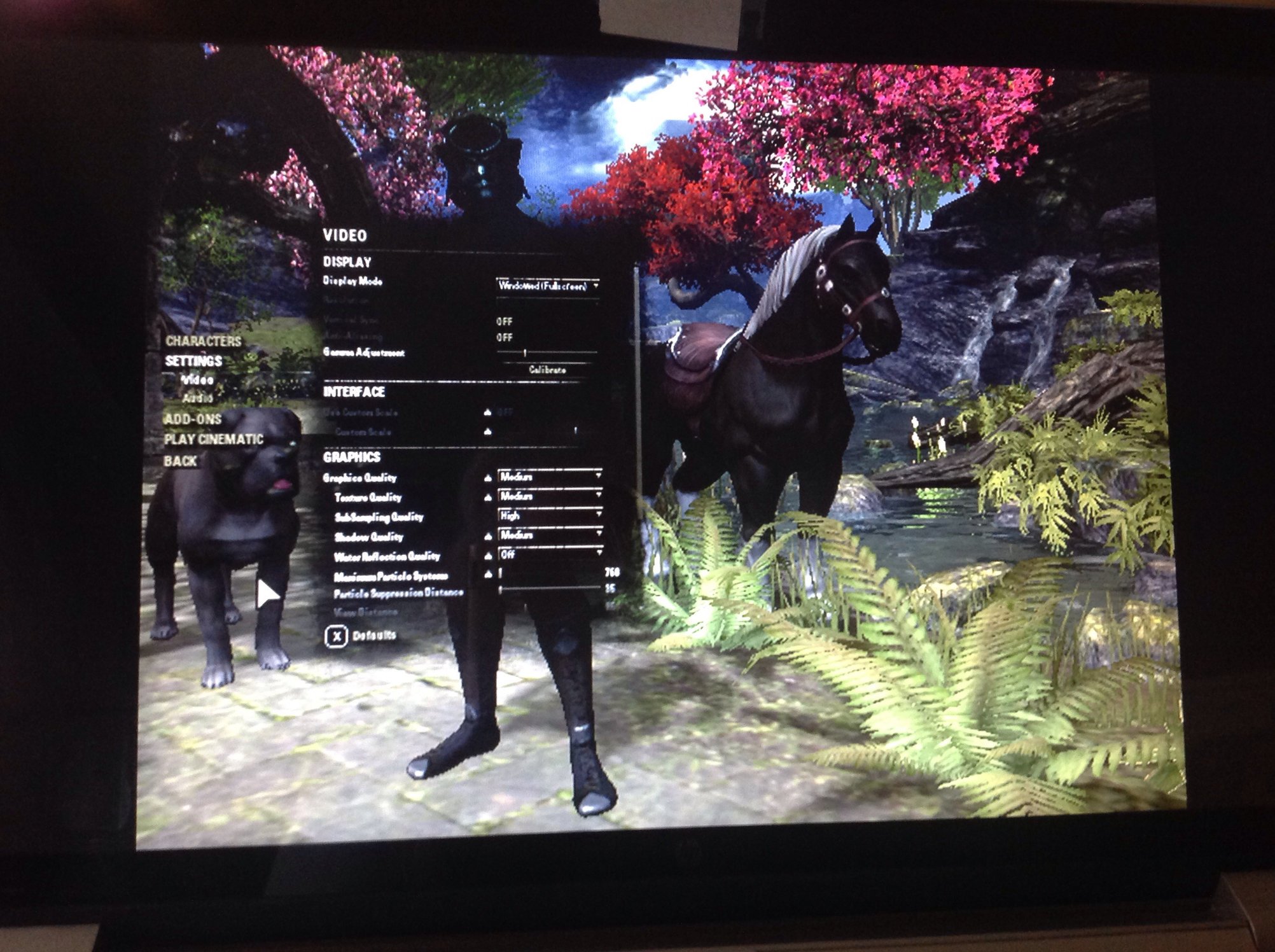
It plays in a small window. Is that how it should be?0 -
 Elsterchen✭✭✭✭✭
✭@GamingLass Good to hear you are able to play. It should not play in a small window, if you enable the windowed(fullscreen) option ingame. Yet i am not sure what you mean with "I use the launcher set on 640x480"? Any settings you are able to access once the launcher started are "ingame" and it should be either 640*480 or windowed(fullscreen), but maybe some other player can help with this or I am just missing something.
Atm many ppl (according to guild chat) get shortcuts to login, myself included. But for me its only once per day, so I guess its bearable (no crash report or anything and it seems the only inconvinience I have, for now)
Did you get stable FPS during your time to play?
If so, and playing was ok for you (ok latency, no microstutters or any weird behaviour, and you graphic card doean't run too hot), just leave it.
Else you may try to reduce some rather "unimportant" videosettings (turn of grass and water reflection, put shadows on low, reduce subsampling rate. -> All have some (rather minimal) effect but may help to ease the job of your graphic card (just test how far you can go concerning graphic quality - which undoubtedly does get really bad on all-low settings (to bad for me to enjoy playing, so just try to find out for yourself what suits you).
Good luck0 -
Elsterchen wrote: »@GamingLass Good to hear you are able to play. It should not play in a small window, if you enable the windowed(fullscreen) option ingame. Yet i am not sure what you mean with "I use the launcher set on 640x480"? Any settings you are able to access once the launcher started are "ingame" and it should be either 640*480 or windowed(fullscreen), but maybe some other player can help with this or I am just missing something.
Atm many ppl (according to guild chat) get shortcuts to login, myself included. But for me its only once per day, so I guess its bearable (no crash report or anything and it seems the only inconvinience I have, for now)
Did you get stable FPS during your time to play? No, I do NOT get stable fps and have huge latency spikes.
If so, and playing was ok for you (ok latency, no microstutters or any weird behaviour, and you graphic card doean't run too hot), just leave it.
Else you may try to reduce some rather "unimportant" videosettings (turn of grass and water reflection, put shadows on low, reduce subsampling rate. -> All have some (rather minimal) effect but may help to ease the job of your graphic card (just test how far you can go concerning graphic quality - which undoubtedly does get really bad on all-low settings (to bad for me to enjoy playing, so just try to find out for yourself what suits you).
Good luck
So far I've tried all that you mentioned, plus I made changes to the usersettings txt file, deleted shadercache file from ESO file, Uninstalled GeForce Experience. And I put my graphics in game BACK to HIGH. When I ran the graphics in game on low or even medium my pc hated it! It ran hot and revved up like it was stressed. Once I put them back to high in game, it runs cooler and doesn't rev up except on rare occasions. But I have horrendous latency now that I never had two weeks ago. Over nine hundred ninety nine....my numbers aren't working on my crappy iPad. Fps of around twenty five. It feels like something NOT having to do with my pc. Perhaps my ISP, perhaps my router ...except it's not affecting youtube or other online activity...maybe ZOS made some change that affected those on pcs with certain types of processors?? I just don't know. But my pc runs the game and it looks fantastic...but I can't fight or much of anything. Latency and fps.0 -
FIXED MY ISSUE!
Was due to a download from HP and Intel that was pending installation. Corrupted file, maybe? Anyways, I found a site that offered a trouble shooter and downloaded the program that automatically hides windows downloads. I did this...and voila! I have no latency and decent fps. I can ride, run, fight again! EVEN THOUGH ZOS said my nvidia 840m was crap and would make the game unplayable...Bull! It runs on high - beautifully. Here's a link to the discussion and there is a link to the website where I found the program.
REALLY hope this might help some folks. Good luck!!!
https://forums.elderscrollsonline.com/en/discussion/433675/fixed-my-latency-fps-and-booting-issues-after-4-1-5/p1?new=11