Maintenance for the week of April 27:
· [COMPLETE] EU megaservers for maintenance – April 27, 2:00 UTC (April 26, 10:00PM EDT) - April 27, 16:00 UTC (12:00PM EDT)
· [COMPLETE] NA megaservers for maintenance – April 27, 3:00AM EDT (7:00 UTC) - 5:00PM EDT (21:00 UTC)
· [COMPLETE] EU megaservers for maintenance – April 27, 2:00 UTC (April 26, 10:00PM EDT) - April 27, 16:00 UTC (12:00PM EDT)
· [COMPLETE] NA megaservers for maintenance – April 27, 3:00AM EDT (7:00 UTC) - 5:00PM EDT (21:00 UTC)
PC Controllers/Gaming Mouse
-
 NBrookus✭✭✭✭✭
✭✭✭✭I was never a good guitar player so using the WASD and trying to hit 1-5 at same time is tough for me. Gotta be an easier way. Currently my weapon swap is F key. I just fat finger stuff too often. Never mind trying to learn to animation cancel
Before you go crazy with gear, look at new keyboards. If you can't reach (q)WASD(r) and 1-5 comfortably, it's the wrong keyboard for you. My right hand doesn't work very well, so I offload a lot of stuff to my left hand using Function keys. Even with small girl hands I can reach everything with just moving my fingers; I picked a keyboard with a compact layout on the left side and a very short key travel; someone with bigger hands might need a bigger layout.
Also you can rebind the keys, for example the F is easier to reach for me than the X, so I swapped them since I pick up a lot of synergies. And I use the one extra mouse that I can reach for weapon swap.
A while back someone was posting that was playing one-handed. You just gotta make it work for you.0 -
 Having a tough time getting a system down where I can move, attack and change weapons....especially since I only have 2 hands
I was never a good guitar player so using the WASD and trying to hit 1-5 at same time is tough for me. Gotta be an easier way. Currently my weapon swap is F key. I just fat finger stuff too often. Never mind trying to learn to animation cancel
What are some of the things the pros use ?
I got the Corsair Scimitar, couldn't get used to it after playing for over a year on console.
Got an Xbox One controller. Loves it.0 -
richardjameshillb16_ESO wrote: »360 controller here, works great, just use K+M for auctions
Pretty much the same but for research assistant.0 -
kargen27✭✭✭✭✭
✭✭✭✭✭this is one of those times where being left handed really helps. I use the mouse with my left hand and most my commands are on the number pad. My skills are on the four arrow keys and the page down key so my thumb can easily reach all those buttons without having to move my hand. Bar switch is the + key (also mouse scroll up) ultimate is 9, synergy is 1, crouch is 3. Anything that I would need to do in combat I can do without having to move my hand.and then the parrot said, "must be the water mines green too."0 -
 Lizzrdd✭✭✭Been using Razer Naga for many years with all MMO and single player games. I cant imagine playing a game like this without it really, for the reasons the OP stated in the first post. You can get them for under 70 bux just about anywhere.Play how you want to, not how others tell you to! Live and let Play!0
 -
 jedtb16_ESO✭✭✭✭✭
✭✭this is one of those times where being left handed really helps. I use the mouse with my left hand and most my commands are on the number pad. My skills are on the four arrow keys and the page down key so my thumb can easily reach all those buttons without having to move my hand. Bar switch is the + key (also mouse scroll up) ultimate is 9, synergy is 1, crouch is 3. Anything that I would need to do in combat I can do without having to move my hand.
similar to this but arrow keys for direction and skills mapped to number pad 1,2,3,0,. and enter for ultimate. quickslot on 4, pickup/interact on 5 and weapon swap 60 -
 HatchetHaro✭✭✭✭✭
✭✭I use a normal keyboard and a simple mouse that has two thumb buttons; those are stupid common btw. Those two buttons are for swapping my bars and for autorun respectively.
It's all about the muscle memory. Train yourself to coordinate both your hands. Don't ignore the A and D buttons; they're actually really useful. If you can't reach a button, switch to moving in another direction to free up your finger to quickly give that skill key a tap.
If you can master moving in one direction while still being able to look around freely (ie going from moving forward to strafing left when looking right), the rest should come to you.Best Argonian NA and I will fight anyone for it
20 Argonians
6x IR, 7x GH, 7x TTT, 5x GS, 6x DB, 1x PB, 4x SBS, 1x MM, 1x US, 2x CB, 1x Unchained0 -
 bellanca6561n✭✭✭✭✭
✭Logitech G13 is a solid choice, plus you can see who's talking on TS. It has a useful LED that shows you. Durable device too.
The Corsair Scimitar has one advantage over what I use - the Razer Naga: there's a texture difference between the button rows, making it easier to transition to.
Yes, you'll have to rewire your brain a bit to get used to these. It's awkward as hell at first. Worth it though. WORTH...IT.
One thing I hate about the Naga is that it stores your profiles on its server...why, I do not know. Thus, when we were hit with that DDOS a few days back, no Naga.
They also insist on updating the damned thing, sometimes multiple times a day.0 -
 thedude33✭✭✭✭✭jedtb16_ESO wrote: »this is one of those times where being left handed really helps. I use the mouse with my left hand and most my commands are on the number pad. My skills are on the four arrow keys and the page down key so my thumb can easily reach all those buttons without having to move my hand. Bar switch is the + key (also mouse scroll up) ultimate is 9, synergy is 1, crouch is 3. Anything that I would need to do in combat I can do without having to move my hand.
similar to this but arrow keys for direction and skills mapped to number pad 1,2,3,0,. and enter for ultimate. quickslot on 4, pickup/interact on 5 and weapon swap 6
Interesting0 -
Armitas✭✭✭✭✭
✭✭✭✭BTW, is this any good? I mean, would it be a utter bs to spend cash on it?
http://www.razerzone.com/store/razer-orbweaver-chroma
Buy it now. It's a game changer. On a keyboard your thumb can't do much but hit the space bar. This puts a d-pad with 8 directional buttons as well as two more separate buttons that your thumb can easily access. So now your thumb goes from operating 1 button to 10 buttons. You can also press 1 button to change the load out on the fly to a completely different set of key functionality. In line keys allow you to use a ASDX format rather than a WASD format for moving. This allows your middle three fingers to rest together for movement rather than with your middle stretched forward. Not only is it more comfortable but it doesn't get in the way of accessing the keys above it when you move forward.
You don't have to buy the most expensive one, a nostromo razer or n52 will work just fine.Edited by Armitas on November 5, 2016 11:01AMRetired.
Nord mDK0 -
thedude33✭✭✭✭✭Doesn't the thumb button take care of all movement?BTW, is this any good? I mean, would it be a utter bs to spend cash on it?
http://www.razerzone.com/store/razer-orbweaver-chroma
Buy it now. It's a game changer. On a keyboard your thumb can't do much but hit the space bar. This puts a d-pad with 8 directional buttons as well as two more separate buttons that your thumb can easily access. So now your thumb goes from operating 1 button to 10 buttons. You can also press 1 button to change the load out on the fly to a completely different set of key functionality. In line keys allow you to use a ASDX format rather than a WASD format for moving. This allows your middle three fingers to rest together for movement rather than with your middle stretched forward. Not only is it more comfortable but it doesn't get in the way of accessing the keys above it when you move forward.
You don't have to buy the most expensive one, a nostromo razer or n52 will work just fine.
Doesn't the thumb button take care of all movement? If it doesn't, then I don't see the point of it.
There has to be something out there that allows all movement tied to one hand.0 -
thedude33✭✭✭✭✭Looking at the keyboard it seems like the usual WASD setup might be part of the problem.I wonder if WERF might work better. With F as the back button...maybe even better if Space was the back button? Very easy for the thumb to get involved that way.
Opens up your pinkie to be useful with easy access to Q or A. Can move forward with E and still easily reach 2 and 5 for different attacks
One step at a time. Currently have weapon swap on my mouse. Get used to that then make the next change.
Trying to reinvent the wheel is tough 0
0 -
 IcyDeadPeople✭✭✭✭✭
✭✭Having a tough time getting a system down where I can move, attack and change weapons....especially since I only have 2 hands
I was never a good guitar player so using the WASD and trying to hit 1-5 at same time is tough for me. Gotta be an easier way. Currently my weapon swap is F key. I just fat finger stuff too often. Never mind trying to learn to animation cancel
What are some of the things the pros use ?
Certainly not a pro, but I use these two: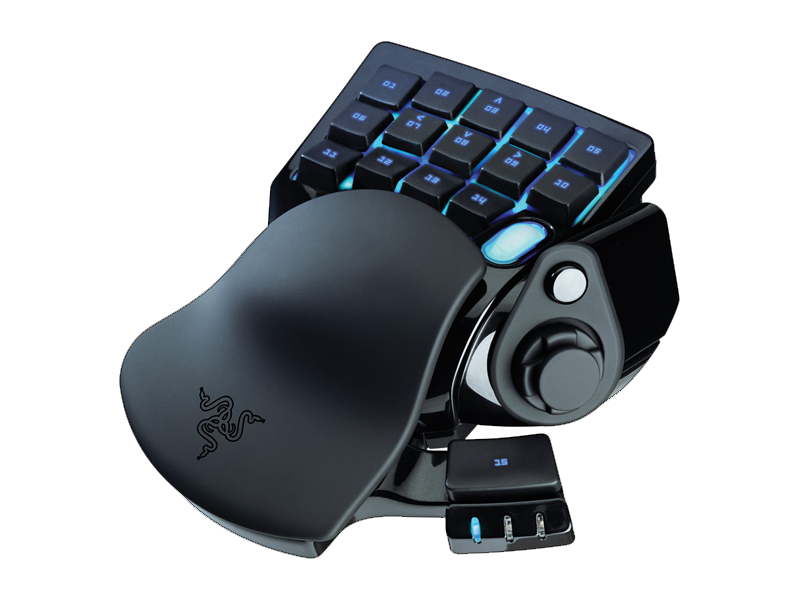
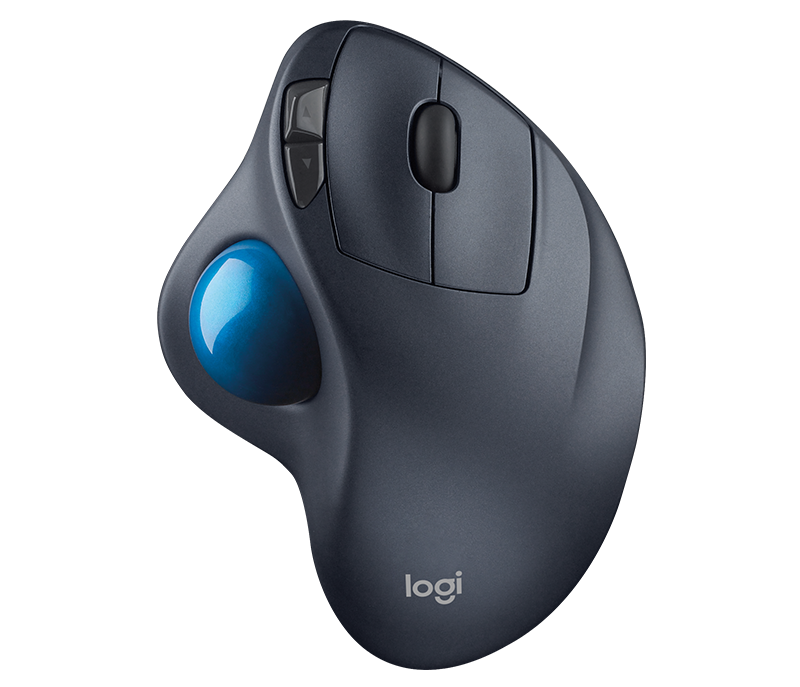
Doesn't the thumb button take care of all movement? If it doesn't, then I don't see the point of it.
The thumb button has a little cap you can remove, which turns it into a directional pad. I use the D-pad for jump, sprint, crouch and dodge roll, with WASD mapped to the finger keys.Edited by IcyDeadPeople on November 5, 2016 1:20PM0 -
 Mady✭✭✭✭✭6 years ago I bought the Razer Naga Molten. Best decision of my gaming life
Now I'm using the Naga Chroma and it's just awesome Discord HypeSquad MemberOfficial AlcastHQ Discord Server: discord.gg/alcasthq
Feel free to join!Those who dream by night in the dusty recesses of their minds wake in the day to find that it was vanity. But the dreamers of the day are dangerous men for they may act their dream with open eyes, to make it possible.1 -
thedude33✭✭✭✭✭IcyDeadPeople wrote: »Having a tough time getting a system down where I can move, attack and change weapons....especially since I only have 2 hands
I was never a good guitar player so using the WASD and trying to hit 1-5 at same time is tough for me. Gotta be an easier way. Currently my weapon swap is F key. I just fat finger stuff too often. Never mind trying to learn to animation cancel
What are some of the things the pros use ?
Certainly not a pro, but I use these two:
Doesn't the thumb button take care of all movement? If it doesn't, then I don't see the point of it.
The thumb button has a little cap you can remove, which turns it into a directional pad. I use the D-pad for jump, sprint, crouch and dodge roll, with WASD mapped to the finger keys.
So you still need both the mouse and keypad for full player movement?
Interesting looking mouse. What is the name of it? What does the ball on the side do?0 -
Syrani✭✭✭✭Doesn't the thumb button take care of all movement?BTW, is this any good? I mean, would it be a utter bs to spend cash on it?
http://www.razerzone.com/store/razer-orbweaver-chroma
Buy it now. It's a game changer. On a keyboard your thumb can't do much but hit the space bar. This puts a d-pad with 8 directional buttons as well as two more separate buttons that your thumb can easily access. So now your thumb goes from operating 1 button to 10 buttons. You can also press 1 button to change the load out on the fly to a completely different set of key functionality. In line keys allow you to use a ASDX format rather than a WASD format for moving. This allows your middle three fingers to rest together for movement rather than with your middle stretched forward. Not only is it more comfortable but it doesn't get in the way of accessing the keys above it when you move forward.
You don't have to buy the most expensive one, a nostromo razer or n52 will work just fine.
Doesn't the thumb button take care of all movement? If it doesn't, then I don't see the point of it.
There has to be something out there that allows all movement tied to one hand.
The thumb stick on the Orbweaver and Tartarus (not sure about the other kinds) for all intents and purposes is a joystick - you can use it to move. Technically, they call it a "D-Pad" because it "clicks" and has "buttons" you can assign keys to, but it functions as a joystick - it's just a "clicky" joystick. You can spin it around 360 degrees. You can assign keyboard functions to that joystick, so I assign WASD to it. This allows me to use my thumb to do all the movement, including strafing, in combination with moving the mouse to keep my view facing in the direction I want to look. That frees up all my fingers on both hands and my other thumb to press keys. I use the Tartarus in my left hand, so the fingers of my left hand are the ones pressing all of my attack buttons, plus several others - such as jump, interact, push to talk, horse mount, potion button, dodge roll, ultimate button, etc - the whole time still being able to move with only my thumb at the same time I am pushing all those other buttons. My right hand operates the mouse, which has my weapon swap, sprint, put away weapon, and synergy buttons, while also using it for the block/bash/light+heavy attacks.
This essentially allows all movement to be tied to one hand, but the camera angle is manipulated with the mouse. This does take some getting used to, but it becomes fluid and second nature fairly quickly. This set up allows you to move and press any key you need to at the same time, with very minimal reaching.
Like I said, I have small hands and short fingers, so it is extremely clunky and sometimes painful for me to try reaching keys on a regular keyboard. When using a keyboard, I was either moving or using other buttons - not both at the same time. This allows me to do everything at the same time.
I got the Tartarus because it's a smaller version of the Orbweaver, so it has less keys. The Orbweaver has an additional row of keys, and may be better for someone with larger hands.
EDIT: To give you an idea of my hand size, the middle finger on my left hand, measured from the palm side, is 3" from the base knuckle to the finger tip. If you have similar size hands, the Tartarus should work for you. If your fingers are a bit longer (and I would say most people's probably are), you may even be able to use the Orbweaver. You can probably go to a store that has these and ask them to take it out of the box so you can get your hand on it to see how it feels. Most stores also have a return policy, so if it seems to fit your hand, you can get it and take it home to use it for a bit. It probably took me several days to a week to get used to it, but now I can't imagine playing with anything else. If you end up not liking it, you can take it back.
Edited by Syrani on November 5, 2016 2:42PM0 -
NBrookus✭✭✭✭✭
✭✭✭✭IcyDeadPeople wrote: »Having a tough time getting a system down where I can move, attack and change weapons....especially since I only have 2 hands
I was never a good guitar player so using the WASD and trying to hit 1-5 at same time is tough for me. Gotta be an easier way. Currently my weapon swap is F key. I just fat finger stuff too often. Never mind trying to learn to animation cancel
What are some of the things the pros use ?
Certainly not a pro, but I use these two:
Doesn't the thumb button take care of all movement? If it doesn't, then I don't see the point of it.
The thumb button has a little cap you can remove, which turns it into a directional pad. I use the D-pad for jump, sprint, crouch and dodge roll, with WASD mapped to the finger keys.
So you still need both the mouse and keypad for full player movement?
Interesting looking mouse. What is the name of it? What does the ball on the side do?
It's the Logitech M570. Not a mouse, it's a trackball. You use your thumb for the movement you'd normally physically move a whole mouse for. I've used it (and it's predecessors) for years but would absolutely use a decent gaming mouse instead if I could. The switches are stiff and clunky and the ball and rollers need cleaning every couple of days or it gets less responsive.0 -
 BTW, is this any good? I mean, would it be a utter bs to spend cash on it?
http://www.razerzone.com/store/razer-orbweaver-chroma
I tried one of those gaming key pads many years ago now i cant play any pc game without one of those.The best thing ever invented for PC gaming.0 -
0
-
Doesn't the thumb button take care of all movement?BTW, is this any good? I mean, would it be a utter bs to spend cash on it?
http://www.razerzone.com/store/razer-orbweaver-chroma
Buy it now. It's a game changer. On a keyboard your thumb can't do much but hit the space bar. This puts a d-pad with 8 directional buttons as well as two more separate buttons that your thumb can easily access. So now your thumb goes from operating 1 button to 10 buttons. You can also press 1 button to change the load out on the fly to a completely different set of key functionality. In line keys allow you to use a ASDX format rather than a WASD format for moving. This allows your middle three fingers to rest together for movement rather than with your middle stretched forward. Not only is it more comfortable but it doesn't get in the way of accessing the keys above it when you move forward.
You don't have to buy the most expensive one, a nostromo razer or n52 will work just fine.
Doesn't the thumb button take care of all movement? If it doesn't, then I don't see the point of it.
There has to be something out there that allows all movement tied to one hand.
yes it allows your thumb only for movement.But in the end,those keypads comes with a software that allows you to configure any key the way you want.So the posibilities are big and one of the reason they are so good.Hell.....i remember once i was going to play a NES emulator and didnt had a proper controller so i turned my keypad upsidedown, (so the thumb cross pad ended on my left hand thumb) grabbed it like a controller,configured the buttons and done.0 -
 Own✭✭✭✭Having a tough time getting a system down where I can move, attack and change weapons....especially since I only have 2 hands
I was never a good guitar player so using the WASD and trying to hit 1-5 at same time is tough for me. Gotta be an easier way. Currently my weapon swap is F key. I just fat finger stuff too often. Never mind trying to learn to animation cancel
What are some of the things the pros use ?
Logitech m600 or razer naga. I prefer the logitech after using both0 -
CurukaellosSoul ShrivenI've been using my Roccat Nyth. (I'm so used to the middle fin and swappable buttons. In fact I have weapon swap set to the middle fin button which works great.) I tried a controller, but just couldn't get the hang of it. To each their own...0