Update 50 is now available for testing on the PTS! You can read the latest patch notes here: https://forums.elderscrollsonline.com/en/categories/pts
Maintenance for the week of April 20:
• [COMPLETE] NA megaservers for patch maintenance – April 20, 3:00AM EDT (7:00 UTC) - 12:00PM EDT (16:00 UTC)
• [COMPLETE] EU megaservers for patch maintenance – April 20, 7:00 UTC (3:00AM EDT) - 17:00 UTC (12:00PM EDT)
• [COMPLETE] NA megaservers for patch maintenance – April 20, 3:00AM EDT (7:00 UTC) - 12:00PM EDT (16:00 UTC)
• [COMPLETE] EU megaservers for patch maintenance – April 20, 7:00 UTC (3:00AM EDT) - 17:00 UTC (12:00PM EDT)
Update taking ages & Crash upon Launch

Jklin
Soul Shriven
So for the last 3 days I've been having problems.
I hadn't played in a while and so I started up the launcher to find a new update needed to be installed. I clicked to begin updating and it was a lot slower than usual. It took 2 whole days, with my computer running throughout the nights. Then when it completed the update, I clicked to Play, only to be met with a black screen, and "The Elder Scrolls Online Crash Reporter" with the message "We're sorry. The Elder Scroll Online has quit unexpectedly". With the usual option to describe what you were doing and the crash report details. I submitted a description of all of this, but I don't know how to proceed.
Right now I'm repairing the launcher but that too is almost as slow as the update. Can the slowness be because of my computer or could it be something with the launcher? I've never had this happen before. The only time anything took this long was when I first installed ESO.
Does anybody know what's going on? Has anyone else had this problem?
I'm afraid I won't have any time to part take in the current deals or events before they're over.
I hadn't played in a while and so I started up the launcher to find a new update needed to be installed. I clicked to begin updating and it was a lot slower than usual. It took 2 whole days, with my computer running throughout the nights. Then when it completed the update, I clicked to Play, only to be met with a black screen, and "The Elder Scrolls Online Crash Reporter" with the message "We're sorry. The Elder Scroll Online has quit unexpectedly". With the usual option to describe what you were doing and the crash report details. I submitted a description of all of this, but I don't know how to proceed.
Right now I'm repairing the launcher but that too is almost as slow as the update. Can the slowness be because of my computer or could it be something with the launcher? I've never had this happen before. The only time anything took this long was when I first installed ESO.
Does anybody know what's going on? Has anyone else had this problem?
I'm afraid I won't have any time to part take in the current deals or events before they're over.
0
-
 ZOS_Billadmin@Jklin
Making the following change in the ESO launcher can sometimes improve download speeds.- Start the ESO launcher.
- Click the gear icon in the top right corner of the launcher.
- This will bring you to the Launcher Settings menu.
- Scroll down to the bottom of the window and change the Maximum Download setting to 5mbps or 10mbps.
Adding an exception to the Windows Firewall and flushing the DNS can also help improve download speed.The Elder Scrolls Online: Tamriel Unlimited - ZeniMax Online Studios
Forum Rules | Code of Conduct | Terms of Service | Home Page | Help Site0 -
JklinSoul Shriven@Jklin
Making the following change in the ESO launcher can sometimes improve download speeds.- Start the ESO launcher.
- Click the gear icon in the top right corner of the launcher.
- This will bring you to the Launcher Settings menu.
- Scroll down to the bottom of the window and change the Maximum Download setting to 5mbps or 10mbps.
Adding an exception to the Windows Firewall and flushing the DNS can also help improve download speed.
Thanks! I'll see if it changes anything. It's currently only at 4%, and I started it slightly before posting this thread.
I had it set to Unlimited, can that make it slower?
0 -
JklinSoul Shriven@ZOS_BillE
Still no improvement in speed.
Update:
This error has popped up every single time I've tried repairing and updating.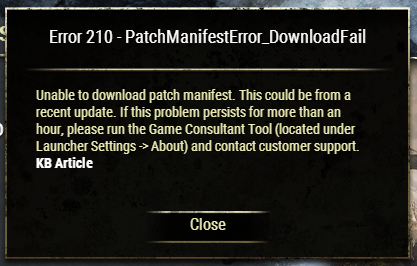
Edited by Jklin on 7 April 2020 20:050 -
ZOS_Billadmin@Jklin
Since you're getting Error 210, you may need to download a new patch manifest file. Instructions for doing so can be found here.The Elder Scrolls Online: Tamriel Unlimited - ZeniMax Online Studios
Forum Rules | Code of Conduct | Terms of Service | Home Page | Help Site0