Maintenance for the week of September 7:
• PC/Mac: No maintenance – September 7
• PC/Mac: No maintenance – September 7
I have never used steam, i buy all from zos store. Yay thanks tou your help i bought my tomes ❤️🌟

Pcgamer
✭✭✭
Hi
Yes i read the other threads about premium tomes and there is no helpful information so please don't move my post or close it as i NEED answers.
I read every bit of info on this that i could find in eso forums and by googling...got nothing. I dont want to have to create a steam account to be able to purchase the premium tomes. The stupid button ingame is not working..tries to take me to my eso elder scrolls account and there is nothing there to help me purchase tomes.
I use master card for my crown purchases and have always payed my subscription via my eso account. Why this infuriating lack of communication to help a client GIVE THEM yay bought them
Edited by Pcgamer on July 17, 2026 3:05AM Yes i read the other threads about premium tomes and there is no helpful information so please don't move my post or close it as i NEED answers.
I read every bit of info on this that i could find in eso forums and by googling...got nothing. I dont want to have to create a steam account to be able to purchase the premium tomes. The stupid button ingame is not working..tries to take me to my eso elder scrolls account and there is nothing there to help me purchase tomes.
I use master card for my crown purchases and have always payed my subscription via my eso account. Why this infuriating lack of communication to help a client GIVE THEM yay bought them
0
-
 Munkfist✭✭✭✭✭I've been able to purchase the upgrades right in game from the "Upgrade Tome" button, no issues whatsoever.
[snip]
[edited for baiting]Edited by ZOS_CouchTato on July 15, 2026 4:19PM@Munkfist PC-NA
The Devoted Torchbugs
Antiquarian's Alpine Gallery Guildhall - Feel free to use!
If your guild needs a crafthall, please feel free to reach out!2 -
 Maitsukas✭✭✭✭✭
✭✭✭You need to set up a saved payment method on account.elderscrollsonline.com for the Premium Tome purchases to work.
Go to Edit Account Info and you can find the option for it under Billing Info: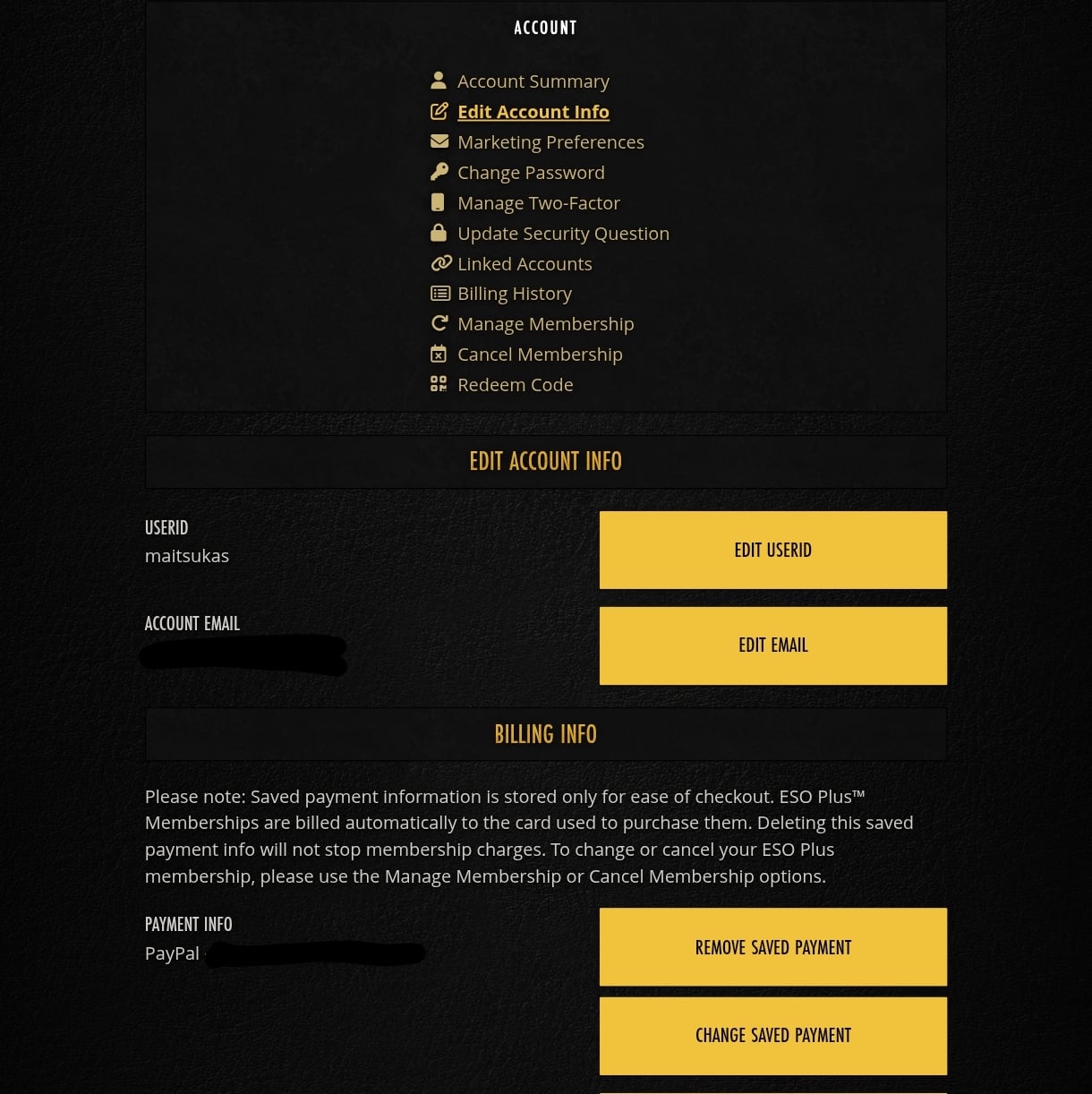
PC-EU @maitsukas
Posting the Infinite Archive and Imperial City Weekly Vendor updates.
Also trying out new Main Quests, Companions, ToT decks, Events and Styles on PTS.6 -
 heaven13✭✭✭✭✭
✭✭✭✭You need to set up a saved payment method on account.elderscrollsonline.com for the Premium Tome purchases to work.
Go to Edit Account Info and you can find the option for it under Billing Info:
This is the correct info. I also do not use Steam. It took me a bit to figure out (luckily my partner figured it out first so could help me out) because one would think "I already have a recurring payment" if one has ESO+ so it was definitely confusing at first.PC/NAMountain God | Leave No Bone Unbroken | Apex Predator | Pure Lunacy | Depths Defier | No Rest for the Wicked | In Defiance of DeathMeet my characters :
Defanged the Devourer | Nature's Wrath | Relentless Raider | True Genius | Bane of Thorns | Subterranean Smasher | Ardent Bibliophile
vAA HM | vHRC HM | vSO HM | vDSA | vMoL HM | vHoF HM | vAS+2 | vCR+2 | vBRP | vSS HM | vKA | vRGIT DOESN'T MATTER BECAUSE THEY'RE ALL THE SAME NOW, THANKS ZOS1 -
Pcgamer✭✭✭
.You need to set up a saved payment method on account.elderscrollsonline.com for the Premium Tome purchases to work.
Go to Edit Account Info and you can find the option for it under Billing Info:
Thank you so much this is very helpfull indeed. Gave yuu an awesome ❤️2 -
Pcgamer✭✭✭You need to set up a saved payment method on account.elderscrollsonline.com for the Premium Tome purchases to work.
Go to Edit Account Info and you can find the option for it under Billing Info:
You helped je so much i got my tomes❤️🌟2
