Maintenance for the week of June 15:
• PC/Mac: No maintenance – June 15
• PC/Mac: No maintenance – June 15
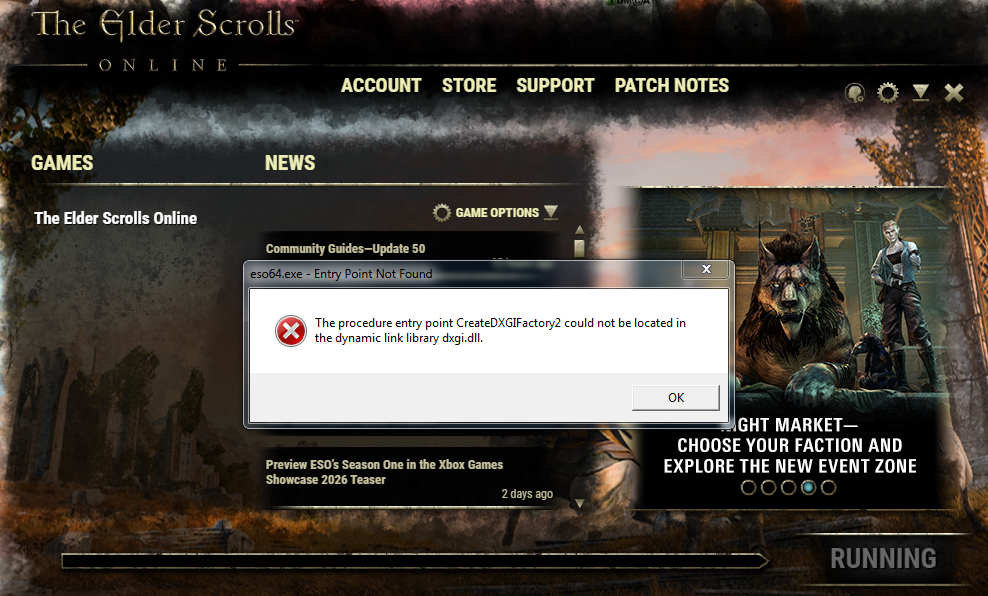
[Update 50] eso64.exe - Entry Point Not Found - (ESO won't start)

Sturmfaenger
✭✭✭✭✭
✭
✭
First: I still use an old Windows (Windows7) and it may be related to that. I use the zip-file for the launcher ZOS provided us with (https://forums.elderscrollsonline.com/en/discussion/680787/launcher-issues-click-here-for-zip-files). And I can enter the launcher.
This morning I logged in before the downtime, and ESO still worked fine. After the update, when I started the launcher, the old error message came, but the Launcher started.
I could download the update, but when I want to start ESO with the button in there, it tells me that it can't start. I get the advice to repair and this:
"eso64.exe - Entry Point Not Found
The procedure entry point 'CreateDXGIFactory2' could not be located in the DLL 'dxgi.dll'."
What I tried:
- I repaired the game (twice).
- I used to provided Launcher-File in ZOS' Zip-folder again for the launcher. It got rid of the error message for the launcher, but I still can't start ESO.
Yes, I have an old Windows version. And maybe its the sign to finally spend the money now for a new one.
But maybe I'm not the only one with that problem. Here's hope to a solution

PC/EU
3
-
 SkaiFaith✭✭✭✭✭
✭✭Windows 7 Is no longer supported, since at least 12 months ago if not more, if I remember correctly."..........Anyway, here's how
to tell if your RPG
sign is cheap" - Tony(?)1 -
 Nurmana✭✭i have the same problem. i found a reddit post where someone "swapped" a DirextX file for a Reshade file which seem to fix it but thats quite dangerous as you mess with Windows System files which get reset if windows detects that.
the error you and me get means that they call for DX12 functions, and DX12 is not available for Windows 7.
All they need to do is to call for the older DX11 Functions and it would work again.
Some Posts on an Overwatch Forum explains this more, here is the text which describes that
The thing is that in Windows 7, compatible versions of the dxgi.dll do not contain the CreateDXGIFactory2 function because it is a DirectX 12 function. The Windows 10 versions of the dxgi.dll have that function, but do not work in Windows 7. Windows 7 does not support DirectX 12, although rudimentary support may be hacked in. However, Overwatch2 works perfectly while using only DirectX 11 functions. So if Blizzard did just call the DirectX 11 function CreateDXGIFactory1 when in Windows 7, it will work perfectly fine like it did until now.
I think it is highly likely that any attempt to inject a wrapper into the pipeline that re-routes the CreateDXGIFactory2 function call to CreateDXGIFactory1, will most likely trigger the OW2 anti-cheat measures.
I dont recommend messing with OS files or changing files provided by ESO, this is just informational that you are not alone here and have to search and experiment on your own risk. I wish i could help but i am very sorry i can not.
i hope the moderators allow this post to stay. i enjoy ESO very much, its one of the last games which run on my lovely Win7 Computer but it seems today in the early morning i did my last Crafting Run on this computer before the "update".
3 -
Vraedlich✭✭✭Ah, this again.
Can the devs be bothered entertaining us anymore?
They released a launcher fix last time, but this sounds like more effort.0 -
 Dagoth_Rac✭✭✭✭✭
✭✭✭✭✭Moving from DirectX 11 to DirectX 12 seems like it should have been at least mentioned in Patch Notes, to give people the entire PTS cycle to prepare. ZOS have been generous in keeping unofficial DX11 support, so they must know a lot of people people still use it. Even if they are not going to do another ad hoc fix, a simple heads up would have been nice. :'(3 -
 Luna13✭✭Same issue here and also using Windows 7. I would like to play ESO again! @ZOS_Kevin @ZOS_JessicaFolsom
The error I get: The procedure entry point CreateDXGIFactory2 could not be located in the dynamic link library dxgi.dll.0 -
 Kazhirra✭✭✭Yes, a concrete warning a few weeks ago would have been nice. :'(
I would be so thankful if there was at least a temporary solution, so we could finish our Night Market goals.
Some of us may be not able to upgrade their OS in the next one or two days....mit besten Grüßen, die Flauschgewordene. 🐾1 -
Vraedlich✭✭✭Yes, a concrete warning a few weeks ago would have been nice. :'(
I would be so thankful if there was at least a temporary solution, so we could finish our Night Market goals.
Some of us may be not able to upgrade their OS in the next one or two days.
If you own the game on Steam or Epic, you can play it on Geforce Now, that's what I've been doing.
Can do that on your phone and your computer if you have a windows 7 geforce now client.
Technically Geforce Now no longer supports Windows 7 (it regularly reminds me the client can't update) but all the games currently still play for me. Not sure if they have the 7 launcher on their site,
The version I'm on in Win7 is Version 2.0.69.149/ro GB/en_US
Personally I use premium as it is a lot nicer but you can use the service for free.0 -
Vraedlich✭✭✭^ Also was able to comfortably complete Opulent Trial via Geforce Now.
How far away you are from a data centre will make a lot of difference.0 -
Sturmfaenger✭✭✭✭✭
✭Thanks for the answers. Glad I'm not alone in this, at least.
Yes, a "Listen guys, this update in a few weeks will BE the end of ESO working on Windows7" would have been good.
I guess, I'll have to go to my new fargrave house bank room with a bucket and a shovel, and use some of that pile of real world 'gold' there for a new PC. Early christmas. And such.PC/EU1 -
Nurmana✭✭I never heard of that vxKex Stuff, but i downloaded it after a google search from github, and it got instantly flagged as virus. i uploaded the installer to virustotal.com, a website with about 70 virus scanners which scan your uploaded files on demand, and it shows highly contagious, 48 of 70 detect trojan or malware.
https://www.virustotal.com/gui/file/7a03cfaed5e4ce5ee875032ae363bf94e7473fad801b51bfe273f09b61de3bad
can you explain this, Luna or kazhirra ?
0 -
Nurmana✭✭Almost all Forums say its safe so i may have overreacted and it may be false positive
And if you say its safe, can you give me/us some instructions how to start ESO with it? is just flagging the eso64 exe with it enough or do we need to install dx12 somehow?0 -
Kazhirra✭✭✭If you have downloaded it from the official VxKex-Site at github, it should be false alarm. This program modifies DLLs and stuff (as some types of malware also do for other reasons), so safety programs see it as potential danger.
When it is installed, you open the VxKex settings and add the game exe to the application list.
In my case I also had to manually copy the d3d11.DLL from my system32 folder into the game/client folder to make it work.
Nonetheless it's experimenting around with system files and should therefore be handled with care.
(This one was desperate enough to try it and it paid out. ) ...mit besten Grüßen, die Flauschgewordene. 🐾0 -
Nurmana✭✭ok, thanks, i give that a try, i dl´d propably a wrong version of vxkex. i try your NEXT Version with your adjustments. and so far its running and stable for you?0
-
Nurmana✭✭After lots of hassle and using the AI and messing around it now runs with the latest kex version, and with the shortcut parameter -dx11 and your great hint to copy the d3d11.dll into gameclient folder. thank you alot for your help. i am not sure WHY its running, it always crashed when i followed suggestions of the ai but now i am in Char Selection and i am just glad. kudos to you for all your help lets hope it works for others too.
0 -
Kazhirra✭✭✭ok, thanks, i give that a try, i dl´d propably a wrong version of vxkex. i try your NEXT Version with your adjustments. and so far its running and stable for you?
Yes, I'm playing on the Night Market for more than one hour now. Glad it works for you too.
I was never happier to see the Login Screen than I was today. ...mit besten Grüßen, die Flauschgewordene. 🐾0
 -
Vraedlich✭✭✭Why would you trust something that compromises the security of your Windows installation dramatically.0
-
sbatr✭great..playing an hr b4 the update and was fine..after the update got this crash message...if they cant help with a fix, guess im done since i cant afford a new comp with real life stuff going on
 0
0