Maintenance for the week of August 31:
• ESO Store and Account System for maintenance – September 3, 10:00AM EDT (14:00 UTC) - 12:00PM EDT (16:00 UTC)
• ESO Store and Account System for maintenance – September 3, 10:00AM EDT (14:00 UTC) - 12:00PM EDT (16:00 UTC)
3rd person FOV too tight

Tarbs01
✭✭
After U50, while having to go in and reset most of my options on all of my characters, I am noticing that the 3rd person FOV is much tighter than it used to be. Before the update I was able to pull back far enough that I could see the entirety of my characters. Now, even with the slider all the way to the right, I can only see to just below their waist. This means that my view is dominated by shoulder blades. When I spawn my assistants, like the ragpicker, I can barely see them due to the amount of screen real estate being taken up by my character.
It is a little jarring as everything just feels way too close now. I have not tried any combat yet to see how it effects that.
I play on Xbox NA with a Series X console.
Is this a bug or has someone made the very bad decision to make this the new normal?
Thanks.
It is a little jarring as everything just feels way too close now. I have not tried any combat yet to see how it effects that.
I play on Xbox NA with a Series X console.
Is this a bug or has someone made the very bad decision to make this the new normal?
Thanks.
Xbox/NA Nord DK For the Pact!
0
-
 fizl101✭✭✭✭✭
✭✭I’m on ps rather than xbox but I’m not seeing any change to FOV in 3rd person
This screenshot was taken today to show fov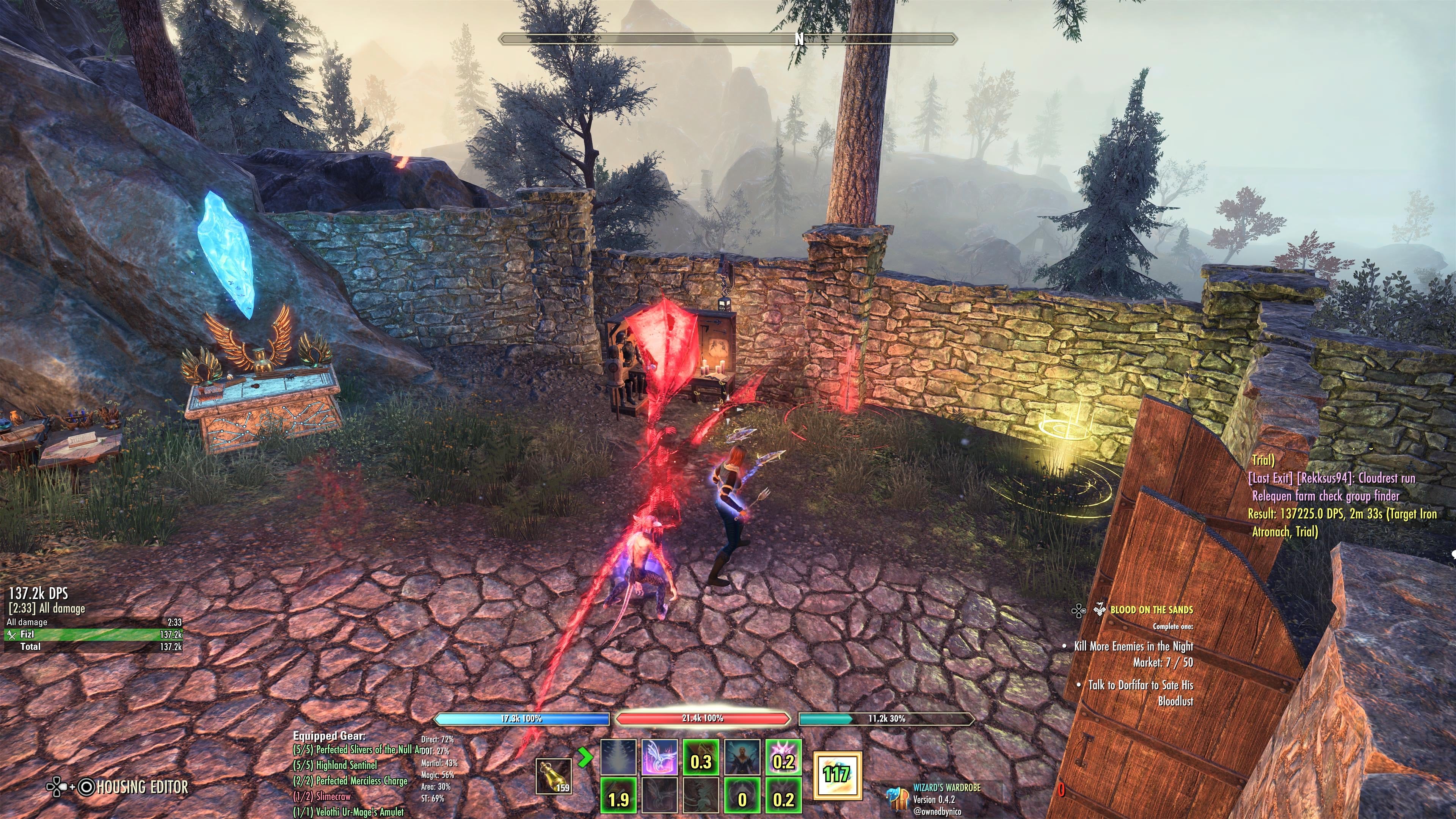
Edited by fizl101 on June 9, 2026 2:38PMSoupy twist2 -
 LootAllTheStuff✭✭✭✭✭After U50, while having to go in and reset most of my options on all of my characters, I am noticing that the 3rd person FOV is much tighter than it used to be. Before the update I was able to pull back far enough that I could see the entirety of my characters. Now, even with the slider all the way to the right, I can only see to just below their waist. This means that my view is dominated by shoulder blades. When I spawn my assistants, like the ragpicker, I can barely see them due to the amount of screen real estate being taken up by my character.
It is a little jarring as everything just feels way too close now. I have not tried any combat yet to see how it effects that.
I play on Xbox NA with a Series X console.
Is this a bug or has someone made the very bad decision to make this the new normal?
Thanks.
Also on XB-NA, and didn't notice any difference at all across a couple of characters last night. In addition to the FOV slider, make sure you are zoomed out on stick. IIRC you hold down on the D-pad and use the right stick to zoom closer to and further away from your character. If it still looks wrong, please consider posting a screen shot so we can see exactly what you are seeing for a better comparison (plus potential bug report!)
Edit to add: also, make sure that there's not a physical object like a wall behind you, as that forces a camera zoom regardless.
Edited by LootAllTheStuff on June 9, 2026 2:51PM1 -
Tarbs01✭✭LootAllTheStuff wrote: »After U50, while having to go in and reset most of my options on all of my characters, I am noticing that the 3rd person FOV is much tighter than it used to be. Before the update I was able to pull back far enough that I could see the entirety of my characters. Now, even with the slider all the way to the right, I can only see to just below their waist. This means that my view is dominated by shoulder blades. When I spawn my assistants, like the ragpicker, I can barely see them due to the amount of screen real estate being taken up by my character.
It is a little jarring as everything just feels way too close now. I have not tried any combat yet to see how it effects that.
I play on Xbox NA with a Series X console.
Is this a bug or has someone made the very bad decision to make this the new normal?
Thanks.
Also on XB-NA, and didn't notice any difference at all across a couple of characters last night. In addition to the FOV slider, make sure you are zoomed out on stick. IIRC you hold down on the D-pad and use the right stick to zoom closer to and further away from your character. If it still looks wrong, please consider posting a screen shot so we can see exactly what you are seeing for a better comparison (plus potential bug report!)
Edit to add: also, make sure that there's not a physical object like a wall behind you, as that forces a camera zoom regardless.
Thanks! I had forgotten all about the D-pad + R-stick option. That seems to take care of it for me.
Just a shame I have to go in and setup all this stuff again, on every character.
Thanks again.Xbox/NA Nord DK For the Pact!0 -
 Gabriel_H✭✭✭✭✭
✭✭✭✭Not for nothing, but this has been a recurring problem for me (on PC) for years. When the camera auto adjusts height because of a building/scenery it tightens up (as it should) but then when there is no longer an obstruction it remains tight*, even panning back out fully manually only moves it a little. Switching zones solves it.
*not to the degree you are saying, as character is still in full view just
Edit: TyposEdited by Gabriel_H on June 9, 2026 5:08PM0