Maintenance for the week of August 10:
• [COMPLETE] NA megaservers for patch maintenance – August 10, 4:00AM EDT (8:00 UTC) - 12:00PM EDT (16:00 UTC)
• [COMPLETE] EU megaservers for patch maintenance – August 10, 8:00 UTC (4:00AM EDT) - 16:00 UTC (12:00PM EDT)
• [COMPLETE] NA megaservers for patch maintenance – August 10, 4:00AM EDT (8:00 UTC) - 12:00PM EDT (16:00 UTC)
• [COMPLETE] EU megaservers for patch maintenance – August 10, 8:00 UTC (4:00AM EDT) - 16:00 UTC (12:00PM EDT)
Switching from PC to Steam

Nemesis7884
✭✭✭✭✭
✭✭✭✭✭
✭✭✭✭✭
If i always played the game directly and want to go through steam in the future; I will have to redownload it through steam; has anyone done that and can share some experience?
Does the ESO folder in the documents folder remain the same or get overwritten; e.g.
- will the saved settings stay the same?
- addons and their settings?
Will I have to delete the old game version first or can I do that after downloading through steam?
Anything else?
Thinking of switching because of the release of the steam controller which only seems to work through steam...
would it make more sense to add eso as non steam game to the steam library in this case?
Edited by Nemesis7884 on April 27, 2026 5:51PM Does the ESO folder in the documents folder remain the same or get overwritten; e.g.
- will the saved settings stay the same?
- addons and their settings?
Will I have to delete the old game version first or can I do that after downloading through steam?
Anything else?
Thinking of switching because of the release of the steam controller which only seems to work through steam...
would it make more sense to add eso as non steam game to the steam library in this case?
0
-
 majulook✭✭✭✭✭
✭Nemesis7884 wrote: »
would it make more sense to add eso as non steam game to the steam library in this case?
If the steam controller will work that way, Yes.Si vis pacem, para bellum0 -
 Rogue_Coyote✭✭✭You will have to start over at level 1 without any equipment, extras, or stuff collected through the pc stand alone version. They will not allow you to login using your old account. I asked years ago for my steam based eso credentials do I can login through the app in the event steam is down or otherwise offline. No dice.0
 -
 Maitsukas✭✭✭✭✭
✭✭✭Keep in mind, that if there are issues regarding a stable connection with the game, it can only affect Steam users but not players on the ESO Store version of the game.
Personally, I'd stay on the first-party option if possible (like I have the whole Assassin's Creed series in my Ubisoft Connect account but not on Steam).PC-EU @maitsukas
Posting the Infinite Archive and Imperial City Weekly Vendor updates.
Also trying out new Main Quests, Companions, ToT decks, Events and Styles on PTS.0 -
 Korvax_Ironwhisper✭✭✭✭✭
✭I think there is a way to launch non-Steam games in Steam. I do it opposite, launching ESO64.exe from the Steam folder for non-Steam accounts. ESO's addons are all stored in the documents folder, so I don't think there will be an issue there.
I don't know how the launching will work via Steam as it has its own authentication system and you don't really login.Edited by Korvax_Ironwhisper on April 27, 2026 7:17PM0 -
 Diminish✭✭✭✭✭
✭You could just backup your addons and saved variables from your documents folder to a location before installing the Steam version in case it overwrites them. Then just copy/paste them back in.
%USERPROFILE%\Documents\Elder Scrolls Online\live\AddOns
%USERPROFILE%\Documents\Elder Scrolls Online\live\SavedVariables
You may even want your screenshots if you have any in case those get wiped:
%USERPROFILE%\Documents\Elder Scrolls Online\live\Screenshots
Your UserSettings.txt:
%USERPROFILE%\Documents\Elder Scrolls Online\live\UserSettings.txt
And your AddOnSettings.txt:
%USERPROFILE%\Documents\Elder Scrolls Online\live\AddOnSettings.txt
I don't use Steam, so I am not sure if it adds any Steam-specific entries to your UserSettings.txt or not - it may, and if so, restoring your previous one may cause your game to crash or act buggy when you launch it. If that happens, just close the game, delete UserSettings.txt, launch the game, and let it get recreated again - you will just need to adjust all your Display, Audio, etc. settings once again.
AddOns are strictly stored in the AddOns directory though, and the settings for them are saved to the SavedVariables folder so they are very easy to restore. At most, if you use Minion, once you switch to the Steam version of the game you may need to go into your Minion settings and point it back to your AddOns directory even if it shows it is still correct so that it rescans the directory again.0 -
Diminish✭✭✭✭✭
✭I think there is a way to launch non-Steam games in Steam. I do it opposite, launching ESO64.exe from the Steam folder for non-Steam accounts. ESO's addons are all stored in the documents folder, so I don't think there will be an issue there.
I don't know how the launching will work via Steam as it has its own authentication system and you don't really login.
There is, it's a pretty similar process to how you do it. I launch ESO from Steam via the official launcher, as well as the Epic version of ESO - both installs share a single instance of the game.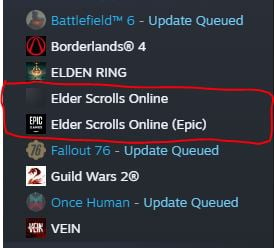
0 -
 imPDA✭✭✭✭You need to buy base game version in Steam and link it on the ESO website in account settings or on first login via steam, see
https://help.elderscrollsonline.com/#en/answer/36517
Addons will not be affected, but to be 100% sure, backup "Documents/Elder Scrolls Online" folder with all addons and settings inside.
You can use both versions of the game; you can even start game from Steam folder and use login/password as usual. You can open multiple game instances if you have multiple accounts, one via Steam and many login/password game instances.
You can even try starting download in Steam, pause, find respectful Steam directory and game files inside, then copy all files you have to Steam directory and run integrity check, it should find most files and download only some extra for Steam - Steam version is the same game with the same exact files, only login part is slightly different.Your Friendly Neighborhood PvP Enjoyer (prior to U48)0