Maintenance for the week of April 6:
• PC/Mac: No maintenance – April 6
• PC/Mac: No maintenance – April 6
Cannot buy the premium+bonus tome?
-
 ZOS_GinaBrunoCommunity ManagerTo expand on what Jess posted yesterday, we do want to suggest two things that may help those of you still running into issues purchasing the Premium Tome.
- When adding a payment method, it is critical that you also add your billing address that matches the saved payment. This is a separate step in the Billing and Account page and must be done in conjunction with saving a payment method.
- If you have a recurring subscription through ESO Plus, the payment method originally used for purchasing the subscription is not a saved payment method you are able to use for making an in-game purchase for the Premium Tome. You must add a new, saved payment method (and don’t forget the billing address!)
Please let us know if any of you continue to run into issues after ensuring you have confirmed completing the callouts above. Thanks!
Gina Bruno
Principal Creator Engagement Manager
Dev Tracker | Service Alerts | ESO Twitter | My Twitter2 -
 dcrush✭✭✭✭✭
✭ZOS_GinaBruno wrote: »To expand on what Jess posted yesterday, we do want to suggest two things that may help those of you still running into issues purchasing the Premium Tome.- When adding a payment method, it is critical that you also add your billing address that matches the saved payment. This is a separate step in the Billing and Account page and must be done in conjunction with saving a payment method.
- If you have a recurring subscription through ESO Plus, the payment method originally used for purchasing the subscription is not a saved payment method you are able to use for making an in-game purchase for the Premium Tome. You must add a new, saved payment method (and don’t forget the billing address!)
Please let us know if any of you continue to run into issues after ensuring you have confirmed completing the callouts above. Thanks!
Hi @ZOS_GinaBruno - why is it only possible to pay with a pre-saved payment method?1 -
DuckFayth✭✭✭ZOS_GinaBruno wrote: »To expand on what Jess posted yesterday, we do want to suggest two things that may help those of you still running into issues purchasing the Premium Tome.
- When adding a payment method, it is critical that you also add your billing address that matches the saved payment. This is a separate step in the Billing and Account page and must be done in conjunction with saving a payment method.
- If you have a recurring subscription through ESO Plus, the payment method originally used for purchasing the subscription is not a saved payment method you are able to use for making an in-game purchase for the Premium Tome. You must add a new, saved payment method (and don’t forget the billing address!)
Please let us know if any of you continue to run into issues after ensuring you have confirmed completing the callouts above. Thanks!
Thanks Gina, I'll recap my steps below because everything appears to be fine from my side but it refuses to work..
I went to my account page on the website, confirmed that my billing address was already there and already current. I clicked "remove address", then added the address manually again. I logged in to the game and got the same error while trying to purchase the upgrade.
I found myself unable to remove my saved payment info as it was grey'd out, see below.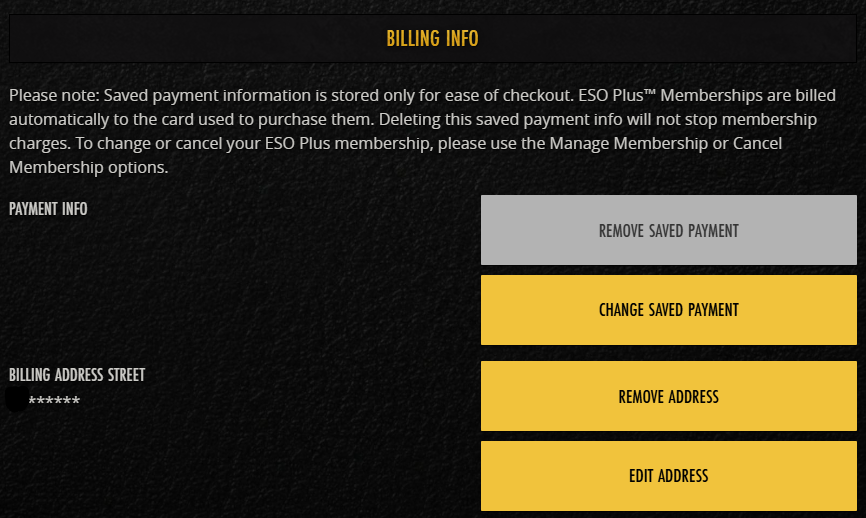
I figured this must be due to my ESO+ subscription, so I cancelled that, and I was still unable to remove my saved payment method. Previously I had already clicked to edit my payment method and added a credit card there, but there is no "preview" of it in that image above. Since the method was blank, I wondered if maybe using that portion of the payments doesn't save properly? So I went through setting up my ESO+ again, ensuring the option to save my payment method was checked. Every single card I attempted to use gave me the following error and I attempted to use 3, 2 credit cards and one debit.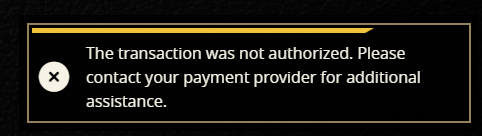
Now I'm unable to buy the tome OR set up ESO+ again, for science 0
0 -
Jordan_Black✭✭✭✭ZOS_GinaBruno wrote: »To expand on what Jess posted yesterday, we do want to suggest two things that may help those of you still running into issues purchasing the Premium Tome.
- When adding a payment method, it is critical that you also add your billing address that matches the saved payment. This is a separate step in the Billing and Account page and must be done in conjunction with saving a payment method.
- If you have a recurring subscription through ESO Plus, the payment method originally used for purchasing the subscription is not a saved payment method you are able to use for making an in-game purchase for the Premium Tome. You must add a new, saved payment method (and don’t forget the billing address!)
Please let us know if any of you continue to run into issues after ensuring you have confirmed completing the callouts above. Thanks!
Thank you @ZOS_JessicaFolsom, adding the separate billing address fixed it and I could buy the tome.1 -
ZOS_GinaBrunoCommunity ManagerZOS_GinaBruno wrote: »To expand on what Jess posted yesterday, we do want to suggest two things that may help those of you still running into issues purchasing the Premium Tome.
- When adding a payment method, it is critical that you also add your billing address that matches the saved payment. This is a separate step in the Billing and Account page and must be done in conjunction with saving a payment method.
- If you have a recurring subscription through ESO Plus, the payment method originally used for purchasing the subscription is not a saved payment method you are able to use for making an in-game purchase for the Premium Tome. You must add a new, saved payment method (and don’t forget the billing address!)
Please let us know if any of you continue to run into issues after ensuring you have confirmed completing the callouts above. Thanks!
Thanks Gina, I'll recap my steps below because everything appears to be fine from my side but it refuses to work..
I went to my account page on the website, confirmed that my billing address was already there and already current. I clicked "remove address", then added the address manually again. I logged in to the game and got the same error while trying to purchase the upgrade.
I found myself unable to remove my saved payment info as it was grey'd out, see below.
I figured this must be due to my ESO+ subscription, so I cancelled that, and I was still unable to remove my saved payment method. Previously I had already clicked to edit my payment method and added a credit card there, but there is no "preview" of it in that image above. Since the method was blank, I wondered if maybe using that portion of the payments doesn't save properly? So I went through setting up my ESO+ again, ensuring the option to save my payment method was checked. Every single card I attempted to use gave me the following error and I attempted to use 3, 2 credit cards and one debit.
Now I'm unable to buy the tome OR set up ESO+ again, for science
Thanks for the info! So as mentioned above, the payment method you're using for the ESO+ subscription is not considered a saved payment, which is why the button is greyed out; there is nothing saved and nothing to remove. As for being able to re-add a card, you may be hitting a rate limit since you're trying to add multiple cards within a short period of time.
As a general FYI:- If you want to save a payment to use for Tamriel Tomes or a web purchase:
- Add your payment via the Edit Account page, or...
- Save the payment when checking out on a purchase
- If you want to save a payment to use for ESO Plus:
- The payment type used for the purchase will be used for renewals (if it's a renewal enabled payment type)
- If you want to change the payment type, you can do so using the manage membership flow
Gina Bruno
Principal Creator Engagement Manager
Dev Tracker | Service Alerts | ESO Twitter | My Twitter2 -
DuckFayth✭✭✭That's the weird part Gina, I saved a card there yesterday fine! Then when I pulled it up today to continue troubleshooting, it was gone. I misdiagnosed it as my ESO+ interfering with it.
The issue seems to be with card processing specifically though, I just went through and set up my paypal using the same debit card that was throwing an error on the website, and with paypal as a saved method it did indeed work like you mentioned above.0 -
 RaikaNA✭✭✭✭✭
✭ZOS_GinaBruno wrote: »@PurpleScroll Any chance you are able to grab a quick video? Even just cell phone footage would be fine.
uh shouldnt the ESO+ subscribers have access to the premium+bonus tome? What's the point of having eso+ when all we get is a craft bag?1 -
Requielle✭✭✭ZOS_GinaBruno wrote: »To expand on what Jess posted yesterday, we do want to suggest two things that may help those of you still running into issues purchasing the Premium Tome.
- When adding a payment method, it is critical that you also add your billing address that matches the saved payment. This is a separate step in the Billing and Account page and must be done in conjunction with saving a payment method.
- If you have a recurring subscription through ESO Plus, the payment method originally used for purchasing the subscription is not a saved payment method you are able to use for making an in-game purchase for the Premium Tome. You must add a new, saved payment method (and don’t forget the billing address!)
Please let us know if any of you continue to run into issues after ensuring you have confirmed completing the callouts above. Thanks!
I already had a billing address on file when I had my issues yesterday - but I deleted my billing address and re-added it, just to be sure. I then (once again) updated my card info. As noted in my previous comment, even after saving my payment information, the box to remove said information remains greyed-out. The in-game purchase option was still not working.
Just for science, I tested adding Paypal. That *did* fully update (i.e. the remove box was now active) and it showed up in-game. But for more science, I updated my payment info to put my card back in, and it was again non-functional. It showed that it saved, but the remove box was once-again greyed-out and it no longer had the option in game.
After doing all that, I decided to take a look at my membership billing info - and it had been changed to PayPal. Once again, removing PayPal made it non-functional, and trying to add my card back on didn't work. Now the [Confirm and Proceed to Checkout] button is greyed out and I'm unable to update my preferred payment method back to my credit card. So I removed PayPal and left no payment method on my membership.
Someone seems to have coded the website to only accept PayPal as a valid payment method? Because despite accepting VISA and confirming that the payment update is successful, it is not actually working.
And, pre-emptively, no I don't want to use PayPal. My PayPal is set up for other reasons, and I would prefer not to start running my game subscription and in-game purchases through it. So I don't consider "just use PayPal!" to be a solution, when direct credit card billing is offered as an option and should be working.0 -
 BearOrK✭✭Hello, as I didn't see this post in bug report I created one. However they closed it. So I will copy and paste everything I typed there:Hello! I play on the 3 platforms and I encountered some issues... I tried contacting the Spanish Speaking comunity manager but they are on holidays.
Playstation
I play the game with texts in Spanish as I try to help the Spanish speaking community. However, the game does not let you buy regular premium tome if the game is in Spanish it only lets you buy Premium + tome (Not even giving the option to use premium tokens). In order to "fix it" you have to change language into "English".
Video
Xbox
In the case of Xbox, its kind of the same as PSN. I don't even have the possibility to select "Upgrade Tome" so I have to change language into English. I do so, and I can select "Upgrade Tome" but whenever option I chose to buy Premium or Premium+ I get an error message making it unable to be buyable.
Video
PC
Unlike PSN or Xbox I am able to select "Upgrade Tome" and both Premium or Premium+ options are available to buy in Spanish. However, when I try clicking on either of them, nothing happends. The same occurs when I change the game into English.
Video
I play on PS5. Xbox Cloud and PC Steam.
As the season has just started we still have plenty of time to buy tomes but I fear of those players who came back from a long time o are first timers and wanted to buy the tomes to enter this new era of the game.
Hopefully it can be fixed soon. Thanks for reading...0 -
 virtus753✭✭✭✭✭
✭✭✭✭✭ZOS_GinaBruno wrote: »@PurpleScroll Any chance you are able to grab a quick video? Even just cell phone footage would be fine.
uh shouldnt the ESO+ subscribers have access to the premium+bonus tome? What's the point of having eso+ when all we get is a craft bag?
In addition to the craft bag, ESO+ gives:
-2 companions unlocked free
-1650 crowns per month
-1 cache of Tome Points (2k) per month
-10% boost to currency (including to Tome Points earned through challenges), XP, and inspiration gains
-access to all paid DLC (13 story zones, not counting Greymoor since it will be free later this year; and 16 dungeon packs)
-access to costume dyeing
-double bank space
-double transmutation crystal capacity
-double furnishing space in houses
-furnishing vault
-double lead timers
-reduced research timers
-discounts on crown store prices
People will certainly value these things differently, depending on how they play the game, and I think it's more than fair to feel it's been devalued as DLCs are going free or the crowns we get from it aren't going to be usable in many of the new systems. But it does factually offer more than the craft bag.2 -
mistpeak✭✭I added my billing address, and it finally worked. I added the payment information yesterday, and I was certain it had my billing information yesterday. Either it didn't or it somehow got wiped out during the whole ordeal to get it working.
I hope in the future this content is sold the same way the old chapters were, on the website. Doing this in game is a mess. I don't intend to fight with this again. I'll simply ignore the content if I have to do this much work to buy something.1 -
 Fuhrankie✭✭ZOS_GinaBruno wrote: »To expand on what Jess posted yesterday, we do want to suggest two things that may help those of you still running into issues purchasing the Premium Tome.
- When adding a payment method, it is critical that you also add your billing address that matches the saved payment. This is a separate step in the Billing and Account page and must be done in conjunction with saving a payment method.
- If you have a recurring subscription through ESO Plus, the payment method originally used for purchasing the subscription is not a saved payment method you are able to use for making an in-game purchase for the Premium Tome. You must add a new, saved payment method (and don’t forget the billing address!)
Please let us know if any of you continue to run into issues after ensuring you have confirmed completing the callouts above. Thanks!
I live in australia, and apparently paypal isn't an option for steam any more (checked both my account and hubs' one) - are the team looking at fixing payment methods or are we SOL?0 -
mistpeak✭✭Just a little additional information, I did use a credit card. I had to reinter it and save it more than once just to get it working.0
-
ZOS_GinaBruno wrote: »To expand on what Jess posted yesterday, we do want to suggest two things that may help those of you still running into issues purchasing the Premium Tome.
- When adding a payment method, it is critical that you also add your billing address that matches the saved payment. This is a separate step in the Billing and Account page and must be done in conjunction with saving a payment method.
- If you have a recurring subscription through ESO Plus, the payment method originally used for purchasing the subscription is not a saved payment method you are able to use for making an in-game purchase for the Premium Tome. You must add a new, saved payment method (and don’t forget the billing address!)
Please let us know if any of you continue to run into issues after ensuring you have confirmed completing the callouts above. Thanks!
I delete my payment method(debit card),then enter it again(saved).
I delete my billing adrees,then enter it again(saved).
I checked my ESOPlus subsciption,which use the same payment method and billing adress.
Log-in to the game,tried to buy the Premium Tome;still the same error;
I haven't a Paypal account and don't plan to create one,which I would not need for anything else.
So,any ETA for letting players buy it with their usual way?Or does players not using Paypal not welcomed to buy Tome in the new model for ESO?0 -
TheDutchChef✭✭Same issue here still arise...
removed both of them (payment + adress)
re-enter them again, all have identical information with the paypal option (adress and all that stuff)
Still either it doesnt recognize i am clicking it, or i get the error as everyone gets that it failed....
Do they even want our money or wat?0 -
 Tyralbin✭✭✭✭✭ZOS_GinaBruno wrote: »@PurpleScroll Any chance you are able to grab a quick video? Even just cell phone footage would be fine.
uh shouldnt the ESO+ subscribers have access to the premium+bonus tome? What's the point of having eso+ when all we get is a craft bag?
I haven't seen this mentioned anywhere else in reply to your question.
We also get 1 premium tome token for each month subbed. Once you get 12 you can use those for a premium+ of your choice. This is done by a seperate button on the upgrade tomes page.
Live a little love a lot send all your gold to this Imperials pot.0 -
 ShadowStrikerr✭✭✭Ok Fixing the Steam Overlay Worked
I also updated my Address & Payment Method on my ESO Account Page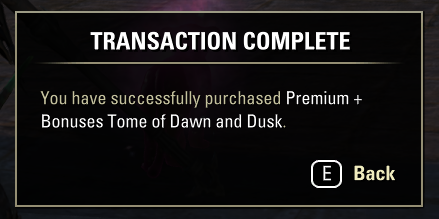
Thanks again for all the help posts I've seen Everyone!!
📘 Tamriel Tome – Premium vs Premium + Bonuses (Simple Breakdown)
After looking through how the system works and comparing both options, here’s my understanding on the actual difference in plain terms:
🟢 Premium Tamriel Tome- Unlocks the full premium reward track
- Gives access to all earnable rewards (mounts, cosmetics, collectibles, etc.)
- Rewards stay available with no time limit once unlocked
- You must still earn and spend Tome Points to purchase each item
🔵 Premium + Bonuses Tamriel Tome
Includes everything from Premium, plus:- 🧥 1 additional bonus collectible (currently a cosmetic like a costume)
- 📜 2 Tome Point caches (4,000 points total) to help you progress faster
🧠 Bottom Line- Both versions give access to the same reward pool, and once unlocked, those rewards remain available permanently.
The only difference is:- 📜 2 Tome Point caches (4,000 points total)
- 🧥 One extra cosmetic item
👉 Simple way to think about it:- ⚔️ Premium = unlock the rewards
- 🏹 Premium + Bonuses = unlock + tome points boost + bonus cosmetic
🌍 Purchasing the Premium + Bonuses (PC_NA & PC_EU) ($29.99 option)- ✔ It is account-wide, not server-specific
- ✔ Once purchased, it is available on both regions
👉 confirmed from personal experience it worked on both PC_NA & PC_EU on my account 👍
⚠️ disclaimer- this confirmation applies only to the direct purchase ($29.99 option).
- i do NOT know if using tome tokens will behave the same way.
Edited by ShadowStrikerr on April 4, 2026 6:45PM1 -
 Sturmfaenger✭✭✭✭✭
✭So... everything I buy in eso, chapters, crowns, eso+ ... I use paysafe codes.
Is it possible to buy tomes with that? If not, why not, if every other purchase in the game works with it? If yes, how?PC/EU0