The issues related to logging in to the European PC/Mac megaserver have been resolved at this time. If you continue to experience difficulties at login, please restart your client. Thank you for your patience!
Cannot buy the premium+bonus tome?
-
 JonesHeathen✭✭Same problem.
My game is trough steam, but my ESO+ and saved payment is on ESO website directly, as Steam started having an issue that my location and billing address are different. Some people work remote, like half of their stuff for the god sake
So when I click on it it does nothing, and I cant save payment in Steam.
Epic blunder that this passed any QA testing.Edited by JonesHeathen on April 2, 2026 7:13PM3 -
 TheDutchChef✭✭Yea after i enabled the steam overlay the game basicly blocked me from entering :')
"An unexpected internal error has occurred".
Already tried repair + redownloaded game and all that stuff they recommend....
Sigh....1 -
mistpeak✭✭
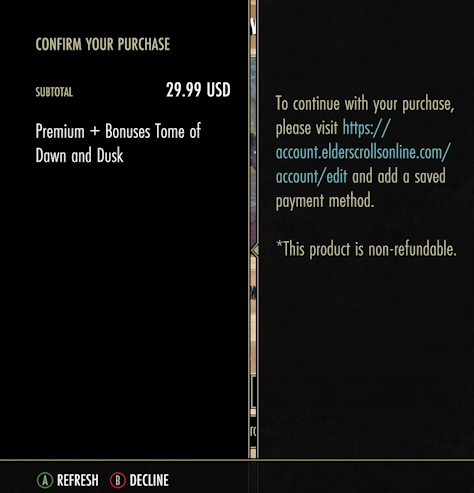
Just some additional information. Here's a screenshot of what I see. That's it. No overlay, nothing else. Just that. The link does not work. I tried typing in to my browser and I get redirected to my account page. I have a payment method saved on the eso website.0 -
Jordan_Black✭✭✭✭
Just some additional information. Here's a screenshot of what I see. That's it. No overlay, nothing else. Just that. The link does not work. I tried typing in to my browser and I get redirected to my account page. I have a payment method saved on the eso website.
I see the above too, I do not have steam. I did go in and save a payment hours ago, but it doesn't detect it. I imagine Tex is right and we have to buy something else to activate it.0 -
 ZOS_JessicaFolsomCommunity Manager
Just some additional information. Here's a screenshot of what I see. That's it. No overlay, nothing else. Just that. The link does not work. I tried typing in to my browser and I get redirected to my account page. I have a payment method saved on the eso website.
Out of curiosity, are you playing on PC with a Steam ESO account using a gamepad, or are you on Xbox?0 -
 Mathius_Mordred✭✭✭✭✭
✭I just spent £12.99 to buy premium tomes and everything is still locked.Skyrim Red Shirts. Join us at https://skyrimredshirts.co.ukJoin Skyrim Red Shirts. Free trader. We welcome all, from new players to Vets. A mature drama-free social group enjoying PVE questing, PvP, Dungeons, trials and arenas. Web, FB Group & Discord. Guild Hall, trial dummy, crafting, transmutation, banker & merchant. You may invite your friends. No requirements1 -
allmyxlvntx✭✭✭ZOS_GinaBruno wrote: »allmyxlvntx wrote: »I get a popup window - looking for me to add a payment method to my ESO account.... which I have... then a "refresh" button but nothing happens.
So there is no way to upgrade at this point, at least for me
Try closing the Upgrade Tomes window and try again?
I ended up buying crowns to "save my payment information"... as just updating it did not work twice, despite the site telling me it had saved the information. So in essence I had to buy something to save information then used to buy upgrade on tome in game. All in all not a great purchasing experience. I was going to get crowns anyway but seriously many would get pretty angry. I was annoyed but have moved on.
Thanks Gina2 -
Jordan_Black✭✭✭✭ZOS_JessicaFolsom wrote: »
Just some additional information. Here's a screenshot of what I see. That's it. No overlay, nothing else. Just that. The link does not work. I tried typing in to my browser and I get redirected to my account page. I have a payment method saved on the eso website.
Out of curiosity, are you playing on PC with a Steam ESO account using a gamepad, or are you on Xbox?
I am on PC and getting the same message without the gamepad interface.0 -
Jordan_Black✭✭✭✭@ZOS_JessicaFolsom I posted too early - see above, meant also to add I do not use steam.0
-
mistpeak✭✭ZOS_JessicaFolsom wrote: »
Just some additional information. Here's a screenshot of what I see. That's it. No overlay, nothing else. Just that. The link does not work. I tried typing in to my browser and I get redirected to my account page. I have a payment method saved on the eso website.
Out of curiosity, are you playing on PC with a Steam ESO account using a gamepad, or are you on Xbox?
I'm on PC NA. I purchased the game directly from the ESO website. I'm using a xbox controller.0 -
ZOS_JessicaFolsomCommunity ManagerHi everyone! We've been troubleshooting the issues some of you have raised with purchasing Tamriel Tome Upgrades, and we have a few suggestions.
First, please ensure that your payment method and billing address are added to the platform you are trying to purchase from. For example, if you play ESO on PC through Steam, you will need to have a billing address and payment method added to Steam, not the ESO account system. We have observed some players getting a "Transaction Failed" error when attempting to purchase a Tamriel Tome Upgrade when there is a mismatch, or missing information. Also, if you have everything set up correctly and still run into this error, we recommend waiting a bit and trying again.
Additionally, if you are using ESO on Steam with a gamepad, please set Steam to "Big Picture Mode". You can do this by going to View then selecting "Big Picture Mode" from the drop-down.
Thank you for your patience, everyone!0 -
JonesHeathen✭✭TheDutchChef wrote: »Yea after i enabled the steam overlay the game basicly blocked me from entering :')
"An unexpected internal error has occurred".
Already tried repair + redownloaded game and all that stuff they recommend....
Sigh....
Same thing.
It only left me enter like after 4h.
My experience so far has been:
I want to buy something, not coz I want anything but to support new feature. I get logged off and cant enter for 4h, epic experience, would recommend.Edited by JonesHeathen on April 2, 2026 8:57PM1 -
ZOS_JessicaFolsomCommunity ManagerJordan_Black wrote: »I posted too early - see above, meant also to add I do not use steam.I'm on PC NA. I purchased the game directly from the ESO website. I'm using a xbox controller.
Thank you both! We're looking into this specific use case, and what you're encountering.
0 -
tom6143346✭✭✭✭Hahah really how bad can someone introduce a system like that . To be clear, I want do any workaround to give you money . You want my money make it work , it’s that easy. Something like that needs to work from day or in gods name you could make use of existing systems like in the past . Another file of never change a running system Anyway don’t want to spend any more energy into this . ZOS stays ZOS no matter what, and people are pissed one more time . How about you do your homework before your introduce something new . I know crazy idea, but could work.Edited by tom6143346 on April 2, 2026 9:17PM4
-
Jordan_Black✭✭✭✭ZOS_JessicaFolsom wrote: »Jordan_Black wrote: »I posted too early - see above, meant also to add I do not use steam.I'm on PC NA. I purchased the game directly from the ESO website. I'm using a xbox controller.
Thank you both! We're looking into this specific use case, and what you're encountering.
Note above that Tex fixed this by buying something and saving his payment info along with the purchase (rather than saving it without purchasing anything). Tagging @ZOS_JessicaFolsom in case you missed his.0 -
Requielle✭✭✭Also unable to purchase the upgrade.
Same issues as everyone else - the in-game popup has a Refresh option that does nothing. Have a saved payment method, have already manually refreshed said payment method. Playing on PC, no Steam. With a keyboard, not a controller. Just one of the most basic, bland, boring, standard, widespread gaming setups around. That I've been using *with this game* since 2014.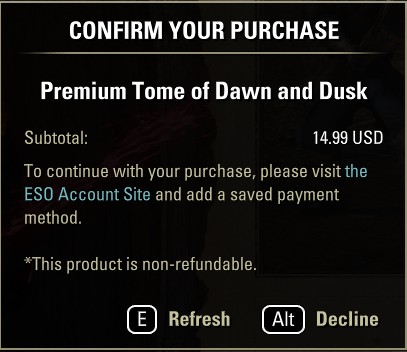
The only additional information I can add is that despite the website stating that it has saved my payment information -
It does not afterwards have the option to remove the information. It only shows the option to change it again -
Which makes me think that perchance it hasn't actually saved the payment information at all.
2 -
Mathius_Mordred✭✭✭✭✭
✭Am I doing something wrong? I paid £12.99 and I see that on my billing history, but I haven't got access to any premium unlocks, so what did I actually get for my £12.99 and can I get a refund if it's broken?Skyrim Red Shirts. Join us at https://skyrimredshirts.co.ukJoin Skyrim Red Shirts. Free trader. We welcome all, from new players to Vets. A mature drama-free social group enjoying PVE questing, PvP, Dungeons, trials and arenas. Web, FB Group & Discord. Guild Hall, trial dummy, crafting, transmutation, banker & merchant. You may invite your friends. No requirements0 -
 KaGaOri✭✭✭✭At the end of my wits with this one.
Steam account and ESO are linked. Overlay is on. There is valid debit card saved in Steam (one I've used to buy stuff from Steam before). But still will get "Transaction failed" message every single time. Tried to restart everything - no change. Erased card from Steam and added it again (twice - got charged 1 Euro each time) - no change.
I'm giving up. I'ts past midnight where I live and got do absolutely nothing in game tonight except uselesly troubleshoot sending ZOS money.
Why can't we just buy the update on ESO store like everything else? Will wait if they fix this somehow, or will just do without updated scroll, I gues.2 -
 Athory✭✭✭I don’t get it! If I buy this Premium + Bonuses for €29.99,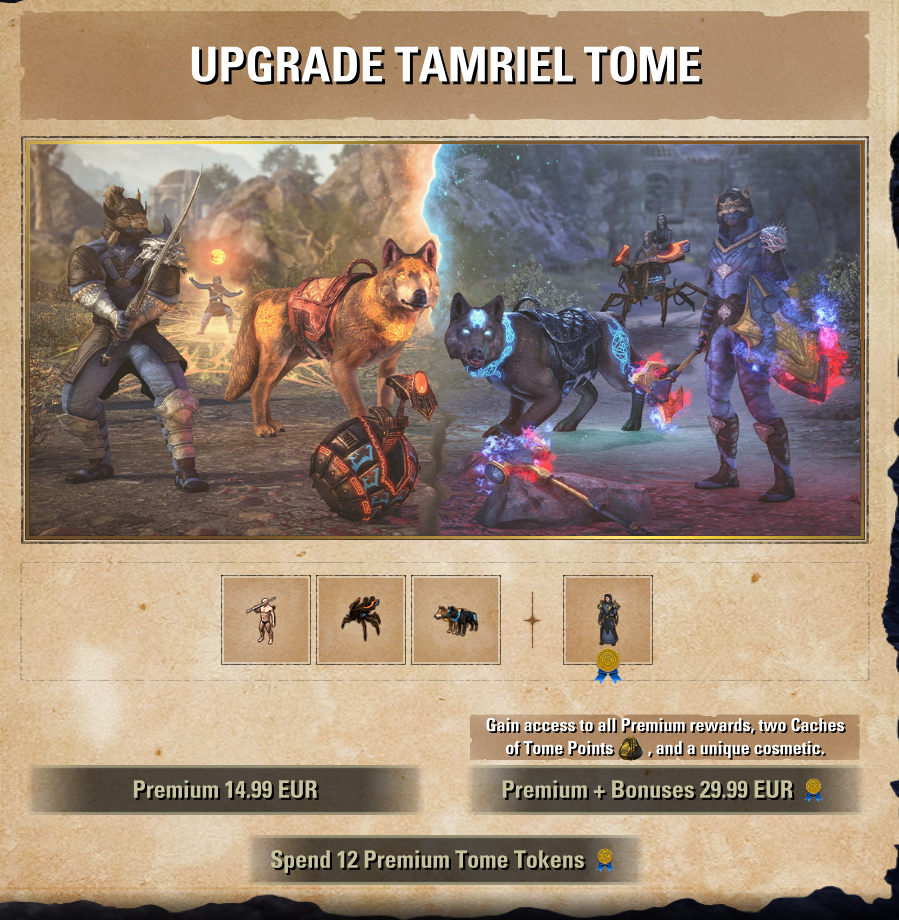
will I have to pay again when Season 1 comes out? What does this mean now? It’s so confusing…
What exactly am I buying? Does it include all seasons? From Season 0 until when?
ZOS, please make this easier to understand.
If it’s a DLC, I understand, I’d expect to pay for the next DLC. But what is this? You’re asking €29.99 for cosmetics and Currency coins I wouldn’t even buy in the Crown Store for €1? I don’t get it!
Edited by Athory on April 2, 2026 10:26PM"@Aislinna
✭✭✭✭✭
There are no game mechanics stopping you from playing dungeons and trials the way you want.
Rather then asking ZOS to modify the game to stop people from playing the way they want, form your own group and play the way you want."If you don’t want random players, then don’t ask for them. Build your roster on Discord, not on Group Finder.2 -
 MisterGibs✭✭✭✭✭Alright you lot, I figured out what was causing me from being able to purchase the Tomes with Steam ESO account. Gonna explain and see if it helps anyone out here.
Go to your Linked accounts page (https://account.elderscrollsonline.com/en-us/account/linked_accounts) and see what name Steam is linked to. This is what mine looked like.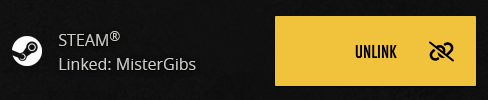
Notice where it says MisterGibs. That's not my account name, that was my profile name at the time of linking. After changing my Steam profile name back to "MisterGibs", the Purchase Tomes button finally worked and I was able to purchase from my Steam Wallet.
Hopefully this helps anyone with Steam issues
Edited by MisterGibs on April 3, 2026 12:24AM0 -
When I wanted to buy the Premium Tome,the game told me to upgrade my payment informations.I did it and was able to proceed.
Then,I got the "transaction failed. please try again later." bug.Frustrating...
Playing from the launcher,on PC EU.0 -
dcrush✭✭✭✭✭
✭Am I reading correctly that you can only buy the premium tracks if you save your payment info beforehand? I was considering getting one of the premium versions since there won’t be a pad chapter this year but if I can only do this by saving my payment info to a website (knowing how often databases are hacked or compromised) then I guess I just won’t be buying any of it. What a massive failure.0 -
DuckFayth✭✭✭Same as everyone else.
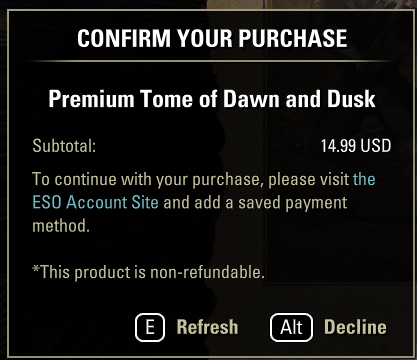
I have ESO from the website, have an active ESO+ sub with saved payment info. I changed and re-saved my payment method from a debit card to a credit card in case that may help, it made no difference.
0 -
 Gabriel_H✭✭✭✭✭
✭✭ZOS_JessicaFolsom wrote: »Hi everyone! We've been troubleshooting the issues some of you have raised with purchasing Tamriel Tome Upgrades, and we have a few suggestions.
First, please ensure that your payment method and billing address are added to the platform you are trying to purchase from. For example, if you play ESO on PC through Steam, you will need to have a billing address and payment method added to Steam, not the ESO account system. We have observed some players getting a "Transaction Failed" error when attempting to purchase a Tamriel Tome Upgrade when there is a mismatch, or missing information. Also, if you have everything set up correctly and still run into this error, we recommend waiting a bit and trying again.
Additionally, if you are using ESO on Steam with a gamepad, please set Steam to "Big Picture Mode". You can do this by going to View then selecting "Big Picture Mode" from the drop-down.
Thank you for your patience, everyone!
Been there, tried that, "Transaction Failed"PC EU
Never get involved in a land war in Asia - it's one of the classic blunders!0 -
 Ingel_Riday✭✭✭✭✭Having the same problem.
I play on the ESO Launcher, no third party anything. Updated my saved payment information. Didn't take. I have no idea why these battle passes (in a game with loot crates and an annual subscription fee to not have inventory misery, no less) have to be such a hassle.
Oh well. New system. Will wait to see if it gets fixed. If not, I guess I won't be buying it... because I LITERALLY can't. Guffaw.0