Maintenance for the week of August 10:
• [COMPLETE] NA megaservers for patch maintenance – August 10, 4:00AM EDT (8:00 UTC) - 12:00PM EDT (16:00 UTC)
• [COMPLETE] EU megaservers for patch maintenance – August 10, 8:00 UTC (4:00AM EDT) - 16:00 UTC (12:00PM EDT)
• [COMPLETE] NA megaservers for patch maintenance – August 10, 4:00AM EDT (8:00 UTC) - 12:00PM EDT (16:00 UTC)
• [COMPLETE] EU megaservers for patch maintenance – August 10, 8:00 UTC (4:00AM EDT) - 16:00 UTC (12:00PM EDT)
Tomes "Light Preview" is completely ineffective

tomofhyrule
✭✭✭✭✭
✭✭✭✭✭
✭✭✭✭✭
This was reported on PTS, and nothing was changed about it.
The Preview button ([R] by default) does not do anything. You preview things by mousing over. But that means that if you want to mouse off while previewing (like if you want to rotate the weapon to get a different angle, or if you want to change the state of the mounts oh never mind, they just removed that option), then the game thinks "oh, you moused off, so that obviously means you want to stop the preview, right?"
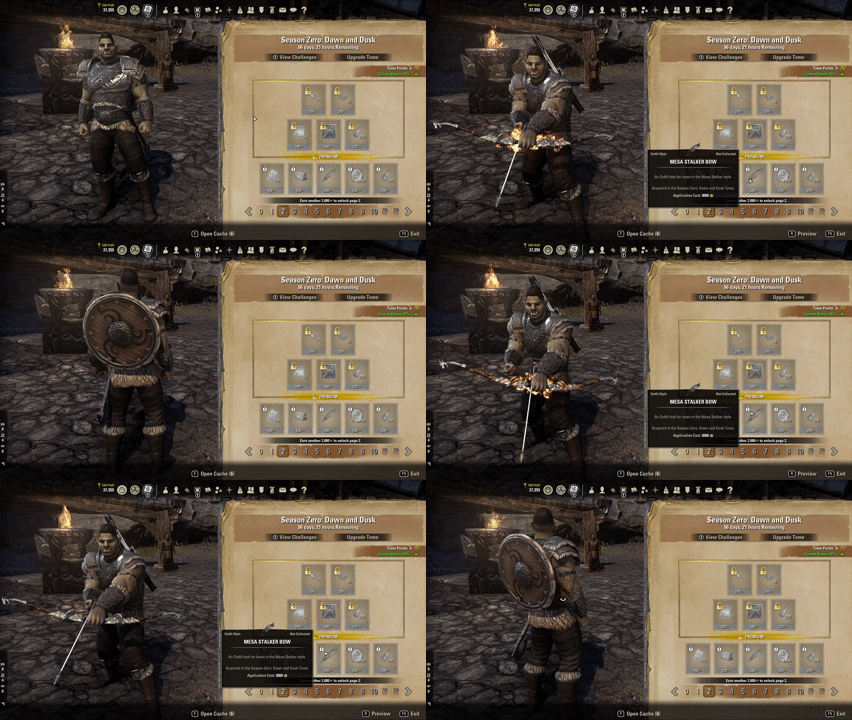
Please don't fix what ain't broke. It is not basically impossible to preview anything with states, and we need to preplan the rotation if we want to look at a weapon or something. Is it... not intended that we be able to get a good look at something to decide if we want to buy it?
The Preview button ([R] by default) does not do anything. You preview things by mousing over. But that means that if you want to mouse off while previewing (like if you want to rotate the weapon to get a different angle, or if you want to change the state of the mounts oh never mind, they just removed that option), then the game thinks "oh, you moused off, so that obviously means you want to stop the preview, right?"
Please don't fix what ain't broke. It is not basically impossible to preview anything with states, and we need to preplan the rotation if we want to look at a weapon or something. Is it... not intended that we be able to get a good look at something to decide if we want to buy it?
7
-
 meekmiko✭✭✭✭✭
✭Press R while hovering over an item and you will go into a normal preview it if it has one.
(But yeah, the UI is HORRIBLE.)🌟 PC/NA CP2300+ [Been playing since 2016] I've been here 10+ years now! 🥳
✨🐪JUSTICE FOR APEX CAMELS 🐪✨ Bring 'em back, ZOS!vMA / vVH / vDSA / vBRP / vAA HM / vSO HM / vHRC HM / vMoL HM / vHoF HM / vAS+1 & +1 / vCR+2 / vSS / vKA/ vRG- 🌩️ 🏹 EP - Jessamine Seed-Nightrun, Master Angler / Dro-m'Athra Destroyer / Bosmer / Sorcerer [Main DPS]
- ☀️ 🛡️ EP - Mihi'Mai-Ra, Plague of Peryite / Khajiit / Templar [Main Tank]
- ☀️ ✨ EP - Lady Lapa'au, Sergeant / Khajiit / Templar-Warden-Nightblade [Main Healer]
- 🌩️ ☄️ EP - Shimmers-with-Static, Spark of Vengeance / Argonian / Sorcerer [PvP Main]
- 🌩️ ☄️ EP - Ra'venk, Style Master / Khajiit / Sorcerer [My OG Main from 2016] ❤️
- ☀️ ✨ EP - Narahni the Moon Dancer, Lunar Champion / Khajiit / Templar
- 🔥 ⚔️ EP - Plays-in Volcanoes, Mighty in Magma / Argonian / Dragonknight
- 🗡️ ⚔️ EP - Bird gra-Shuzgub, Forge Breaker / Orc / Nightblade [Werewolf]
- 🌩️ ☄️ EP - Lashon at-Home, Blackrose Executioner / Redguard / Sorcerer-Dragonknight-Arcanist
- 🗡️ ✨ EP - Blades-at-the-Ready, Witch / Argonian / Nightblade [Super Speedy Mat Farmer]
- 💀 ☄️ EP - Ko'shamari the Doomweaver, Dovahkriid / Khajiit / Necromancer-Sorcerer-Warden [Infinite Archive Main]
- 👁️ 🏹 EP - Elsyiir Lichenhollow, Lady / Bosmer / Arcanist
- ☀️ ⚔️ EP - Lady Fortuna the Blessed, Grand Champion / Imperial / Templar
- 👁️ 🛡️ EP - Mamaea the Sledgehammer, Alpha Predator / Khajiit / Arcanist-Templar-Nightblade
- ☀️ ⚔️ EP - Amarri-do the Magnificent, Cake Connoisseur / Khajiit / Templar
- 🔥 🏹 EP - Falora Veloth, The Merciless / Dunmer / Dragonknight
- 🌱 ✨ EP - Sorvete, Countess / Khajiit / Warden
- 🌩️ ⚔️ EP - Z'majii-dar the Quick, Battlegrounds Butcher / Khajiit / Sorcerer
- 🗡️ 🛡️ EP - Yana-la the Iron Lotus, Silver Knight / Khajiit / Nightblade
- 💀 🛡️ EP - Vashpurri-do the Corrupt, Alpha Predator / Khajiit / Necromancer-Templar
- & I only dabble on the PC/EU server sometimes CP350+:
- 🌩️ ☄️ EP - Steals-Many-Hearts, Argonian / Sorcerer
- 🌩️ ⚔️ EP - Sings-a-Song-of-Storms, Argonian / Sorcerer
- 🗡️ ⚔️ AD - Jessamine Seed-Nightrun, Bosmer / Nightblade
- 🗡️ ⚔️ AD - Pashet the Nimble, Khajiit / Nightblade
- ☀️ ✨ AD - Narahni the Moon Dancer, Khajiit / Templar
- 🗡️ ☄️ DC - Helainie the Shadebringer, Breton / Nightblade
- 🔥 ☄️ EP - Furoni the Ember, Dunmer / Dragonknight
- 💀 ☄️ AD - Bajaa the Blackened Beast, Khajiit / Necromancer
- 🌩️ ☄️ AD - Kit'Katt, Khajiit / Sorcerer
2 -
 Maitsukas✭✭✭✭✭
✭✭✭I have to switch to Gamepad UI to properly preview the cosmetic items.PC-EU @maitsukas
Posting the Infinite Archive and Imperial City Weekly Vendor updates.
Also trying out new Main Quests, Companions, ToT decks, Events and Styles on PTS.0 -
 Thormar✭✭✭✭If am on a page I haven't unlocked I can preview and rotate once I hit R, as seen below:
 PC - NA1
 -
 Sordidfairytale✭✭✭✭✭The regular crownstore preview of the Dare Devil weapons was also bugged for me.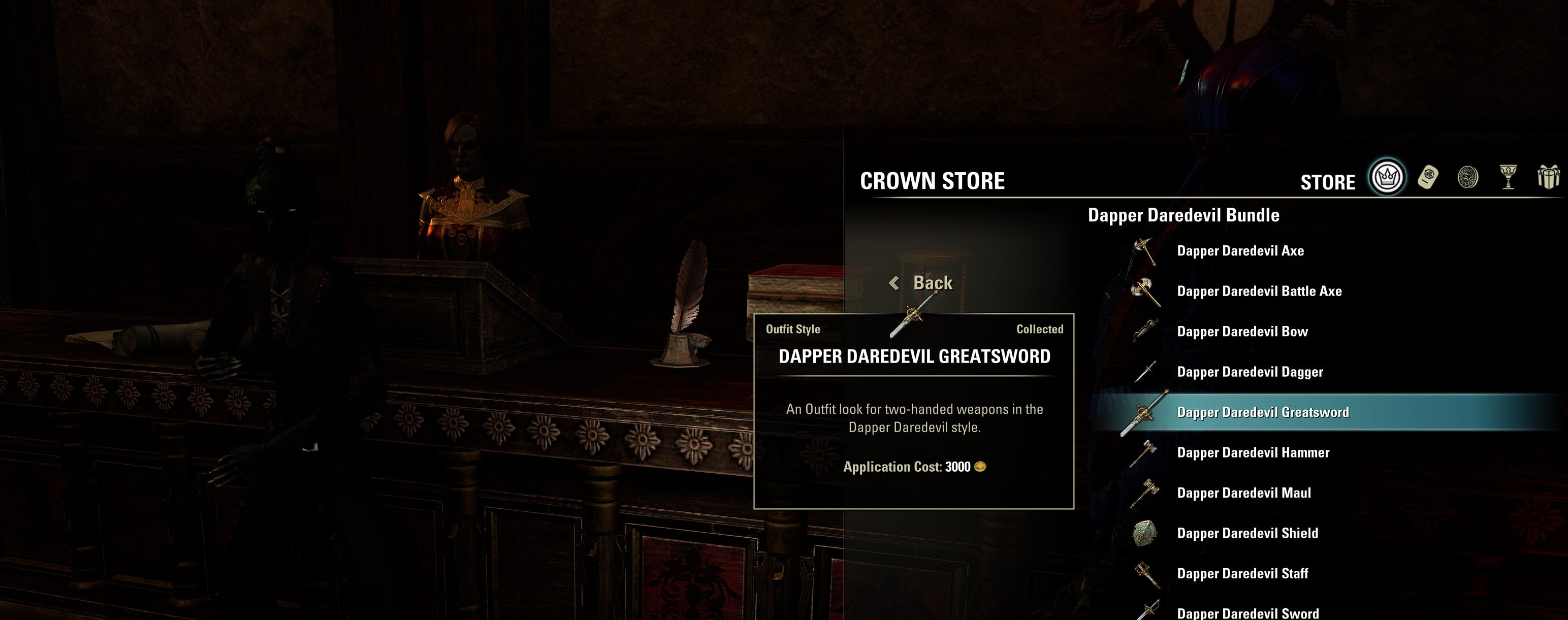
The Vegemite Knight0 -
 coop500✭✭✭✭✭
✭✭✭✭✭Yeah I really want to get the season pass, but I'm not going to until I can actually preview what's in it. We had a system that works in the crown store, why did they have to do this mouse over crap that doesn't work? And how come I can't even preview half the stuff at all? Anything that has a light, medium and heavy styles, I can't preview them at all.Hoping for more playable races.
Hoping the game and it's team remains alive.
BRING BACK MAGICKA WEREWOLVES TO PVE0 -
 twisttop138✭✭✭✭✭
✭✭I said during pts that the UI looks and acts like my 8th graders tech class project. I actually think I was harsher than that. It's just not good. There's so many examples to take inspiration from, I was gonna say fallout 76 but you know what, they have the perfect thing already. Make a version of the crown store UI. It's something everyone is already familiar with, we know it works (lol if it didn't they'd helicopter in nasa scientists) it's just superior.
Bummer to see they didn't hear us yet again.0 -
 Soarora✭✭✭✭✭
✭✭✭✭✭I use the PC UI and I can preview them using R fine. HOWEVER, I still hate the "light preview". It's counterintuitive when everything else in the game is "R to preview" and this one has a mouse-over, especially when the mouse-over is completely ineffective for some things (packs with multiple items in it, the pop-up that shows the individual items covers my character).
The tome has a bit of disorientation problems in general though, like the book becoming slightly larger and then smaller again when flipping pages. I would've much rathered a flipping animation or no animation at all.[PC/NA] Dungeoneer (Tank/DPS), Semi-retired Trialist, and amateur Battlegrounder (DPS) with a passion for The Elder Scrolls lore.
Current GM of Hard Dungeoneers
Tanks: Sorcerer - Necromancer - Templar
DPS: Frost Warden - Stamarc - StamDK - Hybrid NB Healer
Ex-Healer: Warden - Arcanist
Dungeons: 34/34 HMs - 28/28 Tris1 -
coop500✭✭✭✭✭
✭✭✭✭✭I use the PC UI and I can preview them using R fine. HOWEVER, I still hate the "light preview". It's counterintuitive when everything else in the game is "R to preview" and this one has a mouse-over, especially when the mouse-over is completely ineffective for some things (packs with multiple items in it, the pop-up that shows the individual items covers my character).
The tome has a bit of disorientation problems in general though, like the book becoming slightly larger and then smaller again when flipping pages. I would've much rathered a flipping animation or no animation at all.
I wonder if it breaks when we change our keyboard mapping for gameplay. For me, I reassigned R to put away my weapon, normally not a problem, until now. I tried Y, which is another button that is occasionally used for preview for me, and that doesn't work either. What does R do by default?Hoping for more playable races.
Hoping the game and it's team remains alive.
BRING BACK MAGICKA WEREWOLVES TO PVE1 -
Thormar✭✭✭✭
Tried uploading but didn't work. I didn't see the gif on my mobile (tried several browsers).On mobile it just results in a question mark icon.
Any way you could re-upload it? Thanks
However, I see the gif fine on PC.
Am out of ideas as to why I can't see the gif on mobile, even though OP's gif plays fine on my mobile.
Maybe it's a size issue but like I said, am out of ideas. I even tried full site mode but still no joy.
PC - NA0 -
Maitsukas✭✭✭✭✭
✭✭✭I use the PC UI and I can preview them using R fine. HOWEVER, I still hate the "light preview". It's counterintuitive when everything else in the game is "R to preview" and this one has a mouse-over, especially when the mouse-over is completely ineffective for some things (packs with multiple items in it, the pop-up that shows the individual items covers my character).
The tome has a bit of disorientation problems in general though, like the book becoming slightly larger and then smaller again when flipping pages. I would've much rathered a flipping animation or no animation at all.
I wonder if it breaks when we change our keyboard mapping for gameplay. For me, I reassigned R to put away my weapon, normally not a problem, until now. I tried Y, which is another button that is occasionally used for preview for me, and that doesn't work either. What does R do by default?
You were onto something, it is the keybind swap that does cause it! By default, R is for the Ultimate ability.Edited by Maitsukas on April 2, 2026 6:58PMPC-EU @maitsukas
Posting the Infinite Archive and Imperial City Weekly Vendor updates.
Also trying out new Main Quests, Companions, ToT decks, Events and Styles on PTS.0 -
tomofhyrule✭✭✭✭✭
✭✭✭✭✭I use the PC UI and I can preview them using R fine. HOWEVER, I still hate the "light preview". It's counterintuitive when everything else in the game is "R to preview" and this one has a mouse-over, especially when the mouse-over is completely ineffective for some things (packs with multiple items in it, the pop-up that shows the individual items covers my character).
The tome has a bit of disorientation problems in general though, like the book becoming slightly larger and then smaller again when flipping pages. I would've much rathered a flipping animation or no animation at all.
I wonder if it breaks when we change our keyboard mapping for gameplay. For me, I reassigned R to put away my weapon, normally not a problem, until now. I tried Y, which is another button that is occasionally used for preview for me, and that doesn't work either. What does R do by default?
Oh, that probably is it.
I know a friend who had issues with [F4] as the new Challenges hotkey since he had that mapped to something else.
I do have [R] mapped to sheathe/unsheathe.
Odd that that was never a problem in the standard Crown Store though. Only with the Tomes UI did the conflict bug it out.
Thanks
EDIT: yep, that was it.
The binding is UI > Secondary Action, so I just added [ALT] as a tertiary bind for that and now I can properly preview with that while keeping [R] for sheathe.
Still hate the soft preview though. And it still makes no sense that the [R] preview works in the Crown Store despite also being mapped to sheathe while it causes a conflict in the Tomes UIEdited by tomofhyrule on April 2, 2026 10:26PM1 -
 whitecrow✭✭✭✭✭
✭✭✭Yes, it is terrible. I wanted to get a better look at a weapon style and I couldn't.1 -
coop500✭✭✭✭✭
✭✭✭✭✭tomofhyrule wrote: »I use the PC UI and I can preview them using R fine. HOWEVER, I still hate the "light preview". It's counterintuitive when everything else in the game is "R to preview" and this one has a mouse-over, especially when the mouse-over is completely ineffective for some things (packs with multiple items in it, the pop-up that shows the individual items covers my character).
The tome has a bit of disorientation problems in general though, like the book becoming slightly larger and then smaller again when flipping pages. I would've much rathered a flipping animation or no animation at all.
I wonder if it breaks when we change our keyboard mapping for gameplay. For me, I reassigned R to put away my weapon, normally not a problem, until now. I tried Y, which is another button that is occasionally used for preview for me, and that doesn't work either. What does R do by default?
Oh, that probably is it.
I know a friend who had issues with [F4] as the new Challenges hotkey since he had that mapped to something else.
I do have [R] mapped to sheathe/unsheathe.
Odd that that was never a problem in the standard Crown Store though. Only with the Tomes UI did the conflict bug it out.
Thanks
Dang, yeah my ultimate button is now ctrl, which isn't working either.
And yeah I agree, it wasn't a problem before, so what gives? I hope the devs can look into this soon.Hoping for more playable races.
Hoping the game and it's team remains alive.
BRING BACK MAGICKA WEREWOLVES TO PVE1

