[PS5] Change profile option on main login.

alternatelder
✭✭✭✭✭
✭✭
✭✭
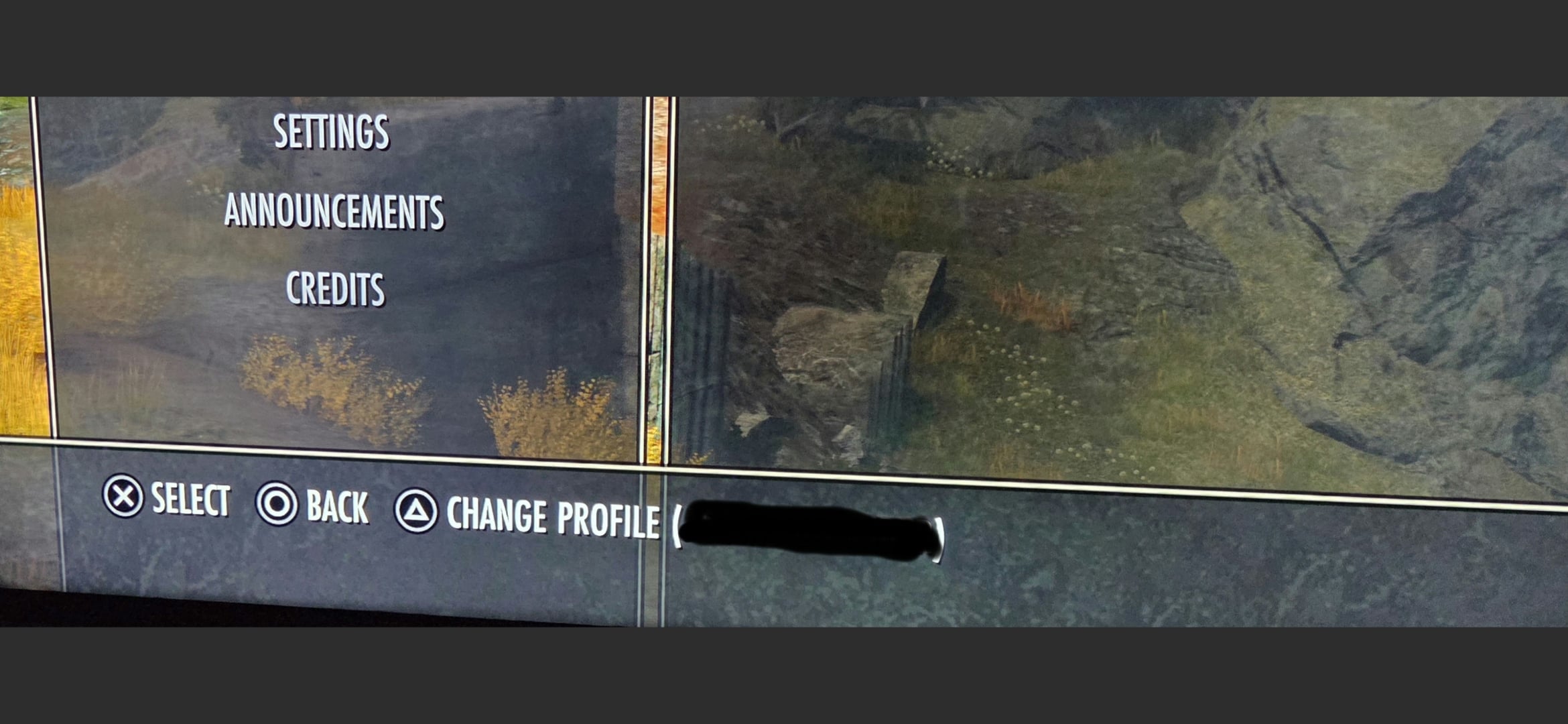
I don't remember seeing this before, all I know is that nothing happens when I select it except that it breaks the login (nothing happens when I hit "Play") and I have to restart the game.
I didn't put this in the bug section because I know it won't be seen for over a week, but also because it's mostly a general question. Is this new, have I been blind before u49?
1
-
 Jestir✭✭✭✭✭So either for swapping between PlayStation accounts........ or is it something for cross play that snuck in 👀1
 -
 ZOS_JessicaFolsomCommunity ManagerHey @alternatelder could you try these troubleshooting steps, please, and reply back with the results?
- Please completely close game client
- Swap profiles to the one that you want to play on via the PS menu
- Relaunch ESO from the newly active profile
Edited by ZOS_JessicaFolsom on March 10, 2026 1:13PM0 -
 lillybit✭✭✭✭✭
✭✭ZOS_JessicaFolsom wrote: »Hey @alternatelder could you try these troubleshooting steps, please, and reply back with the results?- Please completely close game client
- Swap profiles to the one that you want to play on via the PS menu
- Relaunch ESO from the newly active profile
I tried this with my second account, I got the same prompt ant the bottom with the new account name. Pressing triangle did the same thing, stopped it responding to the login button.
I also play on PC in gampad mode and the prompt isn't there, but it stopped me logging in the same way first time I ran it after the update. Had to force quit and run it againPS4 EU0 -
alternatelder✭✭✭✭✭
✭✭ZOS_JessicaFolsom wrote: »Hey @alternatelder could you try these troubleshooting steps, please, and reply back with the results?- Please completely close game client
- Swap profiles to the one that you want to play on via the PS menu
- Relaunch ESO from the newly active profile
I can login to the game after I close the game and restart, the option should just be removed if it causes issues like this to anyone else. My question is just curiosity on why this option is here, and as someone mentioned, was this accidentally snuck in as a crossplay/cross save feature? Swapping profiles on Playstation requires you to logout completely and you need to restart the game anyway, this option here doesn't make sense.1 -
ZOS_JessicaFolsomCommunity ManagerWe have confirmed that this button/option is not functioning as intended, and now have a bug in for this. Thank you all for reporting this.
For what it's worth, this button/option has always been there. It's there to confirm you're logged in with the right profile on your console before playing.0 -
 ZOS_IcymodGreetings,
This thread has been moved to the Bug Reports section, as it is better suited there.
The Elder Scrolls Online Team0 -
lillybit✭✭✭✭✭
✭✭ZOS_JessicaFolsom wrote: »We have confirmed that this button/option is not functioning as intended, and now have a bug in for this. Thank you all for reporting this.
For what it's worth, this button/option has always been there. It's there to confirm you're logged in with the right profile on your console before playing.
I'm not sure I understand that.
Playstation isn't like PC, where a purchased copy only works with one account, so if a linked account on steam downloads it they can't log in with their own account and have it work. If you buy ESO on PS, anyone with an account on that console can run it and have their own game/account. You can't have more than one copy of the game installed so it has to work like that. Also if you're logged in to the console you can't be on the wrong profile, it's the one you linked to that PSN.
If the option has always been there, it's never been a visible thing you could interact with before, it definitely just appeared with this updatePS4 EU3 -
alternatelder✭✭✭✭✭
✭✭ZOS_JessicaFolsom wrote: »We have confirmed that this button/option is not functioning as intended, and now have a bug in for this. Thank you all for reporting this.
For what it's worth, this button/option has always been there. It's there to confirm you're logged in with the right profile on your console before playing.
I'm not sure I understand that.
Playstation isn't like PC, where a purchased copy only works with one account, so if a linked account on steam downloads it they can't log in with their own account and have it work. If you buy ESO on PS, anyone with an account on that console can run it and have their own game/account. You can't have more than one copy of the game installed so it has to work like that. Also if you're logged in to the console you can't be on the wrong profile, it's the one you linked to that PSN.
If the option has always been there, it's never been a visible thing you could interact with before, it definitely just appeared with this update
Yep it definitely doesn't work like PC, and it absolutely was never there before. I've been signing on 99.9% of the days this game has been available since launch, this is the first time I've see it.1