Maintenance for the week of May 11:
• PC/Mac: No maintenance – May 11
• PC/Mac: No maintenance – May 11
Every time

cyclonus11
✭✭✭✭✭
✭✭
✭✭
I have to play the same game every patch 
Looking for files to temporarily move to my external HD...
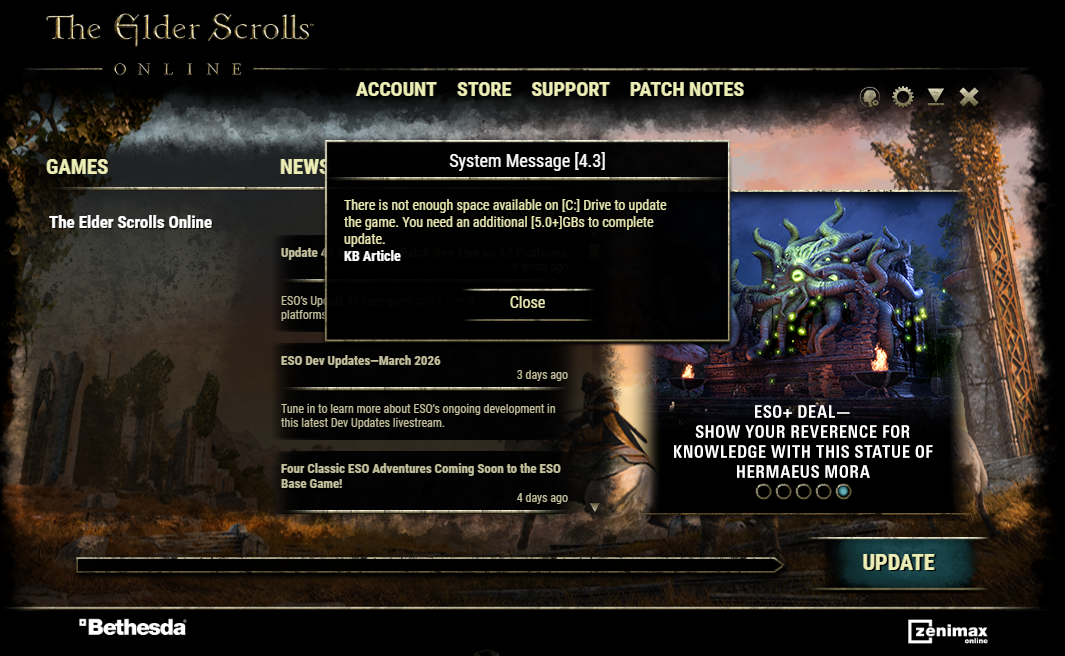
Looking for files to temporarily move to my external HD...
3
-
 randconfig✭✭✭✭✭I personally don't want any big tech companies having any of my data/files, but if I had no choice, I might consider using Google Drive to host some of my files to free up space on my hard drive.
Maybe that could work for you? I think you can make free accounts and each one gets 15GB of free* cloud storage (*free meaning, you won't have to pay financially, but they'll likely scan your documents and collect data from you to use and/or sell to 3rd parties).
Another option: if you have a smartphone with free storage space, you could use that as a temporary storage for some of your files?
Another option: if you're on windows 10, search for "This PC" then right-click your C: drive, select Properties > Disk Cleanup. This will delete temporary files on your drive to help free up some more space, sometimes GBs of space if you haven't run it before.
Either way, hope that helps!0 -
 tsaescishoeshiner✭✭✭✭✭
✭✭✭They need to make the 4k textures optional for players who don't/can't use them. I don't believe they're optional atm, but games that make them optional (like Microsoft's other games) save players as much as 50+ GB.
SSDs are currently very expensive, and I've experienced much longer load times because of mandatory 4k texture files requiring me to move ESO to my hard drive.PC-NA
in-game: @tsaescishoeshiner5 -
cyclonus11✭✭✭✭✭
✭✭Thing is that once the update is installed, I will have a bunch of space again. These install files seem way more bloated than they need to be. Also, I am using OneDrive and still running out of space.
Still finding files to transfer. If this attempt doesn't work, I'll just have to try again tomorrow.
Edit: Didn't work. Trying again tomorrow.Edited by cyclonus11 on March 10, 2026 2:22AM4 -
 Zodiarkslayer✭✭✭✭✭
✭Well, you need to make space, then.🤷 Start by searching for a guide on the web, that explains you where windows stores it's trash data. Not just temporary files. I am talking shader cashes, shadow copies of it's older installations, installer packages of your programmes. These are usually saved under App data in your user directory, but some programs are crazy and store everything wherever they can.
Delete what you don't need.
Also consider taming your windows installation. Easiest way is to partition your SSD into three parts (examples sizes for a 1TB SSD).
C:\ Windows 80GB (you should have ~20GB of free space with a healthy windows installation) \ Programms 420 GB
E:\ Files 500GB
Windows is infamous for creating trash data. This way you get it under control.Edited by Zodiarkslayer on March 10, 2026 7:40AMNo Effort, No Reward?
No Reward, No Effort!0 -
cyclonus11✭✭✭✭✭
✭✭At 65% completion when the installation stopped, the ESO folder was up to 167GB in size, out of 222GB total disk space. The link included with the pop-up warning takes you to a page stating that you need 125GB to 135GB of available space.
@ZOS_Kevin Can we get disk space requirements included with each patch? It's basically a continuous process of trial and error trying to guess how much space I need to clear, and it appears the requirements change with each update.0 -
 LootAllTheStuff✭✭✭✭✭I know a lot of people have separate physical drives for their system, games, and other stuff. At last count, I think my son had 5 drives in his gaming rig, with at least three being SSDs. To OP: if you can afford to add a second drive specifically for games, I would recommend doing that, as it will make managing updates and installs easier. I'd also recommend maintaining a separate physical backup of that gaming drive.0
 -
 Tandor✭✭✭✭✭
✭✭✭✭✭I'd also look at what else you have installed on the drive and take a strong approach to uninstalling things you don't need or which you could easily reinstall after you've patched ESO. Or get a bigger or second drive if you can, of course. All games these days are huge, often with ESO it's the audio files that take up a lot of space.1 -
 davidtk✭✭✭✭✭Usually, the update process (of some games/programs) involves downloading data somewhere (It could be Windows temp folder or in case of ESO is I think installation folder), which is then overwritten in the target installation folder. Unfortunately, instead of overwriting directly, the patcher needs additional space to store temporary data.
This happened to me yesterday on my old laptop, which only has a 250GB SSD.
It was easier to delete the "The Elder Scrolls Online" folder and let the Launcher reinstall game. The Launcher downloads the latest data, so there are no space issues.
So I have several old laptops- One with 250GB SSD only (Partitioned to C and D) - had same problem, just no space. Deleted The Elder Scrolls Online folder and downloaded game again, no problem
- Second with 128GB mSATA (dual boot Win7 + Win10) and 250GB SSD for data - no problem, there is space for patcher temporary data
- My main rig have 500GB nvme with Win11 only (free usually about 200GB+) 1TB nvme (trying to keep 100GB+ free) for ESO and other games what need fast disk for loadings, then several HDDs (data and other games)
Edit: added some more infoEdited by davidtk on March 10, 2026 3:58PMReally sorry for my english2 -
 CalamityCat✭✭✭✭✭I had a similar issue on my Linux install of ESO, when it didn't have enough disk space to finish the update. I ran repair from the launcher because it seemed a bit glichy. The repair ended up updating the game too, but without running out of space. So that worked out better than I expected.
I double checked after this week's update - I had only 20gb free on that drive, but repair could still update it. So there's that option if you're not wanting to do a tedious file re-organization! It just isn't always practical to reserve more than 50gb for game updates.1 -
 Attorneyatlawl✭✭✭✭✭
✭✭✭1tb ssds go for around $130-140+ now as opposed to the old pricing of $50ish when they were cheap. I paid $150 for a 4tb nvme PCIe drive back a couple of years ago. I know the market sucks now and everything is higher priced, but if you're running on such tiny drives as 250gb, you really should try to get a drive if you can afford it. It won't just benefit eso but your whole system.
Failing that, buy a cheap USB flash drive and store your files and documents there.... They're slow, but you can leave eso and windows on your ssd then still.
Pricing is only going to get worse, so waiting won't help . I doubt it will even return to a new normal for another year or more and especially back to older pricing.
I just got a lunar lake laptop with Intel 8p cores, 16gb Ddr5, 1tb ssd and 1080p ips screen as a secondary machine as parts prices are nuts. It cost $350 which is what the ram and ssd would go for alone... And it's capable of playing eso even.Edited by Attorneyatlawl on March 11, 2026 12:08AM-First-Wave Closed Beta Tester of the Psijic Order, aka the 0.016 percent.
Exploits suck. Don't blame just the game, blame the players abusing them!
-Playing since July 2013, back when we had a killspam channel in Cyrodiil and the lands of Tamriel were roamed by dinosaurs.
________________
-In-game mains abound with "Nerf" in their name. As I am asked occasionally, I do not play on anything but the PC NA Megaserver at this time.0 -
 lillybit✭✭✭✭✭
✭✭The update size difference between PS4 and PS5 is massive (this time around PS4 was 60gb and PS5 only 5gb) and I kinda assumed PC would be closer to the lower end. Was really surprised when I updated my laptop and it said it was over 50gb. Now reading this I'm even more surprised that it needs so much more space than that!PS4 EU0 -
cyclonus11✭✭✭✭✭
✭✭I did it! I just deleted the "depot" folder and install went smoothly, with about 45GB of room to spare. 0
0