Maintenance for the week of March 16:
• PC/Mac: No maintenance – March 16
• ESO Store and Account System for maintenance – March 18, 6:00AM EDT (10:00 UTC) - 4:00PM EDT (20:00 UTC)
• PC/Mac: No maintenance – March 16
• ESO Store and Account System for maintenance – March 18, 6:00AM EDT (10:00 UTC) - 4:00PM EDT (20:00 UTC)
Upgrade Bag Space icon in Inventory

JeroenB
✭✭✭✭
Why is the game showing an Upgrade Bag Space icon (clickable and with glowing outline) when I "have 0 bag upgrades remaining"? Surely the icon's display should be suppressed for characters in that situation.
5
-
 ZOS_GinaBrunoCommunity ManagerWould you be able to share a screenshot, please?Gina Bruno
Principal Creator Engagement Manager
Dev Tracker | Service Alerts | ESO Twitter | My Twitter0 -
 LunaFlora✭✭✭✭✭
✭✭✭✭✭on Playstation EU,
i do not have it on my main character who has a fully upgraded bag.
Did you try restarting the game?
miaow! i'm Luna ( she/her ).
🌸*throws cherry blossom on you*🌸
"Eagles advance, traveler! And may the Green watch and keep you."
🦬🦌🐰
PlayStation and PC EU.
LunaLolaBlossom on psn.
LunaFloraBlossom on pc.0 -
 LadyHermione✭✭✭Yeah same issue here. Surely we can at least suppress the highlight if you cannot make it dissapear? Since we can't upgrade anymore.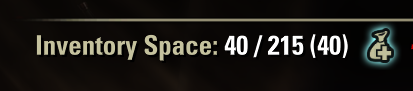
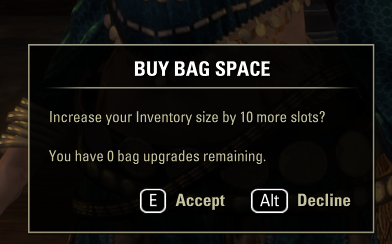
3 -
JeroenB✭✭✭✭
Lady Hermione already posted some, but for confirmation here are mine as well:ZOS_GinaBruno wrote: »Would you be able to share a screenshot, please?
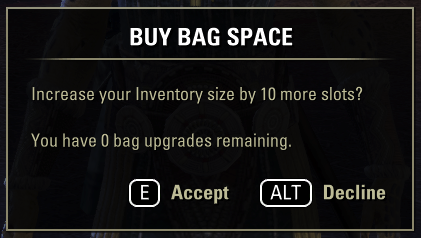
("Accept" and "Decline" both dismiss the window, but with a different sound effect.)
This is on PC-EU for me.
Ah, should have thought of this before posting: Looks like it's an add-on issue that is forcing the icon to appear. With add-ons disabled the icon no longer shows. (At least on this character in this session, I'll quickly test other characters.)Edited by JeroenB on March 9, 2026 7:48PM0 -
ZOS_GinaBrunoCommunity ManagerThanks! Any chance either of you are using addons? And if so, could you try disabling and seeing if that addresses the issue here?Gina Bruno
Principal Creator Engagement Manager
Dev Tracker | Service Alerts | ESO Twitter | My Twitter0 -
 Tyralbin✭✭✭✭✭Could it be down to account wide information?Live a little love a lot send all your gold to this Imperials pot.0
 -
JeroenB✭✭✭✭
Yes, apologies, I should have checked for that first. The icon does not appear with addons disabled, so behaviour as expected in the vanilla client.ZOS_GinaBruno wrote: »Thanks! Any chance either of you are using addons? And if so, could you try disabling and seeing if that addresses the issue here?
From a quick disabling test it looks like Advanced Filters is to blame (or some interaction thereof with another addon).Edited by JeroenB on March 9, 2026 7:57PM3 -
 alakeyfox✭✭✭Yep, should've thought of this before. "Advanced Filters" by Randactyl&Baertram is also the culprit in my case.0
 -
 ADarklore✭✭✭✭✭
✭✭✭✭✭Per the addon page, the author is aware and is working on a fix.CP: 2078 ** ESO+ ** ~~ ***** Strictly a solo PvE quester *****
~~Started Playing: May 2015 | Stopped Playing: July 2025 | Returned: March 2026~~2 -
 katanagirl1✭✭✭✭✭
✭✭✭✭✭Is there an option to remove this line from our inventory if we do not have it at max? I would prefer not to see it.
Khajiit Stamblade main
Dark Elf Magsorc
Redguard Stamina Dragonknight
Orc Stamplar PVP
Breton Magsorc PVP
Dark Elf Necromancer
Dark Elf Magden
Khajiit Stamblade
Khajiit Stamina Arcanist
PS5 NA0 -
JeroenB✭✭✭✭Baertram has published an updated version of Advanced Filters which fixes the issue for characters with 0 bag upgrades remaining.
Note that this updated AF does change the position of the icon for characters with some bag upgrades remaining: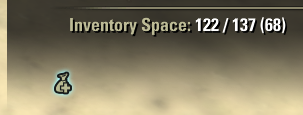
My understanding from the accompanying comment on ESOUI is that this is intentional:
Edit: This is indeed intentional, to prevent overlap with possible other addons.Found a way to detect the thing needs to show or not, and hiding it with AF enabled, if you got all bagspace bought already.
If not it will show to the bottom left now (or behind the bagspace text label if PerfectPixel is enabled -> Should be enough space left there then).Edited by JeroenB on March 12, 2026 4:48PM0
