Maintenance for the week of April 6:
• PC/Mac: No maintenance – April 6
• PC/Mac: No maintenance – April 6
Bandits UI target frame or some other addon?

daemondamian
✭✭✭✭
Does anyone know what addon creates these < > pulsating from the middle out in the target frame (healthbar/info) in combat?

Here's a full screenshot showing the target frame again with a dungeon boss
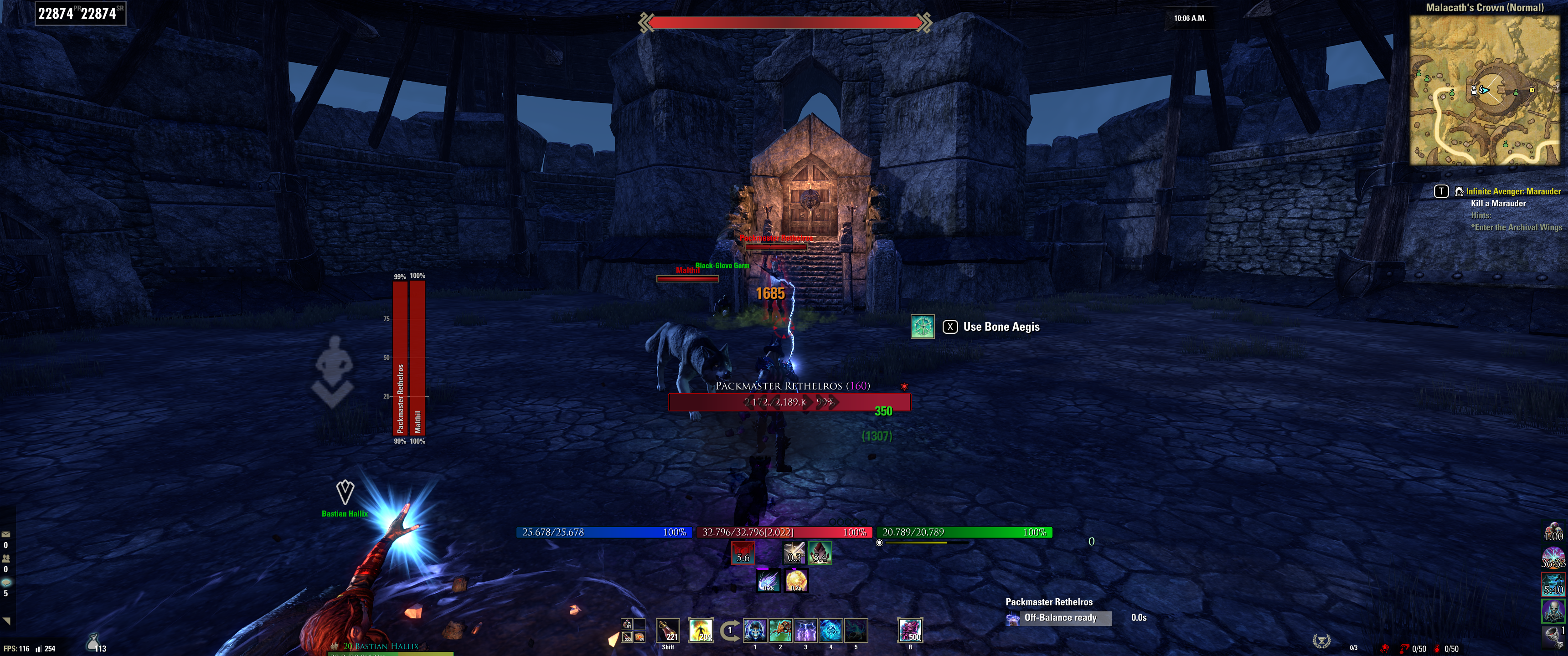
I thought it might be Bandits UI as that turns on and off that (additional) target frame but I can't find anywhere in the settings or description of the addon that refer to it & there's almost 4k comments on the esoui site I'd have to go through to see if anyone else mentioned it.
I'd try the turning off & on addons method until I find one that does affect that target frame but considering Bandits UI turns it on & off it's more likely to be that addon than not?
Edited by daemondamian on March 5, 2026 2:30AM Here's a full screenshot showing the target frame again with a dungeon boss
I thought it might be Bandits UI as that turns on and off that (additional) target frame but I can't find anywhere in the settings or description of the addon that refer to it & there's almost 4k comments on the esoui site I'd have to go through to see if anyone else mentioned it.
I'd try the turning off & on addons method until I find one that does affect that target frame but considering Bandits UI turns it on & off it's more likely to be that addon than not?
0
-
 Baertram✭✭✭✭✭
Yeah, if you turn of Bandits and the bar and effect is gone, it must have been either this bandits addon OR any addon that got a dependency on Bandits and automatically disables if you disable Bandits UI!I'd try the turning off & on addons method until I find one that does affect that target frame but considering Bandits UI turns it on & off it's more likely to be that addon than not?0 -
daemondamian✭✭✭✭
Yeah, if you turn of Bandits and the bar and effect is gone, it must have been either this bandits addon OR any addon that got a dependency on Bandits and automatically disables if you disable Bandits UI!I'd try the turning off & on addons method until I find one that does affect that target frame but considering Bandits UI turns it on & off it's more likely to be that addon than not?
The only addon that shows a dependency in the Add-Ons menu in ESO on Bandits UI is Bandits Companions unless you mean another dependency that ESO wouldn't detect.
Okay so I tried further searching and googled "eso what do the outward moving <> on the enemy health bar mean" and the AI Overview says:
"In The Elder Scrolls Online (ESO), outward-moving arrows (<>) on a health bar generally indicate that the unit (whether it's you, an ally, or an enemy) has a buff increasing their Health Regeneration.
Outward-moving arrows (<>): Increased health regeneration.
Inward-moving arrows (><) ): Decreased health regeneration or a "Defile" effect.
Context for the Arrows:
If you see these on an enemy you are fighting, it means a restorative effect is active on them.
If they are on your own health bar, you have an active buff (like from a potion or Templar/Restoration staff ability) increasing your health recovery."
This reddit link confirms that "outward arrows mean you have increased regen, inward mean decreased"
but I never noticed them on my own healthbar or an enemies healthbar before and they're not appearing on the enemy healthbar that replaces the compass in combat.
I will have to do some tests. If this was part of the base game than would that affect Bandits UI additional target frame or enemy target frame wouldn't that be a known thing?Edited by daemondamian on March 14, 2026 8:54PM0