999+ Ping

DestroyerPewnack
✭✭✭✭✭
Hello. For almost a week now, I have been getting insanely high ping, usually between 300 and 999+.
I asked my guild mates, and they said their game was running fine. So, it's not the game.
I asked my brothers who live with me, and they said the games they play are fine, and they have no lag. I have 900+ Mbps download speed, and 300+ Mbps upload speed. So it's not my ISP.
If it's not the game, and it's not my ISP, what else could it be?
I use an RTX 5080, and I made sure all my drivers and Windows have been updated.
Has anyone had a similar issue before? If so, how did you resolve it?
It's really frustrating to play ESO like this.
Edited by ZOS_Icy on January 2, 2026 7:51PM I asked my guild mates, and they said their game was running fine. So, it's not the game.
I asked my brothers who live with me, and they said the games they play are fine, and they have no lag. I have 900+ Mbps download speed, and 300+ Mbps upload speed. So it's not my ISP.
If it's not the game, and it's not my ISP, what else could it be?
I use an RTX 5080, and I made sure all my drivers and Windows have been updated.
Has anyone had a similar issue before? If so, how did you resolve it?
It's really frustrating to play ESO like this.
2
-
 Sluggy✭✭✭✭✭
✭Sounds like a local machine issue. First thing you're going to want to check is what is running on your machine and what its network traffic looks like. You're going to have start looking for free and safe tools to diagnose the issue. Then you'll need to run down a check list of things such as what apps are running and under what permissions as well as what kind of data they are sending and receiving over the network.
... Or you could nuke from orbit and just reformat and reinstall your OS and software. Not always the best option but sometimes it's the only way to be sure.0 -
 Zodiarkslayer✭✭✭✭✭
✭Remember, latency is not bandwidth! Latency is not about how big your hammer is, but how often you can swing it. 😉
If you have latency issues, there are two possible explanations.
One. Your provider reroutes your signal for some reason. And in the interim you loose connection to ESO servers.
Two. Some operations on your PC cause your network connection to "overload" with too many handles that have too many different servers as targets. You definitely have to analyse and monitor your outgoing traffic. The simplest way is to open your windows taskmanager while playing and sort for "network" while looking at your processes tab. Every process except ESO should have 0 MBit/s.
If not, that is where you should start looking.
A friend of mine told me a couple months ago that his PC got used for crypto mining, without him noticing. Only after he upgraded his Anti-Virus and Security Suite he got alerted and could solve his network and CPU issues.
Apparently some free program that he downloaded had a backdoor and allowed for this.
Internet is wild these days.No Effort, No Reward?
No Reward, No Effort!1 -
 Toanis✭✭✭✭✭You can press Win+R, enter "cmd" and then type either tracert 198.20.200.1 (NA) or tracert 159.100.230.1 (EU) in the command prompt, to get a detailed list of the route your connection takes to ZOS servers.
Somewhere along the way should be a big jump. If it is early, before it even connects to your ISP, it's somewhere in your home (broken cable, overloaded wifi), otherwise you can send the data to ZOS and your ISP as either side can look into the routing.
If you post the result here, please remove the IP from the hops before your ISP.Edited by Toanis on January 2, 2026 4:46PM0 -
DestroyerPewnack✭✭✭✭✭Zodiarkslayer wrote: »Remember, latency is not bandwidth! Latency is not about how big your hammer is, but how often you can swing it. 😉
If you have latency issues, there are two possible explanations.
One. Your provider reroutes your signal for some reason. And in the interim you loose connection to ESO servers.
Two. Some operations on your PC cause your network connection to "overload" with too many handles that have too many different servers as targets. You definitely have to analyse and monitor your outgoing traffic. The simplest way is to open your windows taskmanager while playing and sort for "network" while looking at your processes tab. Every process except ESO should have 0 MBit/s.
If not, that is where you should start looking.
A friend of mine told me a couple months ago that his PC got used for crypto mining, without him noticing. Only after he upgraded his Anti-Virus and Security Suite he got alerted and could solve his network and CPU issues.
Apparently some free program that he downloaded had a backdoor and allowed for this.
Internet is wild these days.
For one, should I try using ExitLag? Would that give me control over rerouting my signal?
And for two: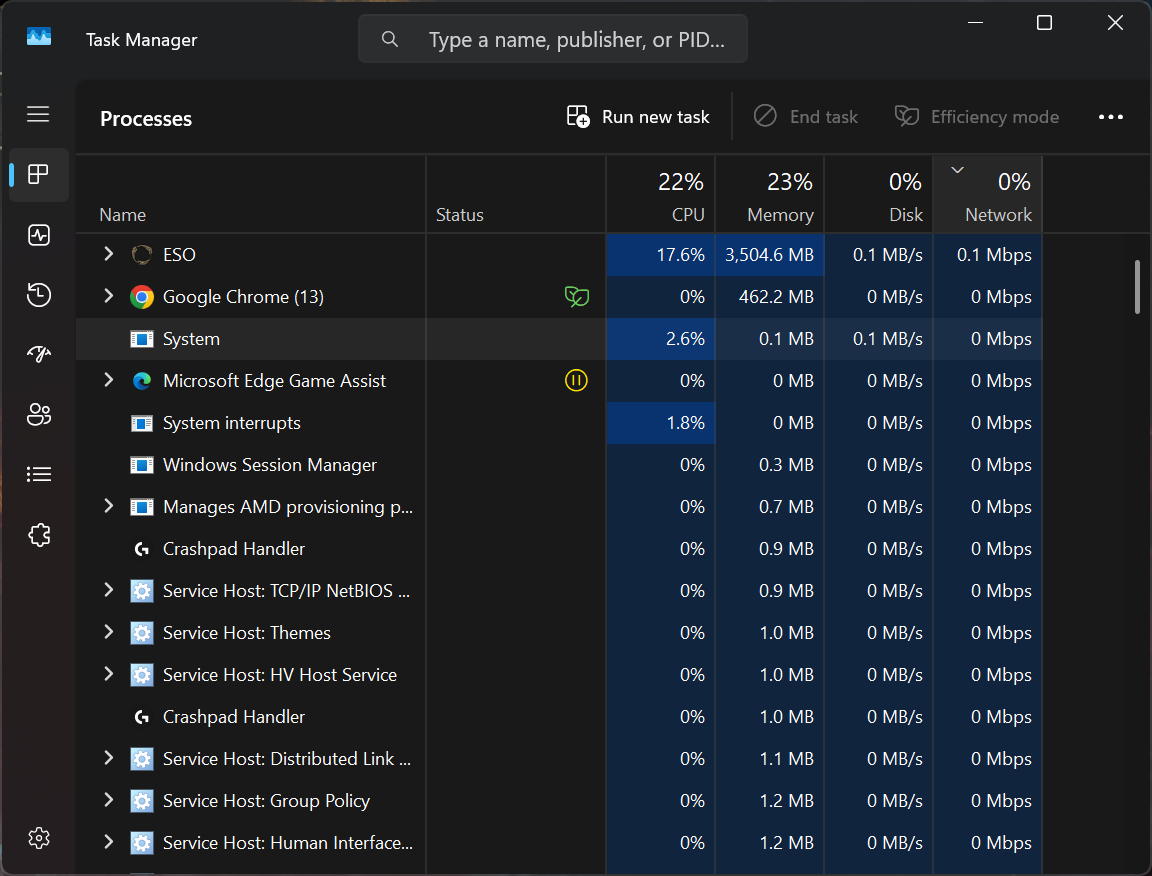
So, I'm guessing that's not it?You can press Win+R, enter "cmd" and then type either tracert 198.20.200.1 (NA) or tracert 159.100.230.1 (EU) in the command prompt, to get a detailed list of the route your connection takes to ZOS servers.
Somewhere along the way should be a big jump. If it is early, before it even connects to your ISP, it's somewhere in your home (broken cable, overloaded wifi), otherwise you can send the data to ZOS and your ISP as either side can look into the routing.
If you post the result here, please remove the IP from the hops before your ISP.
I don't know which numbers I'm supposed to cover, so I won't share a screenshot, but I can tell you that the biggest two numbers I got were from something called akamaitechnologies, and the from same IP address before the hops. Both of those had over 200 ms, while everything else was below 10 ms. Does that give you any clues about what might be wrong? :c
At times like this, I really regret being tech illiterate.Sounds like a local machine issue. First thing you're going to want to check is what is running on your machine and what its network traffic looks like. You're going to have start looking for free and safe tools to diagnose the issue. Then you'll need to run down a check list of things such as what apps are running and under what permissions as well as what kind of data they are sending and receiving over the network.
... Or you could nuke from orbit and just reformat and reinstall your OS and software. Not always the best option but sometimes it's the only way to be sure.
I hope it doesn't come to that. I don't understand why it would be an OS issue, though. I've been playing ESO since forever, and never had any ping issues until a few days/almost a week ago.2 -
Toanis✭✭✭✭✭DestroyerPewnack wrote: »I don't know which numbers I'm supposed to cover, so I won't share a screenshot, but I can tell you that the biggest two numbers I got were from something called akamaitechnologies, and the from same IP address before the hops. Both of those had over 200 ms, while everything else was below 10 ms. Does that give you any clues about what might be wrong? :c
Akamai is basically ZOS' internet provider. The last IP address is the game server.
Seems like the issue is your ISP's route to the Akamai network. That can be anything from defective hardware to security measures running amok. Usually connection issues at that level are solved "automatically", but if it takes more than a few days, definitely open a CS ticket describing your problem and add the tracert result.
A gaming VPN like Exitlag should help until its resolved, but in the end proper internet routing is what you pay your ISP for.Edited by Toanis on January 2, 2026 5:32PM2 -
DestroyerPewnack✭✭✭✭✭
Akamai is basically ZOS' internet provider. The last IP address is the game server.
Seems like the issue is your ISP's route to the Akamai network. That can be anything from defective hardware to security measures running amok. Usually connection issues at that level are solved "automatically", but if it takes more than a few days, definitely open a CS ticket describing your problem and add the tracert result.
A gaming VPN like Exitlag should help until its resolved, but in the end proper internet routing is what you pay your ISP for.
I will do that. Thank you for your help, and thank you all. 0
0 -
 Gabriel_H✭✭✭✭✭
✭✭Sounds like a local issue. Could be your rig, could be your router. Serious question: Have you tried turning it off and on again?PC EU
Never get involved in a land war in Asia - it's one of the classic blunders!0 -
 Durham✭✭✭✭✭
✭No one asked if he was in Greyhost in primetime? That would explain latency.PVP DEADWAIT
PVP The Unguildables0 -
Sluggy✭✭✭✭✭
✭Sounds like a local issue. Could be your rig, could be your router. Serious question: Have you tried turning it off and on again?
Well, they did say that other family members in the house aren't having an issue. So I'm still leaning toward rig. But checking out the ping routing and using something like ExitLag would certainly be a first choice to see if there isn't something weird happening outside the house, first.0 -
Gabriel_H✭✭✭✭✭
✭✭Sounds like a local issue. Could be your rig, could be your router. Serious question: Have you tried turning it off and on again?
Well, they did say that other family members in the house aren't having an issue. So I'm still leaning toward rig. But checking out the ping routing and using something like ExitLag would certainly be a first choice to see if there isn't something weird happening outside the house, first.
It could still be the router. If there is an issue between the rig and router it won't affect others. Could be anything from an IP conflict to a security certifcate issue or lapse that would only affect them.
Edit: And not to be that guy, but trying the simple and easy reboot of the router should be the first choice.Edited by Gabriel_H on January 2, 2026 6:59PMPC EU
Never get involved in a land war in Asia - it's one of the classic blunders!1 -
 Orbital78✭✭✭✭✭
✭Do some speed tests to dallas, TX if you're on pcna during lagging times. For me, Chicago was fast, as well as good speeds to other areas even in Texas. Dallas was the issue, which led me to think my previous issue was routing. I gave the ip address in the troubleshooting faq to my isp support and it was resolved within a week.
They were expanding fiber to more parts of our metro, so perhaps that was part of the issue. It could help to talk to your provider, hopefully they have support that care.
Vpn are a temporary fix sometimes, but fixing the real problem is the best. Unless you're in Australia or something. I hear horrible things from Aussie friends about their Internet and lack of good regional options for home game servers.Edited by Orbital78 on January 2, 2026 7:38PM0 -
 ZOS_IcymodGreetings,
This thread has been moved to the PC Technical Support section, as it is better suited there.
The Elder Scrolls Online Team
0 -
 MrGarlic✭✭✭✭✭
✭@DestroyerPewnack
It is NOT your computer or home network at at fault here. Nor is it the fault of your ISP.
The problem is totally at Akamai Technologies systems. This has been an ongoing problem with ZOS using their services since the great DDoS attacks in the mid to late 2010s.
Akamai has a system called PROLEXIC, that filters all internet traffic at a clients request. It is checking for malicious activity such as Distributed Denial of Service attacks. (DDoS) This is where a huge number of requests to a server inundate it causing 'real' data to slow down significantly or time out altogether. (Google DDoS for a more detailed explanation.)
ZOS has been using Akamai ever since a massive attack on ESO servers causing users to be unable to access the servers for several days. If my memory serves me, it was in 2018. I may be out a bit.
Akamai increases ping times as much as 20% depending where you are in the world. It also causes your +999 ping.
So no, the problem is not at your end.
ZOS will never comment on this as it is security related and they do not comment on suchlike.
As for EXITLAG, I suggest testing it before you commit to a subscription. It may help your situation.
Here is a snippet of my own TRACERT. Ingame my ping shows as permanently in the red. It used to be 220-230 before 2018.
13 43 ms 38 ms 33 ms as55850.auckland.megaport.com [43.243.22.61]
14 38 ms 41 ms 37 ms as32787.auckland.megaport.com [43.243.22.19]
15 39 ms 45 ms 33 ms a23-32-66-89.deploy.static.akamaitechnologies.com [23.32.66.89]
16 286 ms 285 ms 292 ms a184-26-104-148.deploy.static.akamaitechnologies.com [184.26.104.148]
17 291 ms 285 ms 285 ms 198.20.200.1
If yours looks anything like this, then Akamai is the problem, not you'Sharp Arrows'Mr.GarlicHidden by darkness, a shadow in the night,A sped arrow dissecting the gloom,Finding it's target, such delight.4 -
On2wheels✭✭The word "akamai" turns up in other very old threads here as well, so it seems they've been an issue forever. I even found a thread about high pings from Canada, where I'm from too, and I consistently have pings from 80-120 in-game.
So I did a little digging tonight and found the support article that shows the same IP to ping, and my result is 40 min, 40 max, 40 average. https://help.elderscrollsonline.com/#en/answer/30903
So what gives? if my desktop ping is that low why is the game ping so high?0 -
 Narvuntien✭✭✭✭✭
✭✭It's very clearly something going on with my ISP because it's not ESO that is struggling for me today... I clearly made the mistake of attempting a trial, and I got kicked from the server and I can't get back on. "Unexpected error occured contact support" message as I tried to get back in. I am not sure if there is some limit to how many times I can disconnect?
Having said that everyone else in the trial also seems to be struggling, when I eventually got back in.0 -
 CaiWenji✭✭✭✭Happening to me too. I just submitted a ticket after doing the tracert, pathping, and game consultant error report. Started for me around the same time when 2026 began.0
 -
EyelessCZ✭✭✭For last two days its unplayable. Ping spiking from 80 to 999+. Fresh restart of network, modemcrouter restarted, everything on my side is ok. But, I cant even start to launcher. I have to launch game directly from client
Other programs ok.
After no change on my PC, before that everything worked 60ms aprox.2 -
 SirIronclad✭✭✭For last two days its unplayable. Ping spiking from 80 to 999+. Fresh restart of network, modemcrouter restarted, everything on my side is ok. But, I cant even start to launcher. I have to launch game directly from client
Other programs ok.
After no change on my PC, before that everything worked 60ms aprox.
I have a very similar issue, except that my launcher works fine, and I get disconnects as well. They started when I played the game in the evening of February 7. Ping ranges from 100 to 999+. The ping status also seems to not be accurate all the time, or delayed, since sometimes the game is very laggy although the ping shown seems fine and the other way around.
I've tried a bunch of network fixes and also disabled all add-ons without any noticeable changes. I don't think the cause lies on my end, since I can play other online games just fine like always, even Dota 2 where even small network issues are very noticeable.0 -
DestroyerPewnack✭✭✭✭✭I have no proof of this, but I think what caused my issue was going from guild trader to guild trader, searching for multiple items in quick succession. My ping is lower now, so it feels like I was put on a cooldown period for whatever reason, and the game is fine now. It's still slightly higher from before, but gameplay-wise, the game runs fine.
Also, don't bother submitting a ticket. The response I got was generic and completely useless.0 -
SirIronclad✭✭✭I had high hopes when the ping issue were much less noticeable on Sunday, highest value shown was around 200 ms. I also wondered whether the server maintenance would provide a fix.
NOPE! Just logged in, and the game is unplayable: Very unresponsive, doing anything in the guild bank takes forever, if it works at all and I had another DC.
I'm very annoyed by this and disappointed that I haven't seen Zenimax acknowledge this issue yet. Never experienced this while playing ESO before and like I said, other online games are running completely fine.
Does anyone know the best way to contact support in this case?0 -
 jaekobcaed✭✭✭I have to agree that this isn't a local machine issue. I can play other online games with little to no issue but ESO is almost constantly at 999+. I ran speed tests, my ping there was in the high 20s. I've never had server issues with ESO, not even during beta, so I'm not sure what's going on here. It's making me lose interest in playing because I can't do even simple tasks without the frustrating latency.
ZOS needs to fix this ASAP. It's absolutely ridiculous that a modern MMO is like this.AD: Isachar Daierenfel - Altmer Templar | Solveig Falkenberg - Nord Warden
EP: Septimus Adeodatus - Imperial Dragonknight
DC: Esrazhir Mhiitan - Khajiit Necromancer
[PC/NA] Played off and on since beta
First TES: Morrowind | Favorite TES: Oblivion | TES games played: all of them!1