Maintenance for the week of May 25:
• PC/Mac: No maintenance – May 25
• ESO Store and Account System for maintenance – May 27, 6:00AM EDT (10:00 UTC) - 4:00PM EDT (20:00 UTC)
• PC/Mac: No maintenance – May 25
• ESO Store and Account System for maintenance – May 27, 6:00AM EDT (10:00 UTC) - 4:00PM EDT (20:00 UTC)
Is there an Add-on that filters the Furniture Vault by Bound and Unbound?

SilverBride
✭✭✭✭✭
✭✭✭✭✭
✭✭✭✭✭
Is there an Add-on that filters the Furniture Vault by Bound and Unbound? It would be so much easier to pick out furnishings to sell if these were separated from each other.
Edited by SilverBride on December 29, 2025 12:38AM PCNA
0
-
 Enemoriana✭✭✭✭✭
✭✭✭✭✭When placing or retrieving items from home, there are filters with bound/unbound, doesn't that suit?PC EU, @Enemoriana. Ru.
Houses: all sets crafting hub at Rosewine Retreat inn room, Erstwhile Sanctuary as actual Dark Brotherhood Sanctuary, Hunter's Glade as werewolf tavern (downstairs), Strident Springs Demesne as adventurer's house.
Wishlist: character slots, minstrel personality, molten war torte and white gold war torte recipes, Willowpond Haven, Kor and Hildegard houseguests, crown crates.1 -
SilverBride✭✭✭✭✭
✭✭✭✭✭Enemoriana wrote: »When placing or retrieving items from home, there are filters with bound/unbound, doesn't that suit?
I didn't even know that was there! Thanks!
But I don't see such an option for removing furnshings from the Furniture Vault which is where I keep all my unused furnishings. I'd like to be able to just see the unbound furnishings so I can more quickly remove the items I want to sell without having to check them all first.PCNA1 -
 Maitsukas✭✭✭✭✭
✭✭✭SilverBride wrote: »Enemoriana wrote: »When placing or retrieving items from home, there are filters with bound/unbound, doesn't that suit?
I didn't even know that was there! Thanks!
But I don't see such an option for removing furnshings from the Furniture Vault which is where I keep all my unused furnishings. I'd like to be able to just see the unbound furnishings so I can more quickly remove the items I want to sell without having to check them all first.
If you click on both the Furnishing Vault and the Unbound furnishings so that they have the blue background below, it instantly filters the list: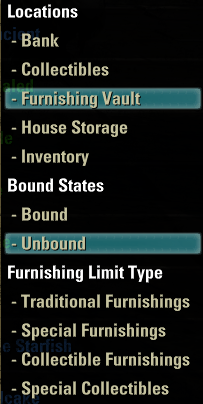
But if you want to find the Unbound furnishings directly from the Furnishing Vault interface, then the Auto Category - Revised add-on can probably help you out. You do need to add filters by yourself though:- Go to the Auto Category add-on settings and click on [Category Setting].
- Select from the left drop-down menu the Furniture Tag and from the right one ByCategory. Then click on "New".
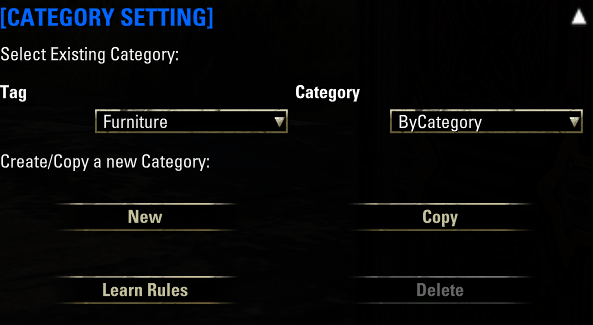
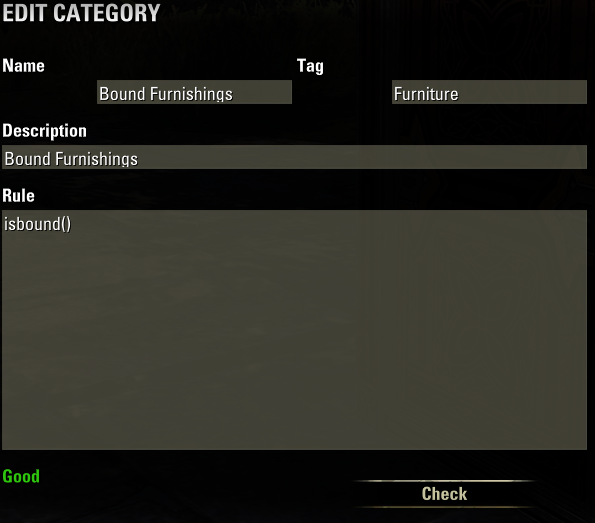
- Fill out the text fields like this:
- Click on "New" again and do the same for Unbound Furnishings:
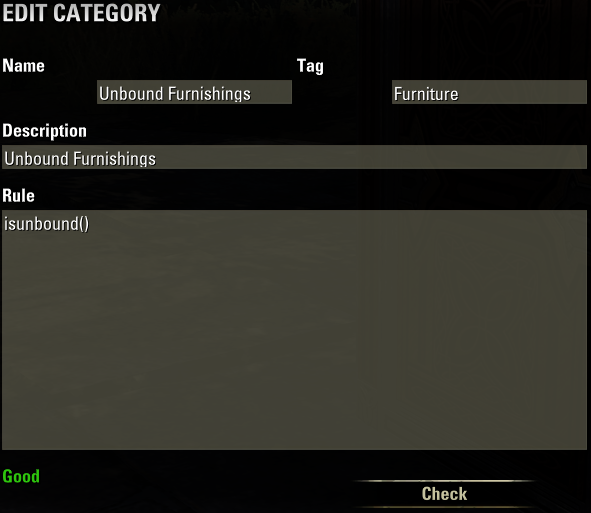
- Once you've done that, go to the [Bag Setting] menu above and under the "Add Category" section, select from the left drop-down menu the Furniture Tag and from the right one the Bound and/or Unbound Furnishings Categories. Then click on "Add To Bag".
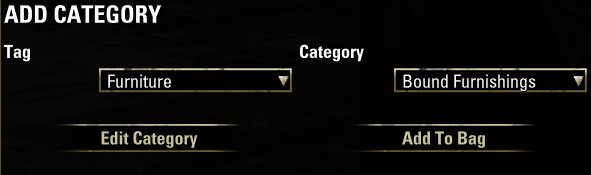
- Now the Furnishing Vault interface should be sorted for you:
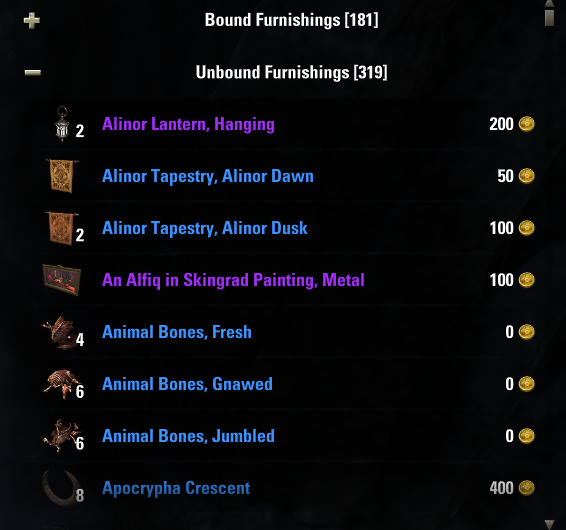
Edited by Maitsukas on December 28, 2025 10:40AMPC-EU @maitsukas
Posting the Infinite Archive and Imperial City Weekly Vendor updates.
Also trying out new Main Quests, Companions, ToT decks, Events and Styles on PTS.3 -
 DinoZavr✭✭✭✭✭
✭not in Furnishing Vault, but everywhere (bank, bag, house storage, vault)
i use Advanced Filters + Bound Items advanced filter
1) https://www.esoui.com/downloads/info2215-AdvancedFilters-UpdatedInventorysub-dropdownpluginfilters.html
2) https://www.esoui.com/downloads/info1385-AdvancedFilters-BounditemsItemSetCollectionfilterplugin.html
this is what i get
PC EU1 -
SilverBride✭✭✭✭✭
✭✭✭✭✭Thanks for the information! I will check these all out when I log in later!PCNA0 -
SilverBride✭✭✭✭✭
✭✭✭✭✭This is partially solved. I didn't realize there were filters we could choose in the housing menu that let us choose to see only bound, or unbound, or both.
THANK YOU to all who offered information!
I think I need to get to know all my menus better. Edited by SilverBride on December 29, 2025 12:38AMPCNA1
 -
SilverBride✭✭✭✭✭
✭✭✭✭✭When I went to the housing menu to pull out items I can only choose to place them, when what I want to do is retrieve them from the Vault to my bag to go sell. But I think I found a work around in the mean time. I can set to only see unbound, place the items I want to sell from the housing menu, then pick them up to my bag.
I'm going to take a look at Advanced Filters and Auto Category - Revised, too.
Edited by SilverBride on December 29, 2025 12:27AMPCNA0