Maintenance for the week of March 2:
• ESO Store and Account System for maintenance – March 3, 9:00AM EST (14:00 UTC) - 12:00PM EST (17:00 UTC)
• ESO Store and Account System for maintenance – March 3, 9:00AM EST (14:00 UTC) - 12:00PM EST (17:00 UTC)
ZOS, Massive Spike in Ping/LAG in Recent Days - What Gives?
-
 erebus_79_ESO✭✭✭PC/NA crashing before character loading into game. Just trying to turn in my daily writs!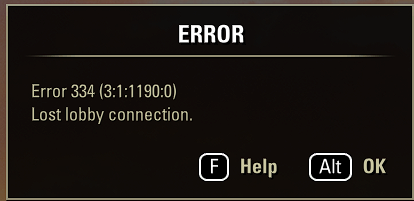
1 -
ISCOLDSOUL✭✭✭Well I have updated everything my end, still horrible lag spikes, now with added load screens as I do my daily writs, and bonus invisible enemies in dungeons, I think the time has come for me an ESO to part ways.
PS
I have cancelled my ESO plus and walking away for a while, tired of ZOS's *** attitude, the game had become frustrating, not fun, which defeats the purpose of playingEdited by ISCOLDSOUL on October 1, 2025 12:29PM4 -
 MrGarlic✭✭✭✭✭
✭I've stopped playing the game this week (other than logging on for daily log-on reward) due to the high ping (PCNA.)
I did a TRACERT and it looks normal, however there is a large disparity between the ping to the PCNA server and what is actually reported in-game. It is a difference of 280ms ping compared to ingame 340ms. The extra ping is noticeable when opening and looting containers, opening doors and collecting mats, where I get the 'Target out of range' error often.
Something is wrong ZOS at your end.
[SNIP]
6 19 ms 20 ms 18 ms ip-116-251-190-56.as55850.net [116.251.190.56]
7 32 ms 34 ms 38 ms et-0-0-2.ch-p-2.as55850.net [103.26.202.252]
8 36 ms 35 ms 38 ms et-0-0-8.cpc-p-2.as55850.net [116.251.184.250]
9 46 ms 55 ms 38 ms et-0-0-31.cpc-p-1.as55850.net [116.251.184.92]
10 * * * Request timed out.
11 281 ms 286 ms 283 ms 198.20.200.1'Sharp Arrows'Mr.GarlicHidden by darkness, a shadow in the night,A sped arrow dissecting the gloom,Finding it's target, such delight.1 -
 manukartofanu✭✭✭✭✭I just ran into the weirdest bug. In Oathworn Pit, right at the end on the finishing blow, I suddenly turned invisible and everything froze. Meanwhile, I see people already typing in chat, thanking and congratulating each other. Then I get a “cannot connect to gameserver” message.
Which means that “cannot connect to gameserver” doesn’t necessarily indicate an actual connection problem — not even with ZOS servers — but it can serve as a placeholder for some unknown error.
The explanation that “your internet didn’t drop overall, but only to the ZOS servers” doesn’t hold up. Otherwise, how would I still be receiving chat messages from other players?Edited by manukartofanu on September 29, 2025 10:09PM0 -
ISCOLDSOUL✭✭✭Okay I got some advice to minimize addons, I did that and the game become playable, still sound was somewhat desynched though.
The weird thing is I had been playing with these addons for ages without any drama, TTC BANDITS etc etc'
Today was getting a lot of loading screens as I travelled thru Tamriel without the above addons inactive, nothing seems to make sense in this game0 -
 method__01✭✭✭✭✭there is def a prob atm with PC EU, cant port to IC ,forever loading screens, traders list not show or delayed
prob started 1-2 hours ago,was fine before
will switch to NA soon and check thereEdited by method__01 on October 6, 2025 9:26AMPC EU/NA /// PS4 EU/NA
Vasanha
This one hears nothing. Sees nothing. This one only sweeps.
desperately need a survey assistant0 -
 Seravi✭✭✭✭✭I am noticing since the last update there is a 3-6 second delay in ALL actions and triggering combat. I cannot use weapons or spells without the delay. I have been questing in West Weald and Galen. I have noticed it is much worse in dungeons. Went into one in WW yesterday and I could walk past the baddies, no problem. Once I am past a few seconds they are like, "Wait was that someone we need to attack?" Sometimes they do, most of the time they don't.
I go up to a baddie, Hit my key to start slicing and dicing with my daggers and nothing happens. Okay the baddie is blind cause I am standing right here and he isn't aggro'd. Stand there and wait for the aggro THEN try to slice and dice. Oh wait delay on combat actions so take the hits THEN maybe the daggers will do something... ugh...
Serious, serious packet loss on the Akami hops. With a latency of 2-3ms this is just crazy.
PC NA No Addons3 -
silentxthreat✭✭✭✭Speaking as someone who has ran with 3 ball groups the only add-ons we use to track stuff is RDK and then run logs and review on ESO Logs. [/quote]
ive suspected the tracking ball groups use was the source of lag for years. I do wish zos would just ban any add on the makes the server unstable.
1 -
Seravi✭✭✭✭✭Kicked to the login screen trying to leave a dungeon on Galen, 11:48AM CST PC NA. Error 334.0
-
dcrush✭✭✭✭✭I’ve disconnected five times today, three of which I was just standing around waiting for a queue to pop. Then suddenly “an unknown error has occurred”.0
-
method__01✭✭✭✭✭looks like PC EU is dead atm,had probs all morning and days before with latency and skills not firing but now cant login at all
edit: re-logged after many tries -have fps drops and latency issues nowEdited by method__01 on December 6, 2025 7:06AMPC EU/NA /// PS4 EU/NA
Vasanha
This one hears nothing. Sees nothing. This one only sweeps.
desperately need a survey assistant1 -
 Displaced_Salad✭✭✭Getting worse every dayMaythor: honestly we're getting the supermarket treatment here ... shrinkflation with the addition of simply moving things about so they seem fresher .. all the while being told a corporation is our friend :P
If it comes with strings, it ain't free. It isn't a gift with purchase; you were overcharged. Companies don't love you; they love money.
I_CraftwithPntButter: 2023 is the year your supposed to be doing better , remember ? (Still waiting for that in 2025)
Advice for the future : com·mu·ni·ca·tion (noun)the imparting or exchanging of information or news.
KlauthWarthog: Well, they can definitely measure fun on their spreadsheets, otherwise they would not be able to nerf it so consistently.3 -
 Ei8htba11✭✭✭✭Chiming in.
PCEU.. ping used to hover around 80~100, the past, what, couple of weeks at least it's doubled, with the ingame latency meter often jumping to 999+ and the game stalling. Sometimes it'll clear, other times I'll get dropped with an error message.
(Feedback link on the first page refuses to load for me)
During play, even with a ping stabilising at around 120, there are still stalls, hiccups and skills not firing. Nothing my end has changed. For comparison, my system:Computer: MSI MS-7E24
CPU: AMD Ryzen 5 7600X (Raphael, RPL-B2)
4700 MHz (47.00x100.0) @ 5250 MHz (52.50x100.0)
Motherboard: MSI B650M GAMING PLUS WIFI (MS-7E24)
BIOS: 1.70, 10/08/2024
Chipset: AMD B650 (Promontory PROM21L.1)
Memory: 32768 MBytes @ 3000 MHz, 32-38-38-96
- 16384 MB PC48000 DDR5 SDRAM - G.Skill F5-6000J3238F16G
- 16384 MB PC48000 DDR5 SDRAM - G.Skill F5-6000J3238F16G
Graphics: Sapphire Radeon RX 9060 XT PULSE OC
AMD Radeon RX 9060 XT, 16304 MB GDDR6 SDRAM
Graphics: AMD Raphael - Internal GPU [MSI]
AMD Radeon, 512 MB DDR5 SDRAM
Drive: CT2000P5PSSD8, 1953.5 GB, NVMe
Sound: ATI/AMD Navi4x - High Definition Audio Controller
Sound: ATI/AMD Zen APU - Display HD Audio Controller
Sound: AMD Zen - Audio Processor - HD Audio Controller
Network: RealTek Semiconductor RTL8125 Gaming 2.5GbE Family Ethernet Controller
Network: MediaTek Wi-Fi 6E MT7922 (RZ616) 160MHz Wireless LAN Card
OS: Microsoft Windows 11 Home (x64) Build 26100.7309 (24H2)4 -
 YandereGirlfriend✭✭✭✭✭
✭✭✭✭✭I was doing a casual vOC last night and nearly half of the group was kicked from the instance at some point or another.
I had thought that that "Vegeance Rules for PvE" thread was mainly for getting rises out of people but experiences like last night in PvE definitely make me wonder if that thread might actually have been right.
The more experienced players in the raid kept saying that, yes, this happens basically every trial.1 -
 CaiWenji✭✭✭✭My ping used to always be around 30 to 60. Now every time I am playing, at least the last few days/weeks it sits around 120 which is bad enough on its own but also keeps randomly spiking way up to 600 or 999+.
I have not changed anything either. I tried to take the survey but it leads me to a page that says, "Sorry, this survey is not currently active."
I have Vexus Fiber 1 Gig internet and the internet speed test along with every other game is completely fine. Any thing I can do?0 -
 Orbital78✭✭✭✭✭
✭My ping used to always be around 30 to 60. Now every time I am playing, at least the last few days/weeks it sits around 120 which is bad enough on its own but also keeps randomly spiking way up to 600 or 999+.
I have not changed anything either. I tried to take the survey but it leads me to a page that says, "Sorry, this survey is not currently active."
I have Vexus Fiber 1 Gig internet and the internet speed test along with every other game is completely fine. Any thing I can do?
https://help.elderscrollsonline.com/#en/answer/30903
I have fiber as well, but I was having lag issues at prime time evenings. I did some speed tests to various parts of the country and noticed when I tried Dallas, TX there were issues at the same times. I called my ISP support and gave them the IP address listed and that I was having latency issues. Within a week I have rarely had issues, though I never really got down to 30-60 consistantly. I usually average around 60-80 with 100 at times shortly, unless it is in Greyhost. Cyrodiil gets weird lag during prime time no matter what.1 -
CaiWenji✭✭✭✭My ping used to always be around 30 to 60. Now every time I am playing, at least the last few days/weeks it sits around 120 which is bad enough on its own but also keeps randomly spiking way up to 600 or 999+.
I have not changed anything either. I tried to take the survey but it leads me to a page that says, "Sorry, this survey is not currently active."
I have Vexus Fiber 1 Gig internet and the internet speed test along with every other game is completely fine. Any thing I can do?
https://help.elderscrollsonline.com/#en/answer/30903
I have fiber as well, but I was having lag issues at prime time evenings. I did some speed tests to various parts of the country and noticed when I tried Dallas, TX there were issues at the same times. I called my ISP support and gave them the IP address listed and that I was having latency issues. Within a week I have rarely had issues, though I never really got down to 30-60 consistantly. I usually average around 60-80 with 100 at times shortly, unless it is in Greyhost. Cyrodiil gets weird lag during prime time no matter what.
Thank you for sharing the link for tracert and pathping along with your experience, I will open up a ticket and share those files with support.0 -
dcrush✭✭✭✭✭Can anyone explain to me why I can log in with two different accounts on the same PC and, while standing around doing nothing, one of them will have 999+ latency spikes and will eventually get kicked with a “please check your internet connection” message while the other is fine?
The one getting lag spikes is launched via the launcher and the other one via a shortcut to the game files. I don’t actually play on two accounts at the same time but I logged in right before the daily reward roll-over and wanted to quickly claim them on both accounts.1 -
 Frayton✭✭✭✭✭Can anyone explain to me why I can log in with two different accounts on the same PC and, while standing around doing nothing, one of them will have 999+ latency spikes and will eventually get kicked with a “please check your internet connection” message while the other is fine?
The one getting lag spikes is launched via the launcher and the other one via a shortcut to the game files. I don’t actually play on two accounts at the same time but I logged in right before the daily reward roll-over and wanted to quickly claim them on both accounts.
This can be caused by one of the accounts using more of your PC's resources or an account with more to load or a character that's in a laggy or buggy spot such as crowded crafting and banking areas.0 -
dcrush✭✭✭✭✭Can anyone explain to me why I can log in with two different accounts on the same PC and, while standing around doing nothing, one of them will have 999+ latency spikes and will eventually get kicked with a “please check your internet connection” message while the other is fine?
The one getting lag spikes is launched via the launcher and the other one via a shortcut to the game files. I don’t actually play on two accounts at the same time but I logged in right before the daily reward roll-over and wanted to quickly claim them on both accounts.
This can be caused by one of the accounts using more of your PC's resources or an account with more to load or a character that's in a laggy or buggy spot such as crowded crafting and banking areas.
Both of them were in Vivec City and because they’re run on the same laptop they use the same addon folder. What could cause one account to use more resources than the other? And aside from that, how would my pc using more resources cause me to get disconnected from the ESO server on one account and not the other? I’m not talking about the game crashing, I could understand that if my pc cannot handle running both accounts at the same time. But lag spikes and disconnects, that’s the part I really don’t understand.0 -
JustLovely✭✭✭✭✭
✭Cyrodiil is almost unplayable again today. But then again Cyro pop locked at 10:00 this morning already too. When you get near the zerg performance tanks big time.3 -
 silky_soft✭✭✭✭✭
✭Tried to play this game again from Australia and again you are using akamai. No wonder it's still a terrible experience.
Actual shown in game is anywhere between 250 and 350ms.
Why can't you find a better solution for players outside local of PCNA?
Tracing route to 198.20.200.1 over a maximum of 30 hops
0
1
2
3
4
5
6 as32787.vic.ix.asn.au [218.100.78.120]
7 a2-21-115-57.deploy.static.akamaitechnologies.com [2.21.115.57]
8 a184-26-104-150.deploy.static.akamaitechnologies.com [184.26.104.150]
9 198.20.200.1
Computing statistics for 225 seconds...
Source to Here This Node/Link
Hop RTT Lost/Sent = Pct Lost/Sent = Pct Address
0
0/ 100 = 0% |
1 0ms 0/ 100 = 0% 0/ 100 = 0%
0/ 100 = 0% |
2 12ms 0/ 100 = 0% 0/ 100 = 0%
0/ 100 = 0% |
3 --- 100/ 100 =100% 100/ 100 =100%
0/ 100 = 0% |
4 --- 100/ 100 =100% 100/ 100 =100%
0/ 100 = 0% |
5 --- 100/ 100 =100% 100/ 100 =100%
0/ 100 = 0% |
6 --- 100/ 100 =100% 100/ 100 =100% as32787.vic.ix.asn.au [218.100.78.120]
0/ 100 = 0% |
7 9ms 0/ 100 = 0% 0/ 100 = 0% a2-21-115-57.deploy.static.akamaitechnologies.com [2.21.115.57]
0/ 100 = 0% |
8 --- 100/ 100 =100% 100/ 100 =100% a184-26-104-150.deploy.static.akamaitechnologies.com [184.26.104.150]
0/ 100 = 0% |
9 216ms 0/ 100 = 0% 0/ 100 = 0% 198.20.200.1
Trace complete.This recent update has made me sad. Sad for the game. Sad for the community. Sad to pay whatever it is now. I want the previous eso back.8 -
 SgtWinnie✭✭✭silky_soft wrote: »Tried to play this game again from Australia and again you are using akamai. No wonder it's still a terrible experience.
Actual shown in game is anywhere between 250 and 350ms.
Why can't you find a better solution for players outside local of PCNA?
Tracing route to 198.20.200.1 over a maximum of 30 hops
0
1
2
3
4
5
6 as32787.vic.ix.asn.au [218.100.78.120]
7 a2-21-115-57.deploy.static.akamaitechnologies.com [2.21.115.57]
8 a184-26-104-150.deploy.static.akamaitechnologies.com [184.26.104.150]
9 198.20.200.1
Computing statistics for 225 seconds...
Source to Here This Node/Link
Hop RTT Lost/Sent = Pct Lost/Sent = Pct Address
0
0/ 100 = 0% |
1 0ms 0/ 100 = 0% 0/ 100 = 0%
0/ 100 = 0% |
2 12ms 0/ 100 = 0% 0/ 100 = 0%
0/ 100 = 0% |
3 --- 100/ 100 =100% 100/ 100 =100%
0/ 100 = 0% |
4 --- 100/ 100 =100% 100/ 100 =100%
0/ 100 = 0% |
5 --- 100/ 100 =100% 100/ 100 =100%
0/ 100 = 0% |
6 --- 100/ 100 =100% 100/ 100 =100% as32787.vic.ix.asn.au [218.100.78.120]
0/ 100 = 0% |
7 9ms 0/ 100 = 0% 0/ 100 = 0% a2-21-115-57.deploy.static.akamaitechnologies.com [2.21.115.57]
0/ 100 = 0% |
8 --- 100/ 100 =100% 100/ 100 =100% a184-26-104-150.deploy.static.akamaitechnologies.com [184.26.104.150]
0/ 100 = 0% |
9 216ms 0/ 100 = 0% 0/ 100 = 0% 198.20.200.1
Trace complete.
JFC This shite again.
No wonder the ping on NA is now the same as a Standard EU ping was.
Zos always raves about "community" and how important it is to them. If that were true they would have listened to Oceanic players last time they involved Akamai. More BS from the masters of it.
I'd say do better but they simply don't care.2 -
Lucasl402✭✭✭✭silky_soft wrote: »Tried to play this game again from Australia and again you are using akamai. No wonder it's still a terrible experience.
Actual shown in game is anywhere between 250 and 350ms.
Why can't you find a better solution for players outside local of PCNA?
Tracing route to 198.20.200.1 over a maximum of 30 hops
0
1
2
3
4
5
6 as32787.vic.ix.asn.au [218.100.78.120]
7 a2-21-115-57.deploy.static.akamaitechnologies.com [2.21.115.57]
8 a184-26-104-150.deploy.static.akamaitechnologies.com [184.26.104.150]
9 198.20.200.1
Computing statistics for 225 seconds...
Source to Here This Node/Link
Hop RTT Lost/Sent = Pct Lost/Sent = Pct Address
0
0/ 100 = 0% |
1 0ms 0/ 100 = 0% 0/ 100 = 0%
0/ 100 = 0% |
2 12ms 0/ 100 = 0% 0/ 100 = 0%
0/ 100 = 0% |
3 --- 100/ 100 =100% 100/ 100 =100%
0/ 100 = 0% |
4 --- 100/ 100 =100% 100/ 100 =100%
0/ 100 = 0% |
5 --- 100/ 100 =100% 100/ 100 =100%
0/ 100 = 0% |
6 --- 100/ 100 =100% 100/ 100 =100% as32787.vic.ix.asn.au [218.100.78.120]
0/ 100 = 0% |
7 9ms 0/ 100 = 0% 0/ 100 = 0% a2-21-115-57.deploy.static.akamaitechnologies.com [2.21.115.57]
0/ 100 = 0% |
8 --- 100/ 100 =100% 100/ 100 =100% a184-26-104-150.deploy.static.akamaitechnologies.com [184.26.104.150]
0/ 100 = 0% |
9 216ms 0/ 100 = 0% 0/ 100 = 0% 198.20.200.1
Trace complete.
JFC This shite again.
No wonder the ping on NA is now the same as a Standard EU ping was.
Zos always raves about "community" and how important it is to them. If that were true they would have listened to Oceanic players last time they involved Akamai. More BS from the masters of it.
I'd say do better but they simply don't care.
Exactly.1


