Maintenance for the week of December 15:
· [COMPLETE] PC/Mac: NA and EU megaservers for maintenance – December 15, 4:00AM EST (9:00 UTC) - 12:00PM EST (17:00 UTC)
· [COMPLETE] Xbox: NA and EU megaservers for maintenance – December 15, 4:00AM EST (9:00 UTC) - 12:00PM EST (17:00 UTC)
· [COMPLETE] PlayStation®: NA and EU megaservers for maintenance – December 15, 4:00AM EST (9:00 UTC) - 12:00PM EST (17:00 UTC)
· [COMPLETE] PC/Mac: NA and EU megaservers for maintenance – December 15, 4:00AM EST (9:00 UTC) - 12:00PM EST (17:00 UTC)
· [COMPLETE] Xbox: NA and EU megaservers for maintenance – December 15, 4:00AM EST (9:00 UTC) - 12:00PM EST (17:00 UTC)
· [COMPLETE] PlayStation®: NA and EU megaservers for maintenance – December 15, 4:00AM EST (9:00 UTC) - 12:00PM EST (17:00 UTC)
eso64.exe issue [Resolved]

SamuelDraconis
✭✭✭

can't update.
[edited for spamming]
"Let me guess, someone stole your sweetroll."
0
-
 TaSheen✭✭✭✭✭
✭✭✭✭✭Well, just to check here.... you don't have a leftover instance of ESO hanging in the background do you? If you're on PC, open Task Manager to check.______________________________________________________
"But even in books, the heroes make mistakes, and there isn't always a happy ending." Mercedes Lackey, Into the West
PC NA, PC EU (non steam)- four accounts, many alts....0 -
 theskymoves✭✭✭✭I had the same pop-up this morning. Hit 'close' on the message, and then 'Update' on the launcher, and the patch downloaded.
Can you not close the message, or is it popping up again when you try to download the patch? 0
0 -
SamuelDraconis✭✭✭Had to reboot my computer to get it working
"Let me guess, someone stole your sweetroll."0 -
 thinkaboutit✭✭✭✭eso64.exe sometimes doesn't close out even if the game isnt running. killing the task in task manager->details works.. or rebooting as you found out
 0
0 -
SamuelDraconis✭✭✭my task manager didn't find eso64.exe running."Let me guess, someone stole your sweetroll."0
-
 Orbital78✭✭✭✭✭
✭SamuelDraconis wrote: »Had to reboot my computer to get it working
I had a ghost instance in my resmon ... manually killed it and it patched fine. Not sure what was up with that.0 -
thinkaboutit✭✭✭✭SamuelDraconis wrote: »my task manager didn't find eso64.exe running.
weird, you were under details and it still didn't show?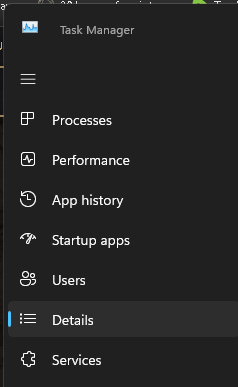
0 -
 SeaGtGruff✭✭✭✭✭
✭✭✭✭✭I wonder if getting kicked out of the game to desktop can leave a vestige of ESO64.exe in memory— maybe not enough of a vestige to show up as a running process in Task Manager, but enough of one to be detected by the launcher?
Don’t mind me, I’m just crazy-speculating out loud, and figuring out ways to use “vestige” in casual conversation!I've fought mudcrabs more fearsome than me!0 -
 Warhawke_80✭✭✭✭✭
✭SamuelDraconis wrote: »my task manager didn't find eso64.exe running.
Still you still could of had a .dll from the program on the hook...That wouldn't show up in TM...but would still keep a program from launching.““Elric knew. The sword told him, without words of any sort. Stormbringer needed to fight, for that was its reason for existence...”― Michael Moorcock, Elric of Melniboné0