Maintenance for the week of March 30:
• [COMPLETE] ESO Store and Account System for maintenance – April 1, 1:00PM EDT (17:00 UTC) - 5:00PM EDT (21:00 UTC)
• [COMPLETE] ESO Store and Account System for maintenance – April 1, 1:00PM EDT (17:00 UTC) - 5:00PM EDT (21:00 UTC)
Does breaking compatibility count as an improvement?

Panthermic
✭✭✭
@ZOS_GinaBruno @ZOS_Kevin tell the developers that they were successfully to break compatibility with KeePass even in fullscreen mode, which worked perfectly before U39. Thank you that I'm not able to use it anymore the way I used to it. 
When the selector pops up, the game loses focus completely, leaving the selected data to get typed into the void.

Edited by Panthermic on August 23, 2023 1:24AM When the selector pops up, the game loses focus completely, leaving the selected data to get typed into the void.
1
-
 Kisakee✭✭✭✭✭
✭Anti bot arrangements.I'm but a sarcastic beef jerky. Irony and cynicism are my parents. You've been warned.5 -
 Amottica✭✭✭✭✭
✭✭✭✭✭If anything it is on the password manager developers to ensure their system is compatible with the game since you are using their system to log into ESO. That responsibility is a one-way street.
From the perspective of Zenimax, password managers are not germane to ESO and it is unrealistic for Zenimax to try to keep the game compatible with all the possible password managers out there. That is even before considering the very logical possible reason @Kisakee has presented.
16 -
Panthermic✭✭✭
9 years after the game's release, really? I'm pretty sure that losing focus from the login's input box won't prevent anything that a bot can do.Anti bot arrangements.
The game is in windowed (fullscreen) mode.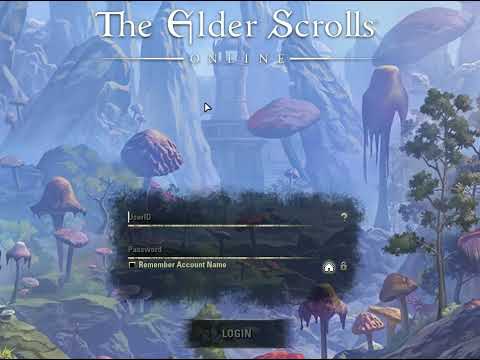 https://youtu.be/MuQUc473Xv8
It worked perfectly for the past 8 years before the U39 and now this is considered as a QoL fix. The password manager doesn't know where the input box is, I don't think at all that it can return the focus to typing the required data. If the game is in fullscreen mode, it gets minimized and simply disappears. How could a password manager, after selecting the required data, return the game to full screen, return the focus to the appropriate input box, and then type?If anything it is on the password manager developers to ensure their system is compatible with the game since you are using their system to log into ESO. That responsibility is a one-way street.
From the perspective of Zenimax, password managers are not germane to ESO and it is unrealistic for Zenimax to try to keep the game compatible with all the possible password managers out there. That is even before considering the very logical possible reason @Kisakee has presented.
You're joking, right?
The game is in fullscreen mode.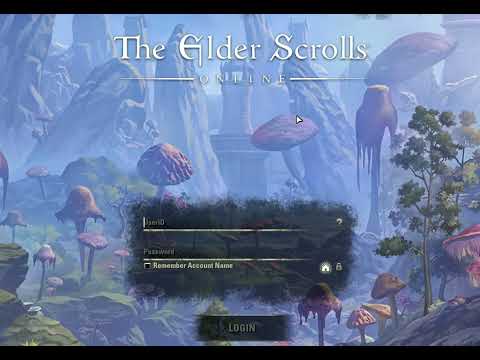 https://youtu.be/u2wJCxFoMd0 1
 -
Amottica✭✭✭✭✭
✭✭✭✭✭Panthermic wrote: »
9 years after the game's release, really? I'm pretty sure that losing focus from the login's input box won't prevent anything that a bot can do.Anti bot arrangements.
The game is in windowed (fullscreen) mode.
It worked perfectly for the past 8 years before the U39 and now this is considered as a QoL fix. The password manager doesn't know where the input box is, I don't think at all that it can return the focus to typing the required data. If the game is in fullscreen mode, it gets minimized and simply disappears. How could a password manager, after selecting the required data, return the game to full screen, return the focus to the appropriate input box, and then type?If anything it is on the password manager developers to ensure their system is compatible with the game since you are using their system to log into ESO. That responsibility is a one-way street.
From the perspective of Zenimax, password managers are not germane to ESO and it is unrealistic for Zenimax to try to keep the game compatible with all the possible password managers out there. That is even before considering the very logical possible reason @Kisakee has presented.
You're joking, right?
The game is in fullscreen mode.
Great that it worked properly for 8 years but that does not change where the responsibility lies.
Even though Zenimax specifically permits add-ons they do not support them and it is upon the add-on developer to ensure their work is in compliance with the current state of the game.
This password manager does not even rise to that level. The complaint should be leveled with the password manager so they can attempt to make changes.
Oh, and yes, with a 9 year-old game they do still look at ways to protect our accounts. While it may not be the case it does make sense to prevent automated password entries as that could very well be an issue they have seen.
Edited by Amottica on August 23, 2023 3:22PM10 -
 ikzaa✭✭✭✭I'm sure if I try really hard I can figure out how to blame update 39 and why my dryer stopped working yesterday it has 39 in the serial number that should do the trick.
It worked perfectly fine until Zenimax updated TESO, coincidence?
I do not think so.11 -
 Elsonso✭✭✭✭✭
✭✭✭✭✭Huh.
If they did remove this capability, then ZOS does bear some responsibility here. It is, in fact, a two-way street. It is only a one-way street when the developer is not cooperative or antagonistic. Hopefully, that is not ZOS. Password managers improve security by allowing longer and more complex passwords that have a high entropy. These passwords make it harder to discover the password by social hacking or dumpster diving. ZOS should never do anything to make it harder for people to use them.
I recommend just a simple Copy-Paste of the password (not User ID) from the password manager to the ESO login screen, which still works in Update 39. Type the User ID manually. More work, yes. Sadly, this is less secure than directly inputting the password using the password manager, but probably not by much.XBox EU/NA:@ElsonsoJannus
PC NA/EU: @Elsonso
PSN NA/EU: @ElsonsoJannus
Total in-game hours: 11321
X/Twitter: ElsonsoJannus1 -
 tomofhyrule✭✭✭✭✭
✭✭✭✭✭This was an intended change from the patch notes:
https://forums.elderscrollsonline.com/en/discussion/comment/7942289/#Comment_7942289Edit boxes will now lose focus, and not gain focus, when the game client itself is not focused.
For example, if you launch ESO and switch to another program, the Username and Password fields will no longer indicate that typing will enter text into them. (No longer share your password with all your friends thinking you're entering it in ESO!)
From the wording of this, it seems designed to prevent players from thinking they have ESO as the active window when they're actually in another window (e.g. a messenger app or a stream) and accidentally typing their password in the wrong place. However, that does mean that you can only put your password into the login screen if ESO is currently your active window.0 -
 Kappachi✭✭✭✭✭Good, anti-bot measures are good for MMORPGs, especially ones like this without 2-factor authentication. There should never be a way to automated enter your account details except for account links such as Steam. I would hope they make it so programs like that never work with the game otherwise people could brute force with rainbow tables like olden days.3
 -
 IsharaMeradin✭✭✭✭✭Can you not alt+tab back to the login screen and ensure that focus is on the correct spot before pressing the shortcut to auto-type the information?PC-NA / PC-EUID @IsharaMeradin
Characters NA
Verin Jenet Eshava - Dark Elf Warden (main)
Nerissa Valin - Imperial Necromancer (secondary)
Lugsa-Lota-Stuph - Argonian Sorcerer
Leanne Martin - Breton Templar
Latash Gra-Ushaba - Orc Dragonknight
Ishara Merádin - Redguard Nightblade
Arylina Loreal - High Elf Sorcerer
Sasha al'Therin - Nord Necromancer
Paula Roseróbloom - Wood Elf Warden
Ja'Linga - Khajiit Arcanist
Characters EU
Shallan Veil - Wood Elf Warden
ID @IsharaMeradin-Epic
Characters NA
Ja'Sassy-Daro - Khajiit Nightblade
Natash af-Ishara - Redguard Warden
Shallan Radiant Veil - Dark Elf Arcanist0 -
Amottica✭✭✭✭✭
✭✭✭✭✭Huh.
If they did remove this capability, then ZOS does bear some responsibility here. It is, in fact, a two-way street. It is only a one-way street when the developer is not cooperative or antagonistic. Hopefully, that is not ZOS. Password managers improve security by allowing longer and more complex passwords that have a high entropy. These passwords make it harder to discover the password by social hacking or dumpster diving. ZOS should never do anything to make it harder for people to use them.
I recommend just a simple Copy-Paste of the password (not User ID) from the password manager to the ESO login screen, which still works in Update 39. Type the User ID manually. More work, yes. Sadly, this is less secure than directly inputting the password using the password manager, but probably not by much.
Yes, it is a two-way street. Most of that street is on the password manager devs side. It is upon the password management developers to find out what they need to do to make their system compatible with ESO.
Edit as follows.
@tomofhyrule has pointed out that the change is intended. The patch notes wording indicates that this will not change, meaning Zenimax will not be taking any responsibility in the matter.
Edited by Amottica on August 24, 2023 5:23PM0 -
 Warhawke_80✭✭✭✭✭
✭I could say that this whole thread is a silly overreach...
I could say that.Edited by Warhawke_80 on August 24, 2023 5:28PM““Elric knew. The sword told him, without words of any sort. Stormbringer needed to fight, for that was its reason for existence...”― Michael Moorcock, Elric of Melniboné1 -
Elsonso✭✭✭✭✭
✭✭✭✭✭
tomofhyrule has pointed out that the change is intended. The patch notes wording indicates that this will not change, meaning Zenimax will not be taking any responsibility in the matter.
Of course not....XBox EU/NA:@ElsonsoJannus
PC NA/EU: @Elsonso
PSN NA/EU: @ElsonsoJannus
Total in-game hours: 11321
X/Twitter: ElsonsoJannus0 -
Amottica✭✭✭✭✭
✭✭✭✭✭
Agree. They need to maintain their focus for the reasons I noted in the rest of the post you quoted.
Of course, if the password manager devs were interested in restoring compatibility they will contact Zenimax to see what they need to change with their password manager to revive its previous usefulness.
Edited by Amottica on August 24, 2023 6:43PM0 -
Panthermic✭✭✭SithisKhajitiiLamae wrote: »Its not ZOS's fault an add on from a whole other developer doesn't work anymore.
It's not an add-on, but a password manager that is supposed to raise security by allowing the use of long--and I mean 20 or more characters long--unguessable, complex, and different passwords for every account. Trying to prevent or even make its usage harder/complicated is a bad move, period.
Bitwarden's website tells me about such passwords I'm using, how about yours? tomofhyrule wrote: »This was an intended change from the patch notes:
https://forums.elderscrollsonline.com/en/discussion/comment/7942289/#Comment_7942289Edit boxes will now lose focus, and not gain focus, when the game client itself is not focused.
For example, if you launch ESO and switch to another program, the Username and Password fields will no longer indicate that typing will enter text into them. (No longer share your password with all your friends thinking you're entering it in ESO!)
From the wording of this, it seems designed to prevent players from thinking they have ESO as the active window when they're actually in another window (e.g. a messenger app or a stream) and accidentally typing their password in the wrong place. However, that does mean that you can only put your password into the login screen if ESO is currently your active window.
Funny because up to now they were actually typing their password into THE game client. What do you think how many players read these forums, how many of them read those patch notes, and how many will now share their credentials due to this change? This won't prevent people who don't see where their cursor blinking or where they're typing from accidentally sharing their credentials.
This whole thing reminds me of when Google screewed millions of users with Android 10 by preventing apps from using the sd-card to store data on it.Good, anti-bot measures are good for MMORPGs, especially ones like this without 2-factor authentication. There should never be a way to automated enter your account details except for account links such as Steam. I would hope they make it so programs like that never work with the game otherwise people could brute force with rainbow tables like olden days.
Talking about anti-bot and hackers and brute force or whatever such thing related to something--TESO--where half of your credentials--usernames--are PUBLICLY visible to anyone logged in to the game is..well..sounds a bit laughable to me.
Bots don't necessarily need to open a new window to do anything, they listen to key combos, so TESO won't ever lose the focus to prevent anything a bot can do. A hacker won't ever bother to try to hack accounts through game clients and they don't manually select the data needed to type in...that's not how brute force works...
Takes too much time--about 4+ seconds per fail to try again, while brute force attacks can try thousands of username+password combos per second--and resources. Hackers don't use their own computers but botnets that might have no GUI--neither Windows--at all and thus won't be able to run any game...
TESO has some kind of 2FA-like system--just not every time required--that pops up the moment you try to log in from an unauthorized computer or browser or just use a wrong password.
Since Steam enforced their idiot new client with a log-in with a QR code system, it's silly though to think you're using a 100% safe system. Just search for Discord's QR code fiasco. Meanwhile, Steam prevents you from logging out from their phone app without being forced to remove the 2FA from your Steam account. Really this is what anyone calls safe?
I really don't know how to tell my opinion about people who in 2023 still use easily guessable--mostly even everywhere the same--passwords that are able to be brute forced, without it might breaking the forum's rules.IsharaMeradin wrote: »Can you not alt+tab back to the login screen and ensure that focus is on the correct spot before pressing the shortcut to auto-type the information?
No. The shortcut brings the selector window up making the game lose focus because not the active window anymore. The needed credentials are selected by clicking on it, and it starts typing the moment you click. If you get the game back by alt+tab then the selector's window goes into the background so you can't click on it.
Agree. They need to maintain their focus for the reasons I noted in the rest of the post you quoted.
Of course, if the password manager devs were interested in restoring compatibility they will contact Zenimax to see what they need to change with their password manager to revive its previous usefulness.
First, you're agreeing that it's some anti-bot thing, and now you're saying that ZOS would give out anything to make programs-- even bots--, to be able to ignore this "anti-bot protection". This brings up the 1 million dollar question of what was the point of this. You're confusing me...and I've no other words to say...0 -
 TaSheen✭✭✭✭✭
✭✭✭✭✭My game passwords are VERY long - 64 characters provided by my host system. I feel that I'm safe.______________________________________________________
"But even in books, the heroes make mistakes, and there isn't always a happy ending." Mercedes Lackey, Into the West
PC NA, PC EU (non steam)- four accounts, many alts....1 -
 Toanis✭✭✭✭✭That cryptic letter combination password thing is a bit outdated though, since it leads to short passwords, writing them down or using 3rd party tools that can accidentally (or intentionally) send the password somewhere else.
In general using your favorite misunderstood song line or a nonsensical sentence that somehow makes some sense for you, then adding deliberate typos or swapping some words to another language is just as secure as random letters and at the same time easier to remember for humans even for much longer passwords that are harder to guess for computers.
Case in point: that Bitwarden site considers "let me play ESO" more secure (centuries) than "xctTzI2§4%&Pt"
0 -
Elsonso✭✭✭✭✭
✭✭✭✭✭That cryptic letter combination password thing is a bit outdated though, since it leads to short passwords, writing them down or using 3rd party tools that can accidentally (or intentionally) send the password somewhere else.
In general using your favorite misunderstood song line or a nonsensical sentence that somehow makes some sense for you, then adding deliberate typos or swapping some words to another language is just as secure as random letters and at the same time easier to remember for humans even for much longer passwords that are harder to guess for computers.
Case in point: that Bitwarden site considers "let me play ESO" more secure (centuries) than "xctTzI2§4%&Pt"
The "centuries" measure is probably most applicable to someone who uses a cat walking across the keyboard to guess passwords. That is how the second password is guessed, but not the first. The first one is probably considerably shorter. Days, maybe. Of course, that is specific to that passphrase. The password/passphrase should never be about the system being logged into, who is logging in, or what someone is doing on that system. XBox EU/NA:@ElsonsoJannus
PC NA/EU: @Elsonso
PSN NA/EU: @ElsonsoJannus
Total in-game hours: 11321
X/Twitter: ElsonsoJannus0 -
Panthermic✭✭✭That cryptic letter combination password thing is a bit outdated though, since it leads to short passwords, writing them down or using 3rd party tools that can accidentally (or intentionally) send the password somewhere else.
It's not outdated, not at all. It leads to short passwords simply because people WANT short passwords. The length of your password depends only on you! (The exception is when passwords are limited in length and, or characters, but that's another story.)
You're mixing up an open-source software with M$ Windows.In general using your favorite misunderstood song line or a nonsensical sentence that somehow makes some sense for you, then adding deliberate typos or swapping some words to another language is just as secure as random letters and at the same time easier to remember for humans even for much longer passwords that are harder to guess for computers.
Basic security rule: do not use the same password more than once. Following this rule, how many different parts of how many songs can you use--while remembering them all--to have different passwords for each account without writing them down? Or do you use the same password for everything?Case in point: that Bitwarden site considers "let me play ESO" more secure (centuries) than "xctTzI2§4%&Pt"
Of course, it's stronger! It's stronger, but not because it makes sense. It's stronger simply because "let me play ESO" is longer than "xctTzI2§4%&Pt". More characters means more possible combinations, so it takes more time to figure it out. If you want real numbers, you can play a little here. GRC's Interactive Brute Force Password “Search Space” Calculator.

Look how drastically the numbers get changed just by adding 2 spaces to get the same 15-character length.And now tell me which is stronger? The "centuries" measure is probably most applicable to someone who uses a cat walking across the keyboard to guess passwords. That is how the second password is guessed, but not the first. The first one is probably considerably shorter. Days, maybe. Of course, that is specific to that passphrase. The password/passphrase should never be about the system being logged into, who is logging in, or what someone is doing on that system.
I recommend that you pay attention to the scenarios shown in the images. According to the calculator, the cat can only be used if it can press the buttons at least a thousand times per second.
It's easier to be smart when you know exactly what you need to figure out than to figure it out without knowing anything about it. 0
0 -
 SeaGtGruff✭✭✭✭✭
✭✭✭✭✭Nothing in the wording of the patch notes suggests to me that this change has anything to do with anti-bot measures.
And the fact that the Steam version of the ESO launcher can auto-enter the user name and password would seem to indicate that there's no deliberate desire on ZOS's part to force non-Steam users to manually enter their user names and passwords.
If a password management is no longer working with ESO' launcher because of this change, the solution would seem to be to contact the app's developer and ask them to change it so the app can somehow supply the user name and password to the ESO launcher without stealing focus from the ESO launcher.I've fought mudcrabs more fearsome than me!0 -
Elsonso✭✭✭✭✭
✭✭✭✭✭Panthermic wrote: »The "centuries" measure is probably most applicable to someone who uses a cat walking across the keyboard to guess passwords. That is how the second password is guessed, but not the first. The first one is probably considerably shorter. Days, maybe. Of course, that is specific to that passphrase. The password/passphrase should never be about the system being logged into, who is logging in, or what someone is doing on that system.
I recommend that you pay attention to the scenarios shown in the images. According to the calculator, the cat can only be used if it can press the buttons at least a thousand times per second.
It's easier to be smart when you know exactly what you need to figure out than to figure it out without knowing anything about it.
The reason that "let me play ESO" is insecure is that it is an obvious password for securing an ESO account. It has nothing to do with how cryptographically strong it is, or how much entropy it has, as it is socially weak.
XBox EU/NA:@ElsonsoJannus
PC NA/EU: @Elsonso
PSN NA/EU: @ElsonsoJannus
Total in-game hours: 11321
X/Twitter: ElsonsoJannus0