HELP: I am in NA but Launcher is trying to Launch EU

Rontabs77
✭✭✭
Hello All,
I was about to play ESO and I was shocked that the launcher was prompting me to Install the game instead of to Play. Then I noticed that the Launcher is trying to install the EU version of the game and it is indicated that the launcher is EU as can be seen below:
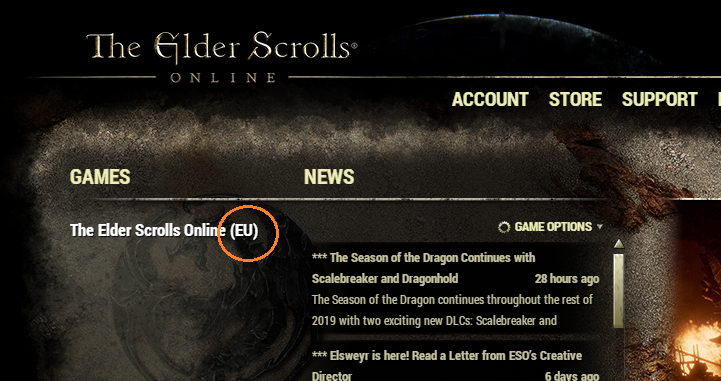
What is the workaround/fix for this?
Please help.
Best regards,
Rontabs
I was about to play ESO and I was shocked that the launcher was prompting me to Install the game instead of to Play. Then I noticed that the Launcher is trying to install the EU version of the game and it is indicated that the launcher is EU as can be seen below:
What is the workaround/fix for this?
Please help.
Best regards,
Rontabs
0
-
Rontabs77✭✭✭Well, I saw from somewhere that the solution was to rename my folder from "Elder Scrolls Online" to "Elder Scrolls Online EU".
I'll try this later tonight when I get back from work and will provide feedback.
Also, it seems that it is an old problem and I am wondering why this just happened to me now. Could it be because I had installed battle.net launcher and Destiny 2 before my ESO launcher dilemma?0 -
 SLy_Kyti✭✭✭✭You can change the region on the game screen
Edited by SLy_Kyti on June 11, 2019 3:37AMMaster Crafter: Almost all motifs
GM~ Blades of Old Tamriel NA/AD
Member~ NZAD
Member~ Blades of Vengeance NA/AD
-Tamriel College -Amazing Deals of Nirn-
1 -
 phaneub17_ESO✭✭✭✭✭
✭✭✭✭✭You're going to get a kick out of this... So go ahead and hit Play on your Launcher. When it goes to the Login Screen, don't Login look to the side where it says Play, Server(EU) CLICK IT, a pop up will come up asking if you want to play on NA or EU radial button, then hit Accept.2 -
Rontabs77✭✭✭Thanks for the advice but I forgot to include that portion of the launcher in my screenshot where it says "Install" instead of "Play" so I could not even log in to switch servers.
Anyway, I'll try that folder renaming solution but not until some 8 to 9 hours later..
Hello @russelmmendoza 0
0 -
 Veles✭✭✭✭this is the end of your game! Now you will play with us in this laggy EU piece of .....forever MUAHAHAHAHA1
 -
 Keewo✭✭✭Just start the Eso Client directly from your Eso Install Directory and log in manually.
Its called Eso64.exe
There you can choose your Server. Let it start and login.
After that, close the game and open your Launcher again.Stam Dk aus Leidenschaft1 -
 Wildberryjack✭✭✭✭✭
✭Just start the Eso Client directly from your Eso Install Directory and log in manually.
Its called Eso64.exe
There you can choose your Server. Let it start and login.
After that, close the game and open your Launcher again.
^This. I have the exe file pulled to my desktop as a shortcut for when the launcher acts up. Always works.The purpose of art is washing the dust of daily life off our souls. ~Pablo Picasso0 -
Rontabs77✭✭✭It said that "You've attempted to use an invalid or out-dated client...".
I play through Steam by the way.
Thank you for suggesting.0 -
 essi2✭✭✭✭✭
✭✭There is no EU or NA client anymore, server is selected on the login screen.
It won't matter which one you install, and your launcher is definitely corrupted or out of date for even showing EU on the launcher.Edited by essi2 on June 11, 2019 3:41PM"The Heritance are racists yes? Idiots. But dangerous, destabilizing racist idiots." - Razum-dar
"Wood Elves aren't made of wood, Sea Elves aren't made of water. M'aiq still wonders about High Elves" - M'aiq the Liar
** Leyawiin Layabouts (PC-EU) - Leyawiin Layabouts (PC-NA) **
*** https://www.youtube.com/@essi2 - https://www.twitch.tv/essi2 ***0 -
Rontabs77✭✭✭Well, I re-installed (re-downloaded for several hours) the game and now I am back in business. :-)
Huhu, I do not know what I will do without this beautiful beautiful game.. :-(0

