Maintenance for the week of February 9:
• NA megaservers for maintenance – February 9, 4:00AM EST (9:00 UTC) - 12:00PM EST (17:00 UTC)
• EU megaservers for maintenance – February 9, 9:00 UTC (4:00AM EST) - 17:00 UTC (12:00PM EST)
• NA megaservers for maintenance – February 9, 4:00AM EST (9:00 UTC) - 12:00PM EST (17:00 UTC)
• EU megaservers for maintenance – February 9, 9:00 UTC (4:00AM EST) - 17:00 UTC (12:00PM EST)
Game will not load into my PC Laptop

psteg55
✭
Hello
I just purchased the game (Disc). Installed into my desktop PC with no issues. I then tried to install the game (via disc) into my laptop (Asus - I-7 6700HQ CPU, NVIDIA Geforce 965, 12 GB RAM, Windows 10 Home and 64 bit operating system).
It installs ok but at the end I get a screen that says "Loading" But nothing happens. I do not get the progress bar, percent complete indicator, nothing. Just the the screen that says "loading"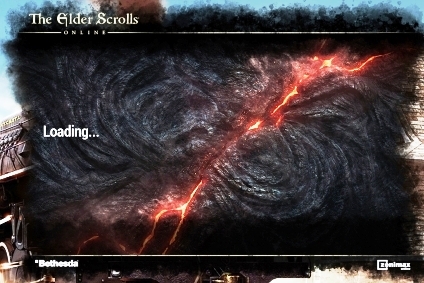
Nothing happens. I even let it run like that for a good 20 hours with absolutely nothing happening. I have gone to the web for answers and nothing seems to work or describe the problem I have. I tried to install directly from the ESO web site with the same result. I need this on my laptop so I can play this game when I am at work or out of town. Please help.
Thank you.
I just purchased the game (Disc). Installed into my desktop PC with no issues. I then tried to install the game (via disc) into my laptop (Asus - I-7 6700HQ CPU, NVIDIA Geforce 965, 12 GB RAM, Windows 10 Home and 64 bit operating system).
It installs ok but at the end I get a screen that says "Loading" But nothing happens. I do not get the progress bar, percent complete indicator, nothing. Just the the screen that says "loading"
Nothing happens. I even let it run like that for a good 20 hours with absolutely nothing happening. I have gone to the web for answers and nothing seems to work or describe the problem I have. I tried to install directly from the ESO web site with the same result. I need this on my laptop so I can play this game when I am at work or out of town. Please help.
Thank you.
0
-
 Falhael✭✭✭Just in case you didn't already try it, try running the launcher as admin.
Windows 10 Home doesn't let you do that automatically even if you only have one account on your pc that obviously has the admin rights. So each time you open the launcher, you gotta do it by right-clicking the eso symbol and then select the "run as administrator" option with the little shield icon next to it.
For me that's the only way to get the launcher to work properly (or the only way I found with limited tech knowledge and skills ) 0
) 0 -
psteg55✭Just in case you didn't already try it, try running the launcher as admin.
Windows 10 Home doesn't let you do that automatically even if you only have one account on your pc that obviously has the admin rights. So each time you open the launcher, you gotta do it by right-clicking the eso symbol and then select the "run as administrator" option with the little shield icon next to it.
For me that's the only way to get the launcher to work properly (or the only way I found with limited tech knowledge and skills )
I have already tried that and tried it again after your suggestion. Still have the same issue. Thank you for your reply.0 -
 JamilaRaj✭✭✭✭✭
✭Try installer from the website (account), as it will have to update, i.e. download the whole game anyway.
Loading, however, may be sign of hanging up while making connection.0 -
psteg55✭Elsterchen wrote: »Why not start from eso64.exe? Just to see if its a launcher or a game problem.
Where do I find eso64.exe ? I am not that computer smart. I know enough to be dangerous.0 -
Falhael✭✭✭Elsterchen wrote: »Why not start from eso64.exe? Just to see if its a launcher or a game problem.
Where do I find eso64.exe ? I am not that computer smart. I know enough to be dangerous.
C:\Program Files (x86)\Zenimax Online\The Elder Scrolls Online\game\client
if you used the default settings when installing the eso64.exe should be there. but you will probably still need the launcher to update your game files before you can actually playEdited by Falhael on January 22, 2018 5:50PM0 -
psteg55✭Elsterchen wrote: »Why not start from eso64.exe? Just to see if its a launcher or a game problem.
Where do I find eso64.exe ? I am not that computer smart. I know enough to be dangerous.
C:\Program Files (x86)\Zenimax Online\The Elder Scrolls Online\game\client
if you used the default settings when installing the eso64.exe should be there. but you will probably still need the launcher to update your game files before you can actually play
I don't have that file. I have Zenimax Online/Launcher and then it goes into the Launcher folder. There is no eso64.exe file.
This is taken right off the website download file. My disc does not have it either. Thank you0 -
Falhael✭✭✭Elsterchen wrote: »Why not start from eso64.exe? Just to see if its a launcher or a game problem.
Where do I find eso64.exe ? I am not that computer smart. I know enough to be dangerous.
C:\Program Files (x86)\Zenimax Online\The Elder Scrolls Online\game\client
if you used the default settings when installing the eso64.exe should be there. but you will probably still need the launcher to update your game files before you can actually play
I don't have that file. I have Zenimax Online/Launcher and then it goes into the Launcher folder. There is no eso64.exe file.
This is taken right off the website download file. My disc does not have it either. Thank you
If you didn't get the launcher to work in the beginning it probably never downloaded any game file. And the launcher itself is just a pretty small file compared to the game itself. This is what it looks like on my computer (it's in german, but you can probably still get the overall picture).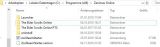
Have you tried getting the support to help you? If you have and they sent their usual useless reply maybe you can escalate the ticket or get @ZOS_GinaBruno or another nice community person to help you out there.Edited by Falhael on January 22, 2018 6:26PM0 -
psteg55✭This is what I have:
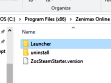
What I don't understand, I had no problem installing into my desk top. It runs great.
I will try support next.
Thank you for your help.
0 -
notimetocare✭✭✭✭✭
✭Does you laptop properly have the extra space required for install. Ive seen many issues woth patches not having double the space for install (and I doubt the issue is fixed). If a patch is 10gb you need 20gb during install0 -
 Reverb✭✭✭✭✭
✭✭✭✭✭It seems from your screencaps that only the launcher installed, and not the game itself. That's why it stays at loading, because it's searching futility for the files to load.
Do a full uninstall and delete any remaining Zenimax Online files, then reboot and try again to download from the website. Don't worry about the disc at all, just keep it handy to entry the registration key when asked.Edited by Reverb on January 23, 2018 12:11AMBattle not with monsters, lest ye become a monster, and if you gaze into the abyss, the abyss gazes also into you. ~Friedrich Nietzsche0 -
psteg55✭It seems from your screencaps that only the launcher installed, and not the game itself. That's why it stays at loading, because it's searching futility for the files to load.
Do a full uninstall and delete any remaining Zenimax Online files, then reboot and try again to download from the website. Don't worry about the disc at all, just keep it handy to entry the registration key when asked.
I deleted everything including cookies and internet memory. Re-booted and re-installed using the website's installer. I still get the same thing. Man!! This is frustrating. Thanks for the help everyone, please do not give up.0 -
psteg55✭Ok, Finally got it to update and install the game. I followed this person's advice:
Originally posted by Coffeecup:
"ESO Support Sent me this, and the game is up and working now!
If your launcher is stuck, you can do the following to fix it:
Download the installer for ESO:TU from https://account.elderscrollsonline.com
Open the Control Panel
Click 'Add/Remove Programs'
Uninstall Microsoft Visual C++ 2010 x86
Uninstall Microsoft Visual C++ 2010 x64
Restart your PC
Run install_ESO.exe (which you downloaded earlier)
Select to install both DirectX and VC++ 2010 Redistributable and complete the installation
Restart the PC once more."
Thanks everyone for your help. I will let you know if this is the final solution for this issue. Hopefully it is. Thank you all again for your help. I am finding this community is a great one to belong to.1