Maintenance for the week of April 6:
• PC/Mac: No maintenance – April 6
• PC/Mac: No maintenance – April 6
Very frequent crashes - DSDiag included

Cryptor
✭✭✭
Hi everyone,
First of all let me say that while I found ESO completely unplayable in beta & early release I went back just two weeks ago and I absolutely love it now. I didn't think ESO could dig itself out of the hole it was in but as far as I can tell all the changes you implemented in the game are top notch and this ship is finally heading into the right direction. I like it so much I am considering subbing to it....other then my issue.
I am experiencing very frequent crashes, that is if I can start the game at all. 4 out of 5 times it crashes right after I press the play button. Though it crashes less sometimes if I start my computer up and open ESO asap without opening anything else.
I attached DxDiag and a screenshot of my startup to this post. I am running genuine Windows 8.1 all hardware details are in DxDiag I believe. Intel 6600 CPU with Geforce 580.
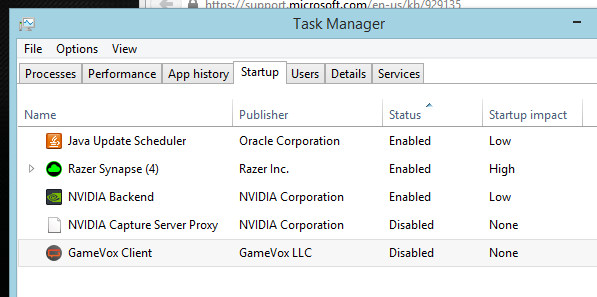
Can anyone suggest anything to me ? This is the only thing that is currently really pissing me off about the game.
First of all let me say that while I found ESO completely unplayable in beta & early release I went back just two weeks ago and I absolutely love it now. I didn't think ESO could dig itself out of the hole it was in but as far as I can tell all the changes you implemented in the game are top notch and this ship is finally heading into the right direction. I like it so much I am considering subbing to it....other then my issue.
I am experiencing very frequent crashes, that is if I can start the game at all. 4 out of 5 times it crashes right after I press the play button. Though it crashes less sometimes if I start my computer up and open ESO asap without opening anything else.
I attached DxDiag and a screenshot of my startup to this post. I am running genuine Windows 8.1 all hardware details are in DxDiag I believe. Intel 6600 CPU with Geforce 580.
Can anyone suggest anything to me ? This is the only thing that is currently really pissing me off about the game.
Casually Xbox Guild: Discord Server - Recruiting Thread - Guild Website - My information: Instagram - Twitch Stream - Youtube Channel - Discord Server - Xbox GT: OGCryptor - Mastodon Profile
0
-
 Xogath✭✭✭I'm currently having the same issue. It just started this week out of nowhere. Prior to this week, I could play ESO just fine for hours on end. Today, however, 9 times out of 10, I can't even launch the game.
Then, when I'm able to, it crashes within 30 minutes; when I'm not in combat, if I'm lucky.
As far as I know, there's no known fix for this, but ZOS is apparently looking in to various crashing issues and I imagine will deploy a bugfix patch that hopefully covers all of them.0 -
 ZOS_MollyHmodHello @Cryptor !
We do have some players report some problems in game with crashing while running Razer Synapse.
If you can try a selective startup or clean boot and successfully log in and stay in game, you can narrow down which software you're running that may be conflicting with ESO.Using the Selective Startup option, you can turn services and startup programs on or off individually to see if the problem occurs the next time you restart your computer. If you select a check box in System Configuration, the service or startup program will run when you restart Windows. If the check box is cleared, the service or startup program won't run when you restart the computer.
Follow this procedure to use the process of elimination to identify the problem.
•Open System Configuration by clicking the Start button.
•Click Control Panel
•Click System and Security
•Click Administrative Tools
•Double-click System Configuration. If you're prompted for an administrator password or confirmation; type the password or provide confirmation.
•Click the General tab
•Click Selective startup
•Clear the Load system services and the Load startup items check box then select the load system services check box
•Click OK, and then click Restart
If the problem reoccurs after restarting, do one or both (if necessary) of the following tasks:
•Identify the system service that is causing the problem
•Click the Services tab
•Click Disable all
•Select the check box for the first service that is listed
•Restart the computer
To identify the system service that is causing the problem
•Click the Services tab,
•Click Disable all,
•Select the check box for the first service that is listed,
•Restart the computer.
If the problem doesn't reoccur, then you can eliminate the first service as the cause of the problem. With the first service selected, select the second service check box, and then restart the computer.
Repeat this process until you reproduce the problem. If you can't reproduce the problem, then you can eliminate system services as the cause of the problem.
Perform the following task to Identify the startup item that is causing the problem
•Click the General tab
•Select the Load startup items check box
•Click the Startup tab,
•Click Disable all,
•Select the check box for the first startup item that is listed,
•Restart the computer.
•If the problem doesn't reoccur, then you can eliminate the first startup item as the cause of the problem.
With the first startup item selected, select the second startup item check box, and then restart the computer. Repeat this process until you reproduce the problem.The Elder Scrolls Online: Tamriel Unlimited - ZeniMax Online Studios
Forum Rules | Code of Conduct | Terms of Service | Home Page | Help Site0 -
Cryptor✭✭✭I looked into the optional patches available for Win 8.1. Most of them were for .net and other frameworks, being that they were optional my system did not auto install them. Once I did every optional update to OS not a single crash since.Casually Xbox Guild: Discord Server - Recruiting Thread - Guild Website - My information: Instagram - Twitch Stream - Youtube Channel - Discord Server - Xbox GT: OGCryptor - Mastodon Profile0
-
 Tashira✭✭✭I have seen where you have to also do a .net repair and that seems to help in some instances0