Maintenance for the week of December 22:
• NA megaservers for maintenance – December 22, 4:00AM EST (9:00 UTC) - 8:00AM EST (13:00 UTC)
• EU megaservers for maintenance – December 22, 4:00AM EST (9:00 UTC) - 8:00AM EST (13:00 UTC)
• NA megaservers for maintenance – December 22, 4:00AM EST (9:00 UTC) - 8:00AM EST (13:00 UTC)
• EU megaservers for maintenance – December 22, 4:00AM EST (9:00 UTC) - 8:00AM EST (13:00 UTC)
Xbox One reality of text chat (just explaining how it works for those who may not be aware)

NewBlacksmurf
✭✭✭✭✭
✭✭✭✭✭
✭✭✭✭✭
There are quite a few posts about why text chat "should" be added to consoles and some about why it "shouldn't" be added.
-This is not the purpose of this thread. This is for information purposes only.
I did want to take time and share how this would work, based on how its been implemented in other games. I personally don't believe the experience this creates is added value to TESO but that is for each of you to decide.
Below I'm going to just share so that while these conversations continue, there is relevance to what "Adding text chat" actually means.
*What it does not mean* (based on examples we have today)
-It does not mean ENTER, "/" or any other keys including letters and number will work
-Hitting ENTER will not throw you into a text chat box (like TESO on PC)
-Hitting "/" will not throw you into a text chat box (like TESO on PC)
(UNLESS you power cycle the Xbox One and start the console with a USB keyboard plugged in)
If you do this, then you can use ENTER to type text into a chat field if supported later by ZOS similar to how PC works today,
* but other fields like friends, etc pop-up the virtual keyboard for some reason.
*What is does mean*(based on examples we have today) If a USB keyboard is not plugged in prior to starting up the Xbox One
-using a controller to go into a menu (lets say the text chat menu by use of additional commands)
-while in the menu, using the controller to trigger or bring up a virtual keyboard
-once the virtual keyboard is open a keyboard can be used to type
-when finished typing, the controller needs to be picked up again to leave this virtual keyboard box
-then another controller input to send the chat out to whatever channel
*the same applies to smartglass* but think of it as a keyboard with the ability to activate the virtual keyboard which then appears both on the smartglass and game screen.
Video: (sorry about the quality)
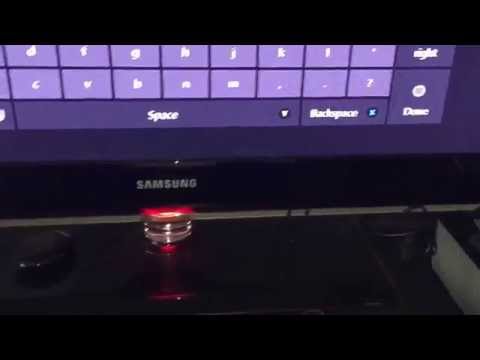 http://youtu.be/ZiaJjS5dcYE
Other helpful info on how text messages are sent on Xbox One
- http://support.xbox.com/en-US/xbox-one/system/send-text-messages
Edited by NewBlacksmurf on April 28, 2015 8:16PM -This is not the purpose of this thread. This is for information purposes only.
I did want to take time and share how this would work, based on how its been implemented in other games. I personally don't believe the experience this creates is added value to TESO but that is for each of you to decide.
Below I'm going to just share so that while these conversations continue, there is relevance to what "Adding text chat" actually means.
*What it does not mean* (based on examples we have today)
-It does not mean ENTER, "/" or any other keys including letters and number will work
-Hitting ENTER will not throw you into a text chat box (like TESO on PC)
-Hitting "/" will not throw you into a text chat box (like TESO on PC)
(UNLESS you power cycle the Xbox One and start the console with a USB keyboard plugged in)
If you do this, then you can use ENTER to type text into a chat field if supported later by ZOS similar to how PC works today,
* but other fields like friends, etc pop-up the virtual keyboard for some reason.
*What is does mean*(based on examples we have today) If a USB keyboard is not plugged in prior to starting up the Xbox One
-using a controller to go into a menu (lets say the text chat menu by use of additional commands)
-while in the menu, using the controller to trigger or bring up a virtual keyboard
-once the virtual keyboard is open a keyboard can be used to type
-when finished typing, the controller needs to be picked up again to leave this virtual keyboard box
-then another controller input to send the chat out to whatever channel
*the same applies to smartglass* but think of it as a keyboard with the ability to activate the virtual keyboard which then appears both on the smartglass and game screen.
Video: (sorry about the quality)
http://youtu.be/ZiaJjS5dcYEOther helpful info on how text messages are sent on Xbox One
- http://support.xbox.com/en-US/xbox-one/system/send-text-messages
-PC (PTS)/Xbox One: NewBlacksmurf
~<{[50]}>~ looks better than *501
~<{[50]}>~ looks better than *501
1
-
 dont actually need a keyboard btw. our phones work just fine via smartglass1
 -
NewBlacksmurf✭✭✭✭✭
✭✭✭✭✭sk8ingeckoub17_ESO wrote: »dont actually need a keyboard btw. our phones work just fine via smartglass
Edit: sorry I'm trying to keep this as a info topic. Feel free o comment as you wish but I'm not hoping to create another thread about it. Just info
Edited by NewBlacksmurf on April 28, 2015 6:04PM-PC (PTS)/Xbox One: NewBlacksmurf
~<{[50]}>~ looks better than *5010 -
 Nestor✭✭✭✭✭
✭✭✭✭✭Even ignoring the clunkiness of the Chat Interface (as it could be different than the game you demo'd as the game did not look like ESO) it is the actually typing that is going to get in the way of text in the game using something like this. I am a decent touch typist, but even then I find myself with little to no time to type out what I want to say before the rest of my party goes somewhere else. Trying to do one of these move the cursor around the screen to select a single character? What, that is like 1/10th or less the typing the speed. No way.
Without Keyboard support, I don't see Text Chat being all that viable for the game.
Just hope the Voice Chat has some way to channelize or segregate so people can have actual conversations. I can just see people trying to talk over zone chat while trying to set up a boss encounter.Edited by Nestor on April 28, 2015 6:19PMEnjoy the game, life is what you really want to be worried about.
PakKat "Everything was going well, until I died"
Gary Gravestink "I am glad you died, I needed the help"0 -
 oehk✭✭I thought this thread was going to show how communications work in console as it was during last weekends beta.
I like the way it is implemented in NW. It disappears after a few moments of not being used, and is usable via Glass, though I wish it were 100% Glass.
@NewBlacksmurf do you have any links to videos showing exactly how it worked during the beta? I think I saw that you got a key, didnt you? Those would be great for this thread.
1) How does Guild chat actually function
2) What is the proximity of voice chat to other characters.
3) Proximity based voice chat, is it confusing only hearing half of the converstaion? ex: The person you hear is within range, and the person he hears and is talking to is out of your range.0 -
NewBlacksmurf✭✭✭✭✭
✭✭✭✭✭I thought this thread was going to show how communications work in console as it was during last weekends beta.
I like the way it is implemented in NW. It disappears after a few moments of not being used, and is usable via Glass, though I wish it were 100% Glass.
@NewBlacksmurf do you have any links to videos showing exactly how it worked during the beta? I think I saw that you got a key, didnt you? Those would be great for this thread.
1) How does Guild chat actually function
2) What is the proximity of voice chat to other characters.
3) Proximity based voice chat, is it confusing only hearing half of the converstaion? ex: The person you hear is within range, and the person he hears and is talking to is out of your range.
I do but you'd want to click the link in my signature and go into the xbox video. I believe one is labelled TESO chat. Try the one labelled TESO voice chat (guild chat is not shown) and you may have to go to my gamertag "NewBlacksmurf"
1. You just talk, very similar to what you see in group chat
2. approx 20 yards and it seems the volume goes up and down slightly based on distance (no distance limit if in a group)
3. I didn't have those experiences as it actually worked very similar to a real life scenario. (If you are trying to listen to someone or if someone is trying to listen to you, people tend to move their characters in response just like you would move your body in real life)Edited by NewBlacksmurf on April 28, 2015 6:23PM-PC (PTS)/Xbox One: NewBlacksmurf
~<{[50]}>~ looks better than *5011 -
 Mirra_Halfelven✭✭✭This really isnt an issue long as the the Xbox one version of ESO will recognize an enter keypress on a keyboard to pop the cursor up in the in game text window ... type your message , hit enter again to send.
Thing is no other Xbox one game has had text chat expect for Neverwinter & I hear they did a very poor job at supporting it.
So I have a feeling most if not all Xbox users think text chat would be the major hassle @NewBlacksmurf posted.
Mirra Halfelven, Templar Troublemaker
Daggerfall Covenant - PS4 NA
PSN: Scooby_6090 -
NewBlacksmurf✭✭✭✭✭
✭✭✭✭✭Even ignoring the clunkiness of the Chat Interface (as it could be different than the game you demo'd as the game did not look like ESO) it is the actually typing that is going to get in the way of text in the game using something like this. I am a decent touch typist, but even then I find myself with little to no time to type out what I want to say before the rest of my party goes somewhere else. Trying to do one of these move the cursor around the screen to select a single character? What, that is like 1/10th or less the typing the speed. No way.
Without Keyboard support, I don't see Text Chat being all that viable for the game.
Just hope the Voice Chat has some way to channelize or segregate so people can have actual conversations. I can just see people trying to talk over zone chat while trying to set up a boss encounter.
so let me also share...there is no zone voice chat at all.
-Chat types are:
1. Proximity chat based on approx 20 yards (like /s)
2. Group chat
3. Guild chat-PC (PTS)/Xbox One: NewBlacksmurf
~<{[50]}>~ looks better than *5011 -
KrisButtar✭✭✭NewBlacksmurf wrote: »There are quite a few posts about why text chat "should" be added to consoles and some about why it "shouldn't" be added.
-This is not the purpose of this thread. This is for information purposes only.
I did want to take time and share how this would work, based on how its been implemented in other games. I personally don't believe the experience this creates is added value to TESO but that is for each of you to decide.
Below I'm going to just share so that while these conversations continue, there is relevance to what "Adding text chat" actually means.
*What it does not mean* (based on examples we have today)
-It does not mean ENTER, "/" or any other keys including letters and number will work
-Hitting ENTER will not throw you into a text chat box (like TESO on PC)
-Hitting "/" will not throw you into a text chat box (like TESO on PC)
*What is does mean*(based on examples we have today)
-using a controller to go into a menu (lets say the text chat menu by use of additional commands)
-while in the menu, using the controller to trigger or bring up a virtual keyboard
-once the virtual keyboard is open a keyboard can be used to type
-when finished typing, the controller needs to be picked up again to leave this virtual keyboard box
-then another controller input to send the chat out to whatever channel
*the same applies to smartglass* but think of it as a keyboard with the ability to activate the virtual keyboard which then appears both on the smartglass and game screen.
Video: (sorry about the quality)http://youtu.be/ZiaJjS5dcYE
Other helpful info on how text messages are sent on Xbox One
- http://support.xbox.com/en-US/xbox-one/system/send-text-messages
That is awful, its not that bad on the Sony consoles. If a kb is plugged in, you hit enter and start typing and when finished hit enter. the display doesn't disappear or anything. Works like PC version really. Without kb its either the options or start button depending if your on PS3/PS4 which puts the cursor in the chat box, and opens a virtual kb, then type and when finished hit the start/option button on the controller. never losing sight of the game screen. That's the way its been for when I played those consoles anyways.0 -
NewBlacksmurf✭✭✭✭✭
✭✭✭✭✭@KrisButtar So can I get some slack? You see my pain right :-)-PC (PTS)/Xbox One: NewBlacksmurf
~<{[50]}>~ looks better than *5010 -
 Zazaaji✭✭✭✭EDIT: Nevermind for now. As I have no way of proving what was posted here originally, I will remove my original replies until I can either prove it myself, or find someone else that has video proof.Edited by Zazaaji on April 28, 2015 7:20PMEnglish is not my first language, Finnish is.
Please don't heap on me for grammar problems.0 -
NewBlacksmurf✭✭✭✭✭
✭✭✭✭✭@NewBlacksmurf
As I said in another thread, part of what you're saying/claiming is just not true:I can share that is purely not true. Play the full (non beta version) of Neverwinter for Xbox One with a USB keyboard plugged into it. I hit enter on my keyboard, type what I want, hit enter again and it sends. I do it every single time I play it.
please show us cause I've used three different keyboards and that is not the case.
I'm not trying to mislead anyone. AND post it on Reddit too cause there are a few thousand of us who would like to use it without all that pop-up and controller use.-PC (PTS)/Xbox One: NewBlacksmurf
~<{[50]}>~ looks better than *5010 -
Zazaaji✭✭✭✭NewBlacksmurf wrote: »@NewBlacksmurf
As I said in another thread, part of what you're saying/claiming is just not true:I can share that is purely not true. Play the full (non beta version) of Neverwinter for Xbox One with a USB keyboard plugged into it. I hit enter on my keyboard, type what I want, hit enter again and it sends. I do it every single time I play it.
please show us cause I've used three different keyboards and that is not the case.
I'm not trying to mislead anyone. AND post it on Reddit too cause there are a few thousand of us who would like to use it without all that pop-up and controller use.
It was not able to do this during NW's beta, but since its full release it can. I am in Protector's Enclave talking to others all the time using this method.
My only guess is maybe you are using a fancy keyboard that requires special drivers on PC? The keyboard I use is a $7 Wal-Mart one with nothing beyond basic functions.
Another thought is are you using a USB hub? My keyboard is plugged into the side-front USB port into a USB Hub along with the Disney Infinity NFC device. The Hub has no separate power cable though. Also, I do not even own a wireless XB1 controller, so my wired controller plugs into one of the back ports.Edited by Zazaaji on April 28, 2015 7:07PMEnglish is not my first language, Finnish is.
Please don't heap on me for grammar problems.0 -
KrisButtar✭✭✭NewBlacksmurf wrote: »@KrisButtar So can I get some slack? You see my pain right :-)
I see the pain. I always thought the virtual kb was awful on PS3/PS4 but this just takes that and adds the hurt. I would never have imagined it being that bad. What a horrid way of doing it. Whoever those devs are should be a ashamed. If I was still subbed to FF14, I would show how easy it was there, night and day difference.
All my 360 games are single player, are text chat this bad on the 360?
0 -
Mirra_Halfelven✭✭✭@Zazaaji mind posting up a quick video of you text chating in Neverwinter
on Xbox One please?
This would alleviate alot, if not all, the push back for text chatting from Xbox one users I think.Edited by Mirra_Halfelven on April 28, 2015 7:12PMMirra Halfelven, Templar Troublemaker
Daggerfall Covenant - PS4 NA
PSN: Scooby_6090 -
NewBlacksmurf✭✭✭✭✭
✭✭✭✭✭@Zazaaji this is one of those situations where you've put your neck out there.
You gotta come through on this... sorry to pressure you but you put yourself out there.
I will say that No one in the Ambassador Lounge or anyone who works at Microsoft has been able to do so (my brother is an employee there) so I'm looking forward to seeing this information from you as its really important and I don't want to mislead anyone but based on the support documents we use and what my brother has access to....its not possible.
-PC (PTS)/Xbox One: NewBlacksmurf
~<{[50]}>~ looks better than *5010 -
Zazaaji✭✭✭✭fran369b14_ESO wrote: »@Zazaaji mind posting up a quick video of you text chating in Neverwinter
on Xbox One please?
This would alleviate alot, if not all, the push back for text chatting from Xbox one users I think.
As much as I'd love to, I have nothing capable of recording video. You're talking to someone that had to stop getting some of my food to save $30 every month for around a year just to buy the $350 kinect-less Xbox One, then sold my official controller and headset just to buy an extra game, then had to wait another 9 months before I was able to comfortably afford buying a Gold subscription (initially for Neverwinter).
I honestly thought all this time everyone could do this, but it would explain why people are saying Neverwinter typing is inconvenient still, which has always confused me. As I have no way of proving this, I will remove my original replies until I can either prove it myself, or find someone else that has video proof.
EDIT: Original replies removed until I can culminate proof, either somehowly from myself or finding someone else that can record it.Edited by Zazaaji on April 28, 2015 7:22PMEnglish is not my first language, Finnish is.
Please don't heap on me for grammar problems.0 -
Mirra_Halfelven✭✭✭NewBlacksmurf wrote: »@Zazaaji this is one of those situations where you've put your neck out there.
You gotta come through on this... sorry to pressure you but you put yourself out there.
I will say that No one in the Ambassador Lounge or anyone who works at Microsoft has been able to do so (my brother is an employee there) so I'm looking forward to seeing this information from you as its really important and I don't want to mislead anyone but based on the support documents we use and what my brother has access to....its not possible.
Zazaaji is right about this...
Proof: http://www.reddit.com/r/Neverwinter/comments/328wij/needs_more_keyboard_functionality/
and
http://www.reddit.com/r/Neverwinter/comments/32mdbr/xbox_follow_up_to_wireless_keyboard_discussion/
@NewBlacksmurf would you like your hat with or with-out ketchup Edited by Mirra_Halfelven on April 28, 2015 7:29PMMirra Halfelven, Templar Troublemaker
Daggerfall Covenant - PS4 NA
PSN: Scooby_6090 -
Zazaaji✭✭✭✭Thank you for the support @fran369b14_ESO , but the first link contains no actual proof, it's just more people like me saying you can type just by pressing "enter". Despite me never once having been dishonest anywhere on these forums before, Newblacksmurf won't believe me or anyone without proof if it goes against what he thinks is right. I'm not trying to sound insulting, it's just how some people are, and that's fine.
I have no clue/have never seen the object in the second link, but it looks pretty useless to me if you already have a USB keyboard.Edited by Zazaaji on April 28, 2015 7:32PMEnglish is not my first language, Finnish is.
Please don't heap on me for grammar problems.0 -
NewBlacksmurf✭✭✭✭✭
✭✭✭✭✭@fran369b14_ESO
Are you proving that Zazaaji's comment is incorrect or that my comment is correct?
I'm seeing:
"...I feel we need quicker ways to use it such as pressing enter on the keyboard would bring up the chat window rather than having to press the chat button in game with the remote. Also this is for the Xbox One version ..."
"This thing is responsive, works in all apps and games that have text fields with no issues. All in all, worth the buy. 8/10"
FYI...its the one attached to my controller in the video...not sure if I slow the camera for you to see it....its no different in entering info than what i show in the video in the OP. You still have to open the text field in order to use the keypad. That still brings up the virtual keyboard menu.
Can someone please prove that my OP is wrong if you have valid information.Edited by NewBlacksmurf on April 28, 2015 7:33PM-PC (PTS)/Xbox One: NewBlacksmurf
~<{[50]}>~ looks better than *5010 -
 Heromofo✭✭✭✭✭1. Console players learn to type fast via on screen keyboard i am almost as quick on console as keyboard
2. On console we do have keyboards that adapt to our controllers
3. I work nights so voice chat may not always be possible how should i communicate
4. Mates partly deaf so at nights he has to have no sound i need to chat to him
5. All current mmos on console from ff to warframe have it so dont see the problem
6. If voice chat remains please up the ignore list from 100 to atleast 100,000 we will need it
Lol the list goes on and on so yar i will use voice chat and i love the idea of it but we do need to be able to type as well please zos. 0
0 -
NewBlacksmurf✭✭✭✭✭
✭✭✭✭✭
Im good as that actually confirms my OP.fran369b14_ESO wrote: »NewBlacksmurf wrote: »@Zazaaji this is one of those situations where you've put your neck out there.
You gotta come through on this... sorry to pressure you but you put yourself out there.
I will say that No one in the Ambassador Lounge or anyone who works at Microsoft has been able to do so (my brother is an employee there) so I'm looking forward to seeing this information from you as its really important and I don't want to mislead anyone but based on the support documents we use and what my brother has access to....its not possible.
Zazaaji is right about this...
Proof: http://www.reddit.com/r/Neverwinter/comments/328wij/needs_more_keyboard_functionality/
and
http://www.reddit.com/r/Neverwinter/comments/32mdbr/xbox_follow_up_to_wireless_keyboard_discussion/
@NewBlacksmurf would you like your hat with or with-out ketchup
The only way to use a keyboard on the Xbox One is after '''"Prompting the text entry field" the only exception may be using internet explorer on some sites but the virtual keyboard still pops up in those cases.
keep going down...some are saying it kinda works but the point is to use in on XBox One and not PC without needing to use the controller simultaneously. I guess you can assume that only one device in the world might work...but I have it and its not doing what the two comments say it will which is why I purchased it myself. It does work for PC but not for XBox one.
Edited by NewBlacksmurf on April 28, 2015 7:41PM-PC (PTS)/Xbox One: NewBlacksmurf
~<{[50]}>~ looks better than *5010 -
Mirra_Halfelven✭✭✭NewBlacksmurf wrote: »@fran369b14_ESO
Are you proving that Zazaaji's comment is incorrect or that my comment is correct?
I'm seeing:
"...I feel we need quicker ways to use it such as pressing enter on the keyboard would bring up the chat window rather than having to press the chat button in game with the remote. Also this is for the Xbox One version ..."
"This thing is responsive, works in all apps and games that have text fields with no issues. All in all, worth the buy. 8/10"
FYI...its the one attached to my controller in the video...not sure if I slow the camera for you to see it....its no different in entering info than what i show in the video in the OP. You still have to open the text field in order to use the keypad. That still brings up the virtual keyboard menu.
Can someone please prove that my OP is wrong if you have valid information.
read these....
http://www.reddit.com/r/Neverwinter/comments/328wij/needs_more_keyboard_functionality/cq93cs0Pressing enter already opens the chat window for me.
http://www.reddit.com/r/Neverwinter/comments/32mdbr/xbox_follow_up_to_wireless_keyboard_discussion/cqck0gy[–]VaultofGrass 2 points 13 days ago
All looks nice, one question:
Is it equivalent to a USB keyboard, or the smartglass typing app?
As in, does your screen get crowded with the virtual keyboard when you type?
permalinkembedsavereportgive goldreply
[–]knightblaze 1 point 13 days ago
No, virtual keyboard doesn't appear. It just brings up the chat UI in game and you type away to what channel you want. No more obtrusive on screen keyboard.
Keys are a little soft so need to put a tiny bit if effort into pressing them but its a quick adjustment and beats lugging out an actual keyboard. That's really my only qualm. For the convience it offers its worth it imo.
Does IMGUR allow videos? I'll try to do a brief video showing it in action, maybe YouTube.
I would be happy to post a video IF I had a Xbox One to verify thisMirra Halfelven, Templar Troublemaker
Daggerfall Covenant - PS4 NA
PSN: Scooby_6090 -
NewBlacksmurf✭✭✭✭✭
✭✭✭✭✭@fran369b14_ESO So basically the only way for it to work is to cut off the xbox one. I just tested this a few times...one success
Plug in a usb keyboard, and start up the xbox one again (each time)
That's pretty ridiculous so it can only work if you start the console with it plugged in
@ZaZaaji thanks too I'll edit this to clarify the requirement to have to power cycle and plug in a usb keyboard first. As I do not want to mislead anyone
Edited by NewBlacksmurf on April 28, 2015 7:53PM-PC (PTS)/Xbox One: NewBlacksmurf
~<{[50]}>~ looks better than *5010 -
Mirra_Halfelven✭✭✭NewBlacksmurf wrote: »@fran369b14_ESO So basically the only way for it to work is to cut off the xbox one.
Plug in a usb keyboard, and start up the xbox one again (each time)
That's pretty ridiculous so it can only work if you start the console with it plugged in
@ZaZaaji thanks too I'll edit this to clarify the requirement to have to power cycle and plug in a usb keyboard first.
No just the 1st time you plug in the usb keyboard or usb transmiter for a wireless usb keyboard, of course you have to do the reboot again if you decide you unplug either as well to get it working again. Most PC's work the same way with usb devices.
Mirra Halfelven, Templar Troublemaker
Daggerfall Covenant - PS4 NA
PSN: Scooby_6090 -
NewBlacksmurf✭✭✭✭✭
✭✭✭✭✭fran369b14_ESO wrote: »NewBlacksmurf wrote: »@fran369b14_ESO So basically the only way for it to work is to cut off the xbox one.
Plug in a usb keyboard, and start up the xbox one again (each time)
That's pretty ridiculous so it can only work if you start the console with it plugged in
@ZaZaaji thanks too I'll edit this to clarify the requirement to have to power cycle and plug in a usb keyboard first.
No just the 1st time you plug in the usb keyboard or usb transmiter for a wireless usb keyboard, of course you have to do the reboot again if you decide you unplug either as well to get it working again. Most PC's work the same way with usb devices.
For whatever reason it actually stops working at some point between playing and not playing the game so you will have to power cycle while plugged in to get it back working again otherwise it only is responsive using numbers, letters and shift... the one on my keypad is usually always plugged in.Edited by NewBlacksmurf on April 28, 2015 7:58PM-PC (PTS)/Xbox One: NewBlacksmurf
~<{[50]}>~ looks better than *5010 -
Mirra_Halfelven✭✭✭@NewBlacksmurf so you tired it & it works in Neverwinter?Mirra Halfelven, Templar Troublemaker
Daggerfall Covenant - PS4 NA
PSN: Scooby_6090 -
NewBlacksmurf✭✭✭✭✭
✭✭✭✭✭
I did try it and it only works with a wired USB keyboard (problably wireless too) IF and only IF you plug it in, turn off the console entirely. Turn the console back on with the keyboard plugged in and launch the game with it in.fran369b14_ESO wrote: »@NewBlacksmurf so you tired it & it works in Neverwinter?
It will allow me to type into the chat field only by using "ENTER" without a pop-up box.
All other fields bring up the pop-up box sadly so this is progress but it kinda sucks that this is the only way for the keyboard to work on Xbox One.
Not sure how helpful this is but guess that's lazy.
turn it off...plug it in...and turn it on just like PC back in the days before USB was created.
Edited by NewBlacksmurf on April 28, 2015 8:08PM-PC (PTS)/Xbox One: NewBlacksmurf
~<{[50]}>~ looks better than *5010 -
Mirra_Halfelven✭✭✭NewBlacksmurf wrote: »
I did try it and it only works with a wired USB keyboard (problably wireless too) IF and only IF you plug it in, turn off the console entirely. Turn the console back on with the keyboard plugged in and launch the game with it in.fran369b14_ESO wrote: »@NewBlacksmurf so you tired it & it works in Neverwinter?
It will allow me to type into the chat field only by using "ENTER" without a pop-up box.
All other fields bring up the pop-up box sadly so this is progress but it kinda sucks that this is the only way for the keyboard to work on Xbox One.
So "enter" type messsage in chatbox "enter" works ....
I think you need to edit you original post ... because that's all the function you need for text chat in ESO and as it stands now its a bit of missinformation.
Edited by Mirra_Halfelven on April 28, 2015 8:11PMMirra Halfelven, Templar Troublemaker
Daggerfall Covenant - PS4 NA
PSN: Scooby_6090 -
NewBlacksmurf✭✭✭✭✭
✭✭✭✭✭fran369b14_ESO wrote: »NewBlacksmurf wrote: »
I did try it and it only works with a wired USB keyboard (problably wireless too) IF and only IF you plug it in, turn off the console entirely. Turn the console back on with the keyboard plugged in and launch the game with it in.fran369b14_ESO wrote: »@NewBlacksmurf so you tired it & it works in Neverwinter?
It will allow me to type into the chat field only by using "ENTER" without a pop-up box.
All other fields bring up the pop-up box sadly so this is progress but it kinda sucks that this is the only way for the keyboard to work on Xbox One.
So "enter" type messsage in chatbox "enter" works ....
I think you need to edit you original post ... because that all the function you need for text chat in ESO
i updated it a while ago. make sure it reads correctly as I think it reads well. Again trying to only give info and not sway but I'm open to suggestions.Edited by NewBlacksmurf on April 28, 2015 8:11PM-PC (PTS)/Xbox One: NewBlacksmurf
~<{[50]}>~ looks better than *5010