Maintenance for the week of May 18:
· [COMPLETE] NA megaservers for maintenance – May 18, 4:00AM EDT (8:00 UTC) - 9:00AM EDT (13:00 UTC)
· [COMPLETE] EU megaservers for maintenance – May 18, 8:00 UTC (4:00AM EDT) - 13:00 UTC (9:00AM EDT)
· [COMPLETE] NA megaservers for maintenance – May 18, 4:00AM EDT (8:00 UTC) - 9:00AM EDT (13:00 UTC)
· [COMPLETE] EU megaservers for maintenance – May 18, 8:00 UTC (4:00AM EDT) - 13:00 UTC (9:00AM EDT)
so what's this about

Kreetar
✭✭✭
maybe this has been talked about before and maybe this is the wrong category, but 
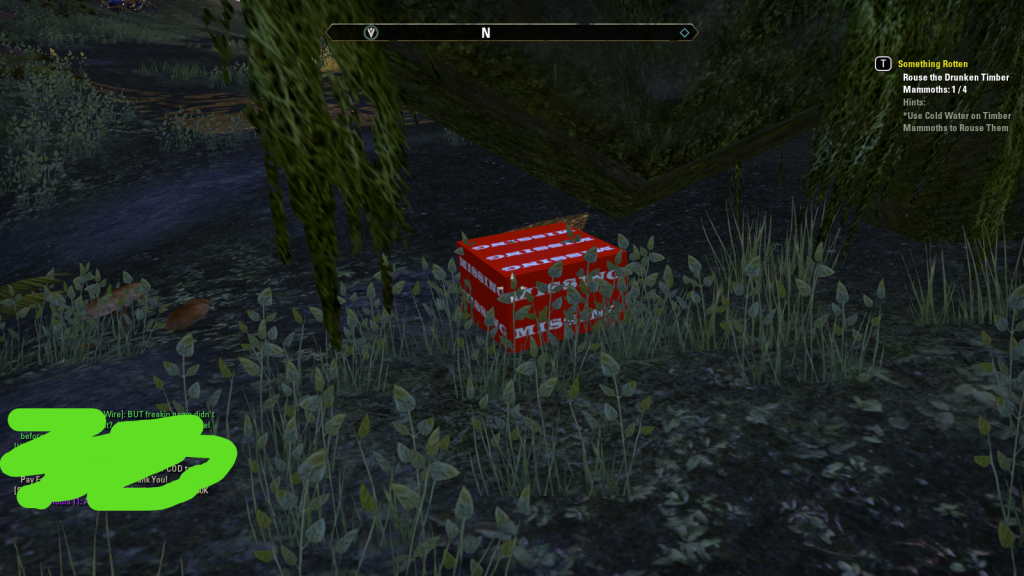
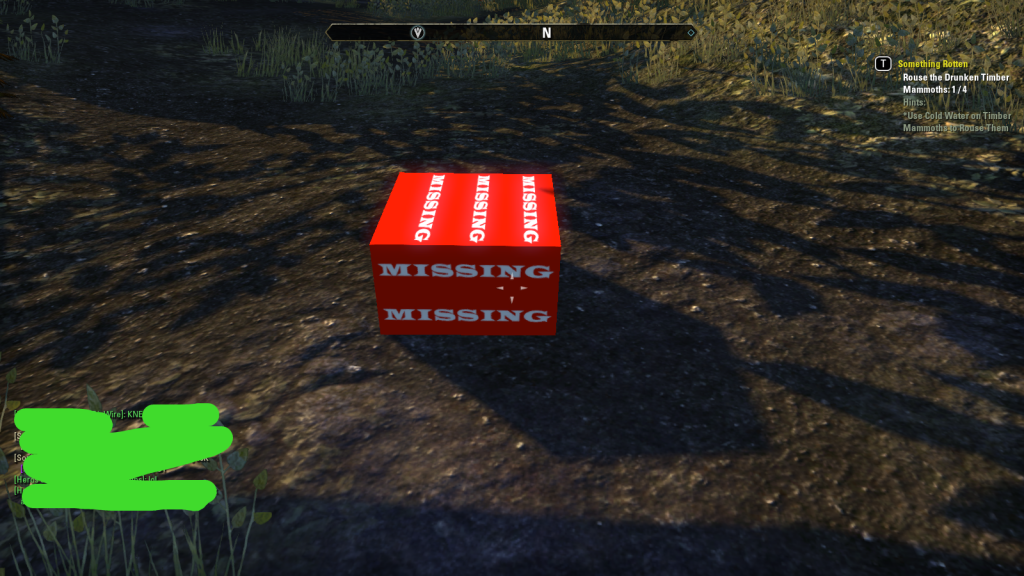
dip me in the blood of mortals and throw me to the Dremora
2
-
 vyndral13preub18_ESO✭✭✭✭✭
✭✭✭✭I dunno, I can't seem to put my finger on it. It is almost like something is....14 -
 RSram✭✭✭✭✭I put in three bug requests since beta about the missing textures. There is nothing wrong with your client; It's just a visual indication used by the developers to quickly see which geometry has textures and which doesn't. So in this case the squares do not have textures assigned to them. It doesn't affect game play and there is nothing you can do about, but just look away.1
 -
 j4k3s7a✭✭Might be a corrupted install or something. Try running C:\Program Files (x86)\Zenimax Online\Launcher\GameConsultant.exe I think it's a repair utility
Edit: Just finished running for me (took ~3 mins). It's not a repair utility, but may be able to tell you if you have any corrupted files. It was just a configuration output for me (IP settings, antivirus, drivers, etc...)Edited by j4k3s7a on August 14, 2014 3:02AM0 -
 I put in three bug requests since beta about the missing textures. There is nothing wrong with your client; It's just a visual indication used by the developers to quickly see which geometry has textures and which doesn't. So in this case the squares do not have textures assigned to them. It doesn't affect game play and there is nothing you can do about, but just look away.
Just three? 14 bug reports. SO MANY of them.Sanguine's Beta Tester1 -
 RedMiniStapler✭✭✭it's an early christmas gift wrapped in 'missing' printed wrapper! click on it! maybe you can get one of those rare motif :P5
 -
 TheAmu✭✭✭I have a lightning staff with a question mark icon in my inventory I've had for months. I call it my lucky lightning staff! I never go anywhere without it!4
 -
Cyberdown✭✭✭that's what they use in the development process for things that need a texture added to it.
now the question is, do you have a corrupted texture where its loading that by default since it cant find the actual texture file...or is that something someone forgot to add artwork to.0 -
RSram✭✭✭✭✭nicholaspingasb16_ESO wrote: »I put in three bug requests since beta about the missing textures. There is nothing wrong with your client; It's just a visual indication used by the developers to quickly see which geometry has textures and which doesn't. So in this case the squares do not have textures assigned to them. It doesn't affect game play and there is nothing you can do about, but just look away.
Just three? 14 bug reports. SO MANY of them.
Just three on the missing textures in front of the cave; since April, I have been playing almost every day, logging in about 1500 hours of play time. I average about a one bug report every 30-40 hours. You do the math:)
Repairing the client didn't work for me, and the bug reports were a month apart for this issue because I was playing 3 different characters.
Edited by RSram on August 15, 2014 7:03AM0 -
 zgrssd✭✭✭✭It's the games way of saying "something went wrong when loading this texture".
99% it just "sorry, your computer did not game the game the file in time or it gave a corrupted file". Especialyl if it does not persist for the same items, the issue is plain on your end.
/reloadui can sometimes fix it.
You should do a repair scan of the game at earliest convenience. If that does not help propably the loading of the textures timed out. This indicates a very high load on your disk at the wrong time.
Make sure you have some space on the disk, no other programms are running and put the eso.exe on the exclusion list of your virus scanner.
Maybe lower the texture quality to be save (the smaller the texture, the easier to load and process it.Edited by zgrssd on August 15, 2014 7:47AMElana Peterson (EU), Dominion, Imperial Sorc, Rune & Alchemy Crafting Char
Leonida Peterson (EU), Daggerfall, Kajiit Nightblade, Tank & main Crafter
Kurga Peterson (EU), Ebonhart, Ork Dragonknight, Provision Mule
Coldblood Peterson (EU) Argonian Templer, Daggerfall, Healer
Incendia Peterson (EU), Dominion, Dunmer Dragonknight, fire DPS & healer
Haldor Belendor (EU), Ebonhart, Breton Sorcerer, Tank
Fuliminictus Peterson (EU), Ebonhart, Altmer Sorcerer, Electric DPS
Me babbling about PvE roles and Armor, Short Guide to Addon Programming (for Programmers)
If you think anything I or somebody else said violates the Rules of this Forum, you are free to flag my posts. Till I get any notifcaion from this, I just asume you know you have no case against me or Zenimax disagrees with you.1 -
stefan.gustavsonb16_ESO✭✭✭✭✭
✭Having a bright red box to flag a non-fatal error in a finished product is a terrible decision. It simply screams "beta, please debug". I have been getting these boxes a lot, at irregular intervals, ever since beta, and they keep cropping up.3 -
KitLightning✭✭✭✭Your build may not be parsed correctly or this is actually a missing object. Either way that's a dummy set in place of a missing object within the build. Usually if the textures are absent, you would have been presented with a claymodel of the object.
Are you able to give the exact location of the said issue?"I'd rather be insane in a sane world, than sane in an insane world!" ~MeWarning - This is a spoiler and looking at it for too long may cause irrecoverable eyesight issues.
◔̯◔
MechWarrior: Living Legends – Total conversion modification for Crysis Wars.
kitlightning.deviantart0 -
 Merlin13KAGL✭✭✭✭✭
✭✭✭✭stefan.gustavsonb16_ESO wrote: »Having a bright red box to flag a non-fatal error in a finished product is a terrible decision. It simply screams "beta, please debug". I have been getting these boxes a lot, at irregular intervals, ever since beta, and they keep cropping up.
I actually think it's kinda brilliant as it's guaranteed to get noticed.
That is to say, there's no Missing it. (Ahem...)
I haven't seen one of these in a long time though.
Just because you don't like the way something is doesn't necessarily make it wrong...
Earn it.
IRL'ing for a while for assorted reasons, in forum, and in game.I am neither warm, nor fuzzy...
Probably has checkbox on Customer Service profile that say High Aggro, 99% immunity to BS2 -
 Tabbycat✭✭✭✭✭
✭✭✭It's an Easter egg *shifty eyes* hmmm yes.Founder and Co-GM of The Psijic Order Guild (NA)
0.016%1 -
 nerevarine1138✭✭✭✭✭
✭✭✭✭✭I put in three bug requests since beta about the missing textures. There is nothing wrong with your client; It's just a visual indication used by the developers to quickly see which geometry has textures and which doesn't. So in this case the squares do not have textures assigned to them. It doesn't affect game play and there is nothing you can do about, but just look away.
Saying there's nothing wrong with the OP's client is an overly simplistic view of what the "Missing" boxes actually mean. It is actually an issue with his client, because I guarantee that other players weren't seeing the missing textures. It is a problem that is generally fixed by relogging, but it's still an issue with the OP's client. Which, before everyone goes insane, is not an assignation of blame. This is a statement of fact.----
Murray?2 -
 MorHawk✭✭✭✭✭Heh, I remember when I first saw these in beta. People treated me like I was telling a fairy tale.I can count to potato.
WWJLHD?Hypertionb14_ESO wrote: »another topic that cant see past its own farts.0 -
 Unknown_poster✭✭✭We had a guy in guild biatching and moaning about the game. Ask what his specs were and he was playing on an old computer with 2 (yes 2) meg of ram and like 512k video card. And was blaming ESO for his issues.1
 -
 GreySix✭✭✭✭✭
✭Played the ESO beta on a 2008 MacBook Pro that barely ran the game at all on ultra-low settings, with a lot of stuttering and screen loading messages.
Never saw boxes like that though.
... still say it's a light saber. Crotchety Old Man Guild
"Hey you, get off my lawn!"0 -
 Lol the missing box, I thought that it was sorted a long time ago,
Fear not the box shall not be missing for long!That perfection is unattainable it is no excuse not to strive for itSorcerer VR12 - Ebonheart Pact0 -
 PSLAnimal✭✭✭✭You just find a missing khajit in a box. Grats!
But it's Schrodinger's Khajit, so it has the potential to be both alive and dead until you open the box and collapse the wave-form.Animal (Ask me what the PSL stands for. Go on. Ask.)
@PSLAnimal on the NA Megaserver
Making people wonder just what the hell is wrong with me since 1961.1 -
ZOS_AmeliaR✭✭✭✭✭Typically "missing" boxes appear when graphics haven't loaded properly. If the boxes aren't bothering you or you're not seeing them too often, feel free to giggle at them (and take screenshots, as you've done already
 ) and move on. If you'd like to see what should be there, or if you're seeing a fair number of these boxes, using the /reloadui command may allow the graphics to properly load.
If /reloadui doesn't help, turning off the grass may (Settings > Video > Grass off). Keep in mind that if your graphics are running at a higher setting than is recommended for your computer's specs, you will see issues like the missing boxes, falling through stairs, and getting trapped in rocks.2 -
vyndral13preub18_ESO✭✭✭✭✭
✭✭✭✭ZOS_AmeliaR wrote: »Typically "missing" boxes appear when graphics haven't loaded properly. If the boxes aren't bothering you or you're not seeing them too often, feel free to giggle at them (and take screenshots, as you've done already) and move on. If you'd like to see what should be there, or if you're seeing a fair number of these boxes, using the /reloadui command may allow the graphics to properly load.
If /reloadui doesn't help, turning off the grass may (Settings > Video > Grass off). Keep in mind that if your graphics are running at a higher setting than is recommended for your computer's specs, you will see issues like the missing boxes, falling through stairs, and getting trapped in rocks.
I love the falling through stairs one. It is my favorite. The first time i encountered it i was baffled. I whispered someone, 'how did you get up there'. And they were like , 'i just walked'. I was all like, 'thanks smart ass!' And he was all like 'take the stairs dumbo!' I was all like, 'what stairs? Dur dur'. And he was all like, 'the stairs your head is sitting on'
Anywho the laugh riot went on for hours, i still enjoy missing stairs.
The end.Edited by vyndral13preub18_ESO on August 15, 2014 1:43PM3 -
 Chuggernaut✭✭✭Missing image, happens in every MMO from time to time.My comrades have returned. I erect the spine of gratitude. You are a hero today. - Bura-Natoo0
 -
 Talrenos✭✭✭✭
Its not missing textures actually; the textures are there on your client. Its ***-poor coding in the rendering system that occasionally does not load a texture, it gets skipped. I know this because I have two accounts, and when one of us sees the 'missing box' the other one does not, they see the item itself. I have found that a /reloadui command or logging out/in or changing instances will fix it.maybe this has been talked about before and maybe this is the wrong category, but
0 -
nerevarine1138✭✭✭✭✭
✭✭✭✭✭sfradenb14_ESO wrote: »
Its not missing textures actually; the textures are there on your client. Its ***-poor coding in the rendering system that occasionally does not load a texture, it gets skipped. I know this because I have two accounts, and when one of us sees the 'missing box' the other one does not, they see the item itself. I have found that a /reloadui command or logging out/in or changing instances will fix it.maybe this has been talked about before and maybe this is the wrong category, but
Are you playing on identical computers?
The rendering system is having issues communicating with the client, which tends to happen when you have your graphical settings turned up too high. It's not a server-side issue.----
Murray?0


