The issues related to Epic players logging in to the North American and European PC/Mac megaservers have been resolved at this time. If you continue to experience difficulties at login, please restart your client. Thank you for your patience!
PhinixUI addon-powered interface for ESO

Phinix1
✭✭✭✭✭
✭✭✭✭✭
✭✭✭✭✭
 http://www.youtube.com/watch?v=nm2ma1DH2UE
PhinixUI is a combination of all the addons I currently use for Elder Scrolls Online, customized to suit my personal esthetic preferences. All of the addons in the video can be downloaded from ESOUI.com, and I highly recommend you download and install their Minion AddOn Manager to install and keep them updated.
If you like the look of this interface, check the download link below and the instructional video on how to set up PhinixUI quickly to make your game look just like mine does in the video! (You still need to use the Minion AddOn Manager from ESOUI.com to install the addons first.)
DOWNLOAD PHINIXUI HERE.
(Instructions for how to install are in THIS VIDEO.)
Enjoy!
2
-
Phinix1✭✭✭✭✭
✭✭✭✭✭I wasn't going to post this here since it is rather long, but I will go ahead. This is the list of all the addons in the video with a link to their timestamp as well as the author's page on ESOUI.com:
*HINT* - Holding SHIFT while clicking the links will open them in a new window.
Please don't be a jerk and quote this post!03m00s - Azurah - Interface Enhanced by Kith
This is the mod I use for my interface layout. Some people like Foundry Tactical Combat, however with a little tweaking, the mods I have in this guide give more and better information and do what FTC does better (IMO). I use Azurah to place my resource bars, and my target bar. You can configure just about any aspect of the general user interface. I also like to set the text display on the target bar to show their total health and the percent they are currently at which helps know when to use certain "execute phase" skills. There is also a range finder and many other useful options. A must have for me.
03m00s - Srendarr - Aura, Buff & Debuff Tracker by Kith
Simple the best addon for displaying buffs that are on your target, as well as your own active buffs and defbuffs. Can show as just icons or as a stacking list. Can show or hide long duration and passive buffs, as well as track them separately from short-duration buffs and ability trackers. Absolutely essential and much more clean and configurable than other options like FTC.
6m53s - Wykkyd's Framework by Wykkyd
Adds a very non-intrusive yet incredibly powerful stat tracker which can be placed at the top or bottom of your screen (or wherever you want). Lets you see at a glance the name of the current zone you are in, your level, XP, horse status, crafting research progress, bag space, gold, soul gems, vampire/werewolf XP, and more. All options can be toggled on or off and customized. Absolutely essential.
8m07s - PSBT - Pawkette's Scrolling Battle Text, Continued by Cairenn, Pawkette
Simply THE BEST scrolling combat text option available, written by Pawkette. Many options to customize the appearance. Much better look and feel compared to other options currently available.
9m44s - Recount by Fayn, McGuffin
An extremely light weight and powerful damage meter for YOUR character's damage, healing, and other information. Does not lead to problems with DPS elitism as with other games since no one else can see your DPS thanks to how ESO's interface is coded. Can be set to minimize during combat, and show for a period of time after combat before auto-hiding. Can additionally set a hotkey to show or hide the window any time you want. Fully resizable, can be placed anywhere.
12m03s - Lootdrop, Continued (All in One) by Flagrick, Pawkette
Awesome addon originally coded by Pawkette. It displays a smooth stack of the things you just looted, and continues to stack the list as you loot more, with a fade-out timer for each separate item. Also tracks XP gains and has many other optional settings. I consider it essential for knowing what I'm grabbing when I turn auto-loot on (recommended).
13m20s - ZrMM - Modified by Aoon
Adds a highly customizable minimap which will show group positions as well as all pins from other addons. Extremely helpful for getting your bearings without pausing to view the cumbersome game map. Can set default zoom levels for zones and towns as well as hotkey buttons to instantly zoom in and out as you play. Under frequent development, many new features on the way. I consider it essential.
14m31s - ESOlocate (coords) by seangcxq
Another simple addon, this one shows you the current in-game coordinates of your character. I usually park this over my minimap. It can be helpful for reporting the location of resources to addon makers.
15m16s - Wykkyd's Quest Tracker by Wykkyd
Customizes the quest tracker to be much more visually appealing. Lets you collapse quests by zone, show how many quests you have per zone, and also collapse the detail display of all but the quest you are currently on. Color coded quests based on your level. Essential.
16m25s - HarvestMap (EsoheadMarkers) by Shinni, Sharlikran
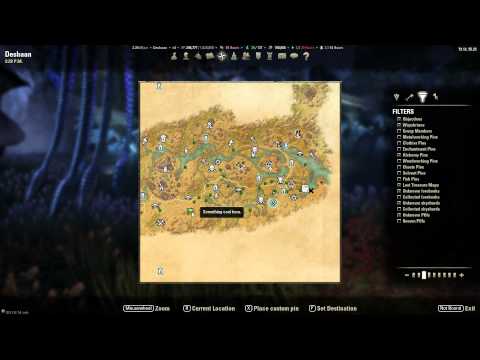
This outstanding addon will track the location (with custom configurable pins) of every resource you harvest (ore, herbs, treasure chests, etc) on your map. There are options to import mega-lists of everything in the game but it tends to bog down the default map (not the addon's fault) plus is sort of cheating. But just having it track where YOU found stuff it extremely helpful for seeing where you have been on a map. Optional account-wide or character specific modes. Can toggle any/all of the custom pins on or off from the main map pin tab. Essential.
19m18s - SkyShards by Garkin
This mod will show the location of all the Sky Shards on your in-game maps. Can be set to auto-hide the ones a particular character has already discovered. Many configuration options, including the option to toggle the pins on and off completely. Many may like to search these things out on their own, however I find that when I am experimenting with a new weapon or spec and simply NEED a few extra skillpoints NOW, turning this on lets me grab them fast and get back to the action!
19m18s - LoreBooks by Garkin
Simply shows the location of all the lore books on the in-game maps. Books can appear in up to four locations in a zone, and all possible locations are shown. So, if you don't find it in a particular location, it will show up in one of the others (all possible points are removed on finding one.) Can be toggled on and off, if you prefer to find things on your own. Personally, I like more information.
21m27s - Lost Treasure by CrazyDutchGuy
Shows the location of all the various hidden treasure (treasure map locations) on the in-game maps. Can be configured to only show the locations for the treasure maps you currently have in your inventory, which is very cool. Configuration options added all the time (just added the option to change the icon for the map locations.) Again some might like to find things on their own, but it can be toggled off easily and used only if you are totally stumped by the treasure maps (which happens, trust me.)
23m00s - Undiscovered by dwot
This addon will add an X to your in-game map anywhere there is a point of interest (mundus stones, quest hubs, wayshrines, etc.) which you have not discovered yet. Hovering your mouse over an X will tell you what that point of interest is. Essential for completionists that want to know at a glance what areas of the map they still need to visit, and what is waiting for them there.
24m06s - Harven's Custom Map Pins (Markers) by Harven
Just as the name implies, this addon allows you to bind a hotkey that will add a custom pin to any in-game map at your cursor location, and let you type any note you want to add to it. Amazing for marking grind locations, places of interest, gorgeous vistas, etc.
26m24s - Clock - Tamriel Standard Time by Tyx
A simple addon that shows the TAMRIEL time (not the real world time) as well as the current moon phase. Ever wondered if the vampires and werewolves were out, or whether it was morning or afternoon on a cloudy day? This addon is for you. Very non-intrusive and configurable.
27m25s - SoftcapInfo by Shinni
Ever notice one of your stats has turned orange and has a little lightning bolt next to it? This means it is overcharged. Basically, all stats have a "soft cap" max value for your level, and if you raise them higher than that (with stat points or gear enchants or buffs), it becomes increasingly difficult to raise them higher. So for example if your health cap is 1000 and your enchants raise it to 1040, the actual value for your health might end up being only 1020 due to diminishing returns. The problem is, the game doesn't show you what the caps are by default, so you can't see how many points you are losing. This addon shows the cap values and your current values, and some quick math can then tell you how many points you are losing by overcharging the stat. Essential!
30m40s - Harven's Extended Stats by Harven
This simple addon will expand your character stat sheet to include many additional values like specific spell resist types, focus and pierce rating, attack and spell power, crit resistance, dodge, parry, block, etc.
31m55s - SpentSkillPoints by Shinni
This amazing yet minimalist addon will show you the number of points you have available to spend in skills out of the total points you currently have on your current character. Additionally, it will show how many points you already have invested in a given skill tree, branch by branch. Essential.
33m15s - Wykkyd's Outfitter by Wykkyd
An advanced and incredibly powerful addon which allows you to bind entire sets of gear or entire skill bar configurations to a single hotkey. Have an AOE and a single target skill layout? Bind them to 2 separate hotkeys and instantly switch between them without having to dig through the interface. (Must be out of combat.) Essential.
39m20s - Advanced Filters by ingeniousclown
This extremely useful addon adds sub-categories under the primary categories of your inventory, bank, guild bank, etc. For example, you can click on the materials tab, then below click on the icon for alchemy to ONLY show alchemy ingredients. Or you might click on the armor tab and click the icon to only show light armor! This is incredibly helpful for offloading all of a specific type of material to the bank or from the bank to a holding alt you have designated for that type of item.
41m05s - BatmanStoreFilter by trtt
This little known yet absolutely ESSENTIAL addon adds sub-category filters to the Materials category when you search the guild store. You can search for just alchemy or provisioning or blacksmithing ingredients for example, or just cooking recipes. I don't think I need to explain how much maddening tedium this eliminates. Download it now!
42m58s - Guild Store Search by xevoran
The "dirty little secret" of ESO guild store shopping. This amazing addon will allow you to "retrieve" the contents of all your guild stores simultaneously, and then search for SPECIFIC NAMES like "Consummate Something Recipe" or "That Motif I Wanted." You get the idea. Results display the price-per-unit in ascending order, and you can click a "go to page" button next to them to instantly bring up the page of whichever guild store has the item you want at the price you want. Initial retrieval takes a minute or two, and must be done again if you log out. Still, an absolutely essential mod for sanity and for finding exactly what you are looking for.
45m26s - Luminary-Trade Sales History by awesomebilly
Gives you the option to see a history of all items you have sold on your guild stores (and all items sold on your guild stores by ANYONE.) Can be configured to automatically pop up when you open your mail or a guild store, though I turn that off and just hit the button when I visit a guild store and want to review. Perhaps the coolest feature is the ability to have an announcement pop up whenever an item you have listed sells, regardless of where you are in the world!
48m17s - Roomba - Guildbank Stacker by Wobin
ESSENTIAL if you are the GM or have full bank access in your guild. Set a hotkey to "Run Roomba" and open your guild bank. Click on the "show all" tab and hit the button, and Roomba will automatically stack ALL the stackable items in your guild bank, instantly reducing the wasted space by having 50 stacks of 5 random food ingredients, etc.
49m54s - Harven's Stack Split Slider by Harven
I'm sure everyone knows you can right-click a stack of items and choose "split stack" to get a popup to choose the size of the two stack sized you want to split it into. You are also likely aware of how incredibly annoying it is to have to sit their with your hand on the "+" or "-" for five minutes (or mash them repeatedly) to finally get to the stack size you want. This amazing sanity addon will transform this into a slider that you can grab and instantly place on the stack size you want.
50m46s - MultiCraft by DonutEnigma
Much like Garkin's Stack Splitter, this essential addon gives you a slider at the create screen of any crafting station which allows you to instantly select how many of a selected item you want to craft! Slider is capped by the mats you actually have available. No more "hit R, wait, hit R, wait..." Just select that you want to make 10 of a given item, hit R once, and watch it go!
52m01s - Nog's Simple Crafting Tooltip by Nogaruk
Adds a helpful window you can move around while at a crafting station which lets you see all the information for the item you currently have in any slot (you can select any slot from the window) for easy comparison with the item you are crafting.
52m56s - RapidChant by Aiiane
Excellent when combined with MultiCraft by DonutEnigma. This removes the spoken rune words when crafting an enchanting glyph which cause the process to take a very long time to complete. Using both addons you can select say 10 glyphs and hit craft, and they will complete in a fraction of the time it would formerly take. Essential, unless you really like the spoken word effect, in which case, you can STILL use MultiCraft (it just takes longer).
53m53s - Sous Chef - Provisioning Helper by Wobin, CrazyDutchGuy, katkat42
Many useful functions for provisioners. Shows a check next to recipes in your inventory you don't know yet. Shows which of your characters already knows a recipe in the tooltip. Shows the tier level of an ingredient in a column in your inventory and the tooltip. Shows the recipes you know that a given ingredient is used in. Shows whether you have the ingredients to craft a recipe as well as how many you can make with the current ingredients you have (inventory and bank). Many other useful options. Non-intrusive yet comprehensive.
55m18s - Crafting Material Level Display by Marihk
Adds some non-intrusive but very helpful information to the tooltip of all crafting materials. For example, it will add the level range and type (additive or subtractive) to the tooltip of a Potency Runestone, and the level range of the things you can craft to the tooltip of things like Flax or Iron Ore. This lets you know what a material can be used for without visiting a crafting station, which is extremely handy.
56m02s - Audio Control by Gaulomatic
Ever been in a bank with 100 people and it seems like every single one of them has their obnoxious monkey pet out howling at you? Ever been in a congested quest hub trying to sort through your inventory and the annoying NPC's won't stop repeating their "helpful hints?" This mod lets you set hotkeys to mute each of the game's audio categories separately, and hit the key again to turn them back on, and at the volume level they were at when you turned them off. For example, when I want silence I have mapped "T," "Y," "U," and "I" to turn off effects, NPC voices, footsteps, and ambient sound respectively. I roll my four fingers over those keys and all I hear is the music. Then roll them back on to proceed. Excellent sanity value!
58m02s - BestFriends by Aiiane
This little addon simply moves the login/logout notice for friends to the notification area (where you see messages like "armor is broken" and the like), instead of having the annoying unfilterable yellow text constantly causing your chat window to show. Furthermore, you can use Azurah (see above) to change the position of the notification area, or Wykkyd's Full Immersion mod to hide the notification entirely. Purely cosmetic, but things like this are important!
59m20s - Binder by Aiiane
Allows you to save a keybind profile by typing /binder save profilename and then load that keybind layout on another character instantly by typing /binder load profilename. To me this is essential, but some people may not mind having to take the time to set up all their key bindings for controls all over again for every single character. It bothers me. This addon gives me sanity points.
60m49s - Luminary - Don't Send Gold Accidentally by awesomebilly
This MAY be fixed at some point by ZOS, but in the meantime this addon is essential. Basically, there is a known bug where if you COD an item to someone for say 1000g, then later you go to send a mail to some random person, it remembers the 1000g value that you had in the gold box and unless you pay attention, you end up sending that 2nd person 1000g! This addon will set the gold field to 0 every time you start a message, so you don't have to worry about accidentally mailing your money away.
62m24s - pNames by Puddy
An incredibly simple yet useful addon, especially for RP purposes. It will cause the names that show up in guild chat to appear as the CHARACTER's name, NOT the @account name.
63m35s - Joviex's Addon Settings Transfer by Joviex
Very useful addon used for copying all the addon settings from one character to all your other characters. Never again will you spend hours meticulously reconfiguring all your addons for every alt you make! I use this in the follow-up video where I describe how to import my PhinixUI settings so your game looks like mine does in the video so definitely make sure you install this.
[url= http://youtube.com/watch?v=gH0ymvAggzk">Separate Video[/url] (but it IS included in PhinixUI)- Wykkyd's Full Immersion by Wykkyd
Many additional options to further customize and hide aspects of the UI. I use this to make the targeting crosshairs just a little smaller, and also to hide the compass. It adds a hotkey option in your keyboard configuration to turn the mod on and off, which I use to hide and show the compass.Edited by Phinix1 on June 20, 2014 1:02AM0 -
 someuser✭✭✭✭@AlienDiplomat
Amazing video brother. I had no idea how customizable the UI could be until I saw your video. VERY well done. This should be a sticky as I really doubt most players know all the cool stuff these add-ons can do.
I also really like the minion program! I think that is a must have. Props to whomever made that one!To make ESO look and feel like a PC MMO check out the following:
PhinixUI addon-powered interface for ESO0 -
 ZOS_CarolusS✭✭✭Greetings everyone,
we are closing this thread, as you already posted the same content in the appropriate subforum here.
Should you feel, that your thread would be better suited in another sub-forum, you can always use the Report function and suggest a better place for it.1
This discussion has been closed.