Command Pet (myth?) (Command companions?)

Jordan_Black
✭✭✭✭
How exactly does Command Pet work? Does it work with All Pets? Companions?
So, I have this Command Pet key set as Y but whenever I have a pet out, it doesn't do anything. It's also default set to Companion Ultimate, and it will make my companion ultimate if I have it set to manual ultimate. And plus I type a lot of words, so I know that my Y key on my keyboard is not broken (evidence provided elsewhere in post.)
But the Y key does not seem to make my pets or companions attack what I want them to attack. Now, I don't sorc much, so I don't know about those pets, but I can make my warden bear attack a specific target only by hitting the ult on that target, but hitting Y doesn't make him move or change his decisions of what to hit.
Even more useful would be a way to make my companion attack and stick to a certain enemy. A tank companion on an IA marauder, for example. Like say if the big four-armed axe throwing menace is out, I have an indestructible Isobel tank, and she's off in a corner taunting a skeleton while the marauder chases me around the room. Is there a way to 'command pet' Isobel?
ty frens
JB
So, I have this Command Pet key set as Y but whenever I have a pet out, it doesn't do anything. It's also default set to Companion Ultimate, and it will make my companion ultimate if I have it set to manual ultimate. And plus I type a lot of words, so I know that my Y key on my keyboard is not broken (evidence provided elsewhere in post.)
But the Y key does not seem to make my pets or companions attack what I want them to attack. Now, I don't sorc much, so I don't know about those pets, but I can make my warden bear attack a specific target only by hitting the ult on that target, but hitting Y doesn't make him move or change his decisions of what to hit.
Even more useful would be a way to make my companion attack and stick to a certain enemy. A tank companion on an IA marauder, for example. Like say if the big four-armed axe throwing menace is out, I have an indestructible Isobel tank, and she's off in a corner taunting a skeleton while the marauder chases me around the room. Is there a way to 'command pet' Isobel?
ty frens
JB
0
-
 JaxontheUnfortunate✭✭✭✭Companions and combat pets yes, non-combat pets no.
For me I hold Y on my keyboard and the either right or left click to tell them to attack something or to stop.3 -
 Orbital78✭✭✭✭✭
✭Console UI is pretty terrible for manually controlling pets, but it works pretty reliably if you have an extra 4-6 buttons to remap. Two of my back buttons are for attack and retreat. Attack is also easiser since a heavy attack also sends them in to attack and focus on your target.0 -
Jordan_Black✭✭✭✭I believe my problem was I didn't realize you also had to use a mouse button, I was just tab-targeting and hitting Y expecting it to do something.0
-
Jordan_Black✭✭✭✭Will heavy attacks prioritize companion target like I've heard it does on sorc pets?1
-
 Taril✭✭✭✭✭Jordan_Black wrote: »Will heavy attacks prioritize companion target like I've heard it does on sorc pets?
Yes. Heavy Attacks work like the Command Pet command.
This works with both "Medium" and fully charged heavy attacks.3 -
 Soarora✭✭✭✭✭
✭✭✭✭✭This really should be in a tutorial somewhere (maybe one of the pop-up ones when you first slot a pet skill or summon a companion). It shares the same fate of weaving where the only mention is in a loading screen…
But yes, Y + right click to make them stop combat and Y + left click or heavy attack to make them start combat on that enemy.[PC/NA] Dungeoneer (Tank/DPS), Retired Trialist, and amateur Battlegrounder (DPS) with a passion for The Elder Scrolls lore.- Current GM of Hard Dungeoneers
- Tanks: Sorcerer - Necromancer - Templar
- DPS: Frost Warden - Stamarc
- Ex-healer
- Dungeons: 32/32 HMs - 26/26 Tris
View my builds!
2 -
 Necrotech_Master✭✭✭✭✭
✭✭✭✭✭companions are functionally the same as petsplays PC/NA
handle @Necrotech_Master
active player since april 2014
i have my main house (grand topal hideaway) listed in the housing tours, it has multiple target dummies, scribing altar, and grandmaster stations (fully filled out with current game), as well as almost every antiquity furnishing on display to preview them
in progress: acquiring mundus stones (currently only have the thief)
feel free to stop by and use the facilities1 -
 TaSheen✭✭✭✭✭
✭✭✭✭✭This really should be in a tutorial somewhere (maybe one of the pop-up ones when you first slot a pet skill or summon a companion). It shares the same fate of weaving where the only mention is in a loading screen…
But yes, Y + right click to make them stop combat and Y + left click or heavy attack to make them start combat on that enemy.
You don't want to know how many years it took me to figure this out....______________________________________________________
"But even in books, the heroes make mistakes, and there isn't always a happy ending." Mercedes Lackey, Into the West
PC NA, PC EU (non steam)- four accounts, many alts....1 -
 DenverRalphy✭✭✭✭✭
✭✭✭✭✭This really should be in a tutorial somewhere (maybe one of the pop-up ones when you first slot a pet skill or summon a companion). It shares the same fate of weaving where the only mention is in a loading screen…
But yes, Y + right click to make them stop combat and Y + left click or heavy attack to make them start combat on that enemy.
Dunno how it looks on PC, but on PS console there's this..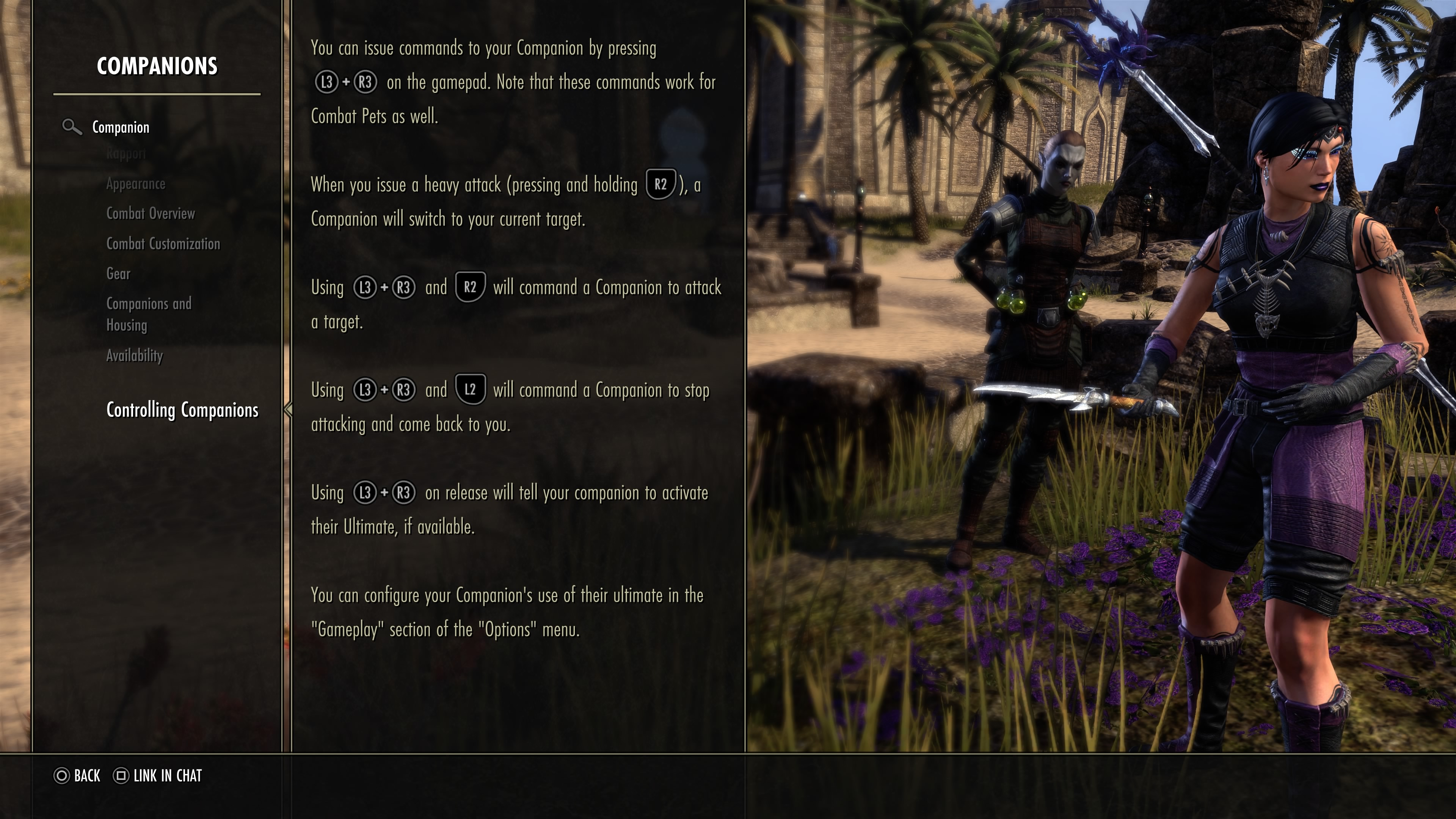
2 -
 AlnilamE✭✭✭✭✭
✭✭✭✭✭This really should be in a tutorial somewhere (maybe one of the pop-up ones when you first slot a pet skill or summon a companion). It shares the same fate of weaving where the only mention is in a loading screen…
But yes, Y + right click to make them stop combat and Y + left click or heavy attack to make them start combat on that enemy.
It's one of the tips you get on load screens. It's been there since the game launched.The Moot Councillor0 -
Soarora✭✭✭✭✭
✭✭✭✭✭DenverRalphy wrote: »This really should be in a tutorial somewhere (maybe one of the pop-up ones when you first slot a pet skill or summon a companion). It shares the same fate of weaving where the only mention is in a loading screen…
But yes, Y + right click to make them stop combat and Y + left click or heavy attack to make them start combat on that enemy.
Dunno how it looks on PC, but on PS console there's this..
I’ll have to take a look later, TBH I only go to the help menu for the emote list and the page on status effects.This really should be in a tutorial somewhere (maybe one of the pop-up ones when you first slot a pet skill or summon a companion). It shares the same fate of weaving where the only mention is in a loading screen…
But yes, Y + right click to make them stop combat and Y + left click or heavy attack to make them start combat on that enemy.
It's one of the tips you get on load screens. It's been there since the game launched.
Yes, that is what I said haha. That’s the only reason I know about it, because I saw it on a load screen.[PC/NA] Dungeoneer (Tank/DPS), Retired Trialist, and amateur Battlegrounder (DPS) with a passion for The Elder Scrolls lore.- Current GM of Hard Dungeoneers
- Tanks: Sorcerer - Necromancer - Templar
- DPS: Frost Warden - Stamarc
- Ex-healer
- Dungeons: 32/32 HMs - 26/26 Tris
View my builds!
1