Maintenance for the week of August 24:
• PC/Mac: No maintenance – August 24
• PC/Mac: No maintenance – August 24
NA server is broken
-
 primatageSoul ShrivenPyr0xyrecuprotite wrote: »I'm curious if this is an internet node issue somewhere. I'm located on the west coast of Canada - could not get into my EU character about an hour ago (login worked, but I was kicked out while trying to load my character). I'm in now (PC/EU), but have a 400+ms ping time, vs the normal of about 200ms (using /latency, fps is normal).
While waiting earlier to see if the issue would clear, I tried another game and it worked, but a resource website that I use was VERY slow, despite being a very simple old-school site - 208.86.227.2 - theoretically hosted in Durham, North Carolina. No idea if this is connected or not - does anyone have a heatmap of current known internet issues or something?
Tried routing around to come from a different direction, made no difference. Used Mexico vpn exit, since the megaserver is supposed to be in Texas.0 -
 neverwalk✭✭✭✭UPDATE: at 10:10 a.m. Pacific, I got back onto PC NA and finished my crafting writs, but when i tried to login to EU server, that was a no go. My ESO is with STEAM and steam launches me to ESO launcher with no problems-it seems the problem is ESO.0
 -
 AngryOldMan✭✭✭✭Was able to log in with other launcher (non-Steam-Launcher). Seems like this problem is Steam realated.1
 -
redgreensunset✭✭✭✭✭
✭@ NA people, welcome to the EU experience.
In all seriousness EU is having troubles too. Been trying to log in for 20 minutes now. PC, with and without Steam, no go.0 -
Ajaxcat✭✭as of this instant my problems .. both login and access to elswyer and greymoor hold breaker horse appear fixed - note that a couple of mounts including the holdbeaker have the ! sign like they are new0
-
ShawnLaRock✭✭✭✭✭
✭Pyr0xyrecuprotite wrote: »I'm curious if this is an internet node issue somewhere. I'm located on the west coast of Canada - could not get into my EU character about an hour ago (login worked, but I was kicked out while trying to load my character). I'm in now (PC/EU), but have a 400+ms ping time, vs the normal of about 200ms (using /latency, fps is normal).
While waiting earlier to see if the issue would clear, I tried another game and it worked, but a resource website that I use was VERY slow, despite being a very simple old-school site - 208.86.227.2 - theoretically hosted in Durham, North Carolina. No idea if this is connected or not - does anyone have a heatmap of current known internet issues or something?
I am admittedly XBOX NA - but west coast Canada - and experiencing the same slow / lag.
Getting stopped in place by invisible barriers; can’t mount; can’t bar-swap.
There are hardly any other players in the crafting area, but menus are laggy; need to double-click almost every function; can hardly menu scroll; even when you finally craft an item, the U.I. freezes for 2-4 seconds longer than normal before the item shows as crafted.
Same stutter when trying to move items to/from bank; delay clicking and learning recipes & plans; and takes a few seconds to click and pick up writ quests. Can’t sprint. Opening containers (ie. Alchemist’s Vessel) takes nearly 10 seconds - and then another nearly 10 seconds to exit after pressing “take all.”
S.
Edit: added examplesEdited by ShawnLaRock on April 21, 2020 6:31PM0 -
 Wonks✭✭✭scelesticscylla wrote: »ZOS_SarahHecker wrote: »Hey all, what platform are you playing on? PC (or Steam,) Xbox or PS4?
From the public eso discord, im seeing reports of all steam pc server issues. Seems non steam users are not affected.
I use the standalone client and had issues earlier in the day. NA ping seems to be horrid at the moment as well.2 -
bearbelly✭✭✭✭✭
✭✭PC/NA (no Steam) PTS -- still getting occasional kicks out of the game to the character screen, with rollbacks every time so far (twice). Most recent time was just a couple of minutes ago. I was jogging through Dragon Bridge; just looking around on my way to Solitude.
It rolled me back to before leaving Deepwood Vale.
Personally, the Live side has been working fine for me all day. (I'm on the SE US coast, if that helps.)0 -
 AcadianPaladin✭✭✭✭✭
✭✭✭✭✭PC NA No Steam. No improvement here. Launcher screen takes notably longer than normal to appear, then 10 seconds or so to slowly 'Update Announcements', then another 10 seconds or so the think before bringing up the 'Play' button. That's 30 seconds or so to even get an operational 'Play' button (as opposed to a normal 3-4 seconds for me). I've generally been able to log in (only one error) today. Once in game, I've only been actually disconnected once. Lag today though is very significant and pervasive though. I can patiently deal with the lag (temporarily) to use menus, harvest, explore, fight basic overland foes. Fighting world or group dungeon bosses is entirely too dangerous however due to lag so I've quit trying any challenging combat today.
The problem is certainly not limited to Steam accounts.
Edited by AcadianPaladin on April 21, 2020 6:51PMPC NA(no Steam), PvE, mostly solo2 -
Artanisul✭✭✭✭My wife, non steam, is in game and doing fine.
I use steam and cant log in.
4 feet apart and different experiences. I would have assumed Steam was the issue, but this thread suggests otherwise.0 -
 EmEm_Oh✭✭✭✭✭I am not on a Steam account. PC NA. I don't think this is steam-related. I'm still getting 300+ latency with huge delays in moving, crafting, etc. Not even touching those anymore as who knows what I'll accidentally do.
EDIT: Seems to go 300, 535, 686, 700 latency.Edited by EmEm_Oh on April 21, 2020 7:06PM0 -
 Tinolyn✭✭✭I'm going to be amused as hell if ESO live gets canceled because they can't even log onto either of their servers.
I'm also going to be amused at the crazy acrobatics the white knights are going to have to go through to explain how broken the game is when both NA and EU servers are malfunctioning, ESO Live can't go forward, AND the PTS Server goes to hell all. at. the. same. time.0 -
 Pyr0xyrecuprotite✭✭✭✭✭PC/NA appears to be working ok again now (after a break for lunch and sanity).0
 -
redgreensunset✭✭✭✭✭
✭So according the Gina on the Greymoor stream it was "ISP issues" which is total bs. And EU still can't log in. But hey HA is fine so screw the Europeans out of yet another day, it's not like NA people or ZOS gives a flying ***.1 -
 Ashryn✭✭✭✭✭PC/NA NOT working for me. Have Steam, but I don't log in through Steam. Worked just fine last night logging into the PTS server. Trying several times to log into the PTS server today and crashed. Would get in, but things just wouldn't load correctly, crashed numerous times...Logged again and again...nothing loading and sometimes even sound is scratchy! I give up
 0
0 -
 newtinmpls✭✭✭✭✭
✭✭✭✭Same difficulty since yesterday. PC NA.
Tried last night on PC EU and it was laggy and buggy too.
Then late last night my sweetie (his computer is next to mine) tried logging into the character creation screen PC NA - he does not play on both servers). Thrown out after about 6 min, tried again, same thing.Tenesi Faryon of Telvanni - Dunmer Sorceress who deliberately sought sacrifice into Cold Harbor to rescue her beloved.
Hisa Ni Caemaire - Altmer Sorceress, member of the Order Draconis and Adept of the House of Dibella.
Broken Branch Toothmaul - goblin (for my goblin characters, I use either orsimer or bosmer templates) Templar, member of the Order Draconis and persistently unskilled pickpocket
Mol gro Durga - Orsimer Socerer/Battlemage who died the first time when the Nibenay Valley chapterhouse of the Order Draconis was destroyed, then went back to Cold Harbor to rescue his second/partner who was still captive. He overestimated his resistance to the hopelessness of Oblivion, about to give up, and looked up to see the golden glow of atherius surrounding a beautiful young woman who extended her hand to him and said "I can help you". He carried Fianna Kingsley out of Cold Harbor on his shoulder. He carried Alvard Stower under one arm. He also irritated the Prophet who had intended the portal for only Mol and Lyris.***Order Draconis - well c'mon there has to be some explanation for all those dragon tattoos.
House of Dibella - If you have ever seen or read "Memoirs of a Geisha" that's just the beginning...
Nibenay Valley Chapterhouse - Where now stands only desolate ground and a dolmen there once was a thriving community supporting one of the major chapterhouses of the Order Draconis0 -
WhyMustItBe✭✭✭✭✭
✭UGH. Gina just said on ESO Live "we think the live server problem is an ISP issue and not really anything we can do as that is out of our hands."
I have two separate ISP's, one DSL and one satellite. Both have no issues on any other service, and I can ping /t servers in Texas and Maryland with constant low latency and no packet loss. ESO alone is the common denominator here.
Why do I feel like they have oversold the game and simply can't handle the free week event, and are blowing smoke instead of doing a real investigation? I feel like I have made more effort to investigate this at this point than they have.
Whatever man, they have my money for the month so what difference does it make. Going back to sleep.
Edited by WhyMustItBe on April 21, 2020 9:02PM1 -
EmEm_Oh✭✭✭✭✭UPDATE: latency is under 300, and average is 225 or so. Normally I get around 180 or less but this is much better than a few hours ago.0
-
redgreensunset✭✭✭✭✭
✭WhyMustItBe wrote: »UGH. Gina just said on ESO Live "we think the live server problem is an ISP issue and not really anything we can do as that is out of our hands."
I have two separate ISP's, one DSL and one satellite. Both have no issues on any other service, and I can ping /t servers in Texas and Maryland with constant low latency and no packet loss. ESO alone is the common denominator here.
Why do I feel like they have oversold the game and simply can't handle the free week event, and are blowing smoke instead of doing a real investigation? I feel like I have made more effort to investigate this at this point than they have.
Whatever man, they have my money for the month so what difference does it make. Going back to sleep.
Yeah I'm calling so much bs on that reason because this issue hit across platforms and on both NA and EU, that is at least two continents were hit separately. If it was really and ISP/general internet issue there's had to have been a major world wide outage which would have affected a lot more than ESO.
So really it feels like speak for, "We don't know what's causing it and we can't be bothered to try and find out anymore so we're just going to pray it goes away on its own".0 -
AcadianPaladin✭✭✭✭✭
✭✭✭✭✭PC NA No Steam. Been having problems (detailed in previous posts here) much of the day. Went back in game about an hour ago and just came out after a perfectly normal session. Getting in was smooth and no lag noted at all. Ran DS1 solo with no problems - lag was making that too hard to comfortably finish earlier in the day. Menus, skills everything working smoothly for me now.PC NA(no Steam), PvE, mostly solo0 -
Sylvermynx✭✭✭✭✭
✭✭✭✭✭Seems fine for me now. Spent a lovely day playing real Skyrim.... had got what I needed to do in ESO done this morning before the issues.0 -
HarmisolSoul ShrivenSo i play eso on the PC EU server via steam ( and the ISP thing that was told is 'interesting'), eitherway i have had issues to connect to PC EU Eso so lets put that straight.
What i did was the following to be able to play still :
To be clear >>Normally i load into eso through steam<<, so if you wanna play Eso Without steam you need to take a couple of steps ( which are easy ).
Step 1,
You need to know where Eso is located, you can do this 2 ways, Navigate manually or go into steam, right click
'The Elder Scrolls Online > Manage > Browse Local Files, Windows will open a window towards the ESO location where its situatuated in steam. ( if you see this window appearing your on the right track it can be that its blinking in your start bar on the bottom of the screen also).
( IF you dont see anything In general the location is on drive xx :: Steam\SteamApps\common\Zenimax Online\ )
You will see there 2 folders.
One is named : 'The Elder Scrolls Online'. ( < this is the NON steam exe folder )
The second one is called : The Elder Scrolls Online (Steam).app (< this is the steam exe folder )
Click the 'The Elder Scrolls Online' Since we want to use NON steam Eso exe.
Click on game > Than on >client.
Step 2
Now you see a big list of loads of stuff.
Try to find the following : eso64 (exe as file type or application)
Now you can do 2 things, you either navigate to this location ea time if steam or some miracle of 'isp malfunction' happens and eso does not want to connect... Meaning you then START the >> eso64 (exe as file type or application) << in the Steam\steamapps\common\Zenimax Online\The Elder Scrolls Online\game\client Folder to play the game.
OR
If you wanna make a shortcut follow step 3 If you wanna play the game Follow step 4
Step 3
You can make an Shortcut to your desktop or whatever place. So you dont need to renavigate ea time inside all the folders.
(right click the >> eso64 (exe as file type or application)<< than hover over > Copy to > than click > Desktop as shortcut, and it will apear there, and you can start it that way.)
Step 4,
Do the following:
When you wanna get started, you need to Start : eso64 (exe as file type or application) Or if you made the shortcut on the desktop. When you have started Eso, than FILL in some info as in ::: Fill in your USERNAME and your PASSWORD from the ESO ACCOUNT website that you use to login on the website itself, and you are able to play.
>> IMPORTANT Side note << : You CAN get a little info box if you trust / dont trust the machine as in a code WILL be send to YOUR e-mail that YOU used for the account on the eso website. Just copy/paste the received code or write it down and fill it in. When done, you are loading into your char selection screen. <<
Happy playing again.
P.s English isnt my native, i just typed this quickly so if its happening again / or stays 'meh' you know the steps or are atleast able to play. So sorry for the typo's and what not or incorrect structure.. Just trying to be helpfull
Happy gameing, Harmisol
Edited by Harmisol on April 22, 2020 12:21AM0 -
newtinmpls✭✭✭✭✭
✭✭✭✭Still kicking me out when anything complicated happens....like say a boss fight.
Undaunted is currently not an option for me, or for my bestie. We both got frozen/kicked.
Edited to say that while I do have Steam on my computer, neither I nor my partner use it to start up the game.
.Edited by newtinmpls on April 22, 2020 12:32AMTenesi Faryon of Telvanni - Dunmer Sorceress who deliberately sought sacrifice into Cold Harbor to rescue her beloved.
Hisa Ni Caemaire - Altmer Sorceress, member of the Order Draconis and Adept of the House of Dibella.
Broken Branch Toothmaul - goblin (for my goblin characters, I use either orsimer or bosmer templates) Templar, member of the Order Draconis and persistently unskilled pickpocket
Mol gro Durga - Orsimer Socerer/Battlemage who died the first time when the Nibenay Valley chapterhouse of the Order Draconis was destroyed, then went back to Cold Harbor to rescue his second/partner who was still captive. He overestimated his resistance to the hopelessness of Oblivion, about to give up, and looked up to see the golden glow of atherius surrounding a beautiful young woman who extended her hand to him and said "I can help you". He carried Fianna Kingsley out of Cold Harbor on his shoulder. He carried Alvard Stower under one arm. He also irritated the Prophet who had intended the portal for only Mol and Lyris.***Order Draconis - well c'mon there has to be some explanation for all those dragon tattoos.
House of Dibella - If you have ever seen or read "Memoirs of a Geisha" that's just the beginning...
Nibenay Valley Chapterhouse - Where now stands only desolate ground and a dolmen there once was a thriving community supporting one of the major chapterhouses of the Order Draconis0 -
chuable✭PC - NA (Steam)
Client Version: eso.live.5.3.9.1987732
Getting a lot of these "internal error has occurred"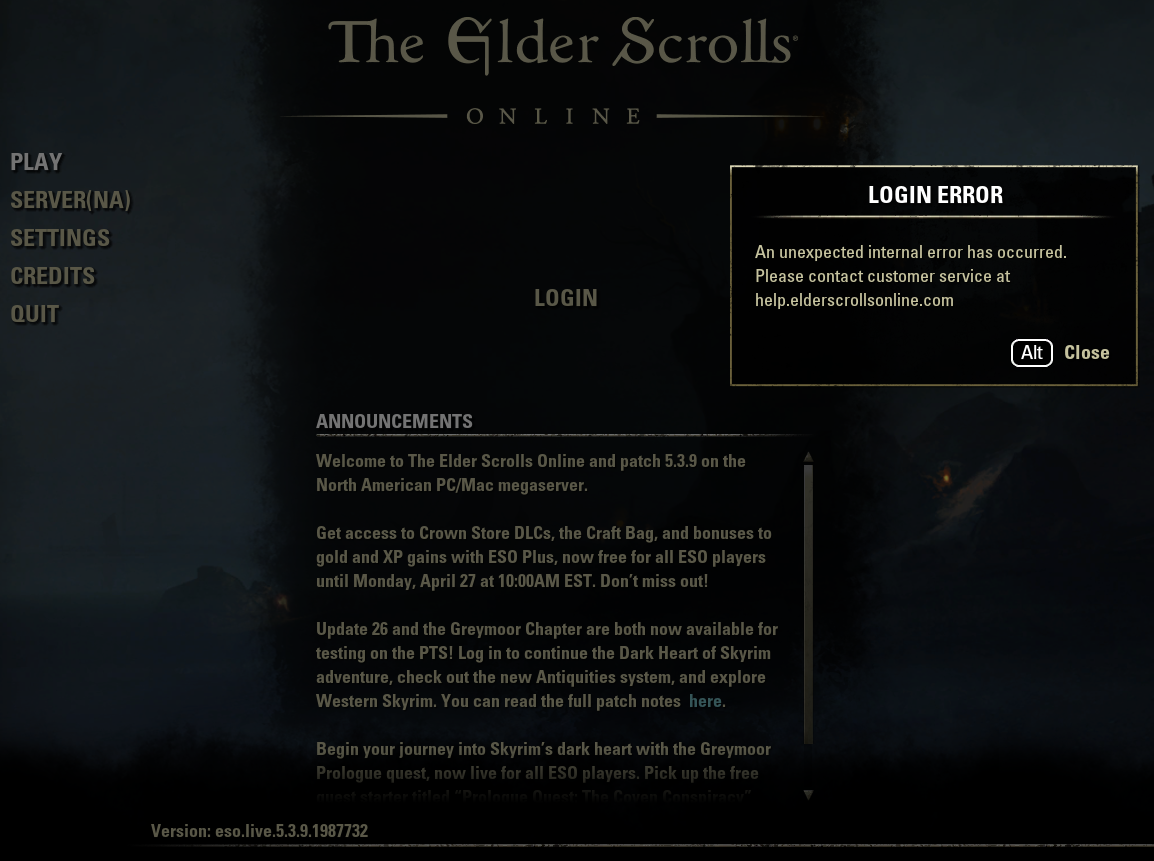
0


