Maintenance for the week of December 15:
· [IN PROGRESS] PC/Mac: NA and EU megaservers for maintenance – December 15, 4:00AM EST (9:00 UTC) - 12:00PM EST (17:00 UTC)
· [IN PROGRESS] Xbox: NA and EU megaservers for maintenance – December 15, 4:00AM EST (9:00 UTC) - 12:00PM EST (17:00 UTC)
· [IN PROGRESS] PlayStation®: NA and EU megaservers for maintenance – December 15, 4:00AM EST (9:00 UTC) - 12:00PM EST (17:00 UTC)
· [IN PROGRESS] PC/Mac: NA and EU megaservers for maintenance – December 15, 4:00AM EST (9:00 UTC) - 12:00PM EST (17:00 UTC)
· [IN PROGRESS] Xbox: NA and EU megaservers for maintenance – December 15, 4:00AM EST (9:00 UTC) - 12:00PM EST (17:00 UTC)
· [IN PROGRESS] PlayStation®: NA and EU megaservers for maintenance – December 15, 4:00AM EST (9:00 UTC) - 12:00PM EST (17:00 UTC)
something's wrong in Wrothgar

fenikx
✭✭✭
Near Icy Shore and also great Bay wayshrine is a large open space instead of the game.
You / I cannot get over or behind it. Eg means that Thukhozod's Sanctum is not possible to reach.
I reported it last week. I see that it is still the case, but I also see that it can be reached by some.
Now I wonder if this is due to my char and whether it is known what I can do about it.
Does anyone have any idea?
You / I cannot get over or behind it. Eg means that Thukhozod's Sanctum is not possible to reach.
I reported it last week. I see that it is still the case, but I also see that it can be reached by some.
Now I wonder if this is due to my char and whether it is known what I can do about it.
Does anyone have any idea?
0
-
fenikx✭✭✭Near Icy Shore and also great Bay wayshrine is a large open space instead of the game.
You / I cannot get over or behind it. Eg means that Thukhozod's Sanctum is not possible to reach.
I reported it last week. I see that it is still the case, but I also see that it can be reached by some.
Now I wonder if this is due to my char and whether it is known what I can do about it.
Does anyone have any idea?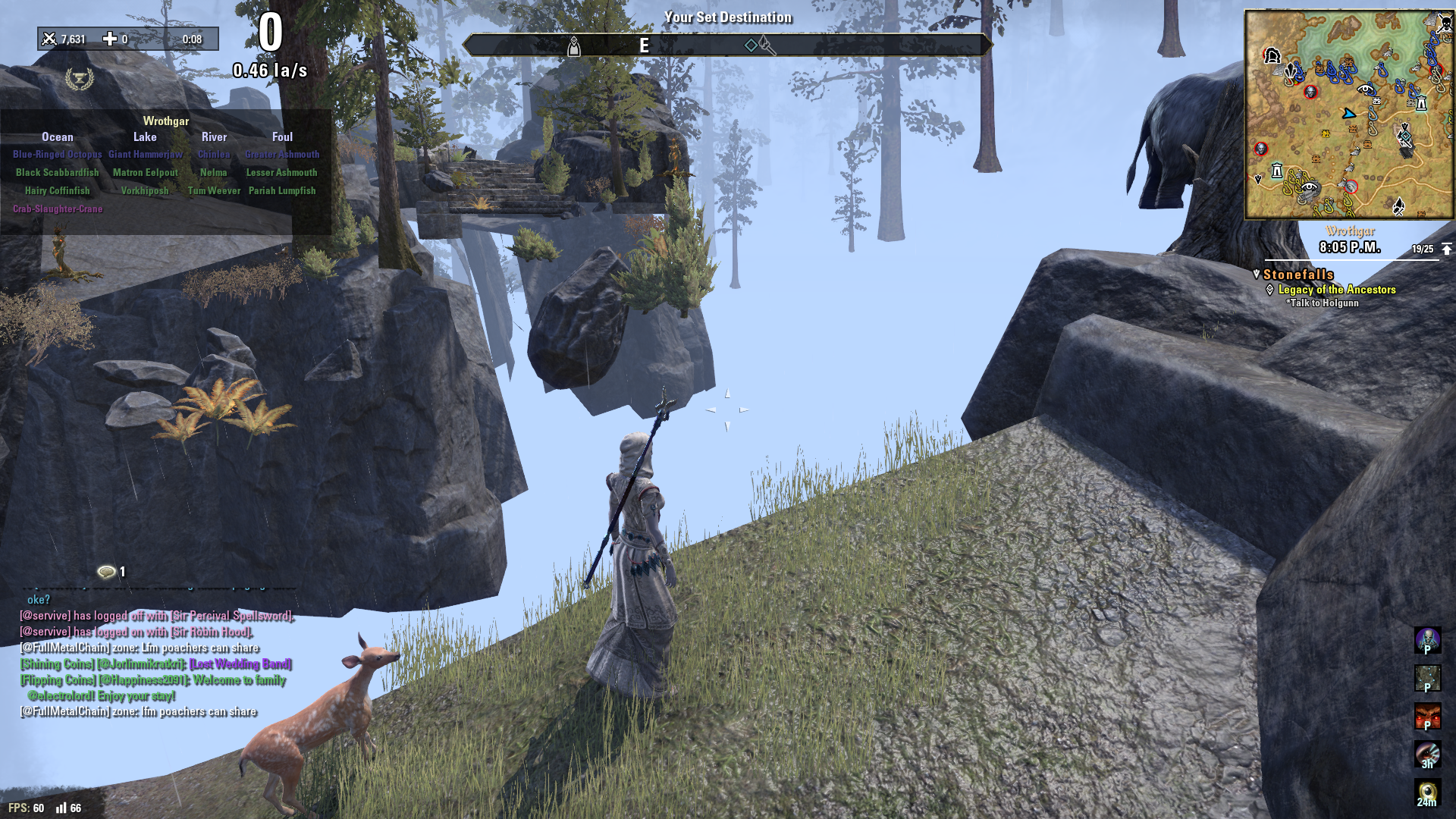
1 -
 Shadowshire✭✭✭✭@fenikx
Please disclose the mega-server and the platform on which you have discovered the issue which you describe. ZOS cannot investigate without that information. Please read the Guidelines For Bug Report Forum for instructions and advice about posting a useful bug report.
When the Game Client does not display all of the terrain, or omits elements such as the terrain surface, buildings, rocks, trees, etc., then often it has not received all of the data needed to display them, from the Game Host (see note below).- Check whether your Internet connection has been lost. If not, then re-loading the character might correct the situation, but sometimes the player must Quit and re-log into the game.
- Check the FPS and latency neters. If latency is shown with 3 red digits, then there has been a long delay in transmission between the Game Client and the Game Host. Usually the situation is resolved within one or two seconds. However, if latency reaches 999+ and remains that way, then the Game Client is likely to soon return the player to the primary account log-in dialog (if it does not crash instead).
From the screenshot in your second post, apparently you are playing on PC/Mac -- but on which mega-server?- Since the HUD shows the output from a fish-tracking add-on, disable loading all of the add-ons that the Game Client loads for the affected character.
- If the problem is not evident without any add-ons loaded, then (one-by-one ) re-enable each add-on that you use for this character, then check whether the problem is present. If it is, then do not use that add-on and notify its developer.
- If the problem is present in the ZOS-only HUD, then it is possible that the game installation is corrupted.
- Before you launch the game -- use ESC > Log Out > Back > Quit if you are playing -- use the Launcher Game Options > Repair Files feature to verify whether files are corrupted, and if so, it will repair them.
- If the problems continue, then either the Game Client is corrupting the game installation, or there is some other problem in the Game Client and/or in the Game Host software.
Note: The Game Client was re-written for Update 25 to upgrade its performance. So, it is not unlikely that the developers introduced, or failed to discover, one or more bugs which are affecting its performance in displaying the Host output, and/or in accepting the input from the player. Unfortunately, we probably cannot revert to the previous Game Client, since it is not likely to work with the changes made to the mega-server to increase its performance in exchanging data with the Game Client.
Since a bear and some trees are on the pure-white surface in the screenshot that you posted, perhaps it is simply snow. Can your character move on to the "absent terrain"? What happens when you attempt to do that?
Good luck!
Edited by Shadowshire on March 14, 2020 7:38PM--- Shadowshire .......... ESO Plus on PC NA with Windows 7 Pro SP1
nil carborundum illegitimi0 - Check whether your Internet connection has been lost. If not, then re-loading the character might correct the situation, but sometimes the player must Quit and re-log into the game.
-
 katanagirl1✭✭✭✭✭
✭✭✭✭✭That would explain some of the unusual comments I saw in zone chat when I was there yesterday.
Judging by the mini-map there, it is a location that I run through often but I have not seen anything quite like that. I can’t pinpoint the exact location, but it is clear that the ground is completely missing in the center of the image.Khajiit Stamblade main
Dark Elf Magsorc
Redguard Stamina Dragonknight
Orc Stamplar PVP
Breton Magsorc PVP
Dark Elf Necromancer
Dark Elf Magden
Khajiit Stamblade
Khajiit Stamina Arcanist
PS5 NA0 -
 dazee✭✭✭✭✭
✭✭Clearly this is part of another daedric plot, parts of wrothgar have already vanished into oblivion! THE END IS NIGH!Playing your character the way your character should play is all that matters. Play as well as you can but never betray the character. Doing so would make playing an mmoRPG pointless.1 -
fenikx✭✭✭[yes of course! i always forget to mention where i play. Sorry and its the NA server and correct: its on PC.
I will try your options, thanks.
0 -
Shadowshire✭✭✭✭--- Shadowshire .......... ESO Plus on PC NA with Windows 7 Pro SP1
nil carborundum illegitimi0

